
SINOTIMER TM623
SINOTIMER TM623 Programmable Astronomical Time Switch User Manual
Model: TM623
Brand: SINOTIMER
Introduction
Thank you for choosing the SINOTIMER TM623 Programmable Astronomical Time Switch. This device is designed for precise time control of various electrical appliances, street lights, and other systems, automatically adjusting switching times based on latitude and longitude. Please read this manual carefully before installation and operation to ensure proper use and longevity of the product.
Key Features
- Programmable Timer Switch
- Clock Display
- Automatic adjustment of switching time according to latitude and longitude
- 8 ON/OFF settings per day
- 1 minute to 24 hours time control scope
- Internal rechargeable battery for program saving
- DIN Rail Installation (35mm)
Specifications
| Parameter | Value |
|---|---|
| Power Supply | 220V AC 50/60Hz |
| Load Capacity | 16A |
| Setting Groups | 8 ON/OFF per day |
| Time Control Scope | 1 minute ~ 24 hours |
| Battery for Programs | Inside, rechargeable |
| Power Consumption | <2W |
| Time Error | <1s/day |
| Mechanical Life | >30,000 times |
| Electric Endurance | >10,000 times |
| Installation | 35mm DIN rail |
| Material | Metal |
| UPC | 780744817736 |
Product Overview


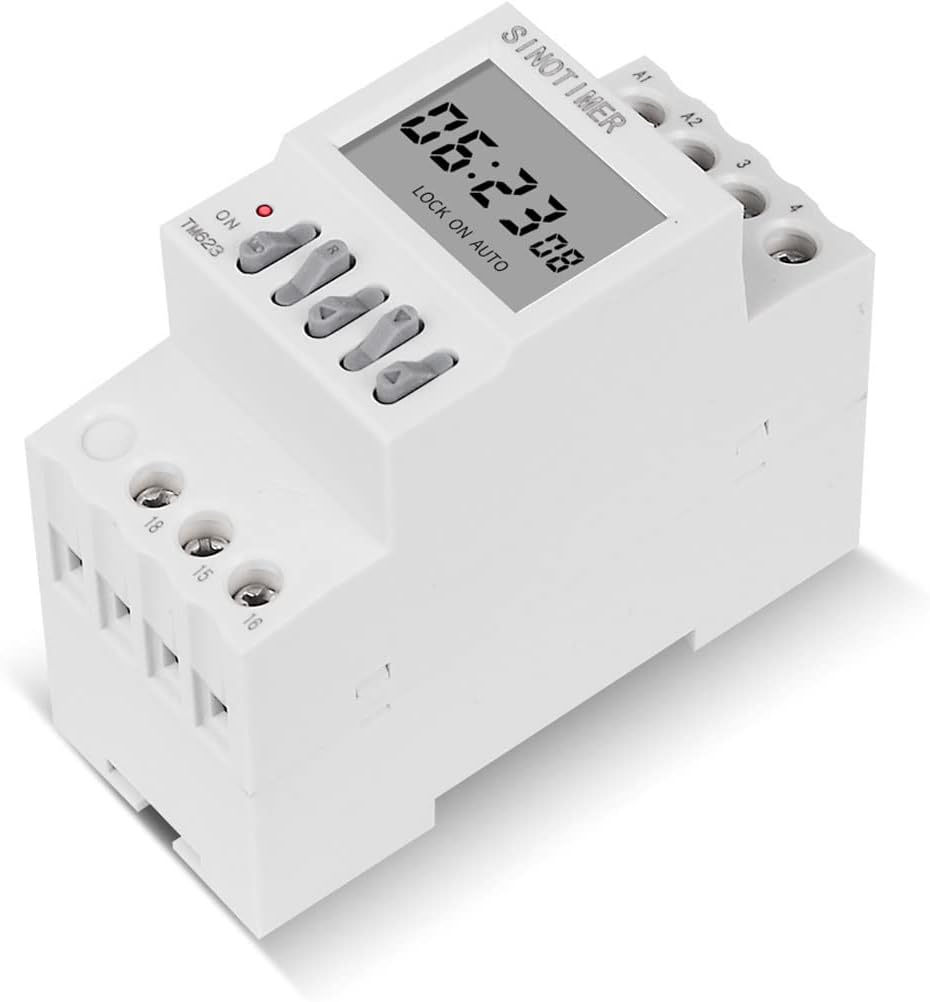


Setup and Installation
Safety Precautions
- Ensure power is disconnected before any installation or wiring work.
- Installation should be performed by a qualified electrician.
- Do not exceed the maximum load capacity of 16A.
Mounting
The TM623 is designed for 35mm DIN rail installation. Snap the device onto the DIN rail securely within your electrical panel or enclosure.
Wiring Diagram
Refer to the diagram printed on the side of the device (Figure 4) for detailed wiring instructions. The device has terminals for power input (A1, A2) and switch output (15, 16, 18).
1. Single Phase Wiring
For controlled appliances powered in single-phase, if the working current exceeds the rated value of this switch (16A), an external AC contactor must be used for expansion control. Connect the power supply to A1 and A2. Connect the load through terminals 15, 16, and 18 as per the contactor's requirements.
2. Three Phase Wiring
If the controlled appliance is supplied with three-phase power, an external AC contactor is required. The timer switch will control the coil of the AC contactor, which in turn switches the three-phase load. Connect the timer's output (e.g., 15 and 18) to the contactor's coil terminals.
Operating Instructions
Initial Power-Up and Time Setting
- Upon first power-up, the display will show the current time.
- The internal battery will charge automatically.
- Set the current time and day using the appropriate buttons (refer to the device's button labels for specific functions like 'MD' for mode/menu, arrow keys for adjustment).
Programming ON/OFF Times
The TM623 allows for 8 ON/OFF settings per day. The astronomical function automatically adjusts these times based on the programmed latitude and longitude.
- Press the 'MD' button to enter programming mode.
- Use the arrow keys to navigate through the program settings (e.g., 1 ON, 1 OFF, 2 ON, 2 OFF, etc.).
- Set the desired ON time for each program.
- Set the desired OFF time for each program.
- Repeat for up to 8 ON/OFF cycles.
- Exit programming mode to save settings.
Latitude and Longitude Setting
For the astronomical function to work correctly, you must input your geographical coordinates.
- Access the latitude/longitude setting menu (consult the device's specific button sequence, often through the 'MD' button).
- Input the correct latitude for your location.
- Input the correct longitude for your location.
- Save the settings. The device will then calculate sunrise and sunset times daily.
Manual Override
The device typically has a manual override button (often labeled 'ON/AUTO/OFF' or similar) to temporarily switch the output ON or OFF, or to return to automatic mode.
- ON: Forces the output ON.
- OFF: Forces the output OFF.
- AUTO: Returns to programmed automatic operation.
Maintenance
- Keep the device clean and free from dust. Use a dry, soft cloth for cleaning.
- Do not use abrasive cleaners or solvents.
- Ensure proper ventilation around the device to prevent overheating.
- The internal battery is rechargeable and designed for long life. No user maintenance is required for the battery.
Troubleshooting
| Problem | Possible Cause | Solution |
|---|---|---|
| Display is blank | No power supply; Internal battery fully discharged. | Check power connections (220V AC). Allow time for internal battery to charge after power is restored. |
| Timer not switching at programmed times | Incorrect programming; Device in manual ON/OFF mode; Incorrect latitude/longitude settings. | Verify program settings (ON/OFF times). Ensure device is in 'AUTO' mode. Double-check latitude and longitude inputs. |
| Output not turning ON/OFF | Overload (if direct connection); Faulty wiring; Internal fault. | If load exceeds 16A, ensure an external contactor is used. Check all wiring connections. If problem persists, contact support. |
| Time error is significant | Environmental factors; Internal clock drift. | The device has a time error of <1s/day, which is normal. If significantly more, contact support. |
Warranty and Support
For warranty information and technical support, please contact SINOTIMER customer service through their official website or the retailer from whom you purchased the product. Please have your model number (TM623) and UPC (780744817736) ready when contacting support.
For more information, visit the official SINOTIMER store: SINOTIMER Store on Amazon
Related documentsTM623


Ask a question about this manual
Ask about setup, troubleshooting, compatibility, parts, safety, or missing instructions. Manuals+ will review the question and use this page’s manual context to help answer it.