
Apple iPhone 13
Apple iPhone 13 User Manual
Model: iPhone 13 (128 GB) - Midnight
Introduction
Welcome to the user manual for your new Apple iPhone 13. This guide provides comprehensive instructions on setting up, operating, maintaining, and troubleshooting your device. The iPhone 13 features a 6.1-inch Super Retina XDR display, an advanced dual-camera system, and the powerful A15 Bionic chip, designed to deliver an exceptional user experience.
- Super Retina XDR Display: Enjoy vibrant colors and incredible brightness on the 6.1-inch screen.
- Cinematic Mode: Automatically shifts focus and adds shallow depth of field to your videos.
- Advanced Dual-Camera System: Capture stunning photos and 4K Dolby Vision HDR videos with 12MP Wide and Ultra Wide cameras.
- A15 Bionic Chip: Experience ultra-fast performance for all your tasks and applications.
- Enhanced Durability: Featuring Ceramic Shield front cover and industry-leading water resistance.
- MagSafe Compatibility: Easily attach accessories and enjoy faster wireless charging.
Setup
Follow these steps to set up your new iPhone 13.
1. Unboxing and Initial Inspection
Carefully remove your iPhone 13 and its accessories from the box. Ensure all components are present: iPhone, USB-C to Lightning cable, and documentation.

Image: Front and back view of the Apple iPhone 13 in Midnight color.

Image: The contents of the iPhone 13 box, showing the iPhone device and the included USB-C to Lightning charging cable.
2. Insert SIM Card
Locate the SIM tray on the side of your iPhone. Use the SIM eject tool (not included, typically comes with your SIM card or can be a paperclip) to open the tray. Insert your nano-SIM card into the tray with the gold contacts facing down, then push the tray back into the iPhone until it clicks into place.
3. Power On and Initial Setup
Press and hold the Side button until the Apple logo appears. Follow the on-screen instructions to select your language, region, and connect to a Wi-Fi network. You will be guided through setting up Face ID, creating a passcode, and transferring data from an old device (if applicable) using Quick Start or iCloud backup.
Operating
Learn how to use the key features of your iPhone 13.
1. Basic Navigation
- Home Screen: Swipe up from the bottom edge to go to the Home screen.
- App Switcher: Swipe up from the bottom edge and pause in the middle of the screen to see open apps.
- Control Center: Swipe down from the top-right corner to access quick settings.
- Notifications: Swipe down from the top-left corner to view notifications.
2. Camera Usage
The iPhone 13 features an advanced dual-camera system. Open the Camera app to start capturing photos and videos.
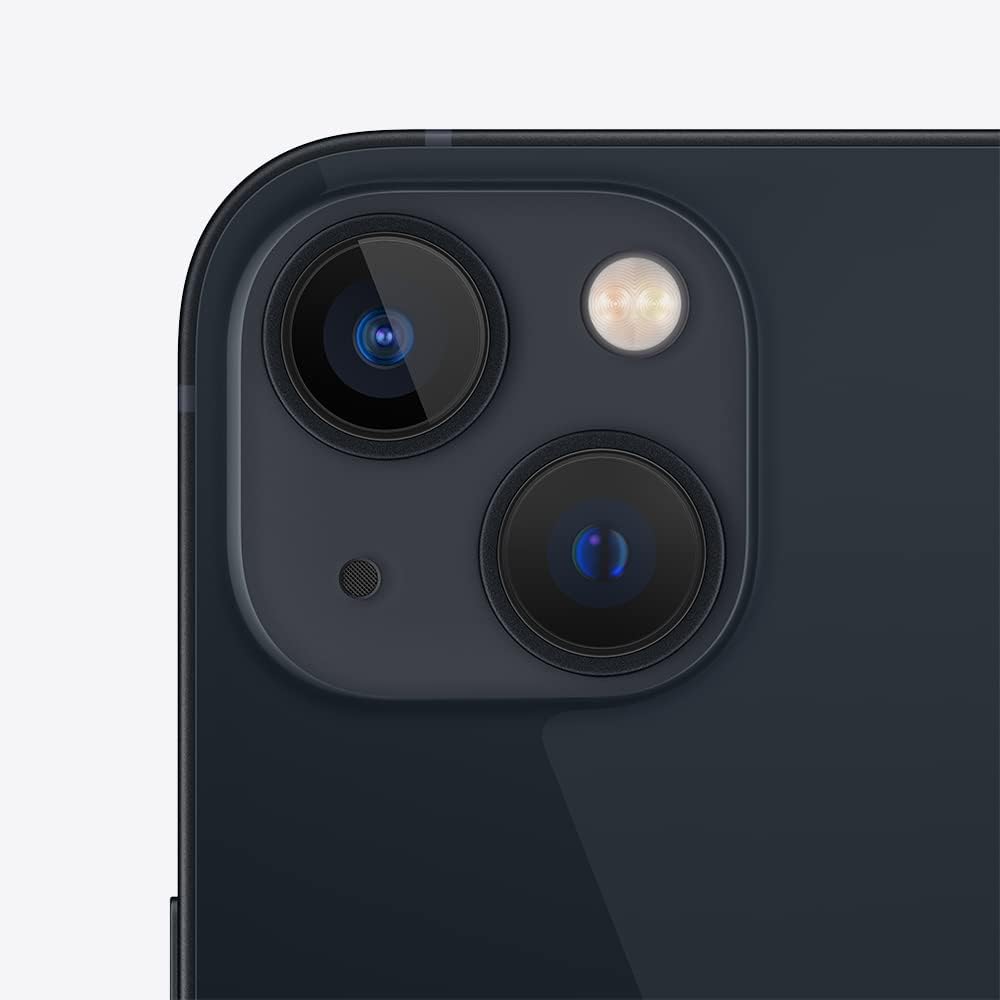
Image: A close-up view of the iPhone 13's dual camera system, showing the two lenses and flash.
- Photo Modes: Switch between Photo, Portrait, Pano, and Night mode.
- Cinematic Mode: Tap the video icon and select "Cinematic" to record videos with shallow depth of field and automatic focus transitions.
- Night Mode: Automatically activates in low-light conditions to capture brighter, more detailed photos.
3. Battery Management
To optimize battery life, go to Settings > Battery > Battery Health. You can also enable Low Power Mode when your battery is low.

Image: A graphic highlighting key features of the iPhone 13, including the 6.1-inch Super Retina XDR display, A15 Bionic chip, durable design with Ceramic Shield, and improved low-light photography.
Maintenance
Proper care ensures the longevity and optimal performance of your iPhone 13.
1. Cleaning Your iPhone
To clean your iPhone, unplug all cables and power it off. Use a soft, lint-free cloth, slightly dampened with water. Avoid using cleaning products, compressed air, or abrasive materials, as they can damage the device.
2. Software Updates
Keep your iPhone's software up to date to ensure you have the latest features, security updates, and performance improvements. Go to Settings > General > Software Update to check for and install updates.
3. Water and Dust Resistance
The iPhone 13 is splash, water, and dust resistant with an IP68 rating under IEC standard 60529 (maximum depth of 6 meters up to 30 minutes). However, resistance is not permanent and may decrease as a result of normal wear. Do not charge a wet iPhone.
Troubleshooting
Here are solutions to common issues you might encounter.
1. Device Not Responding
If your iPhone is unresponsive, perform a force restart:
- Press and quickly release the Volume Up button.
- Press and quickly release the Volume Down button.
- Press and hold the Side button until the Apple logo appears.
2. Connectivity Issues
- Wi-Fi: Go to Settings > Wi-Fi and ensure Wi-Fi is on. Try forgetting the network and rejoining.
- Cellular Data: Go to Settings > Cellular and ensure Cellular Data is enabled. Check with your carrier for service outages.
- Bluetooth: Go to Settings > Bluetooth and ensure Bluetooth is on. Try unpairing and re-pairing the device.
3. App Crashing or Freezing
Close the app from the App Switcher and reopen it. If the issue persists, restart your iPhone. Ensure the app is updated to its latest version from the App Store.
Specifications
Detailed technical specifications for the Apple iPhone 13.
| Feature | Specification |
|---|---|
| Brand | Apple |
| Operating System | iOS 14 (Upgradable to iOS 18) |
| Storage Capacity | 128 GB |
| Screen Size | 6.1 Inches |
| Resolution | 2532 x 1170 |
| Display Type | Super Retina XDR display with True Tone |
| Water & Dust Resistance | IP68 rating (max depth 6 meters up to 30 minutes) |
| Rear Camera | Dual 12 MP cameras (Wide and Ultra Wide) with Portrait mode, Smart HDR 4, Night mode, 4K Dolby Vision HDR video |
| Front Camera | 12 MP TrueDepth camera with Portrait mode, Smart HDR 3, 4K Dolby Vision HDR video |
| Video Playback | Up to 19 hours |
| Audio Playback | Up to 65 hours |
| Fast Charging | Up to 50% charge in about 30 minutes with 20W adapter or higher (sold separately) |
| Height | 146.7 mm |
| Width | 71.5 mm |
| Depth | 7.4 mm |
| Weight | 164 grams |
| Anatel Homologation | 11272-21-01993 |
Warranty and Support
Your Apple iPhone 13 comes with a standard limited warranty provided by Apple. For detailed warranty information, please refer to the documentation included with your device or visit the official Apple support website.
For technical assistance, troubleshooting, or service, please visit the official Apple Support website or contact Apple customer service. You can find extensive resources, FAQs, and contact options online.
Important Note: For product homologation in Brazil, please refer to the Anatel website: sistemas.anatel.gov.br/sch.
Related documentsiPhone 13


Ask a question about this manual
Ask about setup, troubleshooting, compatibility, parts, safety, or missing instructions. Manuals+ will review the question and use this page’s manual context to help answer it.