
YARD FORCE Compact 400RiS
YARD FORCE Compact 400RiS Robotic Mower User Manual
Model: Compact 400RiS
1. Introduction
This manual provides essential information for the safe and efficient operation, installation, and maintenance of your YARD FORCE Compact 400RiS Robotic Mower. Please read all instructions carefully before using the product.
The YARD FORCE Compact 400RiS is a self-propelled robotic lawn mower designed for lawns up to 400 m². It features Wi-Fi connectivity for app control, an iRadar ultrasonic sensor for obstacle detection, an edge cutting function for a tidy finish, and a brushless motor for quiet and efficient performance.
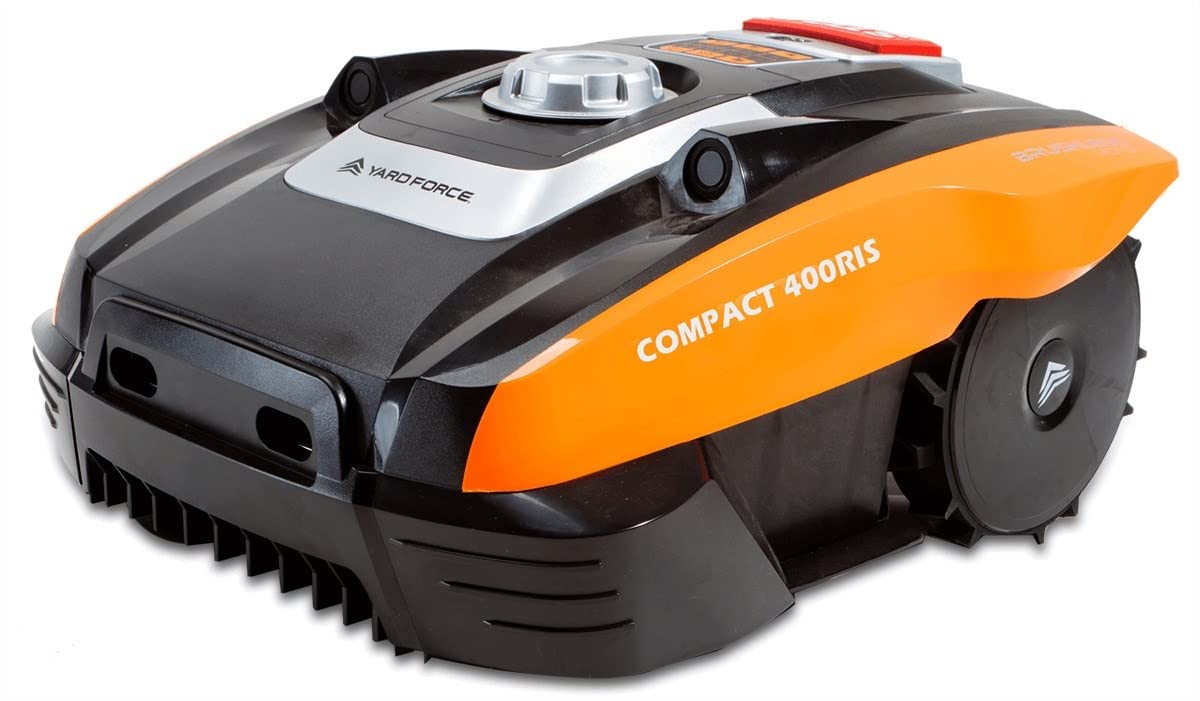
Image 1.1: The YARD FORCE Compact 400RiS Robotic Mower.
2. What's Included
Verify that all components are present in the packaging:
- 1 x Robotic Mower
- 1 x Charging Station
- 100 m Boundary Wire
- 120 x Fixing Pegs
- 9 m Power Cable
- 3 x Replacement Blades
- 3 x Spare Screws for Blades
- 3 x Cable Connectors
- 1 x Ruler (for boundary wire placement)
- 1 x User Manual
3. Setup
3.1. Planning Your Lawn Area
Before installation, assess your lawn. Identify obstacles, slopes, and areas that require special attention. The mower is designed for areas up to 400 m².
3.2. Installing the Charging Station
- Choose a flat area with access to a power outlet, preferably in a shaded spot.
- Ensure there is sufficient clear space around the charging station for the mower to dock easily.
- Connect the power cable to the charging station and plug it into a suitable outdoor power outlet.
3.3. Laying the Boundary Wire
The boundary wire defines the mowing area. Lay it carefully to ensure optimal performance.
- Start and end the boundary wire at the charging station.
- Use the provided ruler to maintain the correct distance from lawn edges and obstacles.
- Secure the wire to the ground using the fixing pegs. Ensure the wire is taut and flush with the ground to prevent tripping hazards and damage.
- For permanent installation, the wire can be buried a few centimeters deep.
3.4. App Installation and Wi-Fi Connection
The YARD FORCE Compact 400RiS is controlled via a smartphone app (CloudHawk). Follow these steps to connect:
- Download the CloudHawk app from your smartphone's app store.
- Create an account and follow the in-app instructions to add your robotic mower.
- Ensure your Wi-Fi network is stable and covers the entire mowing area for reliable connectivity. The mower supports 2.4 GHz Wi-Fi networks.

Image 3.1: Controlling the robotic mower via the smartphone app.
4. Operating the Mower
4.1. Starting and Stopping
- To Start: Press the 'START' button on the control panel or initiate mowing via the CloudHawk app.
- To Stop: Press the large red 'STOP' button on the mower. This will immediately halt the blades and the mower's movement.

Image 4.1: Control panel with the prominent STOP button.
4.2. Adjusting Cutting Height
The cutting height can be adjusted between 20 mm and 55 mm. Use the rotary knob located on top of the mower to set your desired height.

Image 4.2: Cutting height adjustment knob.
4.3. Mowing Functions
- Automatic Mowing: The mower operates automatically within the defined boundary, returning to the charging station when the battery is low.
- Edge Cutting: This function ensures that the edges of your lawn are neatly trimmed, providing a clean finish.
- Mulching System: The mower finely cuts grass clippings and distributes them back onto the lawn, acting as a natural fertilizer for a healthier lawn.
4.4. Safety Features
- iRadar Ultrasonic Sensor: This active safety feature detects obstacles 20-55 mm away, helping the mower avoid collisions.
- Tilt Sensor: If the mower is tilted or lifted, the blades will automatically stop for safety.
- Collision Sensor: Provides additional protection by detecting impacts.

Image 4.3: The iRadar ultrasonic sensor for obstacle detection.
5. Maintenance
5.1. Cleaning
- Regularly clean the mower's chassis, wheels, and cutting deck to remove grass clippings and debris.
- Use a soft brush or cloth. Avoid using high-pressure water jets directly on the mower.
- Keep the charging contacts on both the mower and the charging station clean.
5.2. Blade Replacement
For optimal cutting performance, inspect the blades regularly and replace them when they become dull or damaged. The package includes 3 replacement blades and spare screws.
- Always wear protective gloves when handling blades.
- Turn off the mower and ensure it is not connected to the charging station.
- Carefully turn the mower upside down.
- Unscrew the old blades and replace them with new ones, ensuring the screws are tightened securely.
5.3. Winter Storage
During winter months, clean the mower thoroughly, fully charge the battery, and store it in a dry, frost-free environment. Disconnect the charging station from the power supply.
6. Troubleshooting
| Problem | Possible Cause | Solution |
|---|---|---|
| Mower does not start or stops unexpectedly. | Low battery; safety sensor activated; boundary wire issue. | Charge the battery; check for obstacles or tilt; inspect boundary wire connection. |
| Poor mowing result. | Dull or damaged blades; incorrect cutting height; uneven lawn. | Replace blades; adjust cutting height; level the lawn if necessary. |
| Mower gets stuck frequently. | Obstacles not detected; uneven terrain; boundary wire too close to obstacles. | Ensure iRadar sensor is clean; adjust boundary wire distance from obstacles; improve lawn terrain. |
| App connectivity issues. | Weak Wi-Fi signal; incorrect Wi-Fi settings; app error. | Check Wi-Fi signal strength; ensure 2.4 GHz network is used; restart app/mower; reinstall app if needed. |
7. Specifications
- Brand: YARD FORCE
- Model: Compact 400RiS
- Power Source: Battery Powered (Lithium-ion 20V, 2.0 Ah)
- Material: Plastic
- Color: Black, Orange
- Weight: 8 Kilograms
- Cutting Width: 16 Centimeters
- Cutting Height Adjustment: 20 - 55 Millimeters (5 positions)
- Operating Mode: Automatic
- Battery Life: Approximately 60 minutes
- Connectivity: Wi-Fi (2.4 GHz)
- Safety Features: iRadar Ultrasonic Sensor, Tilt Sensor, Collision Sensor
- Manufacturer: YARD FORCE
- Country of Origin: China
8. Warranty and Support
8.1. Warranty Information
The YARD FORCE Compact 400RiS Robotic Mower comes with a 2-year warranty from the date of purchase. Please retain your proof of purchase for warranty claims. The warranty covers manufacturing defects and material faults under normal use conditions.
For detailed warranty terms and conditions, please refer to the official YARD FORCE website or contact customer support.
8.2. Customer Support
If you encounter any issues or have questions regarding your YARD FORCE Compact 400RiS Robotic Mower that are not covered in this manual, please contact YARD FORCE customer support. Contact details can typically be found on the official YARD FORCE website or on your product packaging.
When contacting support, please have your product model (Compact 400RiS) and serial number ready.
Related documentsCompact 400RiS


Ask a question about this manual
Ask about setup, troubleshooting, compatibility, parts, safety, or missing instructions. Manuals+ will review the question and use this page’s manual context to help answer it.