
1. Introduction
Thank you for choosing the DIHOOM 2K PTZ Solar Wi-Fi Security Camera. This manual provides essential information for setting up, operating, and maintaining your camera to ensure optimal performance and security. This camera features 2K high-definition video, Pan-Tilt-Zoom (PTZ) functionality, solar power for continuous operation, and advanced human detection capabilities, making it ideal for outdoor surveillance.

Image 1: DIHOOM 2K PTZ Solar Wi-Fi Security Camera with solar panel.
2. Product Overview
The DIHOOM security camera is designed for comprehensive outdoor monitoring. It integrates a high-resolution camera with PTZ capabilities, a solar panel for self-sustaining power, and smart detection features.
Key Features:
- 2K High-Definition Video: Captures clear and detailed footage.
- PTZ Functionality: 355° horizontal pan and 90° vertical tilt for wide area coverage.
- 10x Digital Zoom: Allows for closer inspection of details.
- Solar Powered: Equipped with a 7.5W solar panel and 16000mAh battery for continuous operation.
- PIR Human Detection: Reduces false alarms by detecting human heat and shape.
- Color Night Vision: Provides clear, full-color video even in low-light conditions.
- Two-Way Audio: Built-in microphone and speaker for communication.
- IP65 Weatherproof: Designed to withstand various outdoor weather conditions.
- App Control: Remote monitoring and control via a dedicated smartphone application.
Components:
The package includes the camera unit with integrated solar panel, mounting bracket, screws, and a USB charging cable.

Image 2: Product dimensions and included components.
3. Setup
3.1 Initial Preparation
- Charge the Camera: Before first use, fully charge the camera for approximately 8 hours using the provided USB cable.
- Reset the Camera: Press and hold the reset button on the camera for more than 10 seconds. This ensures the camera is ready for pairing with the app.
- Download the App: Download the dedicated smartphone application from your device's app store.
3.2 Network Connection
- The camera supports 2.4GHz Wi-Fi only. Ensure your smartphone is connected to a 2.4GHz Wi-Fi network during setup. If you have a 5GHz/2.4GHz dual-band router, select the 2.4GHz option.
- During setup, place the camera close to your Wi-Fi router (ideally 30-100 cm) to ensure a stable connection.
- If other 2.4GHz wireless devices are nearby, try to keep the camera's antennas at least 1 meter away from them to avoid interference.
- Follow the in-app instructions to add the camera. When scanning the QR code displayed on your phone, hold the camera lens 15-25 cm away from the phone screen. A voice prompt will confirm successful connection.
3.3 Installation
- The recommended installation height is 2.1 meters, with a camera tilt angle of approximately 15 degrees for optimal PIR detection. The PIR detection range is approximately 7 meters forward from the camera.
- The solar panel can be detached from the main unit and installed in a separate, sunnier location to maximize charging efficiency.

Image 3: Easy installation with screws, showing the IP65 waterproof design.
4. Operating Instructions
4.1 App Control
Manage all camera functions through the dedicated smartphone app. This includes live viewing, playback, PTZ control, settings adjustments, and receiving notifications.

Image 4: Smartphone app interface for real-time monitoring, manual siren, light operation, and sensitivity settings.
4.2 PTZ and Zoom Functionality
The camera offers a 355° horizontal pan and 90° vertical tilt, allowing you to remotely adjust the viewing angle via the app. With 10x digital zoom, you can magnify specific areas for more detail.

Image 5: Illustrates 360-degree wide-angle coverage and 10x magnification capabilities.
4.3 PIR Human Detection and Alarms
The camera uses PIR (Passive Infrared) human detection technology to accurately identify human movement, minimizing false alarms from pets or swaying trees. Upon detection, you will receive instant push notifications on your smartphone. You can also manually activate the built-in white LED lights and a 100dB siren via the app to deter intruders.
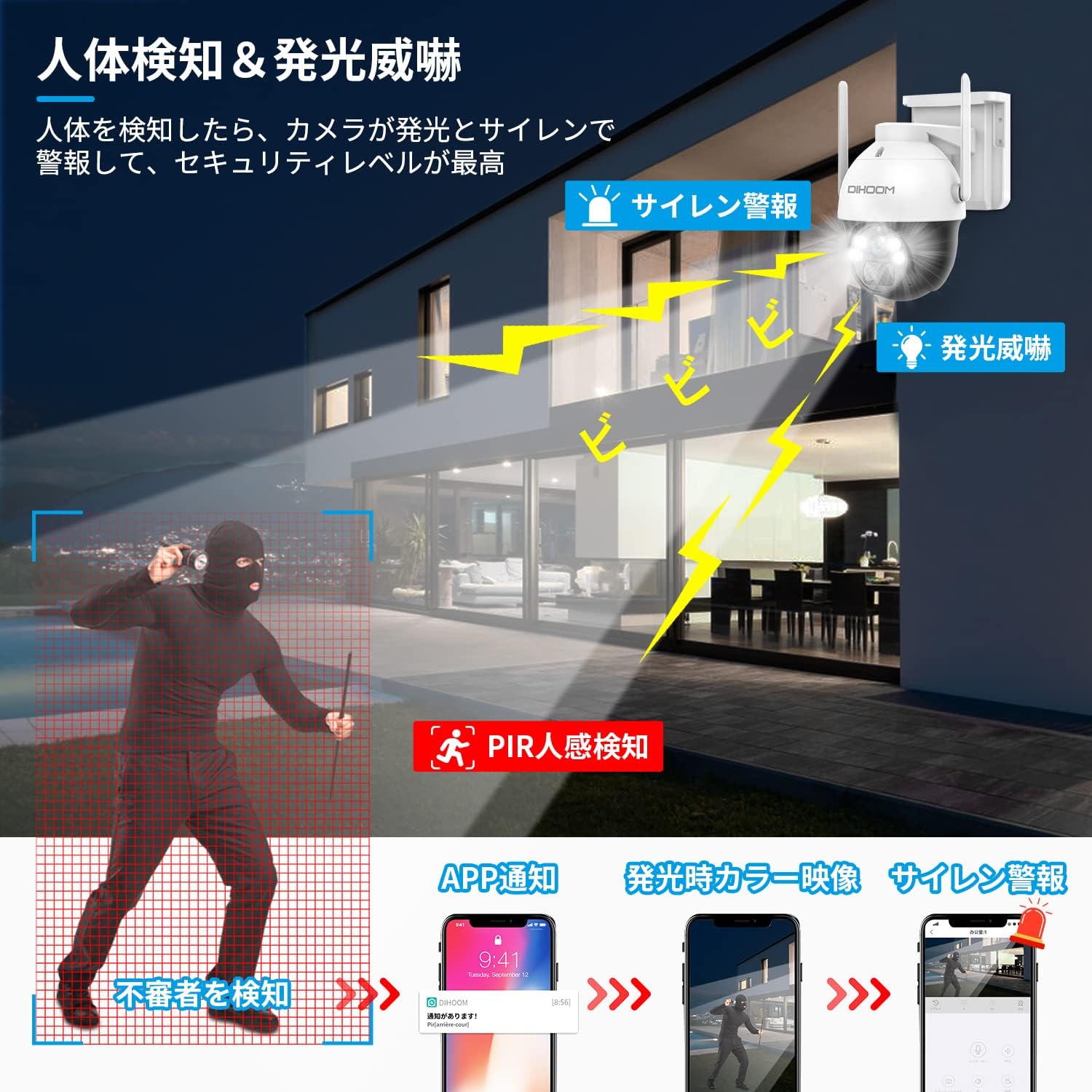
Image 6: Demonstrates PIR human detection triggering light and sound alarms, with smartphone notifications.
4.4 Two-Way Audio
With the integrated microphone and speaker, you can engage in two-way conversations through the camera. This allows you to communicate with visitors or deter unwanted individuals remotely.

Image 7: Shows two-way audio communication and manual alarm activation via the app.
4.5 Night Vision
The camera features 2K color CMOS sensors and white LED lights, enabling clear color video recording even in minimal illumination (1 LUX). This ensures that details are visible day and night.

Image 8: Comparison of 2K color night vision and infrared night vision.
4.6 Video Storage
Recorded footage can be stored on a Micro SD card (up to 128GB, sold separately) or via a paid cloud service. The camera utilizes H.265+ video compression for efficient storage.

Image 9: Storage options including Micro SD card and cloud service.
4.7 Multi-Camera Management and Sharing
The app allows you to add and manage multiple DIHOOM cameras simultaneously. You can also share live or recorded video with family and friends by creating viewing IDs (up to 100 per camera) and setting specific permissions for each shared user.
5. Maintenance
- Solar Panel: Ensure the solar panel is clean and free from obstructions (e.g., leaves, dirt) to maintain optimal charging efficiency.
- Battery Monitoring: Monitor the battery level via the app. You will receive a notification when the battery drops below 20%.
- Weather Resistance: The IP65 rating ensures the camera is protected against dust and water jets. However, avoid submerging the camera in water.
- Cleaning: Gently wipe the camera lens and solar panel with a soft, damp cloth as needed. Avoid abrasive cleaners.

Image 10: The camera is designed to withstand various weather conditions, including rain and snow, with its IP65 rating.
6. Troubleshooting
- Wi-Fi Connection Issues:
- Ensure your router is broadcasting a 2.4GHz Wi-Fi signal.
- Verify the camera is within range of your Wi-Fi router.
- Reset the camera and try the setup process again.
- Frequent False Alarms:
- Adjust the PIR detection sensitivity settings in the app (10 levels available).
- Ensure the camera is not pointed at areas with constant movement (e.g., busy roads, swaying branches).
- Battery Draining Quickly:
- Ensure the solar panel is receiving adequate direct sunlight.
- Check for obstructions on the solar panel.
- Reduce the frequency of motion detection events or live viewing if possible.
- Poor Video Quality:
- Check your Wi-Fi signal strength in the camera's location.
- Ensure the camera lens is clean.
7. Specifications
| Feature | Specification |
|---|---|
| Field of View | 110 degrees |
| Installation Type | Screw-in |
| Night Vision Range | 20 meters |
| Frame Rate | 30fps |
| Material | Plastic |
| Light Source | White LED |
| Features | PTZ Technology, Motion Sensor |
| Coating Features | Waterproof |
| Product Weight | 1.79 Kilograms |
| Recommended Use | Outdoor |
| Connectivity Technology | Wireless |
| Compatible Devices | Smartphone |
| Power Source | Battery Powered |
| Connection Protocol | Wi-Fi |
| Video Capture Resolution | 1440p (2K) |
| Number of Items | 3 (Camera, Solar Panel, Mount) |
| Wireless Communication Technology | Wi-Fi |
8. Warranty and Support
The DIHOOM 2K PTZ Solar Wi-Fi Security Camera comes with a manufacturer's one-year warranty. If you encounter any issues, please do not hesitate to contact us.
- Contact Email: dihoomjp@hotmail.com
- Business Hours: Monday - Friday, 10:00 - 19:30 (Japan Standard Time)
- Technical issues will be addressed by our technical professionals.
This product is certified with the PSE Mark and Radio Law (Technical Conformity Mark), ensuring a safe and reliable user experience.
9. Product Videos
Watch these official product videos for a visual guide to the camera's features and capabilities.
Video 1: Anker Eufy SoloCam S340 Overview. This video demonstrates the camera's 360-degree coverage, AI motion tracking, 3K high-quality zoom, solar charging, and IP65 weather resistance.
Video 2: Anker Eufy SoloCam S340 Features. This video highlights the camera's 360-degree coverage, no wiring or charging requirements, AI motion tracking, alarm and light functions, 3K high-quality video, 8x zoom, night vision, and IP65 durability.


