
COMFEE' CDC22P1BBB
COMFEE’ Countertop Dishwasher User Manual
Model: CDC22P1BBB | Brand: COMFEE'
1. Introduction
The COMFEE’ Countertop Dishwasher is designed for compact living spaces such as dorms, RVs, and apartments, offering efficient dish cleaning with a capacity for 6 place settings. It features 8 washing programs and an extra-drying function to ensure sparkling clean dishes. This manual provides essential information for safe operation, installation, maintenance, and troubleshooting.
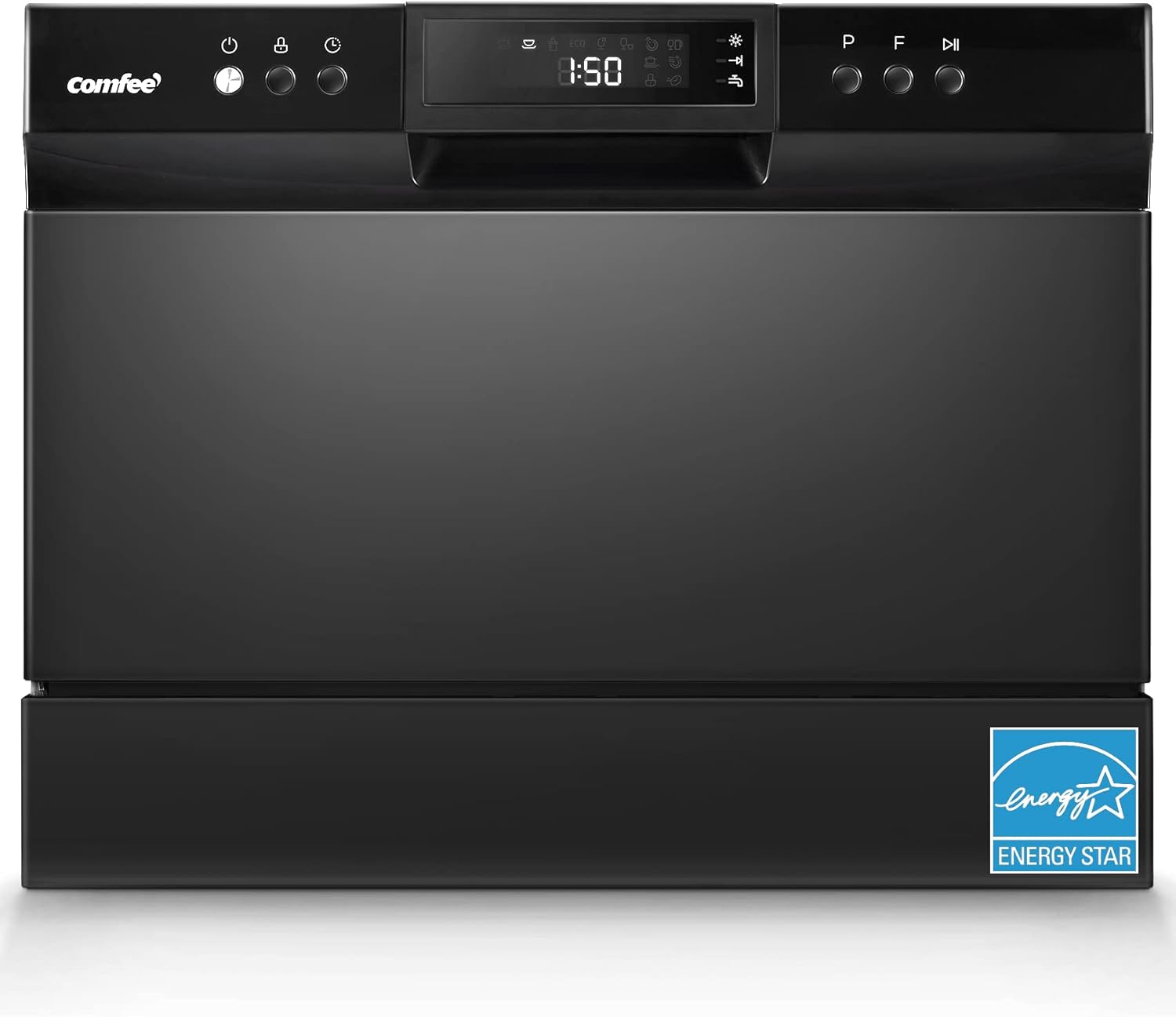
Figure 1.1: COMFEE’ Countertop Dishwasher (Whole Black)
2. Safety Information
Always read and follow all safety instructions before operating the appliance. Keep the manual for future reference. Ensure the dishwasher is properly grounded. Do not operate if the power cord is damaged. Keep children away from the appliance during operation. Only use dishwasher-safe detergents and rinse aids.
3. What's in the Box
Your COMFEE’ Countertop Dishwasher package includes the following components:
- Dishwasher Unit
- User Manual
- Power Cord
- Inlet Hose (59 inches)
- Drain Hose
- Faucet Adapter
- Quick Connect

Figure 3.1: Parts Provided with the Dishwasher
4. Setup and Installation
The COMFEE’ portable dishwasher offers flexible installation options, allowing it to be placed on a countertop or fitted into a cupboard. It can be connected directly to a faucet (suitable adapter may be needed).
4.1 Dimensions and Placement
Ensure adequate space for the dishwasher. The dimensions are approximately 17.2 inches (H) × 21.6 inches (W) × 19.7 inches (D). For countertop placement, ensure the distance between your countertop and wall cupboard is more than 17.5 inches.

Figure 4.1: Dishwasher Dimensions
4.2 Connecting to Faucet
To connect the dishwasher to your faucet:
- Remove the aerator from your faucet.
- Screw on the provided faucet adapter.
- Attach the quick connect to the adapter by pushing down on the top and placing it on the adapter until it locks.
- Connect the inlet and drain hoses from the dishwasher to the quick connect. Ensure all connections are tight to prevent leaks.

Figure 4.2: Flexible Installation Options
5. Operating Instructions
The dishwasher is designed for ease of use with multiple washing cycles and functions.
5.1 Loading Dishes
The dishwasher can fit up to 6 place settings, accommodating up to 70 pieces of tableware with plate sizes up to 10 inches in diameter. Utilize the large dish rack, removable cutlery basket, versatile cup shelves, and slope cup rack for optimal loading.

Figure 5.1: 6 Place Settings Capacity
5.2 Adding Detergent and Rinse Aid
Locate the detergent dispenser and rinse aid dispenser inside the dishwasher door. Fill the detergent dispenser according to the soil level of your dishes. Fill the rinse aid dispenser to the indicated level for improved drying performance and to prevent water spots.
5.3 Washing Cycles
Select from 8 washing cycles based on your needs:
- Heavy (100 mins): For heavily soiled dishware with stubborn stains. Utilizes 12 washing nozzles and 360° spiral spray wash with water up to 154°F.
- Normal (127-155 mins): For moderately soiled dishware, including pots, plates, glasses.
- Baby-Care (90 mins): For lightly soiled dishware, suitable for baby items.
- ECO (75 mins): Energy-efficient cycle for lightly soiled dishware.
- Glass (70 mins): For lightly soiled glasses and delicate items.
- Speed (45 mins): Quick wash for lightly soiled dishes, ideal for multi-round parties. Uses as low as 2.77 gallons of water.
- Rinse (24 mins): For rinsing dishes without full wash.
- Mini-Party (20 mins): For lightly soiled loads, glasses, crystal, and fine china.

Figure 5.2: Available Wash Cycles
5.4 Delay Start Timer
You can set a delay start timer for up to 24 hours, allowing you to schedule wash cycles at your convenience.

Figure 5.3: Delay Start Timer Function
6. Maintenance
Regular maintenance ensures optimal performance and longevity of your dishwasher.
6.1 Cleaning the Filter
Periodically clean the filter located at the bottom of the dishwasher. To remove, twist counter-clockwise and pull it out. Rinse it under running water to remove any food debris. Reinsert by aligning and twisting clockwise until secure.
7. Troubleshooting
If you encounter issues with your dishwasher, check the following common problems:
- Dishwasher not starting: Ensure the power cord is securely plugged in and the door is fully closed. Check if the child lock is activated.
- Dishes not clean: Verify proper loading, ensure spray arms are not blocked, and check detergent and rinse aid levels. Select an appropriate wash cycle for the soil level.
- Water leaks: Check hose connections for tightness and ensure the dishwasher is level.
- Error indicators: Refer to the display screen for specific error codes or indicators (e.g., water faucet icon for unhooked hoses, light bulb icon for low rinse aid).
For persistent issues, please refer to the detailed troubleshooting section in the full User Guide PDF or contact customer support.
8. Specifications
| Brand | COMFEE' |
| Model Name | CDC22P1BBB |
| Installation Type | Countertop |
| Product Dimensions | 19.7"D x 21.7"W x 17.2"H |
| Item Weight | 46 Pounds |
| Capacity | 6 Place Settings |
| Washing Programs | 8 |
| Water Consumption | 2.85 Gallons per Hour |
| Noise Level | 49 dB |
| Voltage | 120 Volts |
| Wattage | 1380 watts |
| Certification | Energy Star |
| Material Type | Stainless Steel, Plastic |
| Date First Available | February 18, 2022 |
9. Warranty and Support
For warranty information, please refer to the official User Manual PDF provided with your product. For customer support, assistance, or to inquire about protection plans, please visit the COMFEE' store on Amazon or contact their customer service directly.
Additional resources:
Related documentsCDC22P1BBB


Ask a question about this manual
Ask about setup, troubleshooting, compatibility, parts, safety, or missing instructions. Manuals+ will review the question and use this page’s manual context to help answer it.