
1. Introduction
The ELRO FS2010 Smoke Detector is designed to provide early warning of fire by detecting smoke. This device features a high-quality optical sensor and an integrated 10-year lithium battery, ensuring long-term protection without the need for frequent battery replacement. It complies with the European standard EN 14604:2005/AC:2008.
This manual provides essential information for the correct installation, operation, and maintenance of your ELRO FS2010 Smoke Detector. Please read it carefully before use and retain it for future reference.
2. Safety Information
- This smoke detector is intended for indoor use only.
- Do not paint the smoke detector. Paint can block the smoke entry points and prevent the alarm from functioning correctly.
- Do not install in areas with high humidity, extreme temperatures, or excessive dust.
- Regularly test the smoke detector as instructed in this manual.
- Never attempt to open or repair the smoke detector yourself. Refer to qualified personnel for service.
- The integrated battery is not replaceable. Do not attempt to remove or replace it.
3. Package Contents
The ELRO FS2010 Smoke Detector package includes:
- ELRO FS2010 Smoke Detector (quantity as purchased, e.g., 6 units)
- Mounting material (screws and wall plugs)
- Integrated 10-year lithium battery (pre-installed)
- User Manual

Image: Six ELRO FS2010 Smoke Detectors as typically supplied in a multi-pack.
4. Product Overview
The ELRO FS2010 Smoke Detector features a compact design with key functional elements:
- Test/Silence Button: Used to test the alarm function and temporarily silence nuisance alarms.
- LED Indicator: Flashes periodically during normal operation and rapidly during an alarm or low battery condition.
- Alarm Horn: Emits an 85dB alarm sound when smoke is detected.
- Optical Sensor: Detects smoke particles.
- Integrated 10-Year Battery: Provides power for the device's entire lifespan.

Image: Exploded view of the ELRO FS2010 Smoke Detector, highlighting its high-quality speaker, durable optical sensor, intelligent chipset, built-in 10-year battery, and fire-retardant PC plastic casing.
5. Setup and Installation
5.1 Choosing an Installation Location
For optimal protection, install at least one smoke detector on each floor of your home, especially in hallways and escape routes. Consider installing additional detectors in bedrooms and living areas.
- Install on the ceiling, as smoke rises.
- Maintain a minimum distance of 50 cm from walls or corners.
- Avoid installing in kitchens, bathrooms, garages, or near ventilation openings, as steam, cooking fumes, or exhaust can cause false alarms.
- Do not install near fluorescent lights or other electrical noise sources.

Image: Recommended placement locations for smoke detectors within a home, such as bedrooms, living rooms, hallways, and wardrobes.
5.2 Mounting the Detector
- Select a suitable mounting location on the ceiling.
- Use the mounting bracket as a template to mark the drill holes.
- Drill two holes and insert the provided wall plugs.
- Attach the mounting bracket to the ceiling using the screws.
- Align the smoke detector with the mounting bracket and twist it clockwise until it clicks securely into place.
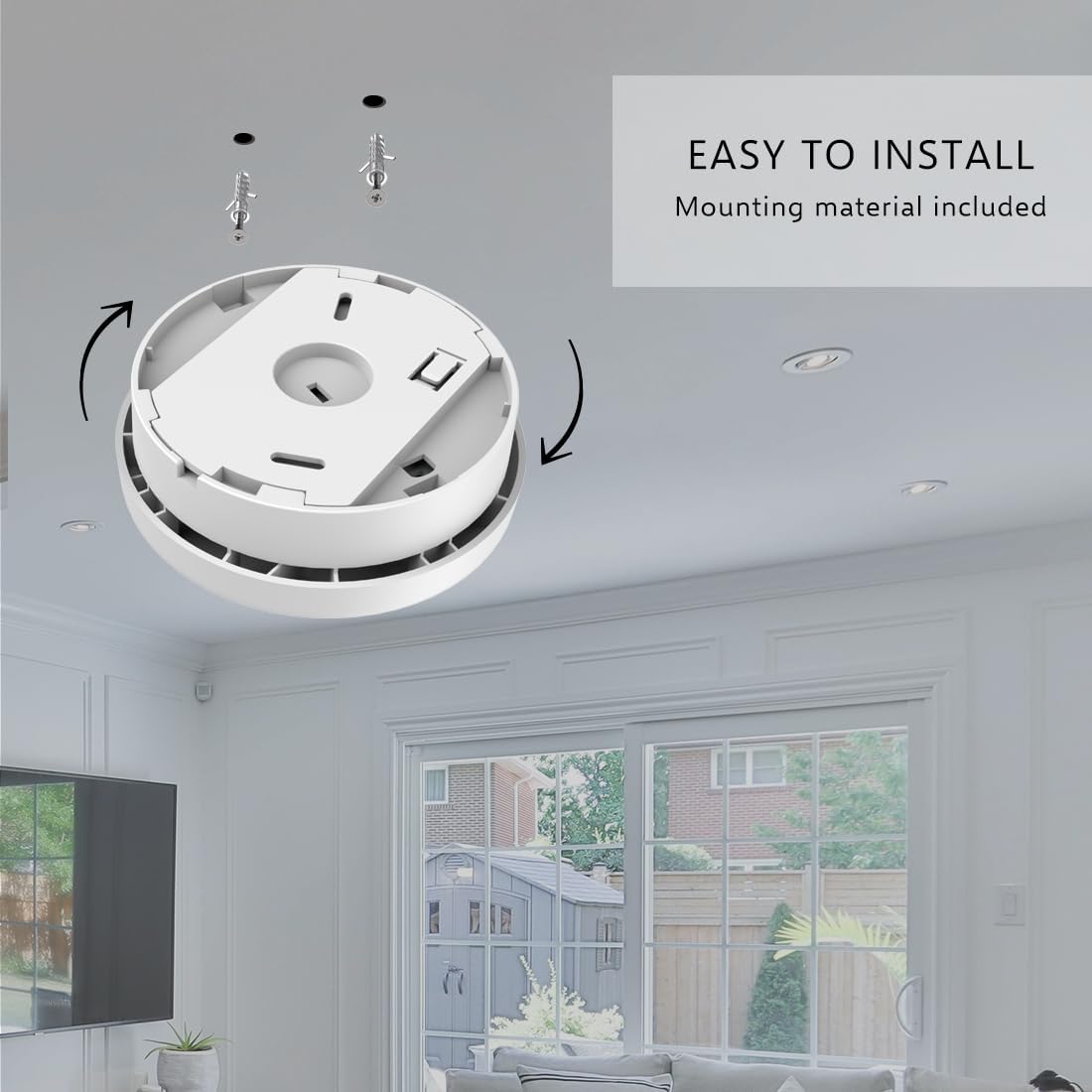
Image: Visual guide demonstrating the simple steps to install the smoke detector on a ceiling using the included mounting hardware.
5.3 Activating the Battery
The integrated 10-year battery is activated upon installation. After mounting the detector, press and hold the test button for a few seconds until the detector emits a signal. This confirms activation, and the battery will then last for 10 years.

Image: Illustration of activating the smoke detector's battery during installation, highlighting its 10-year lifespan.
6. Operating Instructions
6.1 Normal Operation
During normal operation, the LED indicator will flash briefly approximately once every 40-60 seconds, indicating that the detector is functioning correctly.
6.2 Alarm Function
When smoke is detected, the alarm will sound continuously at 85dB, and the LED indicator will flash rapidly. If this occurs, evacuate the premises immediately and contact emergency services.
6.3 Test Function
It is recommended to test your smoke detector monthly to ensure proper operation.
- Press the Test/Silence button briefly. The detector will emit an attenuated test sound (approx. 70dB) to protect your hearing.
- To hear the full 85dB alarm sound, press and hold the Test/Silence button for a longer duration (e.g., 5-10 seconds). Be aware that this sound is very loud.

Image: Explanation of the test sound feature, differentiating between the attenuated sound for short presses and the full alarm sound for prolonged presses of the test button.
6.4 Silence/Pause Function
In case of a nuisance alarm (e.g., from cooking fumes), you can temporarily silence the alarm by pressing the Test/Silence button. The alarm will be silenced for approximately 10 minutes, after which it will automatically reset. If smoke is still present, the alarm will reactivate.
6.5 Low Battery Indicator
When the integrated battery is nearing the end of its 10-year life, the detector will emit a short 'chirp' sound approximately once every 40-60 seconds, accompanied by a rapid LED flash. This indicates that the detector needs to be replaced.
7. Maintenance
Regular maintenance ensures the optimal performance of your smoke detector.
- Monthly Test: Press the Test/Silence button once a month to confirm the alarm is functioning.
- Monthly Cleaning: Gently clean the exterior of the smoke detector with a soft brush attachment on a vacuum cleaner to remove dust and cobwebs. This prevents false alarms and ensures proper smoke entry.
- Do Not Use Cleaning Products: Never use liquid cleaning agents or solvents on the smoke detector, as these can damage the sensor or electronic components.
8. Troubleshooting
| Problem | Possible Cause | Solution |
|---|---|---|
| Detector chirps every 40-60 seconds | Low battery warning. | The integrated 10-year battery is at the end of its life. Replace the entire smoke detector unit. |
| False alarms occur frequently | Dust accumulation, steam, cooking fumes, or improper placement. | Clean the detector as described in the Maintenance section. Relocate the detector away from kitchens, bathrooms, or ventilation. Use the silence function for temporary nuisance alarms. |
| No alarm during test | Detector not activated, battery depleted, or unit malfunction. | Ensure the detector was properly activated during installation. If the unit is old (past 10 years) or still not working after activation, replace the unit. |
9. Specifications
- Model: ELRO FS2010
- Power Source: Integrated 10-year lithium battery
- Sensor Type: Optical
- Alarm Volume: 85dB at 3 meters
- Standard Compliance: EN 14604:2005/AC:2008
- Dimensions (Diameter x Height): 10 cm x 3.5 cm
- Weight: 90 grams
- Operating Temperature: 0°C to 40°C
- Operating Humidity: 25% to 93% relative humidity (non-condensing)

Image: Detailed measurements of the ELRO FS2010 Smoke Detector, indicating a diameter of 100mm and a height of 35mm.
10. Warranty and Support
The ELRO FS2010 Smoke Detector is designed for a lifespan of 10 years, supported by its integrated 10-year battery. This product is manufactured to high-quality standards and complies with relevant European safety regulations.
For any questions, technical support, or warranty claims, please refer to the contact information provided with your purchase or visit the official ELRO website. Please have your product model (FS2010) and purchase details available when contacting support.


