
1. Introduction
This manual provides essential information for the safe and efficient operation of your Mercury Elite 2000U Smart Uninterruptible Power Supply (UPS). Please read this manual thoroughly before installation and use to ensure proper functionality and to prevent damage to the unit or connected equipment. Keep this manual for future reference.
2. Product Overview
The Mercury Elite 2000U Smart UPS is designed to provide reliable backup power and protection for your electronic devices. It features a 2000VA capacity with a 1200W output, ensuring stable power delivery during outages and fluctuations.
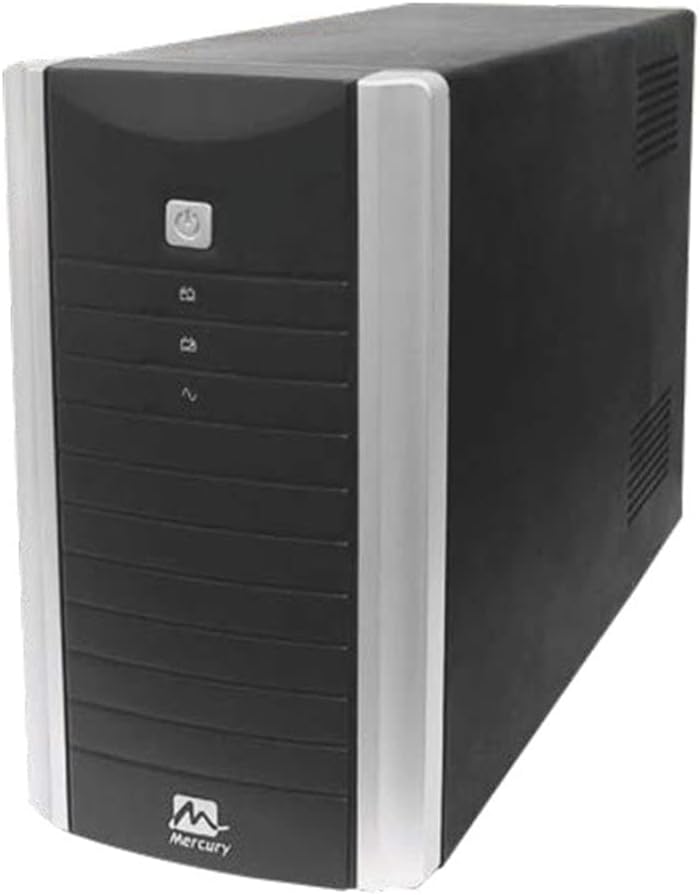
Figure 2.1: Front view of the Mercury Elite 2000U Smart UPS. The image shows the black tower-style UPS unit with silver side accents. The front panel features a power button at the top, indicator lights below it, and the Mercury logo at the bottom.
Key Features:
- 2000VA / 1200W power capacity.
- Input Voltage: 220VAC.
- Input Frequency: 50/60Hz.
- Input Range (220V): 140V-300V.
- Automatic Restart function.
- Output Short Circuit Protection.
- Overload Protection.
- Overcharge Protection.
3. Setup
- Unpacking: Carefully remove the UPS from its packaging. Inspect for any shipping damage.
- Placement: Place the UPS in a clean, dry, and well-ventilated area, away from direct sunlight, heat sources, and excessive dust. Ensure adequate space around the unit for proper airflow.
- Initial Charging: Connect the UPS to a standard wall outlet using the provided power cord. Allow the unit to charge for at least 8 hours before connecting any devices. This ensures optimal battery performance.
- Connecting Devices:
- Connect your computer, monitor, and other critical equipment to the UPS output sockets.
- Do not connect laser printers or other high-surge devices to the UPS output, as this may overload the unit.
- Power On: Press and hold the power button on the front panel for a few seconds until the unit powers on.
4. Operating Instructions
4.1 Powering On/Off
- To Power On: Press and hold the power button until you hear a beep and the indicators light up.
- To Power Off: Press and hold the power button until the indicators turn off.
4.2 Indicator Lights
Refer to the front panel for indicator lights that display the UPS status (e.g., AC mode, battery mode, fault, overload).
4.3 Battery Mode Operation
When the main power fails, the UPS will automatically switch to battery mode, providing power to connected devices. An audible alarm will sound to indicate battery operation. The alarm will typically sound more frequently as the battery level decreases.
4.4 Overload Condition
If the connected load exceeds the UPS's capacity (1200W), an overload alarm will sound, and the UPS may shut down to protect itself. Disconnect non-essential equipment and restart the UPS.
5. Maintenance
- Battery Care: To maintain optimal battery life, ensure the UPS is connected to a power source and fully charged at all times. Avoid deep discharges where possible.
- Cleaning: Keep the UPS clean and free of dust. Use a dry cloth to wipe the exterior. Do not use liquid cleaners.
- Ventilation: Ensure that the ventilation openings on the UPS are not blocked to prevent overheating.
- Storage: If storing the UPS for an extended period, ensure it is fully charged, then disconnect it from the power source. Recharge the unit every 3 months to prevent battery degradation.
6. Troubleshooting
| Problem | Possible Cause | Solution |
|---|---|---|
| UPS does not turn on. | No input power; low battery; power button not pressed correctly. | Check power cord connection; allow UPS to charge; press and hold power button for 3 seconds. |
| UPS beeps continuously in AC mode. | Overload condition. | Reduce connected load; disconnect non-essential devices. |
| Short backup time. | Battery not fully charged; battery nearing end of life. | Allow UPS to charge for 8+ hours; consider battery replacement if old. |
| UPS switches to battery mode frequently. | Unstable input power; high sensitivity setting. | Check utility power quality; consult support for sensitivity adjustment (if applicable). |
7. Specifications
| Feature | Detail |
|---|---|
| Model | Elite 2000U |
| Type | Uninterruptible Power Supply (UPS) |
| Rating Output (VA) | 2000VA |
| Rating Output (W) | 1200W |
| Input Voltage | 220VAC |
| Input Frequency | 50/60Hz |
| Input Range (220V) | 140V-300V |
| Battery | 12V/9AH x 2 |
| Output Voltage | 220V |
| Form Factor | Tower |
| Color | Black |
| Connector Type | IEC 320 |
| Manufacturer | Mercury |
8. Warranty Information
The Mercury Elite 2000U Smart UPS comes with a 1-year warranty from the date of purchase. This warranty is provided by the authorized agent. Please retain your proof of purchase for warranty claims. The warranty covers manufacturing defects and malfunctions under normal operating conditions. It does not cover damage caused by misuse, accidents, unauthorized modifications, or improper installation.
9. Support
For technical assistance, troubleshooting beyond this manual, or warranty service, please contact your authorized Mercury product dealer or the local service center. Please have your product model number (Elite 2000U) and purchase information ready when contacting support.


