Product Overview
The Laser DVD CD Player HD012 is a versatile multi-region player designed to provide a comprehensive home entertainment experience. It supports a wide array of disc and digital media formats, ensuring compatibility with your existing media library. Equipped with HDMI and AV outputs, it offers flexible connectivity options for various television setups. Its compact design and user-friendly interface make it an ideal addition to any home cinema system.

Image: The Laser DVD CD Player HD012, a sleek black unit, is shown with its remote control resting on top. The player features a disc tray, USB port, and a digital display.
What's Included
Upon unboxing your Laser DVD CD Player HD012, please verify that all the following components are present:
- DVD Player (Model: DVD-HD012)
- Remote Control
- Wall Adapter (Power Supply)
- User Manual (this document)
- Note: Batteries for the remote control are not included and must be purchased separately.
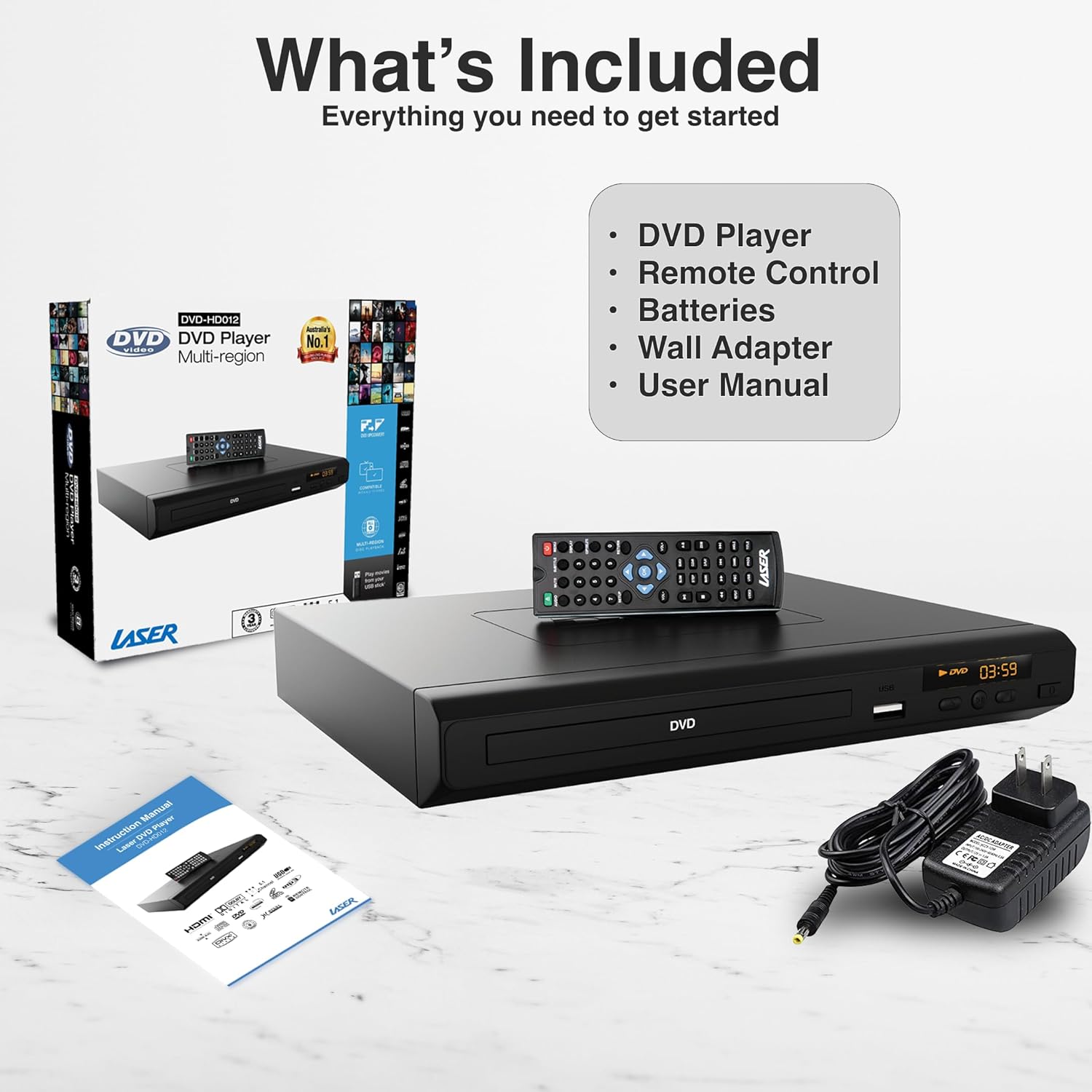
Image: A visual representation of the items included in the product package: the DVD player, its remote control, a wall power adapter, and the user manual, alongside the product packaging box.
Setup Guide
1. Connecting the Player to Your Television
The Laser DVD CD Player HD012 offers multiple connectivity options to suit your television setup:
- HDMI Connection (Recommended for High Definition): For the best audio and video quality, connect an HDMI cable (not included) from the HDMI OUT port on the DVD player to an available HDMI IN port on your television. This single cable transmits both digital video and audio signals.
- RCA Composite Connection (Standard Definition): If your television does not have an HDMI port, or if you prefer an analog connection, use an RCA composite cable (not included). Connect the yellow video cable to the VIDEO OUT port on the DVD player and the yellow VIDEO IN port on your TV. Connect the red and white audio cables to the AUDIO OUT (R/L) ports on the DVD player and the corresponding red and white AUDIO IN (R/L) ports on your TV.

Image: An illustration demonstrating the HDMI output capability of the DVD player, showing a television screen displaying content and the DVD player connected via an HDMI cable, emphasizing high-definition video from a single cable.
2. Powering On the Player
- Connect the provided wall adapter to the DC IN port on the back of the DVD player.
- Plug the wall adapter into a standard electrical outlet.
- Press the POWER button on the front of the DVD player or on the remote control to turn the unit on. The display will illuminate.
- Select the correct input source (HDMI or AV) on your television using your TV's remote control.
Operating Instructions
1. Disc Playback
- Ensure the player is powered on and connected to your TV.
- Press the OPEN/CLOSE button on the front panel or remote control to open the disc tray.
- Carefully place a DVD or CD disc onto the tray with the label side facing up.
- Press the OPEN/CLOSE button again to close the tray. The player will automatically begin reading the disc.
- Use the remote control's PLAY/PAUSE, STOP, REWIND, and FAST FORWARD buttons to control playback.

Image: The DVD player and remote are shown with text indicating support for various video and additional media formats, including DVD-RW, VCD, CD-R, DivX, MP3, JPEG, AVI, MPEG, MPEG4, VOB, and FLV.
2. USB Media Playback
The player supports playback of digital media files from USB memory devices.
- Insert your USB flash drive into the USB port on the front of the DVD player.
- The player should automatically detect the USB device and display a menu for selecting media types (e.g., Photo, Music, Movie).
- Navigate through the folders and files using the arrow keys on the remote control and press ENTER to select.
- Press PLAY to start playback of the selected file.
3. Remote Control Functions
The included IR remote control provides full functionality for operating your DVD player. Key buttons include:
- POWER: Turns the player on or off.
- OPEN/CLOSE: Opens and closes the disc tray.
- PLAY/PAUSE: Starts or pauses playback.
- STOP: Stops playback.
- PREV/NEXT: Skips to the previous or next chapter/track.
- REW/FF: Rewinds or fast forwards through content.
- VOL +/-: Adjusts the volume (if connected directly to an audio system or TV via analog output).
- SETUP: Accesses the system settings menu.
- TITLE/MENU: Accesses the disc title or main menu.
- USB: Switches input to USB mode.
4. Region-Free Playback
This DVD player is designed to be multi-region (region-free), allowing you to play DVDs from any region worldwide (Region 0-6). This feature ensures broad compatibility with your international DVD collection.

Image: The DVD player and remote are depicted against a global map background, highlighting its "Region-Free Playback" capability, allowing users to enjoy DVDs from any part of the world, supporting both PAL and NTSC formats.
5. Supported Media Formats
The Laser DVD CD Player HD012 supports a wide range of disc and digital media formats:
| Category | Supported Formats |
|---|
| Disc Formats | DVD-R/-RW, DVD-Video, DVD+R/+RW, CD, CD-R/RW, VCD, SVCD, HDCD |
| Video Formats (via USB) | AVI, DivX, MPEG, MPEG4, VOB, FLV |
| Audio Formats (via USB/Disc) | MP3, WMA, Dolby Digital, DTS |
| Image Formats (via USB) | JPEG |
The player also features built-in Anti-Shock and Error-Correction technologies to ensure uninterrupted viewing and listening pleasure.

Image: A living room setup showing the DVD player connected to a large television displaying a movie in Full HD 1080p, indicating an immersive audiovisual experience with Dolby 7.1 Surround Sound support.
Maintenance
To ensure the longevity and optimal performance of your Laser DVD CD Player HD012, follow these maintenance guidelines:
- Cleaning the Unit: Use a soft, dry cloth to wipe the exterior of the player. Do not use liquid cleaners, abrasive cleaners, or chemical sprays, as these can damage the finish.
- Disc Care: Handle discs by their edges. Keep discs clean and free of dust, fingerprints, and scratches. Use a soft, lint-free cloth to wipe discs from the center outwards if cleaning is necessary.
- Ventilation: Ensure the player is placed in a well-ventilated area. Do not block any ventilation openings on the unit. Avoid placing it on soft surfaces like carpets or blankets that could obstruct airflow.
- Storage: When not in use for extended periods, disconnect the power adapter and store the player in a cool, dry place away from direct sunlight and extreme temperatures.
Troubleshooting
If you encounter issues with your DVD player, please refer to the following common problems and their solutions:
| Problem | Possible Cause / Solution |
|---|
| No power | - Ensure the power adapter is securely connected to the player and the electrical outlet.
- Check if the power outlet is functional by plugging in another device.
- Press the POWER button on the player or remote control.
|
| No picture on TV | - Verify that the HDMI or RCA cables are securely connected to both the player and the TV.
- Ensure your TV is set to the correct input source (e.g., HDMI 1, AV).
- Check if the disc is inserted correctly and is not damaged.
|
| No sound | - Check audio cable connections (HDMI or RCA).
- Increase the volume on your TV or audio receiver.
- Ensure the player's volume is not muted or set too low.
- Verify the audio settings in the player's setup menu.
|
| Disc not playing / "No Disc" error | - Ensure the disc is clean and free of scratches or smudges.
- Verify the disc is inserted correctly with the label side facing up.
- Check if the disc format is supported by the player (refer to Supported Media Formats section).
|
| Remote control not working | - Ensure fresh batteries are installed correctly (polarity).
- Point the remote directly at the player's IR sensor.
- Remove any obstacles between the remote and the player.
|
If the problem persists after trying these solutions, please contact customer support.
Technical Specifications
| Feature | Detail |
|---|
| Brand | Laser |
| Model | DVD-HD012 |
| Compatible Devices | Television |
| Supported Media Types | CD, DVD, VCD (and various digital formats via USB as listed above) |
| Connector Types | HDMI, RCA (Composite), USB (1 port) |
| Supported Audio Formats | MP3, WMA, Dolby Digital, DTS |
| Audio Output Mode | Surround |
| Special Features | Anti-Shock, Error-Correction, Multi-Region Playback |
| Resolution (Upscaling) | Up to 3840x2160 (4K) via HDMI (for compatible media and display) |
| Power Source | Corded Electric |
| Product Dimensions (L x W x H) | 22 x 18 x 4.5 cm |
| Item Weight | 742 Grams |
Warranty and Support
Your Laser DVD CD Player HD012 comes with a 3-year warranty from the date of purchase, providing peace of mind regarding its quality and performance. This warranty covers manufacturing defects and ensures reliable operation under normal use conditions.
For warranty claims, technical assistance, or any inquiries regarding your product, please contact Laser customer support. Keep your proof of purchase (receipt or invoice) readily available as it will be required for any warranty service.
For the most up-to-date support information, including contact details and FAQs, please visit the official Laser website or refer to the contact information provided with your purchase documentation.


