
1. Introduction
The FunKey DP-61 III is a digital piano designed for beginners, offering the functionality of a modern keyboard with the aesthetic of an e-piano. It features 61 dynamic keys, 300 sounds, 300 rhythms, and 80 demo songs. This instrument includes a learning function, an illuminated display, and integrated stereo speakers, providing a comprehensive musical experience.
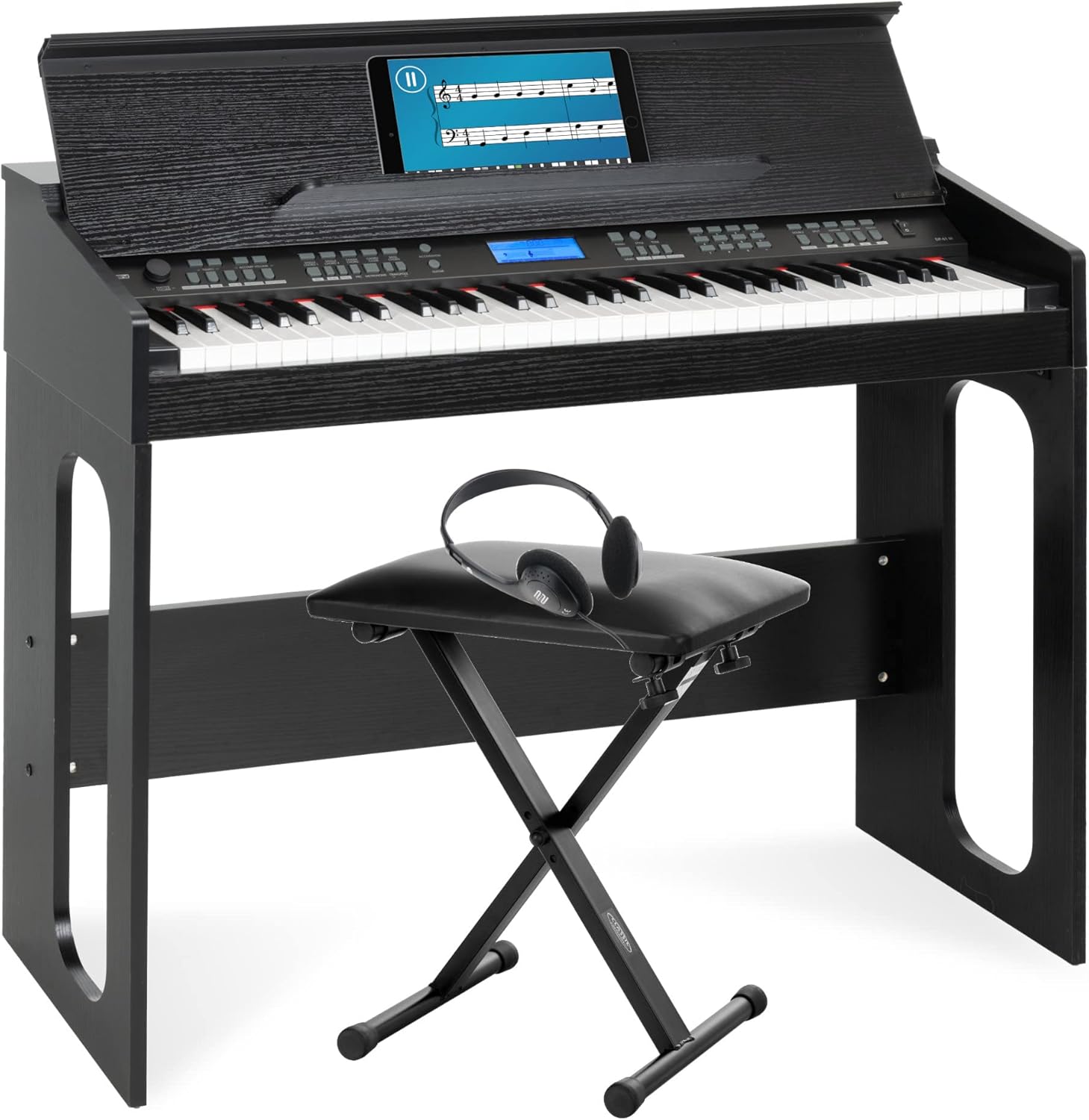
Image 1.1: The FunKey DP-61 III Digital Piano, shown with its accompanying adjustable bench and headphones, ready for use.
2. Package Contents
Please verify that all items listed below are present in your package:
- FunKey DP-61 III Digital Piano (61-key, black finish)
- Sustain Pedal
- Keyboard Bench (adjustable height, black faux leather)
- Headphones (lightweight, adjustable headband, black)
- Power Adapter
- User Manual (this document)

Image 2.1: The adjustable keyboard bench, a component of the FunKey DP-61 III package.
3. Setup
Follow these steps to set up your FunKey DP-61 III Digital Piano:
- Unpacking: Carefully remove all components from the packaging. Retain packaging for future transport or storage.
- Piano Assembly: Assemble the piano stand according to the separate assembly instructions (if provided). Ensure all screws are tightened securely.
- Bench Assembly: The keyboard bench is typically foldable or requires minimal assembly. Adjust its height to a comfortable playing position using the screw mechanism on the legs. The bench offers 3 height settings: 41 cm, 45 cm, and 47.5 cm.
- Connect Sustain Pedal: Locate the "PEDAL" input on the rear panel of the piano. Insert the sustain pedal cable firmly into this port.
- Connect Headphones (Optional): If using headphones, plug them into the "PHONES" jack on the rear panel.
- Power Connection: Connect the power adapter to the DC IN port on the rear panel of the piano, then plug the adapter into a suitable wall outlet.

Image 3.1: Detailed view of the rear panel connections, including power input, headphone jack, line out, sustain pedal input, and USB port.
4. Operating Instructions
This section details the primary functions and controls of your FunKey DP-61 III Digital Piano.
4.1 Power On/Off
Press the POWER button to turn the instrument on or off. The illuminated LCD display will activate upon power-on.
4.2 Sound Selection (Tones)
The DP-61 III offers 300 different sounds. Use the TONE buttons and the numeric keypad or data wheel to browse and select your desired instrument sound.
4.3 Rhythm Selection (Styles)
Access 300 built-in rhythms using the RHYTHM buttons. Select a rhythm and press START/STOP to begin or end the accompaniment. Adjust the accompaniment volume separately.
4.4 Demo Songs
The piano includes 80 demo songs. Press the DEMO button to cycle through and play these pre-recorded pieces.
4.5 Learning Function (Lesson Mode)
Engage the LESSON button to access the learning mode. This feature provides three difficulty levels, allowing you to practice left-hand, right-hand, or both hands for selected songs. The notes to be played are displayed on the LCD screen.
4.6 Recording and Playback
Use the RECORD function to capture your performances. Once recorded, you can play back your compositions using the PLAY button.
4.7 Metronome
Activate the built-in METRONOME to assist with timing and rhythm practice.
4.8 Split and Dual Functions
- Split: Divides the keyboard into two sections, allowing different sounds to be played by the left and right hands.
- Dual: Layers two different sounds across the entire keyboard, creating a richer, combined sound.
4.9 Sustain and Vibration Effects
Utilize the SUSTAIN and VIBRATION effects to add expressive qualities to your playing. The included sustain pedal provides a natural sustain effect similar to an acoustic piano.

Image 4.1: The digital piano highlighting key features such as automatic accompaniment, metronome function, recording, storage, and piano mode.
5. Maintenance
Proper maintenance ensures the longevity and optimal performance of your digital piano.
- Cleaning: Use a soft, dry cloth to wipe down the surface of the piano. For stubborn dirt, slightly dampen the cloth with water. Avoid abrasive cleaners, solvents, or waxes, as these can damage the finish.
- Key Cleaning: Gently wipe the keys with a soft, slightly damp cloth. Do not use excessive moisture.
- Storage: When not in use for extended periods, cover the piano with a dust cover to protect it from dust and debris. Store in a cool, dry place away from direct sunlight and extreme temperature fluctuations.
- Avoid Liquids: Keep liquids away from the instrument to prevent damage to internal electronics.
6. Troubleshooting
If you encounter issues with your FunKey DP-61 III, refer to the following common solutions:
| Problem | Possible Cause | Solution |
|---|---|---|
| No sound | Power not connected, volume too low, headphones connected. | Ensure power adapter is securely connected and unit is powered on. Increase master volume. Disconnect headphones if sound is desired from speakers. |
| Keys not responding | Instrument not powered on, specific function activated (e.g., demo mode). | Verify the piano is powered on. Exit any active demo or lesson modes. |
| Sustain pedal not working | Pedal not properly connected. | Check that the sustain pedal cable is fully inserted into the "PEDAL" jack. |
If the issue persists, please refer to the manufacturer's support resources.
7. Specifications
| Feature | Detail |
|---|---|
| Model | DP-61 III |
| Keys | 61, dynamic, piano-style |
| Sounds (Tones) | 300 |
| Rhythms (Styles) | 300 |
| Demo Songs | 80 |
| Polyphony | 32-note |
| Speakers | 2 x 5 Watt (Total 10 Watts output) |
| Connectors | Line Out, Sustain Pedal, Headphones (3.5mm Jack), USB |
| Dimensions (W x D x H) | 95 x 36 x 79.5 cm |
| Weight | 18.2 kg |
| Keyboard Bench | 3-way height adjustable (41, 45, 47.5 cm), 40 x 30 cm seat, 4.1 kg, max. load 100 kg |
| Headphones | Lightweight (50g), adjustable headband, Frequency: 20-2000Hz, Impedance: 32ohm +/- 10%, Cable length: 1.5m |
| Power Source | Corded Electric |

Image 7.1: Visual representation of the FunKey DP-61 III Digital Piano's dimensions.
8. Warranty and Support
For information regarding warranty coverage, technical support, or service, please refer to the documentation provided with your purchase or visit the official FunKey website. Keep your proof of purchase for warranty claims.
For further assistance, contact your retailer or the manufacturer directly.


