
1. Introduction
This manual provides essential information for the safe and efficient operation of your Vispera Ai43T1 43-inch Smart Full HD Google Android TV. Please read this manual thoroughly before using the television and retain it for future reference. Your Vispera TV offers a 43-inch Full HD display (1920 x 1080 resolution), integrated Google Android TV features including Google Assistant and Chromecast, and access to popular streaming services like Netflix, Amazon Prime Video, Disney+, and YouTube. It also supports Freeview Play for catch-up TV services.
2. Important Safety Information
- Power Source: Ensure the TV is connected to a power supply within the specified voltage range. Do not overload power outlets.
- Ventilation: Do not block ventilation openings. Allow adequate space around the TV for proper airflow to prevent overheating.
- Water and Moisture: Do not expose the TV to rain, moisture, or place objects filled with liquids on or near the TV.
- Cleaning: Unplug the TV before cleaning. Use a soft, dry cloth. Do not use liquid cleaners or aerosol cleaners.
- Placement: Place the TV on a stable, level surface or mount it securely to a wall. Avoid placing it in direct sunlight or near heat sources.
- Children: Supervise children to prevent them from climbing on the TV or stand.
- Servicing: Do not attempt to service this product yourself. Refer all servicing to qualified service personnel.
3. Package Contents
Please check that the following items are included in your TV package:
- Vispera Ai43T1 43-inch Smart Full HD Google Android TV
- Remote Control
- Power Cable
- TV Stand (2 pieces) and Screws
- User Manual (this document)
- Quick Start Guide
4. Setup
4.1 Stand Installation
If you are not wall-mounting the TV, attach the included stand pieces to the bottom of the TV using the provided screws. Ensure the stand is securely fastened before placing the TV on a flat, stable surface.
4.2 Wall Mounting
The Vispera Ai43T1 TV supports VESA standard wall mounts with a pattern of 200 x 200 mm. Use appropriate wall mounting hardware (not included) and consult a professional installer if you are unsure about the process. Ensure the wall can support the weight of the TV.
4.3 Connecting Peripherals
Refer to the diagram below for an overview of the TV's rear ports and typical connections.

Figure 1: Rear view of the Vispera Ai43T1 TV showing various input and output ports.
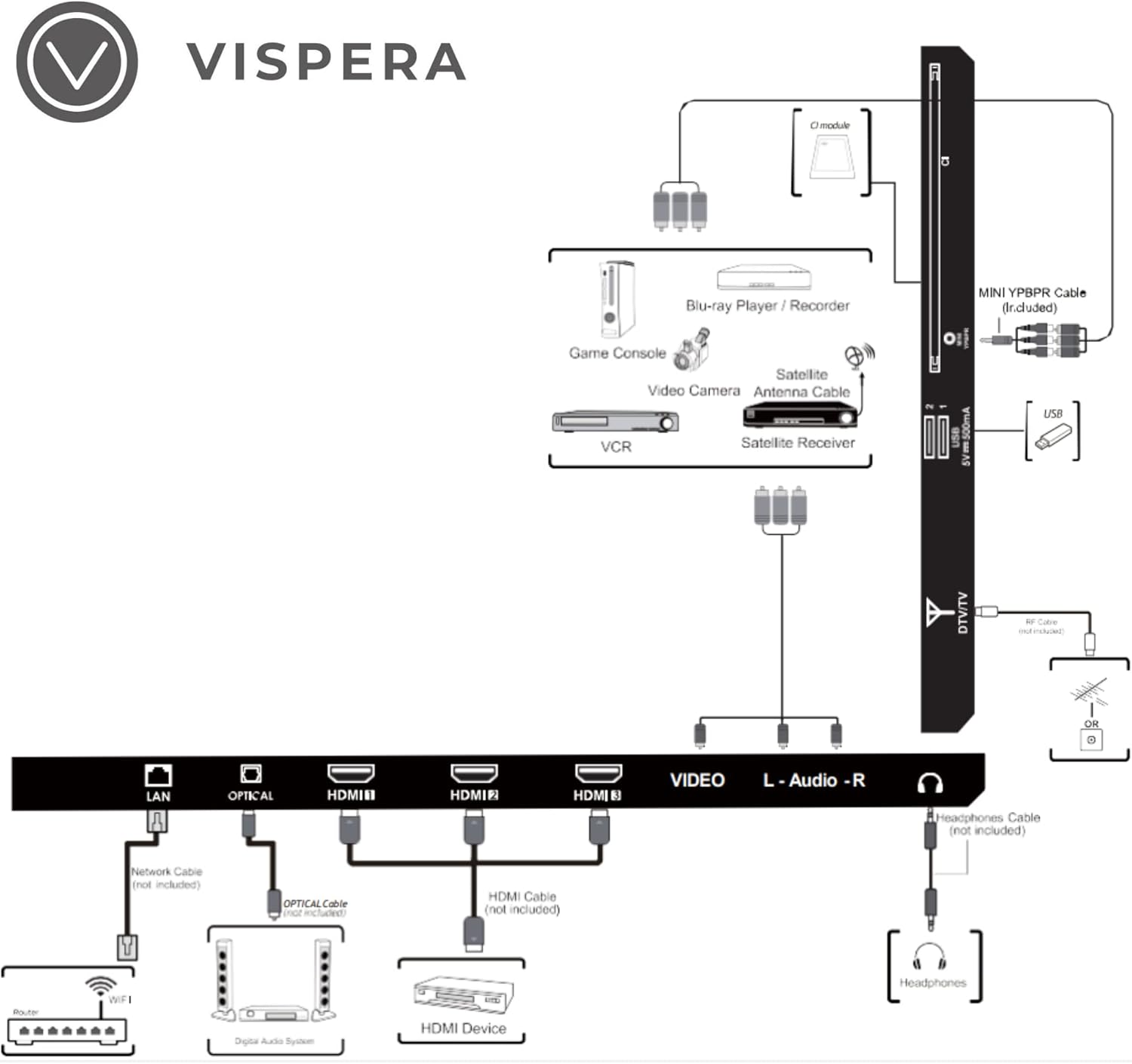
Figure 2: Diagram illustrating various connection types for external devices to the Vispera Ai43T1 TV.
- LAN (Ethernet) Port: Connect an Ethernet cable from your router for a stable wired internet connection.
- OPTICAL (Digital Audio Out): Connect to a digital audio system for high-quality sound.
- HDMI Inputs (HDMI1, HDMI2, HDMI3): Connect High-Definition (HD) signal output devices such as Blu-ray players, game consoles, or set-top boxes.
- VIDEO Input: Connect to composite video output devices.
- L-AUDIO-R Input: Connect to composite audio (L/R) output sockets on external video devices.
- Headphone Socket: Connect headphones for private listening.
- DTV/TV Input: Connect to an antenna (75Ω VHF/UHF) socket with an RF coaxial cable for terrestrial TV broadcasts.
- USB Input: Connect a USB storage device to play photo files or other compatible media.
- MINI YPBPR: Connect to AV devices with component (Y/Pb/Pr) video and audio output sockets.
- CI Slot: Used to insert a CI card for encrypted digital TV channels.
4.4 Initial Power-On and First-Time Setup
- Connect the power cable to the TV and then to a wall outlet.
- Press the Power button on the remote control or the TV.
- Follow the on-screen instructions to complete the initial setup, which typically includes:
- Language selection.
- Connecting to a Wi-Fi network or wired LAN.
- Signing in with your Google Account to access Google services and apps.
- Scanning for TV channels (if an antenna is connected).
- Accepting terms and conditions.
5. Operating Your TV
5.1 Remote Control Functions
The included remote control allows you to navigate your TV's features. Ensure batteries are correctly inserted.
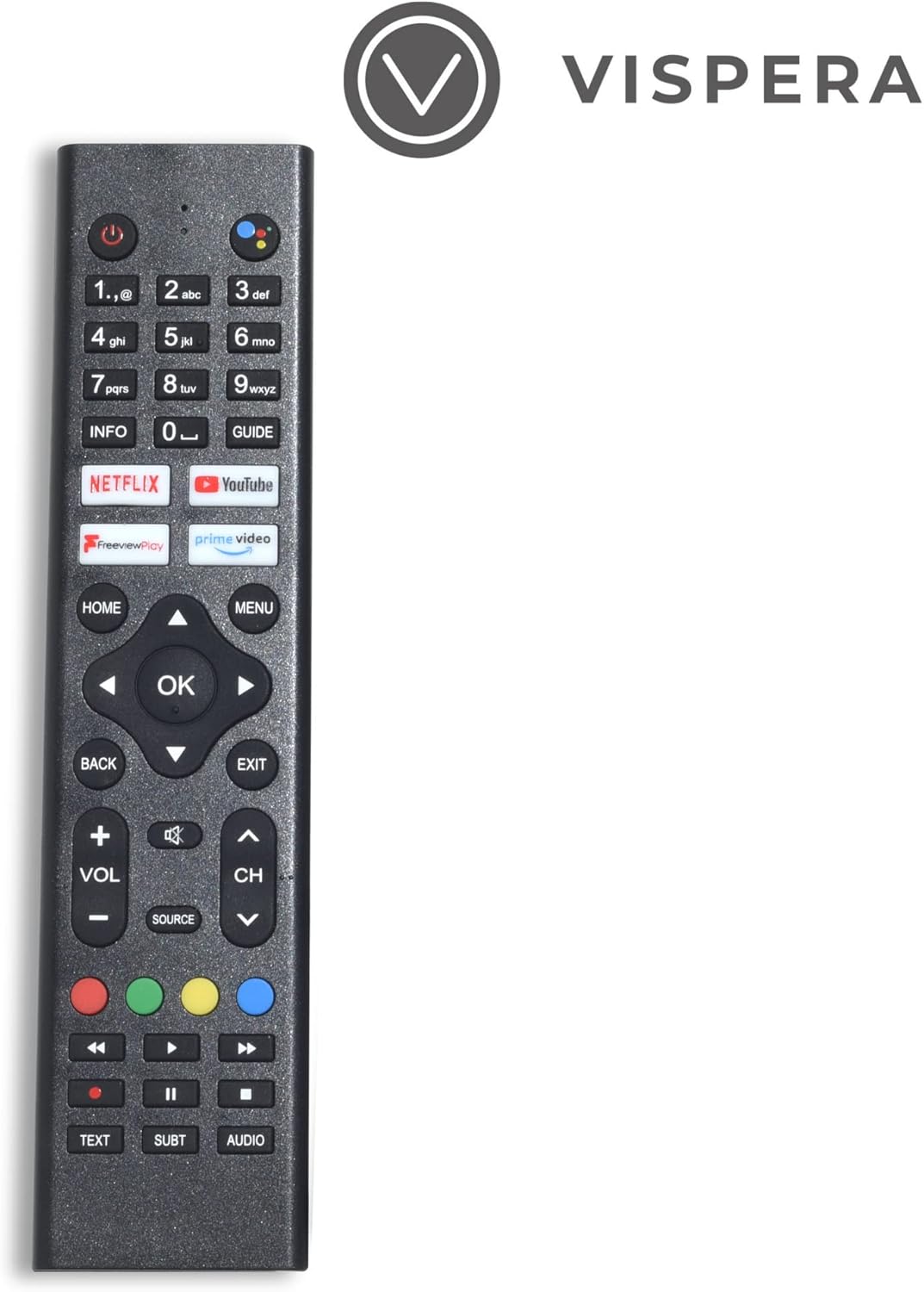
Figure 3: Vispera Ai43T1 Remote Control.
- Power Button: Turns the TV on or off.
- Number Buttons (0-9): Select TV channels directly.
- Google Assistant Button: Activates voice control for searching, controlling smart home devices, and more.
- Navigation Pad (Up/Down/Left/Right/OK): Navigates menus and selects options.
- HOME Button: Returns to the Android TV home screen.
- BACK Button: Returns to the previous screen or menu.
- Volume Up/Down: Adjusts the volume level.
- Channel Up/Down: Changes TV channels.
- Source Button: Selects input sources (HDMI, AV, TV, etc.).
- App Buttons (Netflix, Prime Video, YouTube, Freeview Play): Direct access to these streaming applications.
5.2 Smart TV Features (Google Android TV)
Your Vispera Ai43T1 TV runs on Google Android TV, providing access to a wide range of entertainment and smart features.

Figure 4: The Google Android TV interface on the Vispera Ai43T1, showing various streaming applications.
- Google Assistant: Use your voice to search for movies and shows, get answers, control your TV, and manage compatible smart home devices. Press the Google Assistant button on your remote to activate.
- Chromecast Built-in: Cast photos, videos, and music from your smartphone, tablet, or computer directly to your TV. Ensure your device and TV are on the same Wi-Fi network.
- Streaming Apps: Access pre-installed apps like Netflix, Amazon Prime Video, Disney+, and YouTube. Download more apps from the Google Play Store.
- Google Play Store: Browse and download thousands of apps, games, and content directly to your TV.
5.3 Freeview Play
Freeview Play allows you to watch live TV, catch up on shows you've missed, and access on-demand content from various UK broadcasters. You can scroll back through the TV guide to watch programs directly from the guide, without needing to open individual catch-up apps.
6. Maintenance
- Screen Cleaning: Gently wipe the screen with a soft, lint-free cloth. For stubborn marks, slightly dampen the cloth with water or a specialized screen cleaner (apply to cloth, not directly to screen).
- Cabinet Cleaning: Wipe the TV cabinet with a soft, dry cloth.
- Dusting: Regularly dust the ventilation openings to prevent dust buildup.
- Software Updates: The TV may receive automatic software updates. Ensure your TV is connected to the internet to receive these updates, which can improve performance and add new features.
7. Troubleshooting
If you encounter issues with your TV, refer to the following common problems and solutions:
- No Power:
- Check if the power cable is securely connected to the TV and the power outlet.
- Ensure the power outlet is working by plugging in another device.
- Try pressing the power button on the TV itself, not just the remote.
- No Picture/Sound:
- Verify the correct input source is selected (e.g., HDMI1, TV).
- Check all cable connections (HDMI, antenna, etc.) are secure.
- Adjust the volume.
- Perform a channel scan if using an antenna.
- Remote Control Not Working:
- Replace the batteries with new ones.
- Ensure there are no obstructions between the remote and the TV's IR sensor.
- Pair the remote again if it's a Bluetooth remote (refer to TV settings).
- Network Connection Issues:
- Restart your router and modem.
- Check Wi-Fi password and network settings on the TV.
- Try a wired Ethernet connection if Wi-Fi is unstable.
- Apps Not Loading/Crashing:
- Ensure the TV has a stable internet connection.
- Clear the cache and data for the problematic app in the TV's settings.
- Update the app or the TV's system software.
8. Specifications
Below are the technical specifications for the Vispera Ai43T1 43-inch Smart Full HD Google Android TV.

Figure 5: Technical specifications of the Vispera Ai43T1 TV.
| Feature | Specification |
|---|---|
| Panel Size | 43 inches (diagonally) |
| Display Type | LED |
| Panel Technology | TFT |
| Refresh Rate | 60 Hz |
| Display Resolution | 1080p (1920 x 1080) Full HD |
| HDMI Support | Up to 1080p |
| Aspect Ratio | 16:9 |
| Dynamic Contrast Ratio-Panel | 2400~3000:1 |
| Response Time (G to G) | 11.5 ms |
| Lamp Life (Typ. Hours) | >30,000 hours |
| Horizontal Viewing Angle (At CR>10) | 178° |
| Vertical Viewing Angle (At CR>10) | 178° |
| Wall-mount (LxW-mm) | 200*200 (mm) VESA |
| Operating System | Android |
| Connectivity Technology | Wi-Fi |
| Supported Internet Services | Amazon Prime Video, Google Assistant, Netflix, YouTube |
| Product Weight | 9.53 kg |
| Dimensions (Package) | 104 x 63 x 14 cm |
9. Warranty and Support
Your Vispera Ai43T1 TV comes with a standard manufacturer's warranty. Please refer to the warranty card included in your package for specific terms and conditions, including the warranty period and coverage details. For technical support, troubleshooting assistance, or service inquiries, please contact Vispera customer support through the contact information provided on the official Vispera website or your purchase documentation.


