
1. Product Overview
The SinoTrack ST-901L is a 4G GPS tracker designed for real-time location tracking and security of vehicles. It supports LTE, GSM, and GPRS networks, providing accurate positioning and various monitoring features. The device is compact, waterproof, and includes a relay for remote engine cut-off functionality.

Image: SinoTrack ST-901L 4G GPS Tracker, showing its compact design and wiring.
Included Components:
- 1 x ST-901L 4G GPS Tracker
- 1 x Relay
- 1 x User Manual
- 1 x Double-sided Sticker

Image: Contents of the SinoTrack ST-901L package, including the tracker, relay, manual, and double-sided sticker.
2. Setup Guide
2.1 SIM Card Activation and Installation
A local 4G (LTE) SIM card is required for the tracker to function. The SIM card is not included with the device.
- Activate SIM Card: Before inserting, install the new SIM card into a mobile phone. Activate the SIM card, remove any PIN code, and ensure it can make calls, send texts, and has an active internet connection.
- Open Tracker: Unscrew the screw and carefully open the lid of the GPS tracker.
- Insert SIM Card: Insert the activated SIM card into the tracker's SIM card slot. Ensure it is correctly oriented. The tracker will attempt to identify the APN automatically.

Image: Step-by-step visual guide for opening the tracker and inserting the SIM card.
2.2 Initial Power On and Signal Acquisition
- Charge Device: Charge the tracker for approximately 1 hour before first use.
- Turn On: Turn on the switch on the device. The yellow and blue indicator lights will begin flashing as the device searches for network and GPS signals.
- Acquire Signal: Place the device in an area with good reception (e.g., near a window or outdoors) and wait for about 5 minutes for both lights to become constant. If the yellow light continues to flash, it indicates a network issue; try moving to a different location. The device will use GPS for location if a signal is available, otherwise it will use LBS (Location Based Service).
Video: An overview of the SinoTrack ST-901L 4G tracker and its components, demonstrating the initial setup process including SIM card insertion and power-on sequence.
2.3 APN and GPRS Mode Configuration
If the APN is not automatically recognized, or for optimal performance, manual configuration may be required. Commands are sent via SMS from another phone to the tracker's SIM card number.
- Identify APN: Obtain the APN details (APN name, username, password) from your SIM card provider.
- Set APN (No Username/Password): If your SIM card's APN does not require a username or password, send the SMS command: 8030000 [APN name] (e.g., 8030000 everywhere). The tracker should reply with "SET OK".
- Set APN (With Username/Password): If your APN requires a username and password, send the SMS command: 8030000 [APN name] [APN user] [APN pass] (e.g., 8030000 everywhere eesecure secure). The tracker should reply with "SET OK".
- Set GPRS Mode: After setting the APN, send the SMS command: 7100000. Wait approximately 30 seconds. Both blue and orange lights should remain ON, indicating the device is in GPRS mode and ready for online tracking.
2.4 Physical Installation
The tracker is designed for installation in vehicles. The wiring diagram below illustrates the connections.
- Orange Wire: Connect to ACC (Accessory) port.
- Black Wire: Connect to Power "-" (Negative).
- Red Wire: Connect to Power "+" (Positive).
- Yellow Wire: Connect to the Relay for engine cut-off functionality.
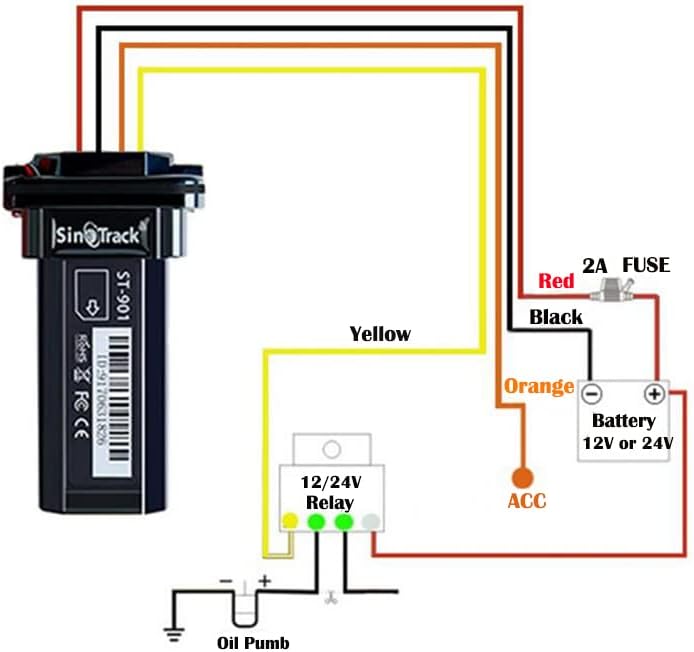
Image: Detailed wiring diagram for the SinoTrack ST-901L, showing connections for power, ACC, and the relay.
3. Operating Instructions
3.1 Real-Time Tracking
Once the device is online (blue and orange lights constant), you can track its location in real-time.
- Web Platform: Access the tracking platform via sinotrackpro.com. Log in using your device's ID number (found on the product) as the username and '123456' as the default password.
- Mobile App: Download the "SinoTrack Pro GPS APP" from your tablet or phone's app store. Log in with the same credentials.

Image: Screenshot of the SinoTrack web platform displaying real-time tracking on a map.

Image: Screenshots of the SinoTrack mobile app, showing real-time tracking and geo-fence setup.
3.2 History Route Playback
The device saves up to 2 years of tracking history. You can view and replay past routes on the tracking platform or app.
- Select the desired date and time range to view the historical route.
- Analyze driving patterns, stops, and speeds.

Image: Screenshot of the SinoTrack app showing the history route playback feature, displaying a vehicle's past movements on a map.
3.3 Geo-Fence Functionality
Set up virtual boundaries (geo-fences) on the map. You will receive alerts when the tracker enters or exits these predefined areas.
3.4 Remote Engine Cut-Off
In case of theft, you can remotely cut off the vehicle's engine by sending an SMS command to the tracker. This feature requires the relay to be correctly installed.
- Send SMS command: 9400000 to the tracker's SIM card number.
- The vehicle will stop moving within 10-20 seconds if its speed is below 20 km/h.
- To restore power, send SMS command: 9410000.
Image: Illustrates the remote engine cut-off feature, showing a mobile phone sending an SMS command to the tracker.
3.5 Alert Notifications
The tracker can send various alerts to your registered phone number or through the app:
- Movement Alert: Notifies you if the vehicle moves from its parked location.
- Speeding Alert: Triggers if the vehicle exceeds a predefined speed limit.
- Low Battery Alert: Informs you when the tracker's internal backup battery is low.
- Shocking Alert: Detects unusual vibrations or impacts.
4. Maintenance
To ensure the longevity and optimal performance of your SinoTrack ST-901L GPS tracker, follow these maintenance guidelines:
- Regular Charging: If using the internal backup battery, ensure it is charged periodically, especially if the vehicle is not in regular use.
- Secure Installation: Periodically check that the tracker is securely mounted and all wiring connections are firm to prevent dislodgement or damage from vibrations.
- Cleanliness: Keep the device free from dust and debris. Wipe with a dry, soft cloth. Avoid using harsh chemicals or solvents.
- Waterproof Feature: While the device is waterproof, avoid prolonged submersion or exposure to high-pressure water jets to prevent potential damage.
- SIM Card Check: Ensure your SIM card remains active and has sufficient data/credit for continuous tracking.
5. Troubleshooting
If you encounter issues with your SinoTrack ST-901L, refer to the following common problems and solutions:
| Problem | Possible Cause | Solution |
|---|---|---|
| Device is offline or not showing on platform | Incorrect APN settings, no network signal, GPRS mode not activated, SIM card issues. | Send SMS command RCONF to the device to check current settings. Verify APN, IP, and Port settings. Ensure SIM card is active and has data. Confirm GPRS mode is set (command 7100000). Move to an area with better network coverage. |
| Location shows China or is inaccurate | No GPS signal, device using LBS for location. | Take the device to an open outdoor area with a clear view of the sky to acquire a strong GPS signal. Location will update once a GPS signal is obtained. |
| SIM card not recognized | SIM card not activated, PIN code enabled, incorrect insertion. | Ensure the SIM card is fully activated and can make calls/send texts from a mobile phone. Disable any PIN codes on the SIM card. Re-insert the SIM card correctly into the tracker. |
| Remote engine cut-off not working | Relay not correctly wired, incorrect SMS command, vehicle speed too high. | Verify the yellow wire is correctly connected to the relay and the relay is properly installed. Ensure the SMS command 9400000 is sent correctly. The vehicle must be moving below 20 km/h for the command to take effect. |
6. Specifications
| Feature | Detail |
|---|---|
| Model Number | ST-904L 4G gps tracker (Note: Product title refers to ST-901L, but specifications list ST-904L. Please verify model upon receipt.) |
| Product Dimensions | 3.54 x 2.04 x 0.66 inches |
| Item Weight | 5.3 ounces |
| Batteries | 1 Lithium Polymer battery (included) |
| Special Features | Waterproof, Remote Engine Cut-Off, Real-Time Tracking, Alert Notification, Geo-Fence, History Route Playback, Rechargeable |
| Supported Application | SinoTrackPRO |
| Specific Uses | GPS tracker for cars, car alarms, car anti-lost alarm tracker |
| Manufacturer | SinoTrack |
| Country of Origin | China |
| First Available Date | January 22, 2022 |

Image: Diagram illustrating the dimensions of the SinoTrack ST-901L GPS tracker.
7. Warranty and Support
SinoTrack provides lifetime support for its online tracking platform. For specific warranty details regarding the hardware, please refer to the documentation included with your purchase or contact SinoTrack customer service directly. No explicit warranty period is provided in this manual.
Additional Resources:
- A comprehensive User Guide (PDF) is available for download.
- For further assistance, visit the SinoTrack website or contact their customer support.


