1. Introduction
Thank you for choosing the Tenergy 7.2V 3000mAh Flat NiMH Battery Pack and Smart Charger. This manual provides essential information for the safe and efficient use, charging, and maintenance of your battery packs and charger. Please read these instructions carefully before use and retain them for future reference.
2. Product Overview
The Tenergy 7.2V 3000mAh NiMH Battery Pack is designed for high-performance RC applications, offering extended runtime and reliable power. The accompanying smart charger ensures safe and efficient charging.

Image 2.1: Tenergy NiMH Battery Pack in various RC applications.

Image 2.2: High Capacity Tenergy NiMH Battery Pack.
Video 2.1: An official Tenergy video demonstrating the 7.2V NiMH battery pack's performance and features in RC hobbies.
3. Battery Specifications
- Voltage: 7.2V
- Capacity: 3000 mAh
- Battery Type: Nickel Metal Hydride Battery (NiMH Battery)
- Connector: Standard Tamiya
- Dimensions (L x W x H): 5.39" x 1.87" x 0.95" (136.9mm x 47.5mm x 24.1mm)
- Weight: Approximately 11.5 oz (326 grams)
- Max Discharge Rate: 30 Amps

Image 3.1: Battery dimensions and connector compatibility guide.
4. Charger Specifications
- Charger Type: NiMH battery charger
- Compatible Battery Type: NiMH/NiCd 2.4V-7.2V battery packs
- Connector: Standard Tamiya
- Power Input: 110-240V AC
- Power Output: 7.2-12V, 0.9A/1.8A
- Standard Charge Rate: 290mA x 16 hours
- Rapid Charge Rate: 1450mA x 2.1 hours

Image 4.1: Tenergy Smart Charger with multiple connector options.
5. Setup
Before first use, ensure all components are present and undamaged. The package includes the 7.2V 3000mAh NiMH battery pack and a smart charger with a standard Tamiya connector.
- Unpack the battery pack and charger from their packaging.
- Inspect the battery and charger for any visible damage. Do not use if damaged.
- Connect the charger to a suitable 110-240V AC power outlet.
6. Charging Instructions
Follow these steps to charge your Tenergy NiMH battery pack:
- Ensure the battery is at room temperature before charging.
- Connect the Tamiya connector of the battery pack to the corresponding output port on the smart charger.
- Select the appropriate charging current (0.9A or 1.8A) on the charger based on the battery's capacity. For 3000mAh batteries, 1.8A is generally recommended for faster charging.
- The charger will begin the charging process. Monitor the LED indicator for status.
- Once fully charged, disconnect the battery from the charger.
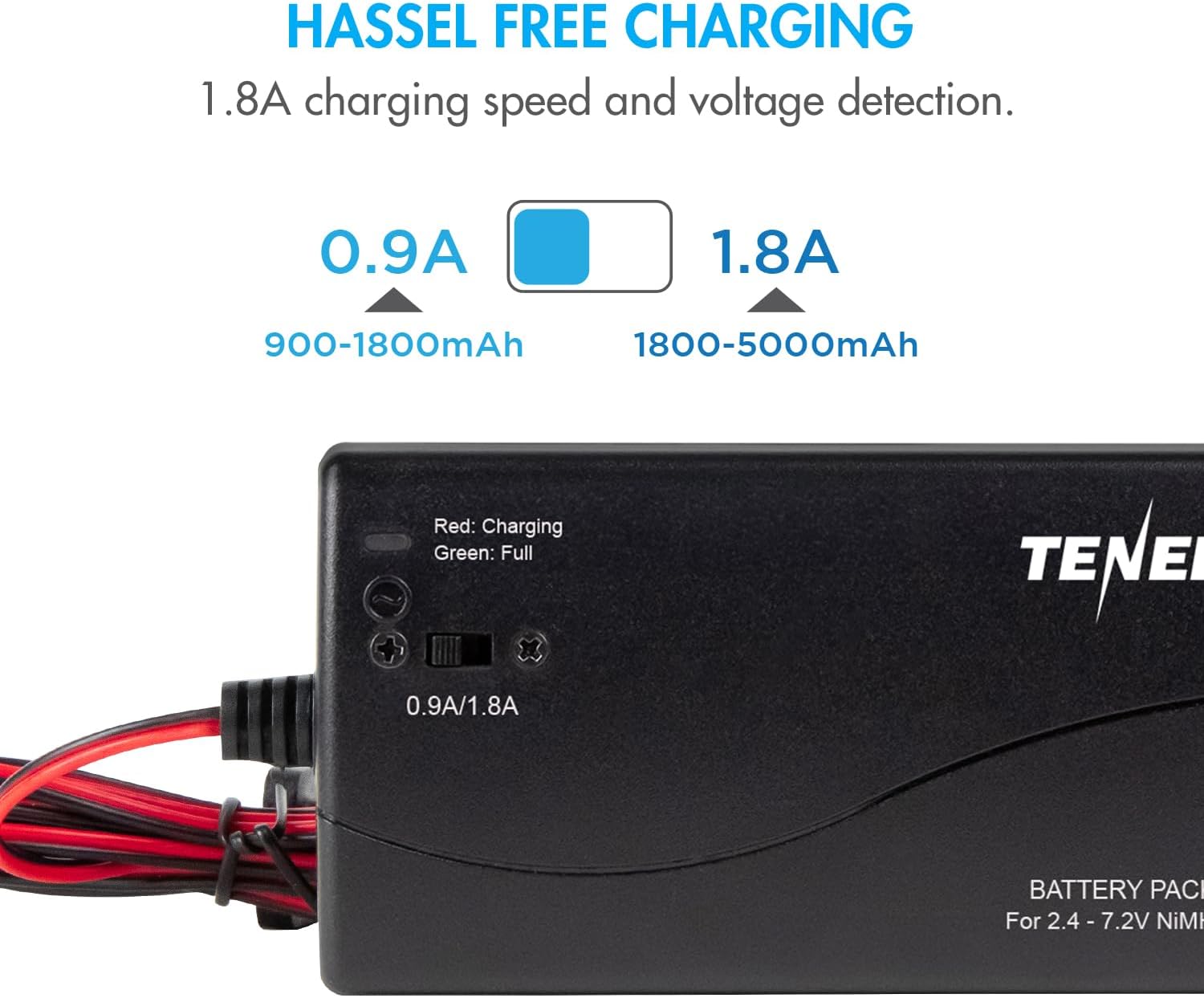
Image 6.1: Tenergy Smart Charger in operation, showing current selection.
6.1 LED Light Indicator
The smart charger features an LED indicator to display the charging status:
| Indicator Status | Meaning |
|---|---|
| Flash Slowly (Green) | No Battery Connected |
| Solid Red | Charging |
| Solid Green | Fully Charged |
| Red Flash | Short Circuit / Battery Reversed / Primary Battery Detected |

Image 6.2: LED Light Indicator Guide for the Smart Charger.
7. Usage Guidelines
The Tenergy 7.2V NiMH battery pack is suitable for various radio-controlled brands and hobbies, including RC cars, RC tanks, RC trucks, and RC boats. It is compatible with models from brands like Traxxas, LOSI, Team Associated, HPI, Kyosho, and Tamiya, especially RC10 cars.
- Always ensure the battery connector matches your RC unit's connector (Standard Tamiya).
- Measure your RC unit's battery compartment to ensure the battery pack fits properly.
- Do not over-discharge the battery. Stop using it when you notice a significant drop in performance to prevent damage.
8. Maintenance and Storage
Proper care and storage will extend the life of your NiMH battery packs:
- Initial Charge: Fully recharge your new battery pack when you first receive it.
- Avoid Over-Discharge: Stop using the battery when performance drops.
- Avoid Over-Charge: Remove the battery from the charger once fully charged.
- Temperature Control: Heat reduces battery life. Do not charge or discharge the battery when it is hot. Always allow batteries to cool down to room temperature before using or charging.
- Storage Voltage: Do not store the battery with low voltage. Recharge after each use to prevent over-discharge during storage.
- Storage Conditions: Always store the battery in a dry and cool place, away from heat or direct sunlight.
- Long-Term Storage: If unused or stored long-term, recharge the battery once every 6 months.
- No Memory Effect: Tenergy NiMH batteries have no memory effect, allowing you to charge them anytime without needing to fully discharge them first.
9. Safety Warnings
WARNING - DO NOT CHARGE LiPo Batteries
- LiPo Battery Identification: DO NOT CHARGE if the label on your battery says: LiPO, LIPO, Li-Po, LI-PO, Li-Polymer, Li-Poly, Lithium Polymer, Li-ion, Lithium-Ion, Lithium.
- Connector Check: LiPo battery packs may often have two sets of leads/connectors. Do not charge if identified as a LiPo battery.
- Risk of Fire/Injury: Failure to follow these warnings may result in fire or personal injury.
- Consult Support: Contact Tenergy customer support if you are unsure if your battery can be charged with this device.
Always handle batteries with care and follow all safety guidelines provided by the manufacturer of your RC device.
10. Troubleshooting
If you encounter issues with your Tenergy battery pack or charger, consider the following common solutions:
- Battery Not Charging:
- Check if the charger is properly plugged into a power outlet.
- Ensure the battery is securely connected to the charger.
- Verify the LED indicator status (should be Solid Red for charging). If it's Red Flash, check for short circuit or reversed polarity.
- Confirm the battery type is NiMH/NiCd and not LiPo.
- Short Runtime:
- Ensure the battery is fully charged before use (Solid Green LED).
- Check for signs of battery degradation (e.g., swelling, excessive heat during use).
- Review maintenance guidelines to ensure proper charging and storage practices are followed.
- Charger Error (Red Flash):
- Disconnect the battery and charger from power.
- Re-connect the battery, ensuring correct polarity.
- Confirm the battery is a compatible NiMH/NiCd type.
- If the error persists, the battery or charger may be faulty.
For persistent issues or further assistance, please contact Tenergy customer support.
11. Warranty and Support
Tenergy products are designed for quality and performance. For information regarding warranty coverage, technical support, or replacement parts, please refer to the official Tenergy website or contact their customer service department directly. Keep your purchase receipt as proof of purchase.
Tenergy Customer Support: Please visit the Tenergy website for contact information.


