
1. Important Safety Information
Please read all instructions carefully before assembly and use. Retain this manual for future reference.
- Weight Capacity: Do not exceed the maximum weight capacity of 220 lbs (100 kg) on the desk surface. Overloading can compromise stability and functionality.
- Operation: When adjusting the desk height using the memory function, ensure the height keys are pressed continuously until the desired height is reached.
- Anti-Collision System: The desk is equipped with an anti-collision system to prevent damage. If an obstruction is detected during height adjustment, the desk will stop and reverse slightly. Ensure the area around the desk is clear during operation.
- Health & Ergonomics: Regularly take short breaks from sitting or standing to maintain good health and promote ergonomic practices.
- Children and Pets: Keep children and pets away from the desk during operation to prevent injury.
2. Product Overview
The FLEXISPOT 4-Legs Electric Standing Desk is designed to provide a versatile and ergonomic workspace. Its robust four-legged frame ensures stability, while the electric height adjustment allows seamless transitions between sitting and standing positions.

Image 2.1: The FLEXISPOT 4-Legs Electric Standing Desk, featuring a white tabletop and frame, equipped with two monitors, a keyboard, mouse, and a desk lamp, illustrating a typical setup.

Image 2.2: A white FLEXISPOT 4-Legs Electric Standing Desk positioned in a home office environment, complete with a computer monitor, laptop, and a small storage unit beside it.
3. Setup and Assembly
Assembly of the FLEXISPOT 4-Legs Electric Standing Desk typically requires one person and takes approximately one hour. All necessary tools are included. Follow the detailed instructions provided in the separate assembly guide for your specific model.
3.1 Unpacking and Component Check
Carefully unpack all components and verify against the parts list in your assembly guide. Ensure no parts are missing or damaged.

Image 3.1: Various components of the FLEXISPOT 4-Legs Electric Standing Desk, including the tabletop sections, legs, and frame parts, neatly arranged for the assembly process.
3.2 Assembly Steps (General Overview)
- Attach Legs to Frame: Securely fasten the four legs to the main desk frame using the provided hardware.
- Assemble Tabletop: If your tabletop comes in multiple pieces, join them according to the instructions, ensuring all rounded corners face outwards. Place a protective layer underneath to prevent scratches.
- Mount Tabletop to Frame: Carefully align and attach the assembled tabletop to the desk frame.
- Install Control Panel: Mount the digital keypad control panel in the designated location.
- Connect Power: Plug in the power cable to the control box and then to a power outlet.
Note: Refer to the dedicated assembly manual for detailed, step-by-step instructions and diagrams specific to your desk model.
4. Operating Instructions
The FLEXISPOT 4-Legs Electric Standing Desk features an intuitive digital keypad for height adjustment and memory functions.
4.1 Adjusting Desk Height
- Up/Down Adjustment: Use the Up (▲) and Down (▼) arrow buttons on the control panel to manually adjust the desk height. Press and hold the button until the desired height is reached.
- Height Range: The desk can be adjusted from a minimum height of 28.7 inches to a maximum height of 47.2 inches.
4.2 Using Memory Presets
The control panel allows you to save up to three preferred height settings for quick adjustments.

Image 4.1: Close-up view of the digital keypad control panel, displaying an LED screen with the current height and buttons for three memorizable height settings (1, 2, 3, M) along with up and down arrows for manual adjustment.
- To Save a Height: Adjust the desk to your desired height using the Up/Down buttons. Press the M button, then immediately press one of the number buttons (1, 2, or 3) to save the current height to that preset. The display will confirm the setting.
- To Use a Saved Height: Press the corresponding number button (1, 2, or 3) for your desired preset. The desk will automatically move to the saved height. Note: Some models require continuous pressing of the preset button until the height is reached.
4.3 Anti-Collision Feature
The desk is equipped with an anti-collision sensor. If the desk encounters an obstruction during movement, it will automatically stop and reverse slightly to prevent damage to the desk or objects.
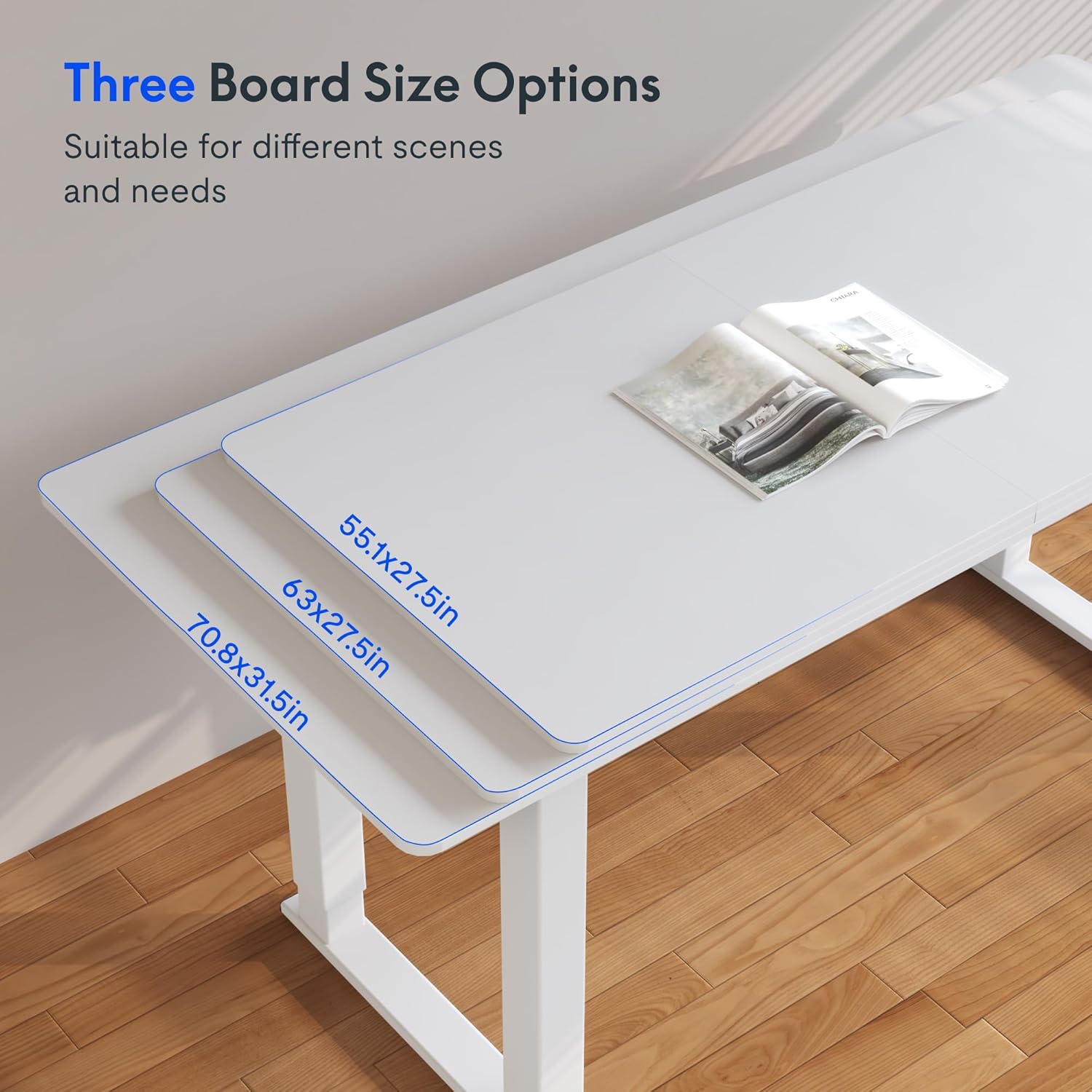
Image 4.2: Illustration of the anti-collision system in action, showing the desk top moving upwards and then stopping and slightly reversing to avoid contact with a white cabinet placed underneath.
5. Maintenance
Regular maintenance ensures the longevity and optimal performance of your standing desk.
- Cleaning: Wipe the desk surface and frame with a soft, damp cloth. Avoid abrasive cleaners or harsh chemicals that could damage the finish.
- Cable Management: Periodically check and organize cables to prevent tangles and ensure smooth operation of the desk's moving parts.
- Inspection: Regularly inspect all screws and connections to ensure they are tight. Retighten if necessary.
6. Troubleshooting
If you encounter issues with your FLEXISPOT standing desk, refer to the following common troubleshooting steps.
| Problem | Possible Cause | Solution |
|---|---|---|
| Desk does not move or respond to controls. | Power cable disconnected; control panel error; overload. | Check power connections. Unplug and replug the desk. Reduce load if exceeding 220 lbs. Perform a reset (refer to specific reset instructions in your assembly guide). |
| Desk moves unevenly or makes unusual noises. | Loose connections; uneven load; motor issue. | Ensure all screws are tightened. Distribute weight evenly on the desk. If the issue persists, contact customer support. |
| Anti-collision system frequently activates. | Obstruction in the path; sensor sensitivity. | Clear the area around the desk. Ensure no objects are interfering with its movement. |
If these steps do not resolve the issue, please contact FLEXISPOT customer support for further assistance.
7. Specifications
Detailed technical specifications for the FLEXISPOT 4-Legs Electric Standing Desk (Model QS2W-1470-AU-RP).
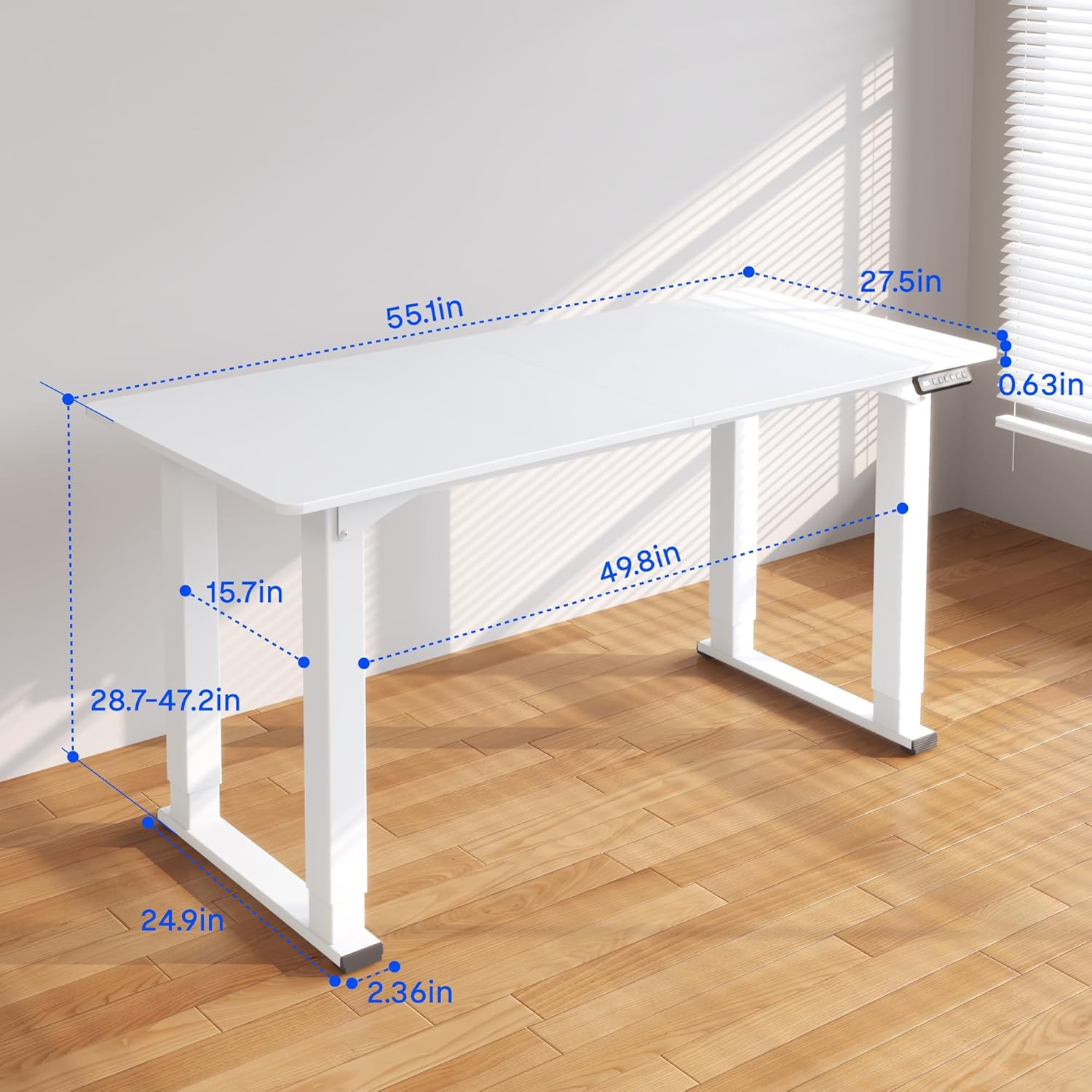
Image 7.1: A diagram illustrating the key dimensions of the FLEXISPOT 4-Legs Electric Standing Desk, including the tabletop length (55.1 inches), width (27.5 inches), and adjustable height range (28.7 to 47.2 inches).
| Feature | Detail |
|---|---|
| Brand | FLEXISPOT |
| Model Number | QS2W-1470-AU-RP |
| Product Dimensions (D x W x H) | 48"D x 31.5"W x 23.6"H (Note: Tabletop is 55"x28") |
| Color | White Frame & White Top |
| Style | Modern |
| Base Material | Metal |
| Top Material Type | Wood (Maple finish) |
| Adjustable Height Range | 28.7" to 47.2" |
| Maximum Weight Capacity | 220 lbs (100 kg) |
| Lifting Mechanism | Electric |
| Assembly Required | Yes |
| Included Components | Desk, Assembly Tools |
| UPC | 810072806017 |
8. Warranty Information
FLEXISPOT provides a limited warranty for this product:
- 5-Year Coverage: Applies to the desk frame and motor.
- 2-Year Coverage: Applies to the control panel and electronics.
Please retain your proof of purchase for warranty claims. For full warranty terms and conditions, refer to the official FLEXISPOT website or contact customer support.
9. Customer Support
For any questions, assistance with assembly, troubleshooting, or warranty inquiries, please contact FLEXISPOT customer support.
- Online Support: Visit the official FLEXISPOT website for FAQs, support articles, and contact forms.
- Contact Information: Refer to the contact details provided on your product packaging or the FLEXISPOT website.


