
Baseus CRDLQ-CS
Baseus Mini Wireless Car Polishing Machine User Manual
Model: CRDLQ-CS
1. Introduction
Thank you for choosing the Baseus Mini Wireless Car Polishing Machine. This cordless electric polisher is designed for efficient and convenient car waxing and polishing, providing professional results with ease. This manual provides detailed instructions for setup, operation, maintenance, and troubleshooting to ensure optimal performance and longevity of your device.
2. Safety Information
Please read all safety warnings and instructions carefully before using the product. Failure to follow the warnings and instructions may result in electric shock, fire, and/or serious injury.
- Keep the work area clean and well-lit. Cluttered or dark areas invite accidents.
- Do not operate power tools in explosive atmospheres, such as in the presence of flammable liquids, gases, or dust. Power tools create sparks which may ignite the dust or fumes.
- Keep children and bystanders away while operating a power tool. Distractions can cause you to lose control.
- Do not expose power tools to rain or wet conditions. Water entering a power tool will increase the risk of electric shock.
- Use the correct power adapter for charging.
- Do not overcharge the battery.
- Avoid direct contact with the rotating pad during operation.
- Always ensure the device is turned off before changing pads or performing maintenance.
3. Product Overview and Components
The Baseus Mini Wireless Car Polishing Machine comes with essential accessories for a complete detailing experience.

Image: The Baseus Mini Wireless Car Polishing Machine shown with its main body, two black foam pads (flat and waffle), a white wool pad, and a USB-C charging cable.

Image: A top-down view of the product packaging and its contents, including the polisher unit, two black foam pads, one white wool pad, and a USB-C charging cable.
Package Contents:
- Baseus Mini Wireless Car Polishing Machine (1 unit)
- Flat Foam Pad (1 unit)
- Waffle Foam Pad (1 unit)
- Polishing Wool Pad (1 unit)
- Type-C Charging Cable (1 unit)
Key Features:
- Cordless design for unrestricted movement.
- Dual speed adjustment (3300rpm/3800rpm).
- Eccentric rotation to prevent paint damage.
- Long-lasting 4000mAh battery.
- Versatile with three types of polishing pads.

Image: The Baseus Cordless Electric Polisher with text overlays highlighting its cordless design, long battery life, two speed levels, eccentric rotation, and inclusion of three types of polishing pads.
4. Setup
4.1 Charging the Device
Before first use, fully charge the polisher. The device features a 4000mAh built-in battery.
- Locate the Type-C charging port on the device.
- Connect the provided Type-C charging cable to the polisher and a suitable USB power adapter (not included).
- The electricity indicator lights will show the charging status. All lights illuminated indicate a full charge.
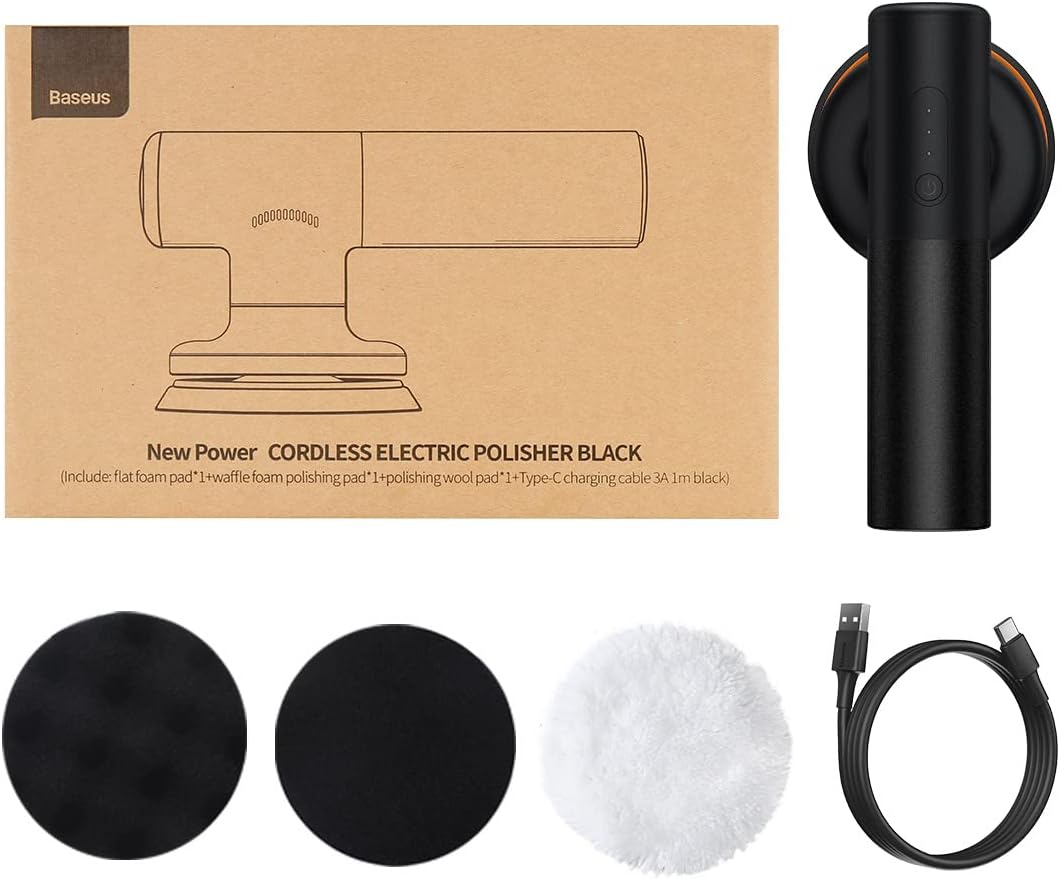
Image: A detailed view of the polisher's handle, pointing out the power button, the three blue LED electricity indicators, and the Type-C charging port for convenient charging.
4.2 Attaching Polishing Pads
The polishing pads attach securely to the polisher's base using a Velcro system.
- Ensure the polisher is turned off.
- Select the appropriate pad for your task (Flat Foam for waxing, Waffle Foam for sealing glaze, Wool Pad for polishing).
- Align the pad with the Velcro base of the polisher and press firmly to secure it.

Image: Illustrates the three types of polishing pads included: Waffle Foam Pad for sealing glaze and applying wax, Flat Foam Pad for even wax application, and Polishing Wool Pad for final polishing.
5. Operating Instructions
5.1 Power On/Off and Speed Adjustment
- To turn on the polisher, long press the power button for 1.8 seconds. It will start in low rotary speed (3300rpm).
- To switch to high rotary speed (3800rpm), short press the power button again.
- To turn off the polisher, long press the power button for 1.8 seconds.

Image: Two panels showing the polisher in use: one demonstrating the 3300 rpm low rotary speed for even waxing, and the other showing the 3800 rpm high rotary speed for brighter polishing results.
5.2 Waxing and Polishing Process
Follow these steps for effective waxing and polishing:
- Clean the surface of your vehicle thoroughly before applying wax or polish.
- Apply a small amount of wax or polish directly onto the chosen pad or the vehicle surface.
- Start the polisher on low speed (3300rpm) for initial wax application, spreading it evenly.
- For polishing and achieving a brighter finish, switch to high speed (3800rpm).
- Move the polisher in overlapping passes, applying light, even pressure. The eccentric rotation helps prevent damage and ensures uniform coverage.
- After waxing, use the polishing wool pad to buff the surface to a high shine.

Image: A four-panel guide illustrating the usage steps: 1) Applying wax to the car, 2) Spreading wax with different pads (waffle, flat, wool), 3) Long pressing the switch button for 1.8s to turn on low rotary speed, and 4) Short pressing to switch to high rotary speed or long pressing to turn off.
5.3 Cordless Operation Benefits
The cordless design offers significant advantages for ease of use and safety.

Image: The top panel shows the Baseus polisher being used cordlessly on a car, emphasizing freedom of movement. The bottom panel shows a tangled corded polisher with a red 'X', illustrating the inconvenience and tripping hazard of corded devices.
6. Maintenance
6.1 Cleaning the Polisher and Pads
- After each use, wipe down the polisher body with a soft, damp cloth. Do not use abrasive cleaners or immerse the device in water.
- Remove the polishing pads and clean them according to their material. Foam pads can typically be rinsed with water and mild soap, then air-dried. Wool pads may require gentle washing and air-drying.
- Ensure pads are completely dry before reattaching or storing.
6.2 Storage
- Store the polisher and its accessories in a cool, dry place, away from direct sunlight and extreme temperatures.
- Keep the device out of reach of children.
- For long-term storage, ensure the battery has some charge (e.g., 50%) to preserve battery health.

Image: The compact Baseus polisher neatly stored in the trunk of a car, demonstrating its small size and ease of portability and storage.
7. Troubleshooting
| Problem | Possible Cause | Solution |
|---|---|---|
| Device does not turn on. | Battery is depleted. | Charge the device fully using the provided Type-C cable. |
| Device not charging. | Charging cable or adapter issue; device defect. | Try a different Type-C cable and USB power adapter. Ensure connections are secure. If problem persists, contact customer support. |
| Low power/performance during use. | Low battery; incorrect speed setting; excessive pressure. | Recharge the battery. Ensure you are using the appropriate speed setting. Apply light, even pressure; do not press too hard. |
| Pads detach during use. | Pad not securely attached; worn Velcro. | Ensure the pad is firmly pressed onto the Velcro base. If Velcro is worn, replacement pads may be needed. |
8. Specifications
| Feature | Detail |
|---|---|
| Model Number | CRDLQ-CS |
| Brand | Baseus |
| Specific Uses | Automotive |
| Speed | 3300rpm (Low), 3800rpm (High) |
| Item Weight | 1.6 Kilograms |
| Voltage | 7.4 Volts |
| Battery Capacity | 4000mAh |
| Power Source | Battery Powered |
| Material | Foam, Wool (for pads) |
| Color | Black |
| Package Dimensions | 35.2 x 18.6 x 15.6 cm |
9. Warranty and Support
9.1 Warranty Information
This product is covered by a manufacturer's warranty. Please refer to the warranty card included in your product packaging for specific terms and conditions, including warranty period and coverage details. Keep your purchase receipt as proof of purchase for warranty claims.
9.2 Customer Support
For any questions, technical assistance, or warranty claims, please contact Baseus customer support through their official website or the retailer from whom you purchased the product. You can visit the official Baseus store on Amazon for more information: Baseus Official Store.
Ask a question about this manual
Ask about setup, troubleshooting, compatibility, parts, safety, or missing instructions. Manuals+ will review the question and use this page’s manual context to help answer it.