
1. Product Overview
The Runleader RL-HM035ATS002 is a multifunctional digital meter designed to monitor various engine parameters. It provides real-time data for total engine running hours (TOT), individual job hours (JOB), engine RPM, and engine temperature. The device also includes programmable maintenance reminders (SVC) and alerts for exceeding RPM or temperature thresholds. Its backlit display ensures visibility in various lighting conditions, and it features a replaceable battery and IP67 waterproof rating.
This meter is suitable for a wide range of gasoline-powered equipment, including garden tractors, compressors, generators, snowmobiles, and watercraft.
2. Package Contents
Before installation, please verify that all components are present:
- Runleader Multifunctional Meter
- TS002 Temperature Sensor Probe
- Cable Ties (x2)
- Bolts (x2)
- Nuts (x4)
- Flat Washers (x2)
- 3M Adhesive Velcro (x1)
- Cut-out Label (x1)
- User Manual (this document)

Image: Product dimensions and included accessories, showing the meter, temperature probe, mounting hardware, and adhesive.
3. Setup and Installation
3.1 Mounting the Meter
The meter offers two primary mounting options:
- Stick-on Mounting: Use the provided 3M adhesive velcro to attach the meter to a clean, flat surface.
- Screw-on Mounting: Secure the meter using the included bolts, nuts, and washers. Drill appropriate holes if necessary.

Image: Illustrations demonstrating both stick-on and screw-on mounting methods for the meter.
3.2 Engine Signal Connection
The meter connects to your engine via a spark plug wire winding and a temperature sensor probe.
- RPM Signal: Wrap the provided wire around the spark plug wire of your engine. The meter detects RPM by sensing the ignition pulses. The wire length is approximately 68.8 inches.
- Temperature Sensor: Connect the TS002 temperature sensor probe to the designated port on the meter. Install the probe in a location that accurately measures engine temperature. Caution: The induction probe cannot be bent to prevent breakage.
The meter is compatible with various gasoline engine types:
- 2-stroke engines: 1, 2, or 3 cylinders
- 4-stroke engines: 1, 2, 3, 4, 5, 6, 8, 12, or 16 cylinders
- 6-stroke engines: 2 cylinders

Image: Diagram showing how to connect the RPM signal wire to the spark plug cable and the temperature sensor to the engine.

Image: Comprehensive overview of both engine signal connection and product mounting methods.
4. Operating Instructions
4.1 Display Functions
The meter's display provides multiple readings:
- TOT Hours: Total accumulated engine running time (0-999.99 hours).
- JOB Hours: Resettable individual working hours.
- Real-time RPM: Current engine revolutions per minute (0-25000 RPM).
- Current Temperature: Real-time engine temperature (-20 °C to +300 °C / -4 °F to +572 °F).
- SVC Timer: Maintenance reminder countdown (5-1000 hours).
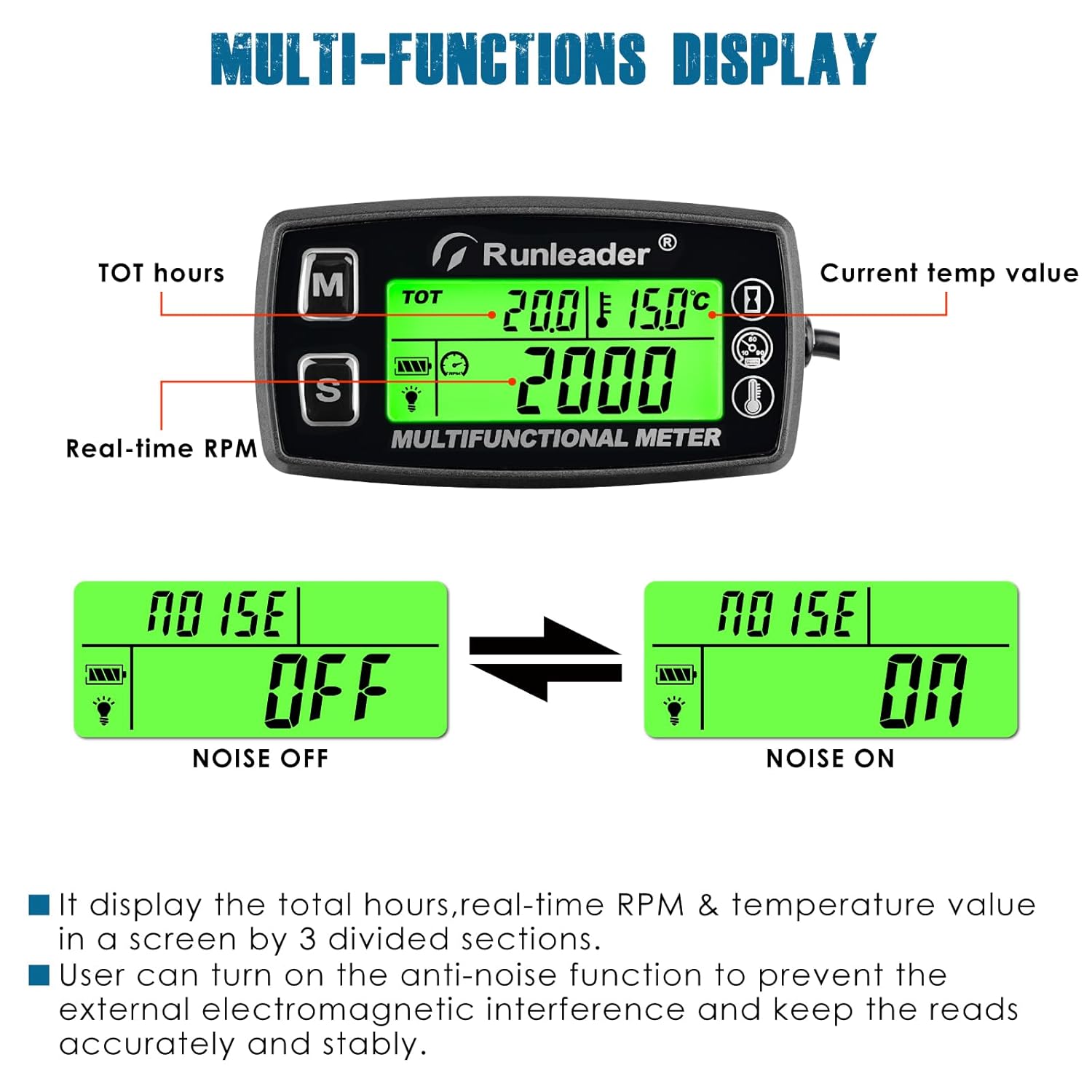
Image: Detailed view of the meter's display, highlighting TOT hours, real-time RPM, and current temperature value.
4.2 Backlight Settings
The meter features a green backlight for low-light conditions. The backlight mode can be configured as:
- Always On: Backlight remains continuously active.
- Off: Backlight is disabled.
- Automatic: (Default OFF) The backlight activates when a button is pressed and turns off after a period of inactivity.
A red backlight will activate to indicate an engine RPM or temperature exceed alert.
4.3 Anti-Noise Function
The meter includes an anti-noise interference function to ensure accurate and stable readings, especially in electromagnetically noisy environments. This function can be toggled on or off as needed.
4.4 Initial Hour Programming (INT)
If replacing an existing hour meter, you can program previous engine hours (INT) into the new meter to maintain an accurate total running time. Refer to the detailed programming instructions in the full manual for this procedure.
4.5 Unit Switching
The temperature display can be easily switched between Celsius (°C) and Fahrenheit (°F) units.
4.6 Power Off
To manually turn off the display and conserve battery, press the 'M' button once, then immediately press both 'M' and 'S' buttons simultaneously. 'OFF' will appear on the display. The meter will automatically turn on when the engine starts.
5. Maintenance
5.1 Maintenance Reminders (SVC)
The SVC timer allows you to set recommended maintenance intervals (5-1000 hours). The meter will provide a reminder when the due time approaches, assisting in timely engine servicing.
5.2 Alerts
The meter provides visual alerts for critical engine conditions:
- RPM Exceed Alert: A red backlight and specific display indication will warn if the engine RPM exceeds the set threshold (100-25000 RPM).
- Temperature Exceed Alert: A red backlight and specific display indication will warn if the engine temperature exceeds the set threshold.

Image: Examples of the display showing maintenance arrival reminder, RPM exceed alert, and temperature exceed alert.
5.3 Battery Replacement
The meter features a replaceable battery. To replace the battery, carefully open the battery compartment cover, remove the old battery, and insert a new one, ensuring correct polarity. Secure the cover back in place.

Image: Step-by-step visual guide for replacing the meter's battery, showing the process of mounting the battery in the cover.
5.4 Waterproof Rating
The device is IP67 waterproof, meaning it is protected from dust and can withstand immersion in water up to 1 meter for 30 minutes. This ensures durability in various outdoor conditions.

Image: The meter with water droplets, illustrating its IP65 (note: feature bullets state IP67) waterproof rating.
6. Troubleshooting
If you encounter issues with your Runleader meter, consider the following common problems and solutions:
- Meter does not turn off: To manually turn off the display, press the 'M' button once, then immediately press both 'M' and 'S' buttons simultaneously. 'OFF' will appear on the display. The meter is designed to automatically turn on when the engine starts.
- Incorrect RPM readings: Ensure the RPM signal wire is correctly wrapped around the spark plug wire. Verify that the engine type (2-stroke, 4-stroke, number of cylinders) is correctly configured in the meter's settings. Incorrect settings can lead to inaccurate RPM display.
- Incorrect or fluctuating temperature readings: Check the connection of the temperature sensor probe. A false contact in the plug can cause intermittent disconnections and error signals. Ensure the probe is securely installed and not bent.
- Difficulty with programming functions: The programming interface can be complex. Refer to the detailed programming section in the complete user manual for precise button press sequences and function selection. Ensure you understand the steps before attempting complex configurations, especially for alarms.
- Battery drains quickly: Ensure the meter is properly turned off when not in use if you wish to conserve battery life. Refer to the 'Power Off' instruction in section 4.6.
For persistent issues, please contact Runleader technical support.
7. Specifications
| Feature | Specification |
|---|---|
| Brand | Runleader |
| Model | RL-HM035ATS002 |
| Material | Acrylonitrile Butadiene Styrene (ABS) |
| Item Weight | 110 Grams |
| UPC | 787997589960 |
| Manufacturer | Ningbo Jiangbei Run Leader Electronics Co., Ltd |
| Total Hour Range (TOT & JOB) | 0-999.99 hours |
| SVC Timer Range | 5-1000 hours |
| RPM Measurement Range | 0-25000 RPM |
| RPM Warning Range | 100-25000 RPM |
| Temperature Measurement Range | -20 °C ~ +300 °C (-4 °F ~ +572 °F) |
| Waterproof Rating | IP67 |
| Battery | Replaceable |
| Backlight | Green (default), Red (for alerts) |
8. Warranty and Support
The Runleader RL-HM035ATS002 Digital Hour Meter comes with a 2-year after-sales service. Runleader is committed to providing reliable technical support and customer service.
For technical assistance, warranty claims, or any product-related inquiries, please contact Runleader customer support through the retailer where the product was purchased or visit the official Runleader website for contact information.
9. Product Applications
The Runleader Digital Hour Meter is versatile and can be used with various gasoline-powered equipment to monitor engine performance and schedule maintenance effectively.

Image: Visual examples of the meter being used on a generator, lawn mower, compressor, ATV, snowblower, and motorcycle.


