
1. Introduction and Overview
The CREWORKS 10L Professional Ultrasonic Cleaner is designed for effective cleaning of various items such as jewelry, eyeglasses, coins, and makeup brushes. It features 240W ultrasonic power, a 40 kHz frequency, and 300W heating. This manual provides essential information for the safe and efficient operation of your ultrasonic cleaner.
Key Features:
- 10L Capacity: Generous tank volume for various cleaning tasks.
- 240W Ultrasonic Power & 40 kHz Frequency: Provides powerful and efficient cleaning action.
- 300W Heating Function: Accelerates the cleaning process by assisting in dirt removal.
- Degas Mode: Quickly removes gas bubbles from cleaning solutions and porous objects, enhancing cavitation efficiency.
- Gentle Mode: Reduces ultrasonic power by half for protective cleaning of delicate items.
- Intuitive Control Panel: Easy adjustment of cleaning duration (up to 30 minutes) and temperature (0-80℃).
- Durable Construction: Made with 304 stainless steel tank and basket for prolonged use and compliance with food safety standards.
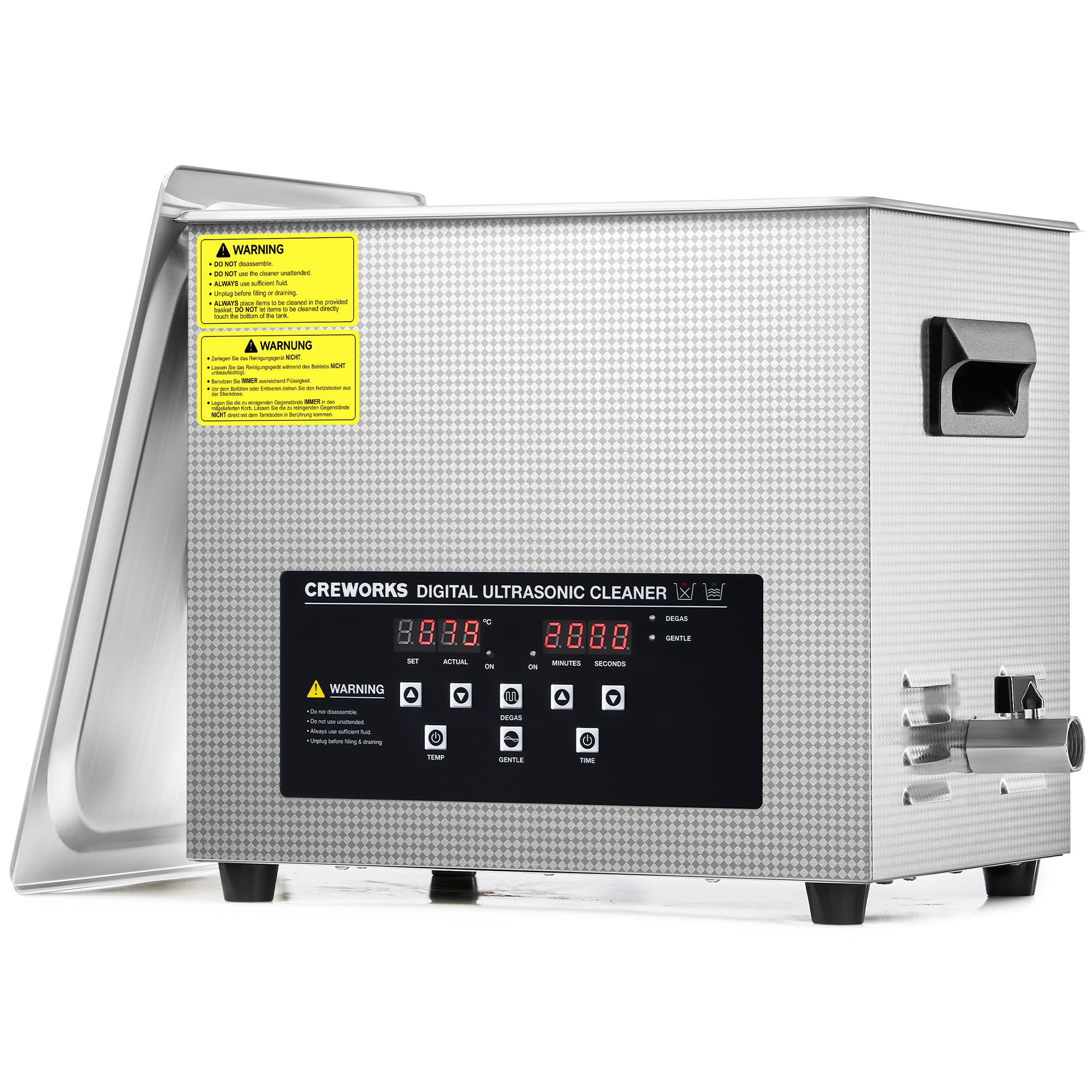
The CREWORKS 10L Professional Ultrasonic Cleaner, showcasing its robust stainless steel construction and user-friendly digital interface.
2. Safety Information
Please read all safety instructions carefully before operating the ultrasonic cleaner. Failure to follow these instructions may result in electric shock, fire, or serious injury.
- Always connect the unit to a grounded power outlet.
- Do not operate the unit without liquid in the tank.
- Do not immerse the main unit in water or other liquids.
- Keep the unit out of reach of children.
- Do not touch the power plug with wet hands.
- Unplug the unit before cleaning or maintenance.
- Ensure proper ventilation during operation, especially when using cleaning solutions.
- Avoid using flammable or corrosive cleaning solutions.
- Do not disassemble the unit. Refer servicing to qualified personnel.
3. Package Contents
Verify that all items are present in the package:
- CREWORKS 10L Professional Ultrasonic Cleaner Unit
- Stainless Steel Cleaning Basket
- Stainless Steel Lid
- Power Cord
- User Manual
4. Product Overview / Components
Familiarize yourself with the main components of your ultrasonic cleaner.

Detailed view of the intuitive digital control panel, allowing precise adjustments for temperature, cleaning time, and activation of specialized cleaning modes.
Key Components:
- Stainless Steel Tank: Holds the cleaning solution and items.
- Digital Control Panel: For setting time, temperature, and modes.
- Heating Element: Warms the cleaning solution.
- Ultrasonic Transducers: Generate ultrasonic waves.
- Drain Valve: For easy draining of the tank.
- Lid: Reduces noise and prevents splashing.
- Cleaning Basket: Holds items during cleaning, keeping them off the tank bottom.
5. Setup
- Placement: Place the ultrasonic cleaner on a stable, level, and dry surface. Ensure there is adequate ventilation around the unit.
- Power Connection: Connect the power cord to the unit and then to a grounded electrical outlet.
- Fill the Tank: Open the lid and fill the stainless steel tank with an appropriate cleaning solution. Do not exceed the 'MAX' fill line. Ensure the items to be cleaned will be fully submerged.
- Insert Basket and Items: Place the cleaning basket into the tank. Carefully place the items to be cleaned into the basket, ensuring they do not touch each other or the bottom of the tank directly.
- Close Lid: Close the lid to reduce noise and prevent splashing during operation.
6. Operating Instructions
Follow these steps to operate your CREWORKS ultrasonic cleaner:
- Power On: Plug in the unit. The digital display will illuminate.
- Set Temperature (Optional): Press the 'TEMP' button to adjust the desired heating temperature (0-80℃). The unit will begin heating the solution. Heating can accelerate the cleaning process.
- Activate Degas Mode (Recommended): For optimal cleaning, especially with new solutions or porous items, press the 'DEGAS' button. This mode removes air bubbles from the solution, improving ultrasonic efficiency. Run for 1-2 minutes.
- Set Cleaning Time: Press the 'TIME' button to set the desired cleaning duration (1-30 minutes).
- Select Cleaning Mode:
- Standard Cleaning: Simply start the unit after setting time and temperature.
- Gentle Mode: For delicate items, press the 'GENTLE' button. This reduces ultrasonic power by half to prevent damage.
- Start Cleaning: Press the 'ON/OFF' button to start the ultrasonic cleaning process. The timer will count down.
- End of Cycle: The unit will automatically stop when the timer reaches zero. You can manually stop the process at any time by pressing the 'ON/OFF' button.
- Remove Items: Carefully open the lid and use the basket to lift the cleaned items out of the tank. Rinse items with clean water if necessary and dry them thoroughly.
- Drain Tank: After cleaning, unplug the unit. Open the drain valve to empty the used cleaning solution into a suitable container. Close the valve once empty.

Visual explanation of how ultrasonic waves create and collapse microscopic bubbles, providing thorough cleaning even in hard-to-reach areas.

Understanding the Degas mode for optimizing cleaning solution and the Gentle mode for safely cleaning fragile objects.

Visual demonstration of the cleaning effectiveness, showing items before and after ultrasonic treatment.
7. Maintenance
Proper maintenance ensures the longevity and optimal performance of your ultrasonic cleaner.
- Cleaning the Tank: After each use, drain the tank and rinse it with clean water. Wipe the interior and exterior with a soft, damp cloth. Do not use abrasive cleaners or steel wool.
- Descaling (if necessary): If mineral deposits build up in the tank, use a mild descaling solution specifically designed for stainless steel, following the product instructions.
- Storage: Ensure the unit is completely dry before storing. Store in a cool, dry place away from direct sunlight and extreme temperatures.
- Power Cord: Inspect the power cord regularly for any signs of damage. If damaged, contact customer support for replacement.
8. Troubleshooting
If you encounter any issues, refer to the following troubleshooting guide:
| Problem | Possible Cause | Solution |
|---|---|---|
| Unit does not power on | No power supply; Power cord loose; Unit damaged | Check power outlet; Ensure power cord is securely plugged in; Contact customer support |
| No ultrasonic action | Tank empty or insufficient liquid; Unit not started; Transducer fault | Fill tank to appropriate level; Press 'ON/OFF' button; Contact customer support |
| Heating not working | Heating function not activated; Heating element fault | Press 'TEMP' button to set temperature; Contact customer support |
| Poor cleaning results | Incorrect cleaning solution; Solution too cold; Overloaded tank; Items touching tank bottom; Degas mode not used | Use appropriate solution; Increase temperature; Reduce number of items; Use cleaning basket; Activate Degas mode |
If the problem persists after attempting these solutions, please contact CREWORKS customer support.
9. Specifications
Technical specifications for the CREWORKS 10L Professional Ultrasonic Cleaner:
| Feature | Specification |
|---|---|
| Model | DUC |
| Tank Volume | 10 Liters |
| Ultrasonic Power | 240W |
| Heating Power | 300W |
| Ultrasonic Frequency | 40 kHz |
| Timer Range | 1-30 minutes |
| Temperature Range | 0-80℃ |
| Tank Material | 304 Stainless Steel |
| Overall Dimensions (L x W x H) | 37 x 27 x 30 cm |
| Tank Dimensions (L x W x H) | 30 x 24 x 17 cm |
| Weight | 6.5 kg |

Visual representation of the ultrasonic cleaner's overall dimensions (37x27x30 cm) and the internal tank (30x24x17 cm) and basket (27x21x15 cm) measurements.
10. Warranty and Support
CREWORKS products are manufactured to high-quality standards and are warranted against manufacturing defects. Please refer to the warranty card included with your purchase for specific terms and conditions.
For technical support, troubleshooting assistance, or warranty claims, please contact CREWORKS customer service through the retailer where the product was purchased or visit the official CREWORKS website for contact information.


