
FEASYCOM FSC-BT630
Nordic nRF 52832 BLE Bluetooth 5.2 High Speed UART Transparent Module
Model: FSC-BT630 | Brand: FEASYCOM
1. Introduction
This user manual provides comprehensive information for the FEASYCOM FSC-BT630 module, a compact and high-performance Bluetooth Low Energy (BLE) module based on the Nordic nRF52832 chipset. Designed for reliable and high-speed data transmission, this module is ideal for a wide range of Internet of Things (IoT), industrial, medical, and smart appliance applications. Please read this manual carefully before using the module to ensure proper operation and to maximize its capabilities.
2. Product Overview
The FSC-BT630 is a cutting-edge Bluetooth 5.2 module that offers robust wireless connectivity with low power consumption. Its small form factor and integrated antenna make it suitable for space-constrained designs. It supports UART for transparent data transmission, making integration with microcontrollers straightforward. The module is pre-certified with FCC, IC, CE, and KC, simplifying product development and compliance.

Figure 2.1: Front view of the FSC-BT630 module, displaying the FEASYCOM logo and model number.

Figure 2.2: Back view of the FSC-BT630 module, illustrating the solder pads for integration.
3. Key Features
- Bluetooth 5.2 Compliance: Supports the latest Bluetooth 5.2 specifications for enhanced performance and reliability.
- Nordic nRF52832 Chipset: Utilizes a powerful and energy-efficient Nordic nRF52832 SoC.
- Ultra-Small Form Factor: Compact size of 10mm x 11.9mm x 1.7mm, ideal for miniature designs.
- High-Speed UART: Supports UART programming and data interface with baud rates up to 921600 bps.
- Transparent Data Transmission: Facilitates easy data transfer between devices.
- Extended Range: Coverage up to 50 meters (165 feet) with a transmit power of 4dBm.
- Low Power Consumption: Optimized for battery-powered applications, with low current draw in sleep and working modes.
- Multiple Interfaces: Includes I²S audio, I²C/AIO/PIO/PWM control, SPI master/slave, and PDM digital microphone interfaces.
- NFC-A Tag Support: Features Type 2 Near Field Communication (NFC-A) tag with wakeup-on-field and touch-to-pair capabilities.
- Integrated Antenna: Comes with an on-board antenna, with support for external antenna options.
- OTA Upgrade Support: Allows for Over-The-Air firmware updates.
- Certified: FCC, IC, CE, KC, and SRRC certified for global compliance.
- Profile Support: Embedded Bluetooth stack profiles support HID, GATT, ANCS, and more.
- Memory: 512 KB Flash and 64 KB RAM.

Figure 3.1: FSC-BT630 module dimensions and certifications.

Figure 3.2: FSC-BT630 module memory specifications.
4. Technical Specifications
| Attribute | Value |
|---|---|
| Model Number | FSC-BT630 |
| Chipset | Nordic nRF52832 |
| Bluetooth Version | Bluetooth 5.2 (BLE) |
| Dimensions (L x W x H) | 10mm x 11.9mm x 1.7mm (0.39 x 0.47 x 0.06 inches) |
| Weight | 0.07 ounces |
| Transmit Power | 4dBm |
| Coverage | Up to 50m (165ft) |
| UART Baud Rate | Up to 921600 bps |
| Flash Memory | 512 KB |
| RAM | 64 KB |
| Certifications | FCC, IC, CE, KC, SRRC |
| Hardware Interface | Bluetooth 5 |
| Data Link Protocol | Bluetooth |
| Data Transfer Rate | GATT (Android: 80KB/S, Apple: 8KB/S with flow control, 18KB/S without) |
| UPC | 768253192445 |

Figure 4.1: Size comparison of the FSC-BT630 module with a US dollar coin.
5. Setup and Integration
Integrating the FSC-BT630 module into your system requires careful attention to power supply, data communication, and physical mounting.
5.1. Pinout and Connections
The module features a stamp form factor with solder pads for connection. Key pins typically include:
- VDD: Power supply input (e.g., 3.3V).
- GND: Ground connection.
- TXD (UART Transmit): Connects to the RXD pin of your host microcontroller.
- RXD (UART Receive): Connects to the TXD pin of your host microcontroller.
- RTS/CTS (Flow Control): Optional pins for hardware flow control, recommended for high baud rates.
- GPIOs: General Purpose Input/Output pins for various control functions (I²C, SPI, PWM, etc.).
Refer to the detailed datasheet for the complete pinout diagram and electrical characteristics to ensure correct connections.
5.2. Power Supply
Provide a stable and clean power supply within the specified voltage range (typically 1.8V to 3.6V for nRF52832, refer to datasheet for exact range). Ensure adequate current capacity, especially during transmission peaks.
5.3. Antenna Considerations
The FSC-BT630 includes an on-board antenna. For optimal performance, ensure the antenna area is clear of metal objects and ground planes. If using an external antenna, connect it to the designated U.FL connector (if present) or solder pad, following impedance matching guidelines.
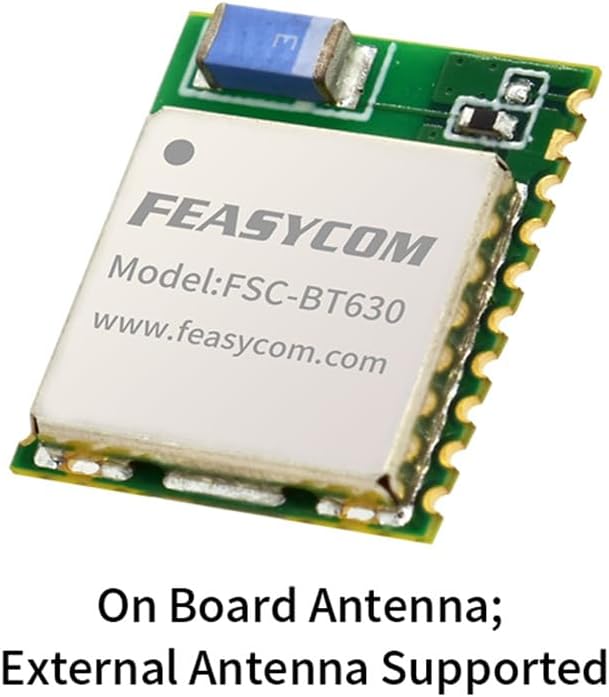
Figure 5.1: FSC-BT630 module with antenna information.
6. Operating Instructions
The FSC-BT630 module operates primarily as a transparent UART bridge for Bluetooth Low Energy communication. Its functionality is typically controlled via AT commands or through a custom firmware application.
6.1. Initializing the Module
Upon power-up, the module will enter a default state, often discoverable or advertising. You can configure its behavior using AT commands sent over the UART interface. Common commands include setting the device name, baud rate, advertising parameters, and connection modes (e.g., peripheral, central).
6.2. Bluetooth Connection
- Advertising: The module can be configured to advertise its presence, allowing other Bluetooth devices (e.g., smartphones, other modules) to discover it.
- Scanning: If configured as a central device, the module can scan for other advertising Bluetooth devices.
- Connection Establishment: Once discovered, a connection can be established. The module supports both BLE Client and Peripheral roles.
- Data Transmission: After a successful connection, data sent to the module's UART input will be transmitted over Bluetooth, and data received via Bluetooth will be output through the UART.
The module supports high data transfer speeds, with GATT speeds up to 80KB/s for Android and up to 18KB/s for Apple devices (without flow control).
6.3. Over-The-Air (OTA) Updates
The FSC-BT630 supports OTA firmware updates. This allows for convenient updates to the module's firmware without physical access, typically performed via a dedicated mobile application or host software. Refer to the FEASYCOM SDK and documentation for detailed OTA procedures.
7. Maintenance
The FSC-BT630 module is designed for long-term reliability with minimal maintenance. However, adhering to the following guidelines can help ensure optimal performance and longevity:
- Environmental Conditions: Operate the module within its specified temperature and humidity ranges. Avoid exposure to extreme temperatures, direct sunlight, moisture, or corrosive environments.
- Physical Handling: Handle the module with care. Avoid dropping or subjecting it to excessive mechanical stress. When soldering, follow proper ESD (Electrostatic Discharge) precautions.
- Cleaning: If necessary, gently clean the module's surface with a soft, dry cloth. Do not use liquid cleaners or solvents.
- Firmware Updates: Regularly check the manufacturer's website for new firmware versions. Applying updates can improve performance, add features, or resolve issues. Always follow the official OTA update procedures.
8. Troubleshooting
If you encounter issues with your FSC-BT630 module, consider the following troubleshooting steps:
8.1. No Power / Module Not Responding
- Check Power Supply: Verify that the VDD pin receives the correct voltage (e.g., 3.3V) and that the GND connection is secure. Ensure the power supply can deliver sufficient current.
- Polarity: Confirm that power connections are not reversed.
- Physical Connection: Inspect solder joints for cold joints or shorts.
8.2. Unable to Establish Bluetooth Connection
- Module State: Ensure the module is in an advertising or discoverable mode.
- Range: Verify that the connecting device is within the module's operational range (up to 50m).
- Interference: Check for potential sources of 2.4GHz interference (Wi-Fi, other Bluetooth devices).
- Antenna: Ensure the antenna area is unobstructed and properly connected (if external).
- Firmware: Confirm the module has the latest stable firmware.
8.3. Data Transmission Issues (UART)
- UART Connections: Double-check TXD/RXD connections (TXD of module to RXD of host, and vice-versa).
- Baud Rate: Ensure the UART baud rate on both the module and the host device matches.
- Flow Control: If using RTS/CTS, ensure they are correctly implemented and enabled on both ends.
- Voltage Levels: Verify that UART voltage levels are compatible between the module and the host (e.g., 3.3V logic).
8.4. Unexpected Behavior
- Reset: Try power cycling the module or issuing a software reset command (if available).
- Factory Reset: As a last resort, consider performing a factory reset (refer to datasheet for procedure), which will revert all settings to default.
- Documentation: Consult the official FEASYCOM FSC-BT630 datasheet and application notes for more in-depth troubleshooting and specific AT commands.
9. Warranty and Support
FEASYCOM provides technical support and warranty services for the FSC-BT630 module. For specific warranty terms and conditions, please refer to the purchase agreement or contact FEASYCOM directly.
9.1. Technical Support
For technical inquiries, detailed datasheets, application notes, and software development kits (SDKs), please visit the official FEASYCOM website or contact their support team:
- Website: www.feasycom.com
- Contact: Refer to the "Contact Us" section on the website for email and phone support options.
When contacting support, please provide your module's model number (FSC-BT630), a detailed description of the issue, and any relevant system information.
Related documentsFSC-BT630


Ask a question about this manual
Ask about setup, troubleshooting, compatibility, parts, safety, or missing instructions. Manuals+ will review the question and use this page’s manual context to help answer it.