
1. Introduction
The BAOFENG GM-15 Pro is a high-performance GMRS (General Mobile Radio Service) handheld two-way radio designed for reliable long-range communication. This device features NOAA weather reception, GMRS repeater capability, and convenient USB-C charging. It is an ideal tool for outdoor enthusiasts, emergency preparedness, and group communication.
2. What's in the Box
- BAOFENG GM-15 Pro Two-Way Radio
- 1500mAh Rechargeable Battery
- US Charger (AC Adapter)
- USB-C Charger Cable
- AR-771 GMRS Antenna (High Gain)
- Belt Clip
- Hand Strap
- Earpiece
- User Manual
3. Product Overview
The BAOFENG GM-15 Pro features a robust design with an LCD display and intuitive keypad for easy operation. Key components include a power/volume switch, PTT (Push-to-Talk) key, and dedicated function buttons.
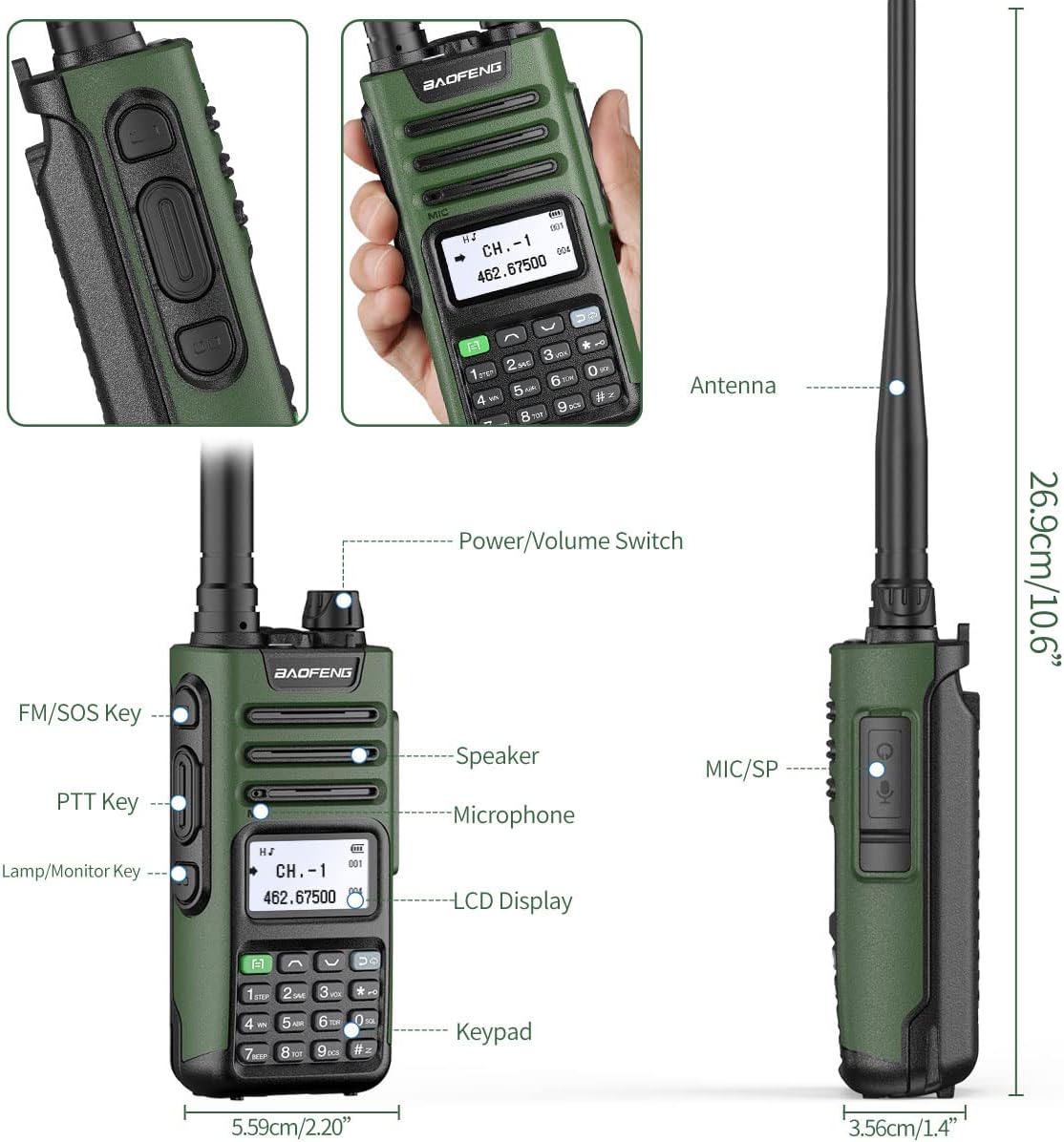
The radio's display can show both channel name and frequency simultaneously for clear identification during use.

4. Setup
- Battery Installation: Align the 1500mAh battery with the back of the radio and slide it into place until it clicks securely.
- Antenna Attachment: Screw the AR-771 GMRS antenna clockwise onto the antenna connector at the top of the radio until it is finger-tight. Ensure a secure connection for optimal performance.
- Initial Charging: Before first use, fully charge the battery. Connect the USB-C charging cable to the battery's USB-C port or place the radio in the charging dock.
- Belt Clip Installation: The belt clip can be attached to the back of the radio using the provided screws.
5. Basic Operation
- Power On/Off: Rotate the power/volume knob clockwise to turn the radio on. Rotate counter-clockwise to turn it off.
- Volume Adjustment: Rotate the power/volume knob to adjust the audio level.
- Channel Selection: Use the UP/DOWN arrow keys on the keypad to navigate through available GMRS channels.
- Transmitting: Press and hold the PTT (Push-to-Talk) button on the side of the radio to transmit. Release the button to listen.
- Display Mode (VFO/MR): Press the VFO/MR button to switch between Frequency Mode (VFO) and Channel Mode (MR).
6. Advanced Features
6.1 NOAA Weather Alerts
The GM-15 Pro is equipped to receive NOAA Weather Alerts, providing timely emergency warnings to help you prepare in advance for severe weather conditions.

6.2 GMRS Repeater Capability
The radio supports GMRS repeater channels, allowing for extended communication range. It features 24 customizable repeater channels where you can program different CTCSS/DCS tones.

6.3 Scanning Function
The GM-15 Pro includes a scanning feature to monitor frequencies. This allows you to find active channels within the supported UHF/VHF/GMRS bands.

6.4 Flashlight
A built-in flashlight is located at the top of the radio for convenience in low-light conditions.

6.5 Programming
The BAOFENG GM-15 Pro can be programmed via its keypad or through software. For advanced programming and customization of channels, software-based programming is recommended. The radio supports programming via a USB cable connected to a computer.
Note: Some users have reported that this model may not be compatible with 'Chirp' software. Please refer to the official BAOFENG programming tools or 'Odmaster' app for best results.
7. Charging
The GM-15 Pro offers versatile charging options:
- USB-C Direct Charging: The 1500mAh battery features a built-in USB-C port, allowing direct charging using the provided USB-C cable from various power sources like a car charger, PC, power bank, or wall socket.
- Charging Dock: The radio can also be charged by placing it in the included desktop charging dock, which connects to the US AC adapter.

8. Antennas
The BAOFENG GM-15 Pro comes with an AR-771 GMRS High Gain Antenna. This antenna is designed to increase communication distance and improve signal clarity. The antenna is flexible and can be bent freely.

9. Specifications
| Feature | Detail |
|---|---|
| Model Number | GM-15PRO |
| Item Weight | 1.06 pounds |
| Product Dimensions | 1.4 x 5.59 x 10.6 inches |
| Display Type | LCD |
| Radio Bands Supported | UHF, VHF, GMRS |
| Power Source | Battery Powered |
| Voltage | 7.4 Volts |
| Special Feature | Long Range, NOAA Weather Receiver & Scan, GMRS Repeater Capable, USB-C Charging |
| Manufacturer | BAOFENG |
10. Maintenance
- Cleaning: Use a soft, damp cloth to clean the radio's exterior. Avoid harsh chemicals or abrasive cleaners.
- Battery Care: Store the battery in a cool, dry place. Avoid extreme temperatures. Do not short-circuit the battery terminals.
- Antenna Care: Ensure the antenna is securely attached. Avoid bending or stressing the antenna excessively.
- Storage: When not in use for extended periods, remove the battery and store the radio in a dry, dust-free environment.
11. Troubleshooting
- No Power: Ensure the battery is fully charged and correctly installed. Check the power/volume knob is turned on.
- Poor Reception/Transmission: Verify the antenna is securely attached. Ensure you are within range of other radios or repeaters. Check for obstructions in the line of sight.
- No Audio: Adjust the volume knob. Check the earpiece connection if in use.
- Programming Issues: Refer to the programming section of this manual or consult official BAOFENG programming resources.
12. Warranty and Support
For warranty information, technical support, or service inquiries, please contact BAOFENG customer service directly or visit their official website. Keep your purchase receipt as proof of purchase for warranty claims.
FCC Licensing: Operation of GMRS radios requires an FCC license. Please ensure you obtain the necessary license before operating this device to comply with federal regulations.