
Introduction
The Amplicomms BigTel 1502 Duo is a DECT cordless phone system designed for users seeking amplified sound and enhanced accessibility. This dual-handset system features large buttons, an audio-boost function, powerful ringtones, and hearing aid compatibility, making it ideal for individuals with hearing impairments or those who prefer a louder, clearer phone experience. It also includes a call blocking function to prevent unwanted calls.

Image: The Amplicomms BigTel 1502 Duo system, showing two black cordless handsets in their respective charging cradles. The handsets feature large, easy-to-read displays and prominent buttons.
Package Contents
Before you begin, please ensure all items are present in your package:
- 2 x Amplicomms BigTel 1502 Handsets
- 2 x Charging Bases
- 2 x AAA Rechargeable Batteries (per handset)
- 1 x Power Adapter
- 1 x Telephone Line Cord
- User Manual (this document)
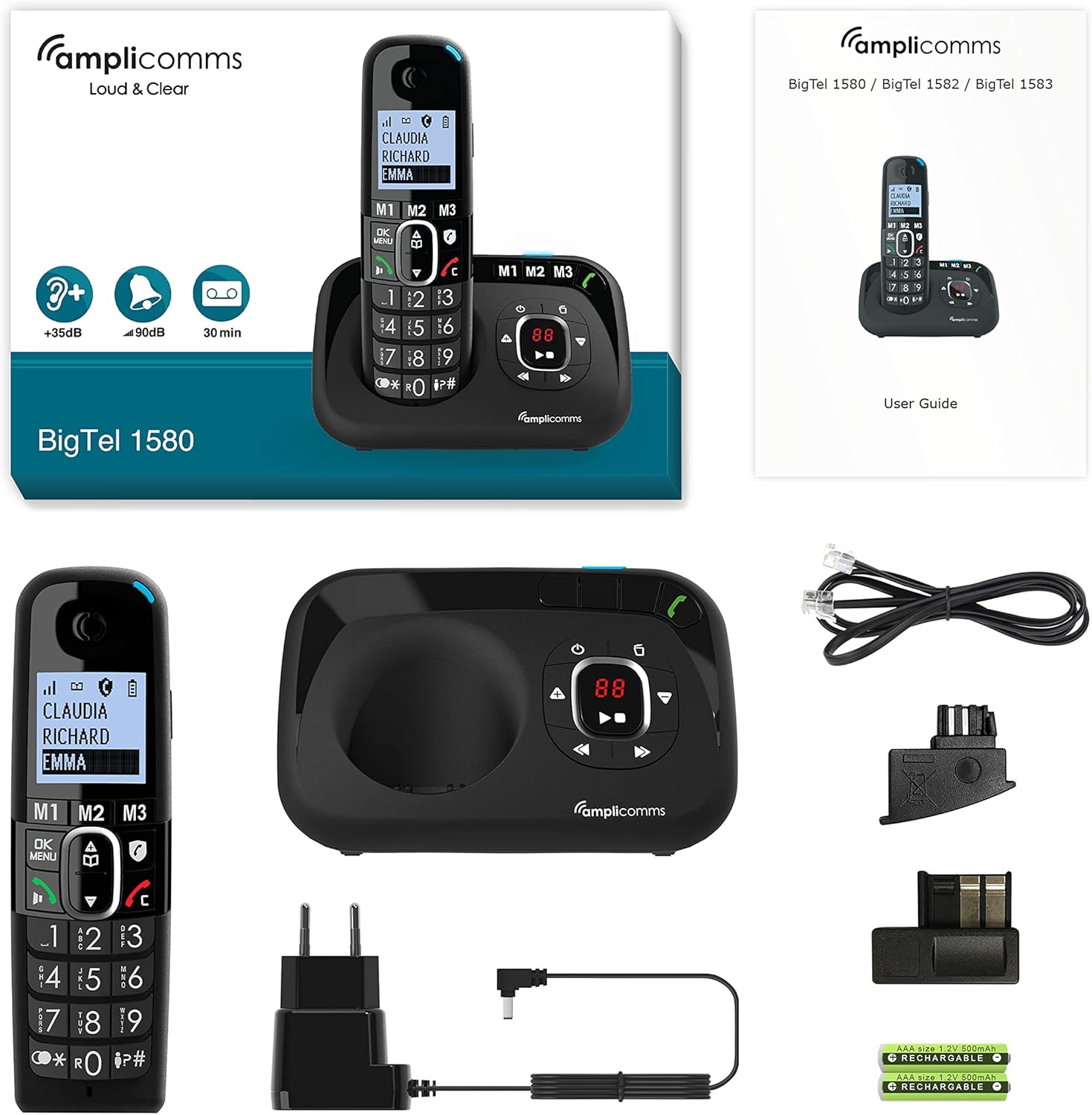
Image: A comprehensive view of the Amplicomms BigTel 1580 (similar model) package contents, including a handset, main base unit, power adapter, telephone line cord, and rechargeable AAA batteries, alongside the user guide.
Setup Guide
1. Battery Installation
- Locate the battery compartment cover on the back of each handset.
- Slide the cover downwards to open.
- Insert the two AAA rechargeable batteries, observing the correct polarity (+ and -).
- Replace the battery compartment cover.
2. Connecting the Base Station
- Connect one end of the telephone line cord to the LINE port on the main base station.
- Connect the other end of the telephone line cord to your telephone wall socket.
- Connect the small end of the power adapter to the DC IN port on the main base station.
- Plug the large end of the power adapter into a standard electrical outlet.
- For the additional charging base, connect its power adapter to an electrical outlet.
3. Initial Charging
Place each handset onto its respective charging base. The display will indicate charging. For optimal battery performance, allow the handsets to charge continuously for at least 16 hours before first use, even if the display shows a full charge sooner.
Operating Instructions
Making and Receiving Calls
- To Make a Call: Pick up the handset or press the Green Call Button. Dial the desired phone number using the large keypad. Press the Green Call Button again to initiate the call.
- To Receive a Call: When the phone rings, pick up the handset or press the Green Call Button. The visual ring indicator will also flash.
- To End a Call: Press the Red End Call Button or place the handset back on its charging base.
Audio-Boost Function
The BigTel 1502 features a dedicated Audio-Boost button on the side of the handset to amplify the sound during a call by up to +35dB. This is particularly useful for users with hearing difficulties.
- During a call, press the Audio-Boost Button (often marked with a speaker icon or "+35dB") on the side of the handset to activate or deactivate the amplification.

Image: A side view of the Amplicomms handset, highlighting the dedicated Audio-Boost button, typically located on the side for easy access during a call.
Call Blocking Function
This feature helps prevent unwanted calls. There are two modes:
- Manual Mode: Block numbers easily during or after a call by pressing the dedicated call blocking button (often marked with a shield or "STOP" icon).
- Automatic Mode: Only allows numbers stored in your phonebook or VIP numbers to ring through. All other calls are blocked. Refer to the handset menu for detailed setup of this mode.

Image: A close-up of the Amplicomms handset, showing the large keypad, clear display, and various feature icons, including the call blocking symbol (a shield with "STOP").
Direct Memory Keys (M1, M2, M3)
The handset features three direct memory keys (M1, M2, M3) for quick dialing of your most important or frequently called contacts.
- To Store a Number:
- Press and hold the desired memory key (M1, M2, or M3) until the display prompts you.
- Enter the phone number using the keypad.
- Enter the name (if supported by the model).
- Press the OK/Save button to confirm.
- To Dial a Stored Number: Simply press the desired memory key (M1, M2, or M3). The phone will automatically dial the stored number.
Phonebook (Directory)
The phone has a directory for up to 100 names and numbers.
- Accessing the Phonebook: Press the Menu/OK button and navigate to the "Phonebook" or "Directory" option.
- Adding a Contact: Select "Add New" and follow the on-screen prompts to enter the name and number.
- Dialing from Phonebook: Scroll through the contacts using the navigation keys and press the Green Call Button to dial.
Hands-Free Function
The hands-free function allows you to talk without holding the handset, with adjustable volume.
- During a call, press the Hands-Free/Speaker button (often marked with a speaker icon) to activate or deactivate speakerphone mode.
- Use the volume up/down keys to adjust the speaker volume.
Maintenance
- Cleaning: Use a soft, damp cloth to clean the handset and base unit. Do not use abrasive cleaners or solvents.
- Battery Care:
- Always use the supplied rechargeable batteries.
- If the phone will not be used for an extended period, remove the batteries to prevent leakage.
- Do not expose batteries to extreme temperatures.
- Placement: Place the base unit in a central location away from other electronic devices that may cause interference (e.g., microwaves, Wi-Fi routers).
Troubleshooting
| Problem | Possible Cause | Solution |
|---|---|---|
| No dial tone / Cannot make or receive calls. | Telephone line cord not connected properly. Power adapter not connected. Handset out of range or not registered. | Ensure all cables are securely connected. Check power outlet. Move closer to the base unit. Re-register handset if necessary (refer to full manual). |
| Low or no sound during a call. | Volume too low. Audio-Boost not activated. | Adjust call volume using the side keys. Press the Audio-Boost button on the side of the handset. |
| Handset display is blank. | Batteries are depleted or not inserted correctly. | Place handset on the charging base. Ensure batteries are correctly inserted and charged for at least 16 hours initially. |
| Unwanted calls still coming through. | Call blocking not configured correctly. | Ensure call blocking is activated and numbers are added to the block list. Check if "Automatic Mode" is enabled for VIP-only calls. |
Specifications
| Feature | Detail |
|---|---|
| Brand | Amplicomms |
| Model Number | ATL1423334 (BigTel 1502 Duo) |
| Color | Black |
| Phone Type | Cordless DECT Phone |
| Special Features | Large keys, Audio-Boost (+35dB), Hearing aid compatible, Call blocking, Adjustable ringer volume (up to 90dB), Hands-free function |
| Compatible Devices | Hearing aids |
| Batteries | 2 x AAA rechargeable batteries (included) per handset |
| Talk Time | Up to 10 hours |
| Phonebook Capacity | 100 names and numbers |
| Display | Large backlit display with large characters |
Warranty and Support
Amplicomms products are designed for reliability and performance. For information regarding warranty coverage, technical support, or spare parts availability, please refer to the warranty card included in your product packaging or visit the official Amplicomms website. You may also contact your retailer for assistance.

