
1. Introduction and Overview
This manual provides essential information for setting up, operating, and maintaining your Apple Watch Series 7 GPS 41mm. The Apple Watch Series 7 features an advanced display, comprehensive health monitoring capabilities, and robust fitness tracking, designed to integrate seamlessly into your daily life.

Figure 1: Apple Watch Series 7 GPS 41mm in Starlight Aluminum with Starlight Sport Band.
2. What's in the Box
Upon unboxing your Apple Watch Series 7, verify that all components are present:
- Apple Watch Series 7 Case (Starlight Aluminum)
- Sport Band (Starlight)
- 1m Magnetic Charging Cable
3. Setup
3.1 Initial Charge
Before first use, fully charge your Apple Watch. Connect the 1m Magnetic Charging Cable to a USB power adapter (sold separately) and plug it into a power outlet. Place the back of your Apple Watch on the magnetic charger. The watch will display a charging indicator.
3.2 Pairing with iPhone
- Ensure your iPhone is updated to the latest iOS version and Bluetooth is enabled.
- Turn on your Apple Watch by pressing and holding the side button until the Apple logo appears.
- Bring your iPhone near your Apple Watch. A pairing screen will appear on your iPhone. Tap 'Continue'.
- Position your iPhone so that your Apple Watch appears in the viewfinder in the Apple Watch app.
- Follow the on-screen instructions to complete the pairing process, including setting up a passcode and choosing your preferred settings.
3.3 Basic Navigation
- Digital Crown: Rotate to scroll, zoom, or adjust values. Press to go to the watch face or open the App View. Double-press to switch between recently used apps.
- Side Button: Press to open the Dock (recently used apps) or access Apple Pay. Press and hold for emergency services or to power off.
- Touch Display: Tap to select, swipe to navigate, and force touch for additional options.
4. Operating and Key Features
4.1 Display
The Apple Watch Series 7 features an Always-on Retina display, offering nearly 20% more screen area than Series 6 for enhanced visibility. The front crystal is designed to be highly crack-resistant, providing increased durability.

Figure 2: The larger, more durable display of the Apple Watch Series 7.
4.2 Health Monitoring
The device includes advanced sensors for comprehensive health insights:
- ECG App: Take an electrocardiogram anytime, anywhere to check for signs of atrial fibrillation.
- Heart Rate Notifications: Receive alerts for high, low, and irregular heart rhythms.
- Blood Oxygen App: Measure your blood oxygen levels with a powerful sensor.
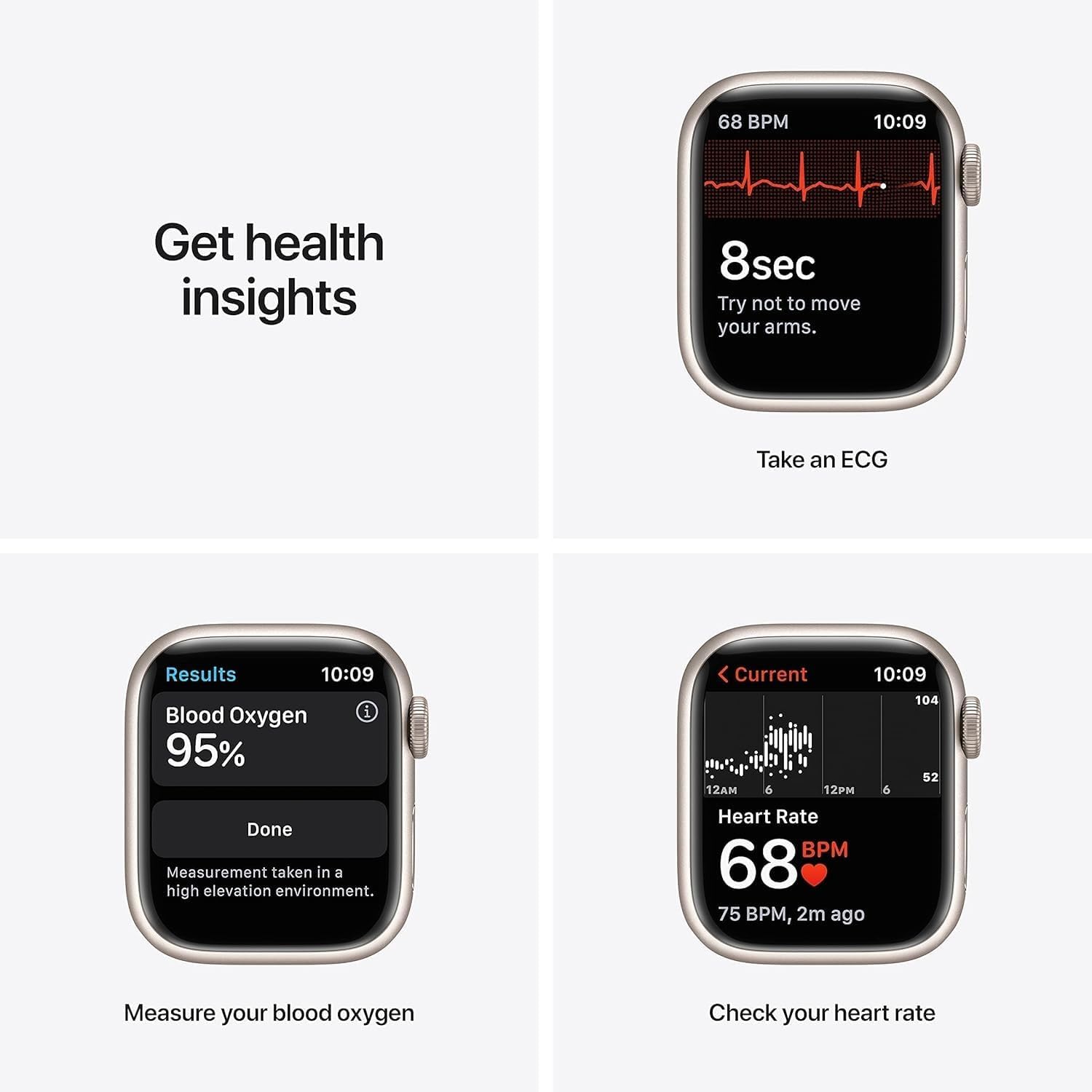
Figure 3: Health monitoring features including ECG, Blood Oxygen, and Heart Rate.
4.3 Fitness Tracking
Track your daily activity and workouts with precision:
- Activity Tracking: Monitor your daily movement, exercise, and stand goals in the Fitness app.
- Workout Modes: Track various workouts including running, yoga, swimming, dance, Tai Chi, and Pilates.
- Sleep App: Set sleep goals and track your sleep patterns.
- Mindfulness App: Stay present and reduce stress with guided meditations and reflections.
4.4 Connectivity & Payments
The GPS model provides location tracking for workouts and navigation. Utilize Apple Pay for secure and convenient payments directly from your wrist.
Video 1: An overview of the Apple Watch Series 7 GPS 41mm, demonstrating its features and design.
4.5 Other Functions
Beyond health and fitness, the Apple Watch Series 7 offers additional functionalities:
- Media Sync: Sync your favorite music, podcasts, and audiobooks for on-the-go listening.
- Notifications: Receive notifications from your iPhone directly on your wrist.
- Customizable Watch Faces: Personalize your watch face with various complications and styles.
Video 2: A brief 7-second preview showcasing the Apple Watch Series 7, highlighting its display and physical appearance.
5. Maintenance
To ensure the longevity and optimal performance of your Apple Watch, follow these maintenance guidelines:
- Cleaning: Regularly clean your Apple Watch and band with a soft, lint-free cloth. For stubborn dirt, slightly dampen the cloth with fresh water. Avoid using harsh chemicals or abrasive materials.
- Water Exposure: The Apple Watch Series 7 is swimproof. After swimming, rinse the watch with fresh water and dry it thoroughly.
- Software Updates: Keep your Apple Watch software (watchOS) updated to ensure access to the latest features, security enhancements, and performance improvements. Updates can be managed through the Apple Watch app on your iPhone.
- Battery Care: To maximize battery lifespan, avoid exposing the watch to extreme temperatures. Charge the device regularly, but avoid leaving it fully charged or fully discharged for extended periods.
6. Troubleshooting
If you encounter issues with your Apple Watch, consider the following common troubleshooting steps:
- Watch Not Turning On: Ensure the watch is sufficiently charged. Connect it to the magnetic charging cable and allow it to charge for at least 30 minutes.
- Pairing Issues: Verify that Bluetooth is enabled on your iPhone and both devices are within range. Restart both your iPhone and Apple Watch, then attempt pairing again.
- Apps Not Responding: Force quit the app by pressing the side button, then swipe the app to the left and tap the 'X' button. Reopen the app. If the issue persists, restart your Apple Watch.
- Inaccurate Readings (Heart Rate/Activity): Ensure the watch is worn snugly on your wrist, not too tight or too loose. Clean the back of the watch to ensure sensors are unobstructed.
- Battery Draining Quickly: Check for background app refresh settings and disable unnecessary notifications. Ensure watchOS is updated. If the issue persists, contact Apple Support.
7. Specifications
| Feature | Detail |
|---|---|
| Product Dimensions | 1.61 x 1.97 x 0.42 inches |
| Item Weight | 1.13 ounces (32 Grams) |
| Item Model Number | Watch Series 7 |
| Batteries | 1 Lithium Ion batteries required |
| Standing Screen Display Size | 1.8 Inches |
| Memory Storage Capacity | 32 GB |
| Operating System | WatchOS |
| Special Features | Activity Tracker, Heart Rate Monitor, Sleep Monitor, Blood Oxygen |
| Battery Capacity | 284 Milliamp Hours |
| Connectivity Technology | Wireless |
| Wireless Communication Standard | Bluetooth |
| GPS | Built-in GPS |
| Manufacturer | Apple Computer |
| Date First Available | December 20, 2021 |
8. Warranty and Support
For information regarding warranty coverage, technical support, and service options for your Apple Watch Series 7, please refer to the official Apple support website or contact Apple customer service directly. Details about the Amazon Renewed Guarantee for this product can be found on the product's purchase page.