
1. Introduction
Thank you for choosing the Starfavor 88 Key Keyboard, model SEK-88S. This digital piano is designed for beginners and experienced players alike, offering a semi-weighted key action, a variety of sounds, and versatile connectivity options. This manual provides essential information for setting up, operating, maintaining, and troubleshooting your new instrument to ensure a fulfilling musical experience.

Figure 1.1: The Starfavor 88 Key Keyboard demonstrating its thin and portable design, suitable for playing anywhere.
2. Safety Information
- Power Supply: Use only the specified power adapter. Disconnect the power cord during lightning storms or when unused for long periods.
- Water and Moisture: Do not expose the instrument to rain, moisture, or excessive humidity. Keep liquids away from the keyboard.
- Heat Sources: Do not place the instrument near heat sources such as radiators, heat registers, stoves, or other apparatus (including amplifiers) that produce heat.
- Ventilation: Ensure proper ventilation. Do not block any ventilation openings.
- Cleaning: Clean only with a dry cloth. Avoid using liquid cleaners or aerosols.
- Handling: Handle the instrument with care. Avoid dropping or subjecting it to strong impacts.
- Repairs: Do not attempt to service this product yourself. Refer all servicing to qualified service personnel.
3. Package Contents
Upon opening the package, please verify that all the following items are included:
- Starfavor 88 Key Keyboard (SEK-88S)
- Power Adapter
- Sustain Pedal
- Headphones
- Music Stand (attaches to keyboard)
- Keyboard Stand (X-style)
- Carrying Bag

Figure 3.1: Overview of the Starfavor 88 Key Keyboard and its included accessories.
4. Setup
4.1 Assembling the Keyboard Stand
- Unfold the X-style keyboard stand and adjust it to your desired height. Ensure the locking mechanism is securely engaged.
- Place the Starfavor 88 Key Keyboard securely on the stand. Ensure it is stable and does not wobble.
4.2 Connecting Peripherals
The keyboard features various ports for connectivity:
- Power Adapter: Connect the included power adapter to the DC IN port on the back of the keyboard and then to a wall outlet.
- Headphones: Plug your headphones into the 3.5mm HEADPHONE jack for private practice.
- Sustain Pedal: Connect the sustain pedal to the SUSTAIN PEDAL jack for expressive playing.
- Audio Out: Use the AUDIO OUT jacks to connect to external amplifiers or speakers.
- USB MIDI: Connect the keyboard to a computer or smart device using a USB cable for MIDI functionality.
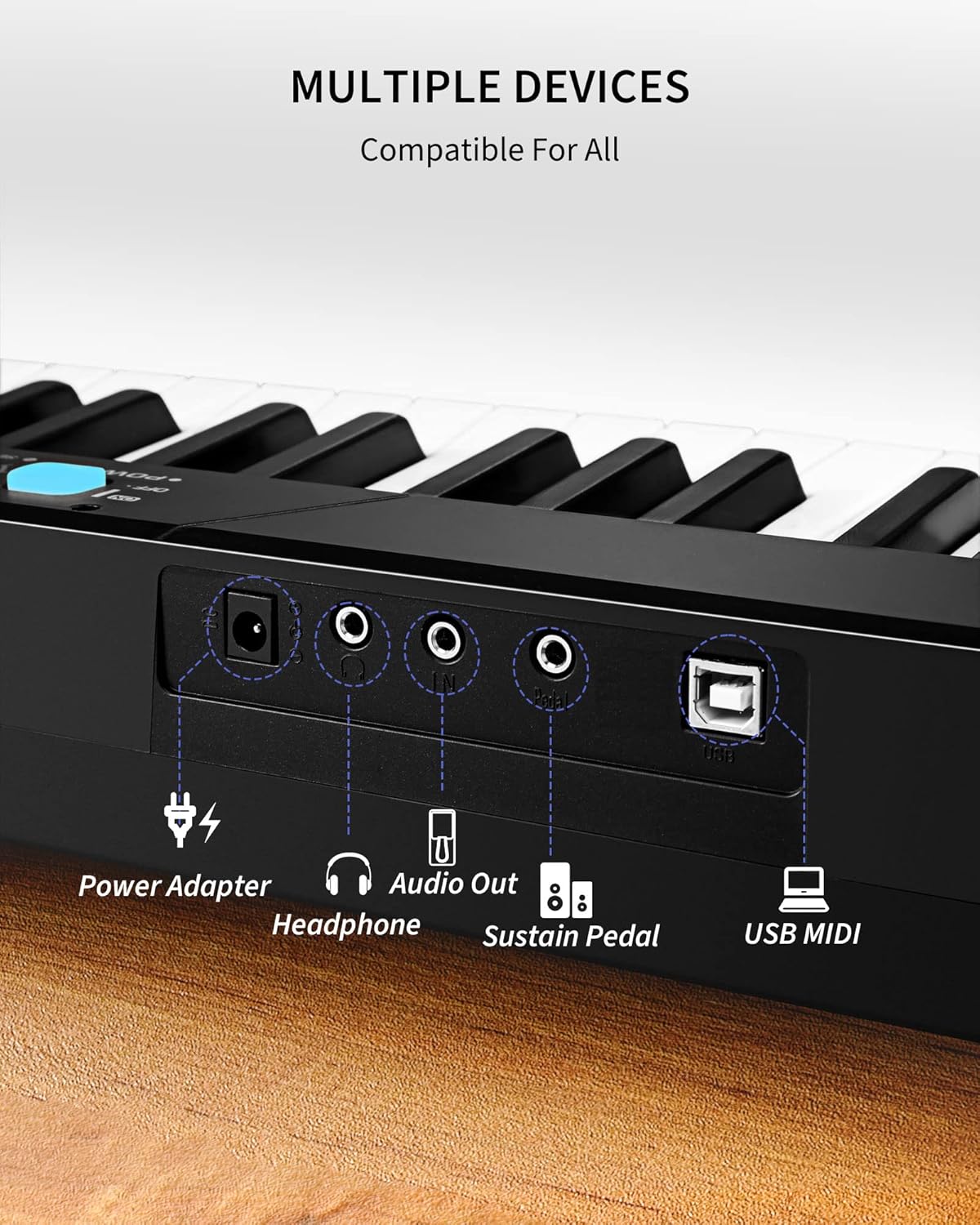
Figure 4.1: Connectivity ports on the Starfavor 88 Key Keyboard.
5. Operating Instructions
5.1 Power On/Off and Volume Control
- To power on the keyboard, press the POWER button located on the control panel. The display will illuminate.
- Adjust the overall volume using the VOLUME knob.
- To power off, press the POWER button again.

Figure 5.1: Main control panel of the keyboard.
5.2 Timbres, Rhythms, and Demo Songs
The keyboard offers 8 Timbres, 128 Rhythms, and 31 Demo Songs for diverse musical exploration.
- Selecting Timbres: Press the TONE button, then use the SELECT knob to browse through the 8 available instrument sounds.
- Selecting Rhythms: Press the RHYTHM button, then use the SELECT knob to choose from 128 rhythm patterns.
- Playing Demo Songs: Refer to the manual's specific section for playing the 31 built-in demo songs, typically accessed via a dedicated button or combination of buttons.
5.3 Dual Keyboard Function
The Dual Keyboard feature allows the keyboard to be split into two identical sections, enabling two players to play simultaneously, which is convenient for teaching or duets.
- To activate Dual Keyboard mode, press the SPLIT button. The keyboard will divide into two halves, each with the same octave range.
- Press the SPLIT button again to exit Dual Keyboard mode.

Figure 5.2: Demonstration of the Dual Keyboard feature.
5.4 MIDI Functionality
The MIDI (Musical Instrument Digital Interface) function allows the keyboard to communicate with computers and other MIDI-compatible devices. This enables recording, sequencing, and using the keyboard as a controller for software instruments.
- Connect the keyboard to your computer via the USB MIDI port using a standard USB cable.
- Install any necessary drivers (if prompted by your operating system) or software for your chosen MIDI application.
5.5 Learning Mode and Touch Sensitivity
The keyboard is designed to facilitate learning, especially when connected to smart devices and compatible applications.
- Learning Mode: Connect your tablet or smartphone to the keyboard via USB MIDI. Many popular learning apps (e.g., GarageBand, POP Piano, Synthesia, Perfect Piano, Flowkey) can utilize the keyboard for interactive lessons.
- Touch Sensitive Keys: The 88 semi-weighted keys feature a Smart Touch Curve Sensitive System, which means the volume and tone of the notes change based on how hard or soft you press the keys, mimicking the feel of an acoustic piano.

Figure 5.3: The keyboard in Learning Mode with a connected smart device.

Figure 5.4: Explanation of the keyboard's touch-sensitive keys.
6. Maintenance
- Cleaning: Use a soft, dry cloth to wipe the surface of the keyboard. For stubborn dirt, slightly dampen the cloth with water and a mild detergent, then wipe dry immediately. Avoid abrasive cleaners or solvents.
- Storage: When not in use, store the keyboard in a cool, dry place away from direct sunlight and extreme temperatures. Use the included carrying bag for protection.
- Key Care: Avoid placing heavy objects on the keys or applying excessive force, which can damage the key mechanism.
- Connectivity Ports: Keep all ports free of dust and debris.
7. Troubleshooting
| Problem | Possible Cause | Solution |
|---|---|---|
| No sound from speakers/headphones. |
|
|
| Keys are not responding or sound incorrect. |
|
|
| Sustain pedal not working. |
|
|
| Scratchy sound from audio output/headphones. |
|
|
8. Specifications
| Feature | Description |
|---|---|
| Model Number | SEK-88S |
| Number of Keys | 88 Semi-weighted |
| Dimensions (L x W x H) | 47.17 x 7.5 x 2.36 inches |
| Item Weight | 11 Pounds |
| Timbres | 8 |
| Rhythms | 128 |
| Demo Songs | 31 |
| Connectivity | 3.5mm Headphone Jack, Audio Out, Sustain Pedal Jack, USB MIDI |
| Power Source | Electric (Power Adapter) |
| Special Features | Portable, Dual Keyboard Function, Touch Sensitive Keys, Learning Mode Compatibility |
| Skill Level | Beginner |
9. Warranty and Support
Starfavor products are manufactured to high-quality standards. For information regarding warranty coverage, technical support, or service inquiries, please refer to the warranty card included with your product or visit the official Starfavor website. You can also contact Starfavor customer service directly for assistance.
For more information and support, visit the Starfavor Brand Store on Amazon.