
Introduction
Thank you for choosing the Fila Unisex Digital Watch, Model 38-191-104. This manual provides essential information for the proper setup, operation, and maintenance of your watch. Please read it carefully to ensure optimal performance and longevity of your device.
Product Overview
The Fila Model 38-191-104 is a digital wrist watch designed for unisex use, featuring a style inspired by 1970s fashion. It combines a retro aesthetic with modern digital timekeeping and an alarm function.
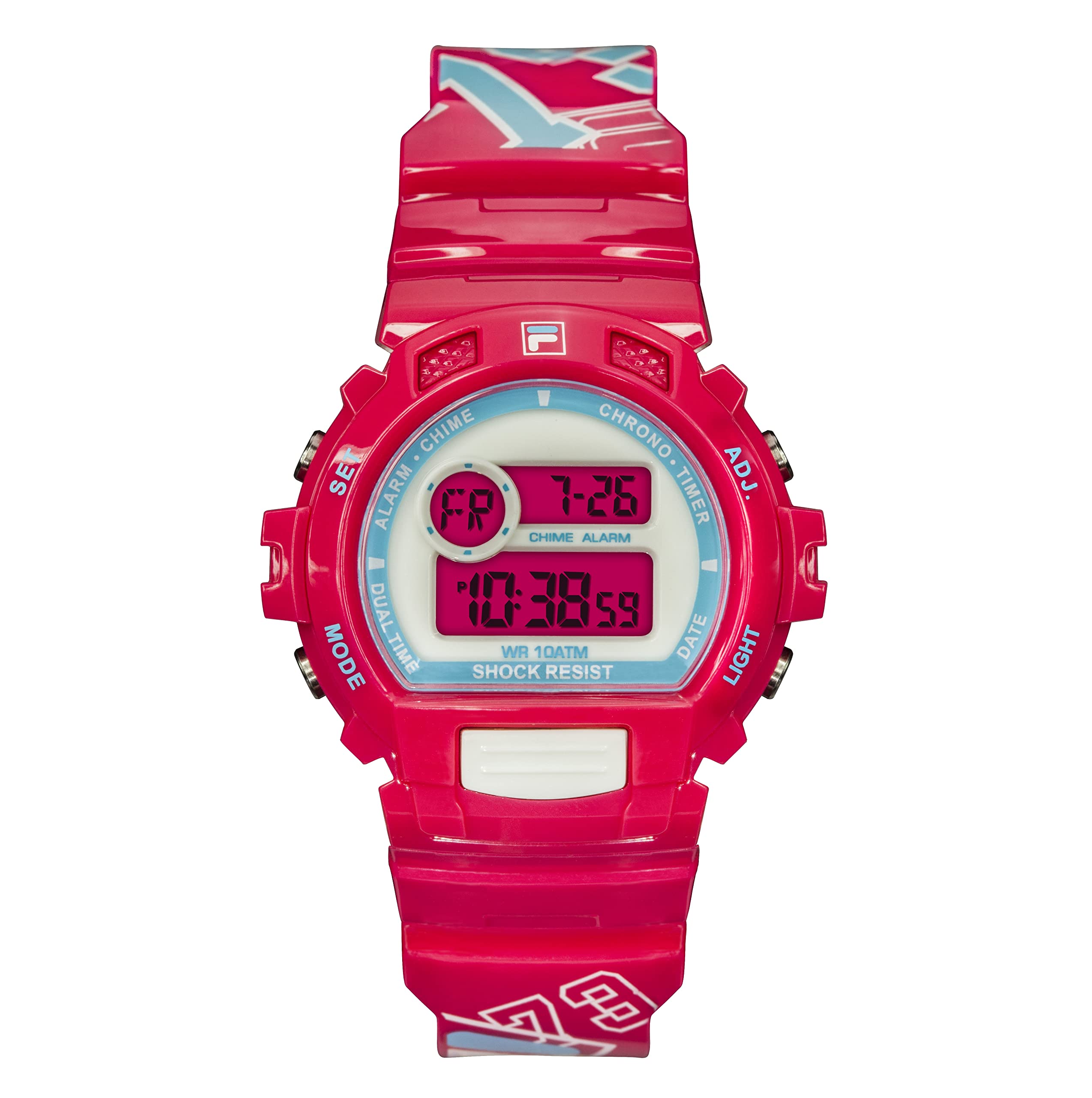
Image: Fila Unisex Digital Watch, Model 38-191-104, showcasing its digital display and pink silicone strap.
Setup
Battery Installation
Your Fila digital watch comes with one Lithium Ion battery pre-installed. No immediate battery installation is required for initial use.
Initial Time Setting
- Identify Buttons: Locate the control buttons on the side of your watch. Typically, there are buttons for 'Mode', 'Set', 'Adjust', and 'Light'. Refer to the watch's physical markings if available.
- Enter Time Setting Mode: Press the 'Mode' button repeatedly until the time display starts flashing or indicates a setting mode.
- Adjust Time: Use the 'Adjust' or 'Set' button to change the hour, minute, and other time parameters. The 'Mode' button usually cycles through the different settings (hours, minutes, 12/24-hour format).
- Confirm Settings: Once the time is set, press the 'Mode' button or a dedicated 'Confirm' button to exit the setting mode.
Note: Specific button functions may vary slightly. If you encounter difficulties, refer to the general operating instructions below.
Operating Instructions
Basic Functions
- Time Display: The watch primarily displays time in digital format.
- Date Display: Press the 'Mode' button once from the time display to view the date.
- Backlight: Press the 'Light' button (if available) to illuminate the display in low-light conditions.
Setting the Alarm
Your watch includes an alarm feature.
- Access Alarm Mode: Press the 'Mode' button until "AL" or "Alarm" appears on the display.
- Set Alarm Time: Use the 'Set' or 'Adjust' button to set the desired alarm hour and minute.
- Activate/Deactivate Alarm: In alarm mode, use a specific button (often 'Adjust' or 'Start/Stop') to toggle the alarm ON or OFF. An alarm icon will typically appear when activated.
- Exit Alarm Mode: Press the 'Mode' button to return to the normal time display.
Maintenance
Cleaning
To clean your watch, wipe it gently with a soft, dry cloth. For the silicone strap, a damp cloth with mild soap can be used, followed by drying thoroughly. Avoid harsh chemicals or abrasive materials.
Water Resistance
This watch is water-resistant up to 10 meters. This means it can withstand splashes or brief immersion in water, such as during hand washing or light rain. It is not suitable for swimming, showering, or diving. Do not operate buttons while the watch is wet.
Battery Replacement
When the display dims or functions become erratic, the battery may need replacement. Battery replacement should ideally be performed by a qualified watch technician to ensure proper sealing and water resistance. The watch requires one Lithium Ion battery.
Troubleshooting
- Watch not displaying time: Check if the battery is depleted. If the watch is new, ensure any protective plastic tabs have been removed.
- Time is incorrect: Follow the "Initial Time Setting" instructions to reset the time.
- Alarm not sounding: Ensure the alarm function is activated (look for an alarm icon on the display). Check the alarm time setting.
- Display is dim: This usually indicates a low battery. Consider professional battery replacement.
Specifications
| Feature | Detail |
|---|---|
| Model Number | 38-191-104 |
| Brand | Fila |
| Display Type | Digital |
| Movement Type | Japanese Quartz |
| Target Gender | Unisex (Adult) |
| Case Material | Polycarbonate |
| Case Diameter | 40 millimeters |
| Case Thickness | 12 millimeters |
| Band Material Type | Silicone |
| Band Width | 6 millimeters |
| Band Color | Pink |
| Dial Color | Grey |
| Clasp Type | Buckle |
| Water Resistance Depth | 10 meters |
| Special Features | Alarm |
| Power Source | Battery Powered (1 Lithium Ion battery included) |
| Product Dimensions | 0.59 x 0.59 x 0.59 cm |
| Item Weight | 100 grams |
Warranty and Support
Warranty Information
This Fila watch comes with a 6-month limited warranty from the date of purchase. This warranty covers manufacturing defects under normal use. It does not cover damage resulting from accidents, improper use, unauthorized repairs, or normal wear and tear.
Customer Support
For warranty claims, technical assistance, or any questions regarding your Fila watch, please contact the retailer or the official Fila customer service in your region. Please have your purchase receipt and watch model number (38-191-104) available when contacting support.