
Introduction
This manual provides essential instructions for the safe and efficient operation of your Generic Multisonic Amplifier Stereo, model MS-04. Please read this manual thoroughly before using the device and retain it for future reference. This amplifier is designed to provide audio amplification with multiple input options including Bluetooth, USB, SD Card, FM radio, and AUX.
Safety Instructions
- Power Source: Ensure the amplifier is connected to an AC power source within the specified voltage range (AC 220-240V, 50/60Hz).
- Ventilation: Do not block ventilation openings. Allow adequate space around the unit for proper airflow to prevent overheating.
- Water and Moisture: Do not expose the amplifier to rain, moisture, or dripping/splashing liquids. Do not place objects filled with liquids, such as vases, on the apparatus.
- Heat: Keep the unit away from heat sources such as radiators, heat registers, stoves, or other apparatus (including amplifiers) that produce heat.
- Cleaning: Unplug the unit from the wall outlet before cleaning. Use a dry cloth for cleaning.
- Servicing: Do not attempt to service this product yourself. Refer all servicing to qualified service personnel.
- Speaker Connections: Ensure all speaker connections are correct and secure before powering on the amplifier. Incorrect wiring can damage the unit.
Product Overview
The Multisonic Amplifier Stereo MS-04 features a compact design with various input and output options. Familiarize yourself with the front and rear panels before operation.
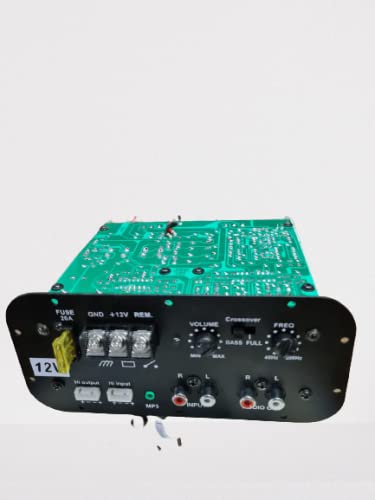
Figure 1: Front view of the Multisonic Amplifier Stereo MS-04. This image displays the main unit, showing the LED display, control knobs, and various input ports on the front panel.
Front Panel Controls and Inputs
- Power Button: Turns the amplifier on or off.
- LED Display: Shows current mode, track information, or FM frequency.
- Mode Button: Switches between Bluetooth, USB, SD, FM, and AUX input modes.
- Play/Pause Button: Controls playback for USB/SD and Bluetooth.
- Previous/Next Buttons: Navigates tracks for USB/SD/Bluetooth or tunes FM stations.
- Volume Knob: Adjusts the master volume level.
- Bass/Treble Knobs: Adjusts low and high frequency audio output.
- USB Port: For connecting USB flash drives.
- SD Card Slot: For inserting SD memory cards.
- AUX Input (3.5mm): For connecting external audio devices via a 3.5mm cable.
Rear Panel Connections
- Speaker Terminals: Connects to passive speakers (Left/Right).
- FM Antenna Input: For connecting the included FM antenna.
- RCA AUX Input (L/R): For connecting external audio devices via RCA cables.
- AC Power Input: Connects to the main power supply.
Setup
- Unpacking: Carefully remove the amplifier and all accessories from the packaging. Retain the packaging for future transport or storage.
- Speaker Connection: Connect your passive speakers to the speaker terminals on the rear panel. Ensure correct polarity (+ to + and - to -) for each speaker. Incorrect polarity can result in poor sound quality.
- FM Antenna Connection: Connect the provided FM antenna to the FM antenna input on the rear panel. Extend the antenna for better reception.
- Audio Source Connection:
- AUX (RCA): Connect your audio source (e.g., CD player, TV) to the RCA AUX input on the rear panel using an RCA cable.
- AUX (3.5mm): Connect your audio source (e.g., smartphone, tablet) to the 3.5mm AUX input on the front panel using a 3.5mm audio cable.
- USB/SD: Insert a USB flash drive into the USB port or an SD card into the SD card slot on the front panel.
- Power Connection: Connect the AC power cord to the amplifier's AC power input and then plug it into a wall outlet.
Operating Instructions
- Power On/Off: Press the Power button on the front panel to turn the amplifier on. The LED display will illuminate. Press it again to turn off.
- Source Selection: Press the 'Mode' button repeatedly to cycle through the available input sources: Bluetooth, USB, SD, FM, and AUX. The selected mode will be indicated on the LED display.
- Volume Control: Rotate the 'Volume' knob clockwise to increase the volume and counter-clockwise to decrease it.
- Tone Control: Use the 'Bass' and 'Treble' knobs to adjust the low and high frequency response of the audio output to your preference.
- Bluetooth Pairing:
- Select 'Bluetooth' mode using the 'Mode' button. The display will show 'BLUE' or similar, indicating it's ready for pairing.
- On your Bluetooth-enabled device (smartphone, tablet), enable Bluetooth and search for available devices.
- Select 'Multisonic' or a similar name from the list of devices.
- Once paired, the amplifier will emit a confirmation sound, and the display may change.
- You can now play audio from your device through the amplifier.
- USB/SD Playback:
- Insert a USB flash drive or SD card with audio files (MP3, WAV, etc.) into the respective port/slot.
- Select 'USB' or 'SD' mode using the 'Mode' button. The amplifier will automatically begin playing the first track.
- Use the 'Play/Pause', 'Previous', and 'Next' buttons to control playback.
- FM Radio Tuning:
- Select 'FM' mode using the 'Mode' button.
- Press and hold the 'Play/Pause' button to initiate an automatic scan for FM stations. The amplifier will save detected stations.
- Use the 'Previous' and 'Next' buttons to cycle through the saved FM stations.
Maintenance
- Cleaning: Disconnect the power cord before cleaning. Use a soft, dry cloth to wipe the exterior of the amplifier. Do not use liquid cleaners or aerosol sprays.
- Storage: If the amplifier will not be used for an extended period, unplug it from the power outlet and store it in a cool, dry place, away from direct sunlight and extreme temperatures.
- Ventilation: Regularly check that the ventilation openings are clear of dust and debris to ensure proper heat dissipation.
Troubleshooting
| Problem | Possible Cause | Solution |
|---|---|---|
| No power | Power cord not connected; Power outlet faulty; Power button not pressed. | Ensure power cord is securely plugged in. Test the outlet with another device. Press the power button firmly. |
| No sound from speakers | Speakers not connected; Volume too low; Incorrect input source selected; Audio source not playing. | Check speaker connections and polarity. Increase volume. Select the correct input mode. Ensure your audio source is playing. |
| Bluetooth not connecting | Amplifier not in Bluetooth mode; Device too far; Device already paired with another unit. | Switch amplifier to Bluetooth mode. Move device closer to amplifier. Disconnect from other Bluetooth devices. |
| USB/SD not playing | Incorrect mode; Unsupported file format; Corrupted files; USB/SD not inserted correctly. | Select USB/SD mode. Ensure files are in supported formats (e.g., MP3). Try another USB/SD card. Reinsert the USB/SD card. |
| Poor FM reception | Antenna not connected or extended; Weak signal. | Connect and fully extend the FM antenna. Try repositioning the antenna for better signal. |
Specifications
- Model: MS-04
- Type: AV Control Amplifier
- Power Source: AC Adapter
- Power Consumption: 160 W
- Dimensions (W x H x D): 16 cm x 8 cm x 24 cm
- Frequency Response: 10 Hz - 100 kHz
- Connectivity: Bluetooth, USB, SD Card, FM, AUX
- Manufacturer: Shree Kaali Ennterprises
Warranty and Support
This product is covered by a standard manufacturer's warranty. For specific warranty terms and conditions, please refer to the documentation provided at the time of purchase or contact your retailer. For technical support or service inquiries, please contact the retailer or manufacturer directly. Please have your model number (MS-04) and purchase date available when contacting support.


