Product Overview
The roborock Q7 Max is an advanced robot vacuum and mop combo designed to provide comprehensive floor cleaning. It features powerful suction, precise navigation, and simultaneous vacuuming and mopping capabilities, making it ideal for various floor types and pet hair.

Figure 1: The roborock Q7 Max Robot Vacuum and Mop Combo in white, with a smartphone displaying the companion app.
Setup
Before first use, ensure the robot is fully charged and the Roborock app is installed on your smartphone. The robot utilizes PreciSense LiDAR Navigation to build accurate 3D maps of your home, enabling efficient cleaning routes.
- Unboxing and Placement: Remove all packaging materials. Place the charging dock against a wall on a hard, flat surface, ensuring clear space around it for the robot to dock easily.
- Charging: Place the robot on the charging dock. The indicator lights will show charging status. Ensure it is fully charged before the first cleaning cycle.
- App Installation and Connection: Download the "Roborock" app from your app store. Follow the in-app instructions to connect your robot to your 2.4G Wi-Fi network.
- Initial Mapping: Once connected, initiate an initial mapping run through the app. The robot will navigate your home to create a detailed map, identifying rooms and obstacles. This map is crucial for smart navigation and custom cleaning.

Figure 2: The robot vacuum utilizing its Precision PreciSense LiDAR for accurate 3D mapping and navigation.

Figure 3: The robot automatically returning to its charging dock.
Operating the Robot Vacuum
The roborock Q7 Max offers versatile cleaning modes and smart controls for an effortless experience.
Cleaning Modes
- Vacuum Only: For dry debris collection. The powerful 4,200 Pa suction effectively lifts dirt and pet hair from various surfaces.
- Mop Only: For wet cleaning. Ensure the water tank is filled and the mop cloth is attached.
- Vacuum and Mop Simultaneously: This mode allows the robot to vacuum and mop at the same time, ideal for removing fine dust and maintaining floor cleanliness. The electronic pump provides 30 adjustable water flow levels via the app.

Figure 4: The robot vacuum performing simultaneous vacuuming and mopping, tailoring settings to match floor types.

Figure 5: Illustration of the powerful 4,200 Pa suction pulling dirt and pet hair from floors and carpets.
App and Voice Control
Utilize the Roborock app for comprehensive control and customization:
- Custom Routines: Set up personalized cleaning schedules and routines for different areas or times.
- 3D Mapping: View and interact with the detailed 3D map of your home.
- No-Go Zones & No-Mop Zones: Define specific areas where the robot should not enter or mop, preventing it from going into restricted areas or mopping carpets.
- Voice Control: Integrate with smart home assistants like Amazon Alexa and Google Home for convenient voice commands.
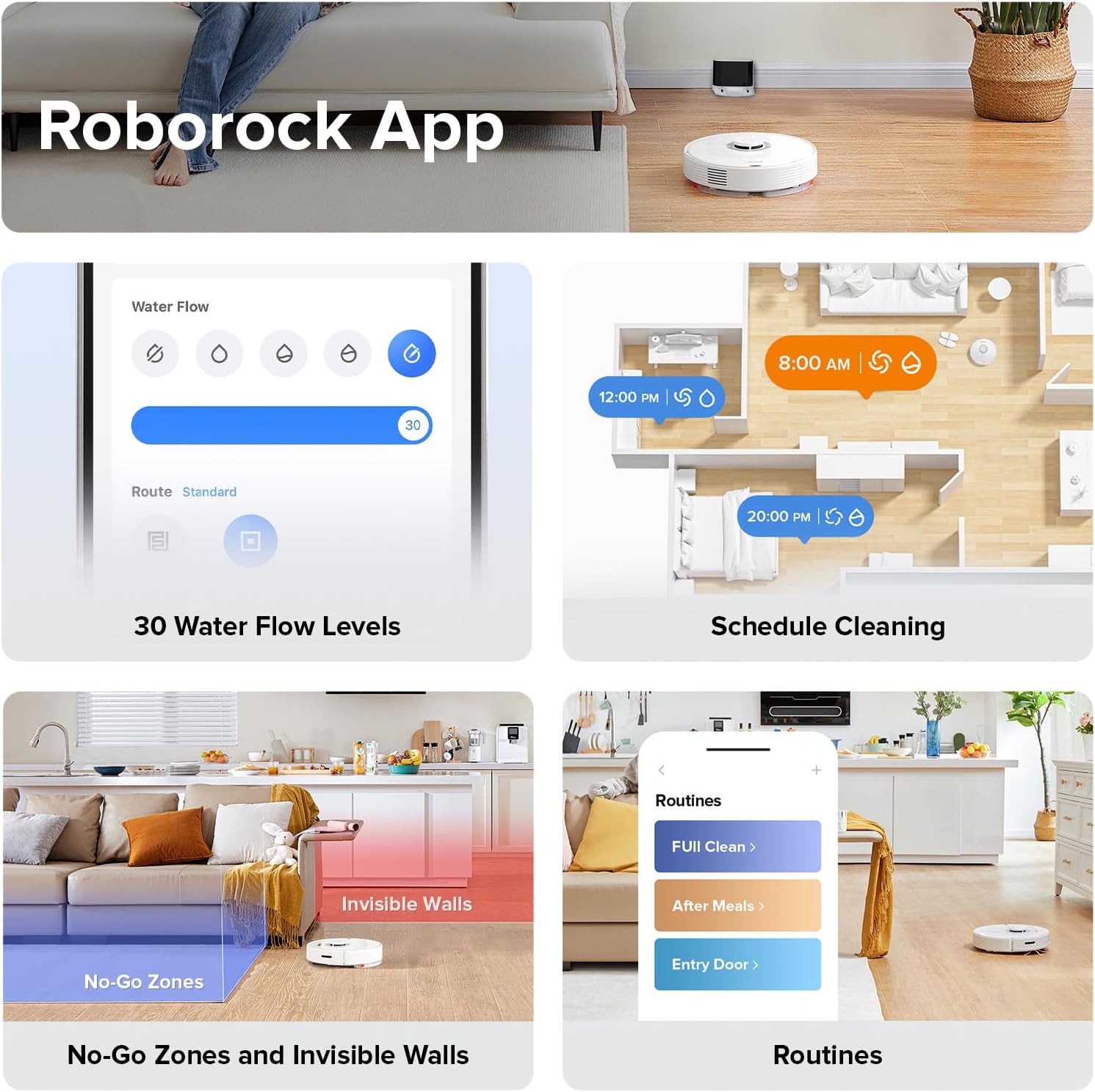
Figure 6: Screenshots of the Roborock app showing water flow levels, schedule cleaning, no-go zones, and custom routines.

Figure 7: A user interacting with the robot vacuum using voice commands through a smart assistant.

Figure 8: Visual representation of No-Go Zones and No-Mop Zones set within the app.
Video 1: Official demonstration of the Roborock Q7 Max simultaneously mopping and vacuuming, showcasing its efficiency on hard floors.
Maintenance
Regular maintenance ensures optimal performance and longevity of your roborock Q7 Max.
- Combined Dustbin & Water Tank: The robot features a 470 ml dustbin and 350 ml water tank. Empty the dustbin and refill the water tank regularly, especially after each cleaning cycle.
- All-Rubber Main Brush: The all-rubber brush is designed to resist hair tangles. Periodically remove and clean the main brush to ensure efficient debris collection.
- Washable Filter: The filter is washable. Clean it under running water and allow it to air dry completely before reinserting.
- Mop Cloth: Remove the mop cloth after each mopping session and wash it. It can be hand-washed or machine-washed.

Figure 9: Illustration showing the capacities of the combined 470 ml dustbin and 350 ml water tank.

Figure 10: Close-up of the all-rubber main brush, designed to prevent hair tangles and maintain close contact with the floor.
Troubleshooting
Here are some common issues and their solutions:
- Robot not mopping carpets: The Q7 Max does not have a carpet sensor that automatically lifts the mop. To prevent mopping carpets, define "No-Mop Zones" in the app for carpeted areas. Alternatively, remove the mop cloth attachment when cleaning carpeted areas.
- Robot getting stuck or hitting obstacles: Ensure the initial mapping is accurate. Clear small obstacles like cables or toys from the cleaning path. The robot has anti-collision and anti-fall sensors to prevent damage.
- Poor suction performance: Check if the dustbin is full and empty it. Clean the main brush and side brush for any tangled hair or debris. Ensure the washable filter is clean and dry.
- Robot not connecting to Wi-Fi: Verify that your Wi-Fi network is 2.4Ghz, as the robot only supports this frequency. Ensure the robot is within range of your router.

Figure 11: The robot vacuum detecting and avoiding obstacles in its path.

Figure 12: The robot vacuum utilizing its cliff sensors to prevent falls down stairs or ledges.
Specifications
| Feature | Detail |
|---|---|
| Brand | roborock |
| Model Name | Q7 Max |
| Suction Power | 4,200 Pa |
| Dustbin Capacity | 470 ml |
| Water Tank Capacity | 350 ml |
| Battery Life | Up to 180 minutes |
| Max Cleaning Area | Up to 3,229 sqft |
| Navigation | PreciSense LiDAR |
| Control Method | App, Voice |
| Wi-Fi Support | 2.4Ghz only |
| Product Dimensions | 13.9"L x 13.8"W x 3.8"H |
| Item Weight | 13 pounds |
Warranty and Support
The roborock Q7 Max comes with a 1-year warranty.
For detailed instructions, troubleshooting, and further assistance, please refer to the official User Manual PDF or visit the roborock support website.


