1. Product Overview
The roborock S7 MaxV Ultra is an advanced robotic vacuum and mop designed to provide a comprehensive and largely hands-free cleaning solution for your home. It integrates cutting-edge navigation, powerful suction, and intelligent mopping capabilities with a sophisticated self-maintenance dock.

This image displays the roborock S7 MaxV Ultra robot vacuum positioned in front of its accompanying Empty Wash Fill Dock. The dock is a tall, dark-colored unit with multiple compartments visible at the top, indicating its self-maintenance capabilities. The robot itself is a sleek, circular device, also in a dark color, with sensors and brushes visible around its perimeter. The setup is shown on a clean, light-colored floor, ready for operation.
Key Features:
- Empty Wash Fill Dock: Provides automatic dust emptying, mop washing, and robot water tank refilling, with self-cleaning capabilities for the dock itself.
- ReactiveAI 2.0 Obstacle Avoidance: Utilizes an RGB camera, neural processing unit, and 3D structured light systems for effective obstacle recognition and navigation, even in dark rooms.
- 5100Pa Suction: Delivers powerful suction for efficient pickup of debris, hair, and dust from hard floors and carpets.
- VibraRise Mopping System: Scrubs floors up to 3,000 times per minute for effective stain removal and intelligently lifts the mop when a carpet is detected.
- Advanced App Control: Allows for furniture recognition, automatic mapping, customized cleaning patterns, and real-time monitoring.
2. Setup
What's in the Box:
- 1* Q7Max Robot Vacuum Cleaner (Note: Product title indicates S7 MaxV Ultra, but box content lists Q7Max. Please refer to actual product packaging for exact contents.)
- 1* Charging Dock
- 1* Power Cable
- 1* User Manual (PDF link available in Support section)
Initial Setup:
- Unpack all components from the box.
- Place the Charging Dock against a wall on a hard, level surface, ensuring adequate space around it for the robot to maneuver.
- Connect the Power Cable to the Charging Dock and plug it into a power outlet.
- Place the robot vacuum onto the Charging Dock to begin charging. Ensure the robot is fully charged before its first use.
- Download the roborock app from your device's app store and follow the in-app instructions to connect your robot.
3. Base Station Features
The Empty Wash Fill Dock is a central component of the S7 MaxV Ultra, providing automated maintenance to minimize user intervention. It handles dust collection, mop washing, and water tank refilling.
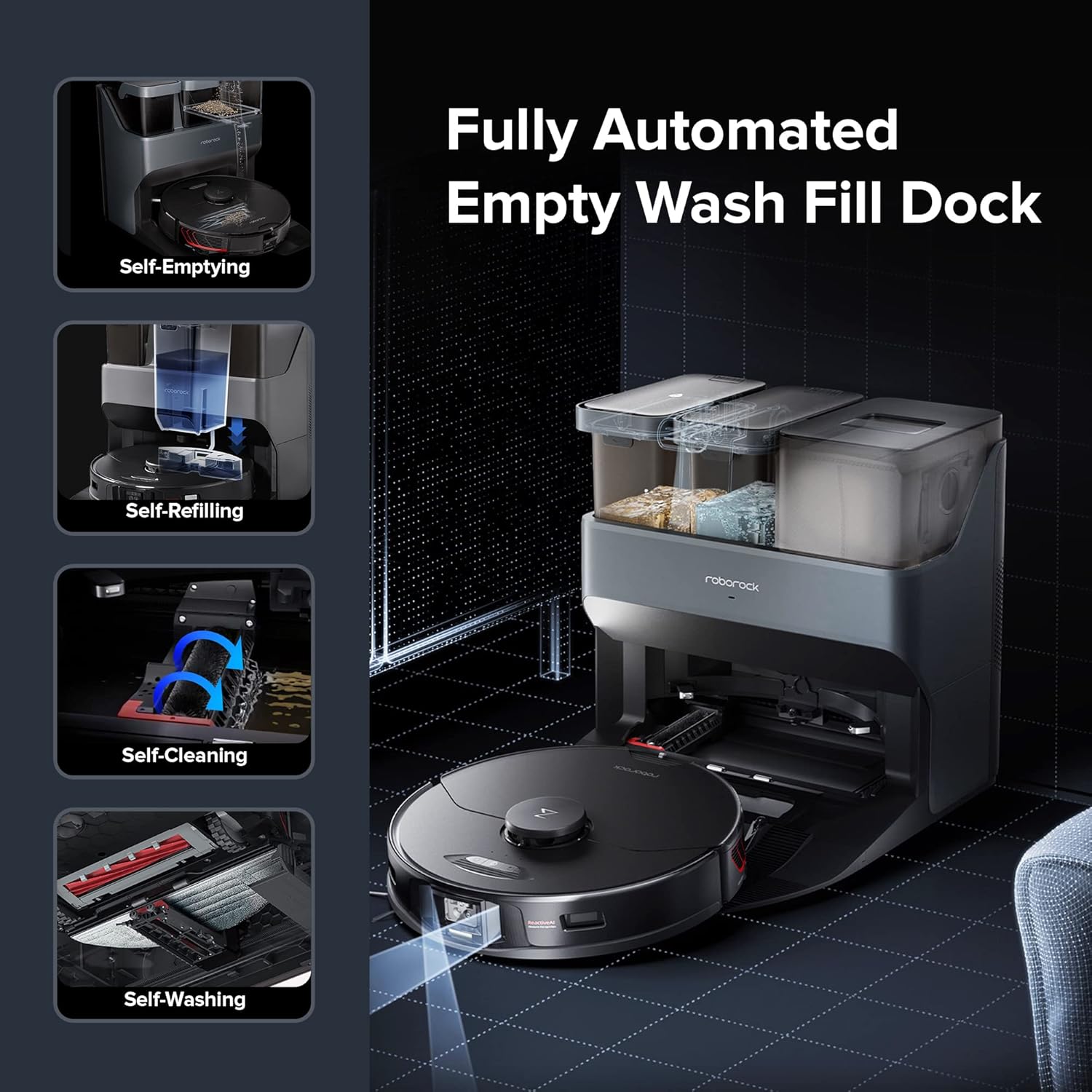
This image illustrates the various automated functions of the Empty Wash Fill Dock. It shows four distinct processes: 'Self-Emptying' where the robot's dustbin is emptied into the dock, 'Self-Refilling' where the robot's water tank is replenished, 'Self-Cleaning' indicating the dock's ability to clean itself, and 'Self-Washing' which refers to the dock's function of cleaning the robot's mop.
- Automatic Dust Emptying: The dock automatically empties the robot's dustbin, holding up to 7 weeks of dust.
- Automatic Mop Washing: The dock washes the robot's mop during and after cleaning sessions.
- Automatic Water Tank Refilling: Extends the robot's mopping range by refilling its water tank.
- Self-Cleaning Dock: The dock itself is designed to clean its components, reducing manual maintenance.
4. Mopping System
The S7 MaxV Ultra features the VibraRise mopping system, which combines high-intensity sonic scrubbing with an intelligent auto-lifting function.

This image shows the roborock S7 MaxV Ultra robot vacuum actively mopping a hard floor with visible dried stains. The robot is dark-colored and circular, with its mopping pad extending from its underside, effectively cleaning a path through the spilled liquid. The image highlights the scrubbing action of the VibraRise system, designed to remove stubborn grime.
- Sonic Vibration: The mop scrubs at up to 3,000 times per minute to effectively remove dried-on dirt and stains.
- Intelligent Mop Lifting: The mop module automatically lifts when a carpet is detected, allowing the robot to vacuum carpets and mop hard floors in a single cleaning run without wetting the carpet.

This image demonstrates the Intelligent Mop Lifting feature of the roborock S7 MaxV Ultra. The dark-colored robot vacuum is shown transitioning from a hard floor onto a light-colored carpet. A blue visual effect indicates the mop lifting mechanism, allowing the robot to vacuum the carpet without wetting it, while simultaneously cleaning hard floors.
5. Navigation
The S7 MaxV Ultra employs advanced navigation systems to efficiently map and clean your home.
- PreciSense LiDAR Navigation: Creates accurate maps of your home, enabling efficient and systematic cleaning routes.
- Adaptive Route Algorithms: The robot learns and adapts to your home's layout, optimizing cleaning paths for maximum coverage.
- Multi-Level Mapping: Capable of storing maps for multiple floors, making it suitable for multi-story homes.
6. Obstacle Avoidance
Equipped with ReactiveAI 2.0, the S7 MaxV Ultra excels at identifying and avoiding common household obstacles.
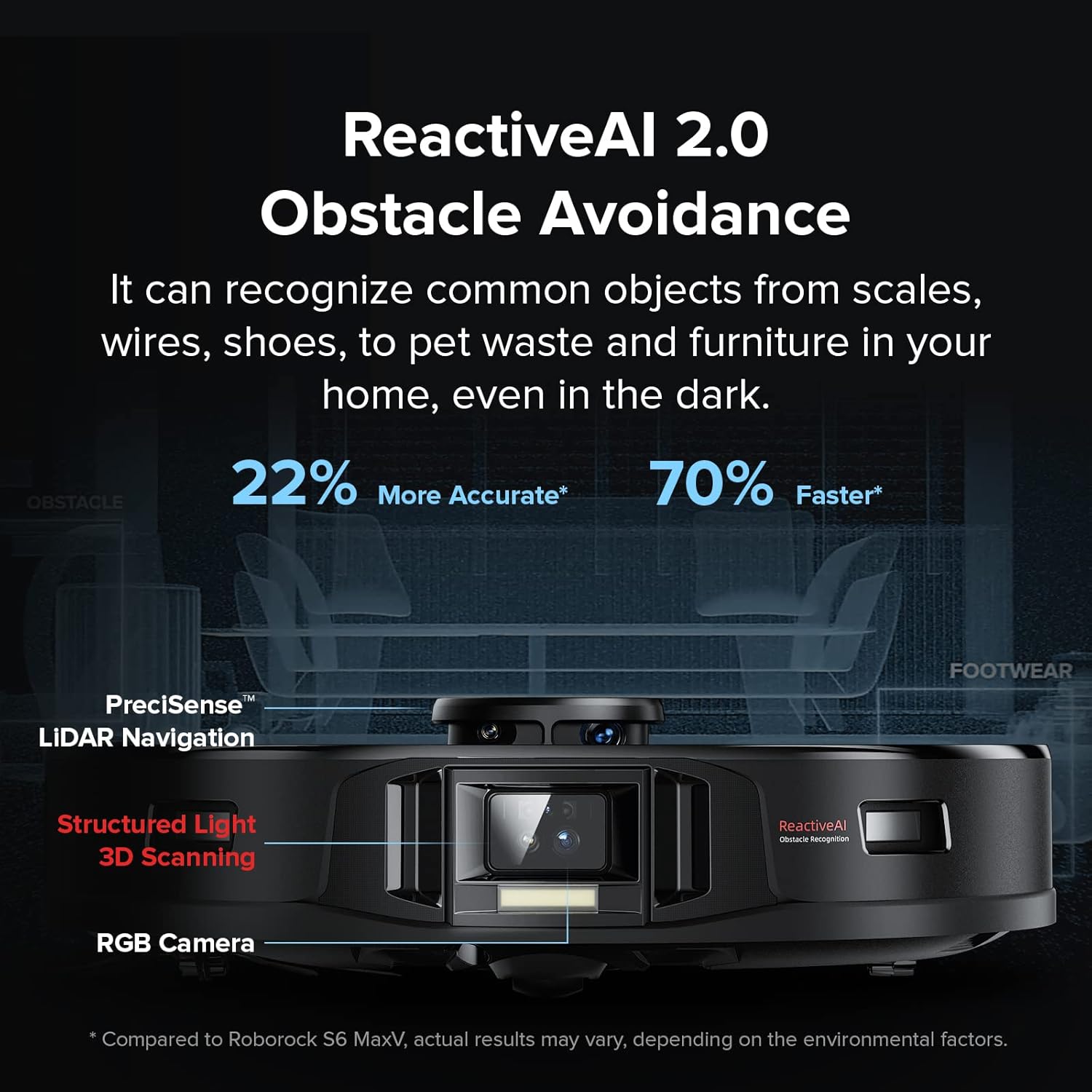
This image highlights the ReactiveAI 2.0 Obstacle Avoidance system on the roborock S7 MaxV Ultra. A close-up of the robot's front shows its RGB camera and 3D structured light sensors. Text overlays indicate that the system can recognize common objects like scales, wires, shoes, pet waste, and furniture, even in the dark, and is 22% more accurate and 70% faster compared to previous models.
- RGB Camera & Neural Processing Unit: Allows the robot to recognize and react to various objects in its path.
- 3D Structured Light Systems: Supplements the camera to accurately detect unknown objects, their size, and location, enabling the robot to navigate around them.
- Low-Light Performance: An additional light turns on in dark rooms, ensuring effective obstacle recognition at night.
7. Power and Cleaning Performance
The S7 MaxV Ultra is engineered for powerful and efficient cleaning across different surfaces.

This image visually represents the powerful 5100Pa suction of the roborock S7 MaxV Ultra. The dark-colored robot vacuum is shown on a floor, with arrows indicating strong airflow pulling in dust and debris, which is depicted as a cloud of particles around the robot. The large '5100Pa' text emphasizes its high suction capability.
- 5100 Pa Suction: Offers more than double the power of previous models like the S6 MaxV, effectively picking up debris, hair, and dust.
- Multi-Directional Floating Brush: Keeps the brush closer to the surface for more effective cleaning on uneven floors.
- Efficient Cleaning: Demonstrates high efficiency in picking up debris on hard floors and carpets, with strong performance even on embedded dirt.
8. Noise Levels
The S7 MaxV Ultra is designed to operate with varying noise levels depending on the selected power mode.
- Quiet Mode: Operates at approximately 57.0 dB.
- Balanced Mode: Operates at approximately 59.5 dB.
- Turbo Mode: Operates at approximately 62.0 dB.
- Max Mode: Operates at approximately 72.9 dB.
Note: Noise levels may vary based on environment and surface type.
9. Specifications
| Feature | Specification |
|---|---|
| Product Dimensions | 13.9"L x 13.8"W x 3.8"H |
| Item Model Number | S7 MaxV Ultra |
| Batteries | 1 Lithium Ion batteries required. (included) |
| Date First Available | April 30, 2022 |
| Manufacturer | roborock |
| Color | Dark |
10. Maintenance
Regular maintenance ensures optimal performance and longevity of your roborock S7 MaxV Ultra.
- Emptying Dustbin: The Empty Wash Fill Dock automatically empties the robot's dustbin. Periodically check the dock's dustbag and replace it when full.
- Cleaning Mop: The dock automatically washes the mop. Ensure the clean and dirty water tanks in the dock are maintained.
- Brush Maintenance: Regularly check the main brush and side brush for tangled hair or debris and clean as needed.
- Sensor Cleaning: Wipe down all sensors on the robot and dock with a soft, dry cloth to ensure proper function.
- Filter Cleaning: Clean the robot's filter regularly and replace it as recommended in the full user manual.
11. Troubleshooting
If you encounter issues with your roborock S7 MaxV Ultra, try the following basic troubleshooting steps:
- Robot Not Charging: Ensure the charging dock is properly connected to power and the robot is correctly aligned with the charging contacts.
- Poor Cleaning Performance: Check the dustbin for fullness, clean the main brush and side brush, and ensure the mop pad is clean and wet. Verify suction settings in the app.
- Navigation Errors: Clean all sensors on the robot. Ensure there are no new obstacles or changes in the environment that might confuse the robot. Re-map if necessary.
- App Connectivity Issues: Restart the robot and your Wi-Fi router. Ensure the robot is within Wi-Fi range.
- Dock Malfunction: Check water tanks for proper placement and fill levels. Ensure the dock's self-cleaning components are free of debris.
For more detailed troubleshooting, refer to the full user manual or contact customer support.
12. Support
For further assistance, warranty information, or to access the complete user manual, please use the resources below:
- Official User Manual (PDF): Download PDF Manual
- Roborock Brand Store: Visit Roborock Store on Amazon
- Customer Service: Refer to the official Roborock website or your purchase platform for direct customer support contact information.
Note: No official product videos from the seller were found for embedding based on the provided data.


