
Introduction
Thank you for choosing the Patriot Lighting Swank 16" Gray Indoor Integrated LED Fandelier. This product combines the functionality of a ceiling fan with the illumination of an integrated LED light, designed for indoor use. It features a sleek gray finish, a clear acrylic shade, and offers color-changing and dimmable LED lighting, all controllable via a handheld remote.
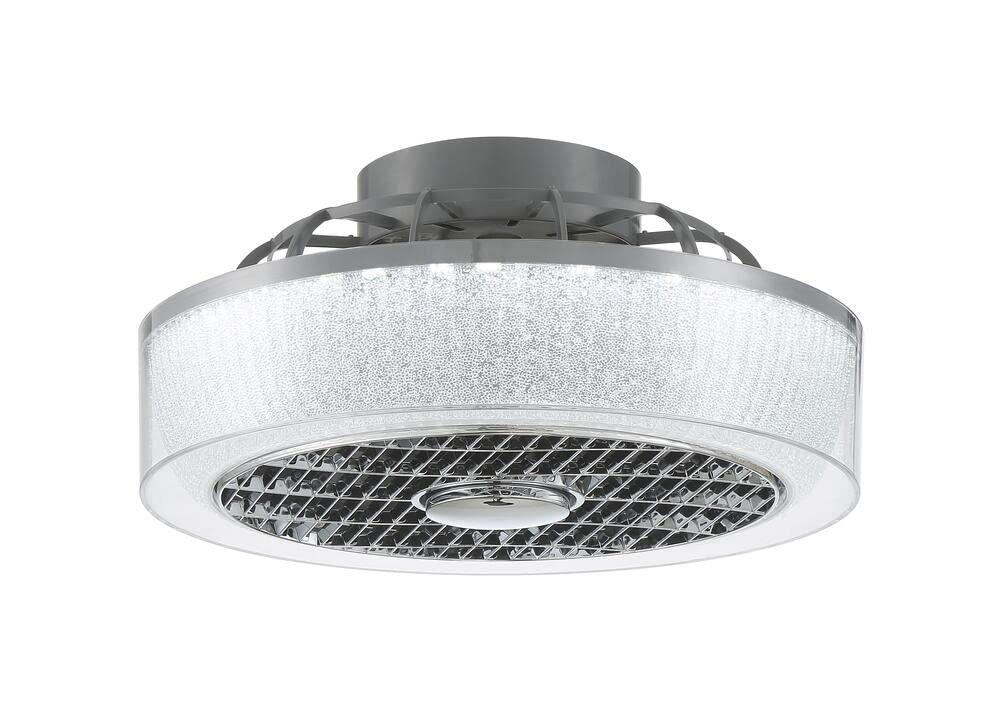
Image: The Patriot Lighting Swank 16" Gray Indoor Integrated LED Fandelier, showcasing its compact design and modern aesthetic.
Important Safety Information
Please read and understand all instructions before beginning installation. Failure to follow these instructions may result in electric shock, fire, or personal injury.
- Always disconnect power at the main circuit breaker or fuse box before installing, cleaning, or servicing the fixture.
- Consult a qualified electrician if you are unsure about wiring procedures.
- Ensure all electrical connections are secure and comply with local electrical codes and ordinances.
- This fixture is designed for indoor use only. Do not install in wet or damp locations.
- Use only the remote control provided with the unit.
- Do not attempt to modify the fixture or its components.
What's in the Box
Verify that all components are present before beginning installation:
- Fandelier Unit (Integrated LED and Fan)
- Mounting Bracket and Hardware
- Handheld Remote Control
- User Manual
Specifications

Image: Diagram highlighting key components and features of the fandelier, including its gray finish, DC motor, clear shade with sanded crystal accents, and remote-controlled operation.
| Feature | Detail |
|---|---|
| Brand | Patriot Lighting |
| Model Name | Swank |
| Model Number | 37591-MNDC |
| Dimensions (L x W x H) | 16.93"L x 16.93"W x 8.66"H |
| Color | Gray |
| Material | Acrylic |
| Shade Color | Clear with Sanded Crystal Accents |
| Indoor/Outdoor Usage | Indoor |
| Installation Type | Flush Mount |
| Light Source | Integrated LED |
| Wattage | 28 watts |
| Voltage | 120 Volts |
| Color Temperature Options | 3,000K (Soft White), 4,000K (Bright White), 5,000K (Daylight) |
| Light Output (Lumens) | 1,450 (3000K), 1,950 (4000K), 1,550 (5000K) |
| Color Rendering Index (CRI) | 80 |
| Control Method | Remote Control |
| Required Assembly | Yes |
Setup and Installation
This fixture is designed for flush mount installation on a standard ceiling. Professional installation is recommended.
- Prepare for Installation: Turn off power at the circuit breaker. Ensure the mounting surface is structurally sound to support the fixture's weight.
- Install Mounting Bracket: Secure the mounting bracket to the ceiling junction box using the provided hardware. Ensure it is firmly attached.
- Electrical Connections: Carefully connect the electrical wires from the fixture to the corresponding wires in the junction box (e.g., black to black, white to white, ground to ground). Use wire nuts to secure connections.
- Attach Fandelier Unit: Lift the fandelier unit and attach it to the mounting bracket, ensuring all wires are tucked safely inside the junction box. Secure the unit with the provided screws.
- Restore Power: Once the fixture is securely installed and all connections are checked, restore power at the circuit breaker.
- Remote Control Pairing: Insert batteries into the remote control. Follow the remote control's specific instructions for pairing with the fandelier, typically involving a power cycle and pressing a pairing button within a short timeframe.

Image: The fandelier installed in a bedroom, demonstrating its flush-mount design and how it integrates into a living space.
Operating Instructions
The Patriot Lighting Swank Fandelier is operated using the included handheld remote control.

Image: The fandelier in a room setting, highlighting its sleek gray finish and suitability as an indoor flush mount ceiling fan.
- Power On/Off: Use the dedicated power button on the remote to turn the fan and light on or off.
- Fan Speed Control: The remote allows you to adjust the fan speed. Typically, there are multiple speed settings (e.g., low, medium, high).
- Light On/Off: Separate buttons may be available to control the light independently from the fan.
- Color Temperature Adjustment: Cycle through the available color temperatures (3,000K Soft White, 4,000K Bright White, 5,000K Daylight) using the designated button.
- Dimming Function: Use the dimming buttons (e.g., '+' and '-') to adjust the brightness of the LED light. A compatible dimmer is integrated into the fixture.
- Fan Direction (if applicable): Some models allow for reversible fan direction for summer (downward airflow) and winter (upward airflow). Refer to your remote for this feature.

Image: The fandelier installed in a kitchen, demonstrating its versatility in various indoor environments.
Maintenance
Regular maintenance ensures optimal performance and longevity of your fandelier.
- Cleaning: Before cleaning, ensure the power is turned off at the circuit breaker. Use a soft, dry cloth to wipe down the exterior surfaces. Do not use abrasive cleaners, solvents, or polishes as they may damage the finish or acrylic shade.
- Integrated LED: The LED light source is integrated and designed for long-term use. It does not require bulb replacement.
- Remote Control: Replace batteries in the remote control as needed (typically AAA or AA, refer to the remote's battery compartment).
Troubleshooting
If you encounter issues with your fandelier, refer to the following common problems and solutions:
| Problem | Possible Cause | Solution |
|---|---|---|
| Fandelier does not turn on. | No power supply; loose wiring; remote control issue. | Check circuit breaker. Ensure all wiring connections are secure. Verify remote control batteries and pairing. |
| Remote control is not responding. | Dead batteries; remote not paired; obstruction. | Replace remote batteries. Re-pair the remote control with the fandelier (refer to setup instructions). Ensure no obstructions between remote and fandelier. |
| Light is not working, but fan operates. | Light function off on remote; internal wiring issue. | Ensure the light function is activated on the remote. If problem persists, consult a qualified electrician. |
| Fan is not operating, but light works. | Fan function off on remote; internal wiring issue. | Ensure the fan function is activated on the remote. If problem persists, consult a qualified electrician. |
| Light changes to brightest setting after power cycle. | Default setting of the integrated LED module. | This is a common characteristic for some integrated LED fixtures. Adjust the light setting with the remote after each power cycle if a specific setting is desired. |
Warranty and Support
This Patriot Lighting product is covered by a manufacturer's warranty against defects in materials and workmanship. For specific warranty details, duration, and terms, please refer to the documentation included with your purchase or contact Patriot Lighting customer support.
For technical assistance, troubleshooting beyond this manual, or to inquire about replacement parts, please contact Patriot Lighting customer service. Contact information can typically be found on the product packaging or the official Patriot Lighting website.


