
1. Product Overview
The Untrammelife Outdoor Barn Light is a versatile exterior lighting fixture designed for various outdoor applications. It features advanced sensor technologies, including a PIR motion sensor and a dusk-to-dawn IC sensor, to enhance security and convenience. This fixture offers multiple lighting modes and adjustable motion detection capabilities, all within a durable, weather-resistant design.
Key Features:
- Four Lighting Modes: Includes DB Mode (40% brightness, 100% on motion), Auto Mode (off, 100% on motion), DTD Mode (auto on at dusk, off at dawn), and Override Mode (100% brightness all night).
- Adjustable Sensing Distance: Sensitivity can be adjusted from 5 feet to 35 feet to suit specific needs and avoid false triggers.
- Weather-Resistant Construction: Made from heavy-duty steel, ensuring durability against strong winds, rough weather, and resistance to rust and deformation.
- Bulb Included: Compatible with 60W max E26 based bulbs, with a bulb provided in the package.
- Easy Installation: Comes with all necessary mounting hardware for quick and straightforward setup.

Image 1.1: Untrammelife Outdoor Barn Light, showcasing its matte black finish and gooseneck design.
Video 1.1: Official product video demonstrating the Untrammelife Outdoor Barn Light's features, including its design, illumination, and waterproof capabilities.
2. Safety Information
Please read all safety instructions carefully before installation and operation. Failure to follow these instructions may result in electric shock, fire, or other hazards.
- Electrical Safety: To avoid the risk of electrical shock, ensure the main power supply is shut off at the circuit breaker before installing or servicing the fixture.
- Professional Installation: It is strongly recommended that a qualified electrician install this fixture to ensure proper wiring and safety compliance.
- Mounting Height: For optimal performance, install the fixture at least 6 feet (1.8 meters) above the ground. At this height, the motion sensor can provide a detection distance of up to 40 feet (12 meters) at 77 degrees Fahrenheit (25 degrees Celsius).
- Sensor Placement: To minimize false triggers, avoid mounting the fixture near heat sources such as air conditioners, vents, or furnace exhausts. Also, do not install it in a direction facing reflective objects or other light sources.
3. Package Contents
Verify that all components are present before beginning installation:
- 1 x Untrammelife Outdoor Barn Light Fixture
- 1 x E26 Base Bulb (included)
- Mounting Hardware (screws, wire nuts, etc.)
- Instruction Manual
4. Specifications
| Feature | Detail |
|---|---|
| Model Number | 747301833653 |
| Dimensions (H x W x Extension) | 10.5" x 12.25" x 16.75" (from wall) |
| Backplate Width | 4.75" |
| Weight | 2.3 lbs (1.81 kg) |
| Bulb Base | A19/Medium (Standard E26) |
| Max Wattage | 60W |
| Power Source | Corded Electric |
| Material | Metal (Heavy-duty steel) |
| Finish | Matte Black |
| Motion Detection Range | 220° angle, Max 40FT distance |
| Sensor Type | PIR Motion Sensor, Dusk-to-Dawn IC Sensor |

Image 4.1: Detailed dimensions and electrical specifications for the Untrammelife Outdoor Barn Light.
5. Installation
The Untrammelife Outdoor Barn Light is designed for easy installation, and all necessary mounting hardware is included. For detailed instructions, please refer to the diagrams and steps provided in the packaging or contact customer support.
- Prepare for Installation: Ensure the main power supply to the installation area is turned off at the circuit breaker.
- Mounting Bracket: Secure the mounting bracket to the junction box on your wall using the provided screws.
- Wiring: Connect the fixture's wires to your household wiring according to local electrical codes. Typically, this involves connecting live to live, neutral to neutral, and ground to ground. Use the provided wire nuts to secure connections.
- Attach Fixture: Carefully align the fixture with the mounting bracket and secure it with the decorative nuts or screws.
- Install Bulb: Screw the included E26 base bulb into the socket. Note: Only use incandescent bulbs or dimmable LED bulbs.
- Restore Power: Once the fixture is securely installed and wired, restore power at the circuit breaker.
Important Installation Notes:
- Install the fixture at least 6 feet above the ground for optimal motion sensor performance.
- Avoid installing near heat sources or reflective surfaces to prevent sensor interference.
6. Operating Modes
This fixture features a next-generation motion sensor with four distinct working modes, selectable via controls on the unit:
- DB Mode (Dim Brightness Mode): Provides 40% brightness at night. When motion is detected, the light automatically switches to 100% brightness. After motion ceases for 20 seconds to 3 minutes (adjustable), it returns to 40% brightness.
- Auto Mode: The light remains off at night. When motion is detected, it illuminates at 100% brightness. It turns off after 20 seconds to 3 minutes (adjustable) of no detected motion.
- DTD Mode (Dusk-to-Dawn Mode): The light automatically turns on at dusk at 100% brightness and automatically turns off at dawn. Motion sensing is inactive in this mode.
- Override Mode: This mode keeps the lights on at 100% brightness continuously throughout the night. To activate, turn the wall switch OFF and then ON within 2 seconds. The light will stay on for approximately 8 hours or until dawn.
The exterior light features auto-off after dawn in any mode.

Image 6.1: Visual representation of DB Mode and Auto Mode operation, showing light behavior with and without motion detection.
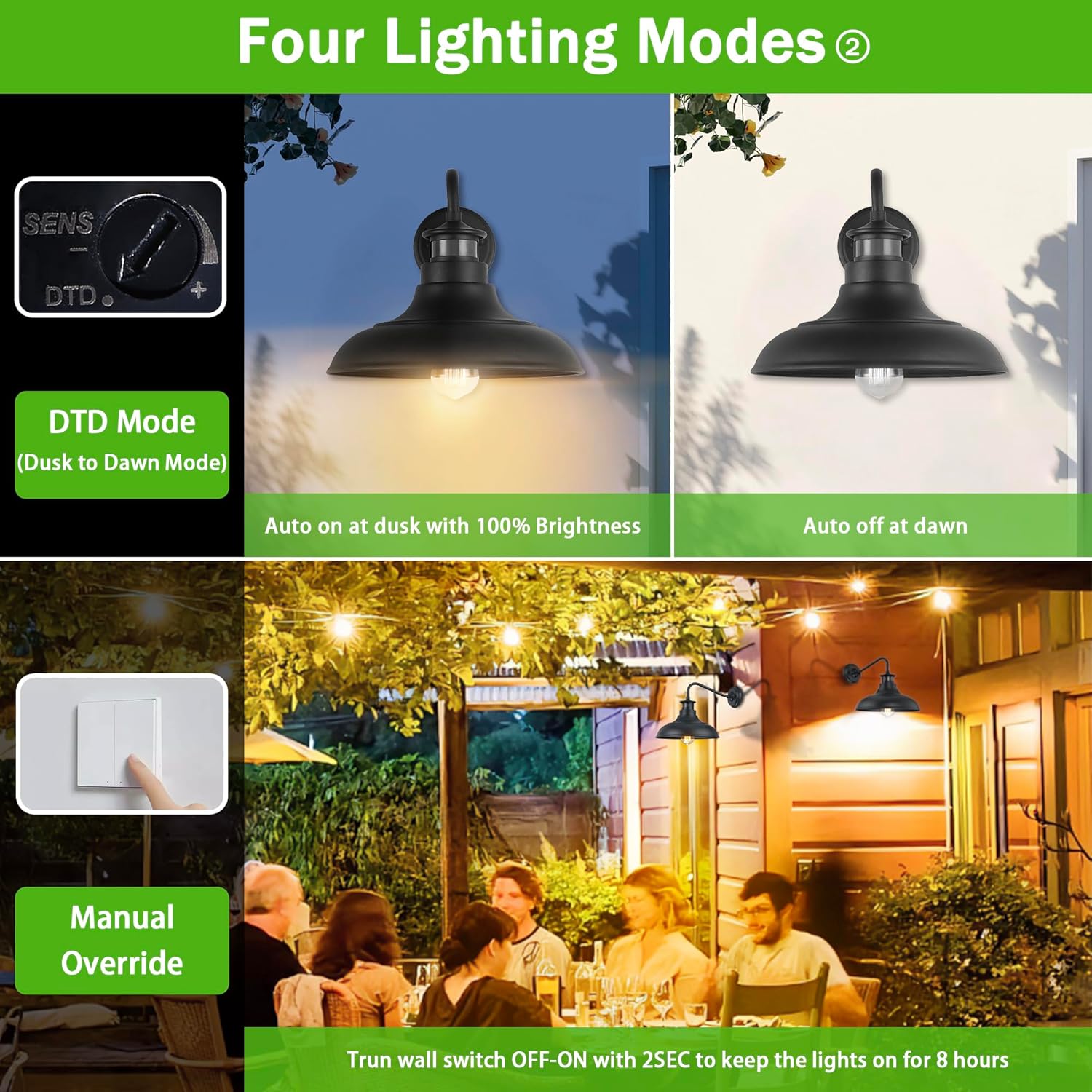
Image 6.2: Illustration of DTD Mode (Dusk-to-Dawn) and Manual Override Mode, demonstrating automatic and continuous lighting functions.
Adjustable Sensing Distance
The sensitivity knob allows for continuous adjustment of the motion sensing range from 5 feet to 35 feet. This feature enables customization of the detection area to meet specific requirements. For example, if the fixture is located near a road, the sensing distance can be reduced to prevent activation by passing vehicles or pedestrians.
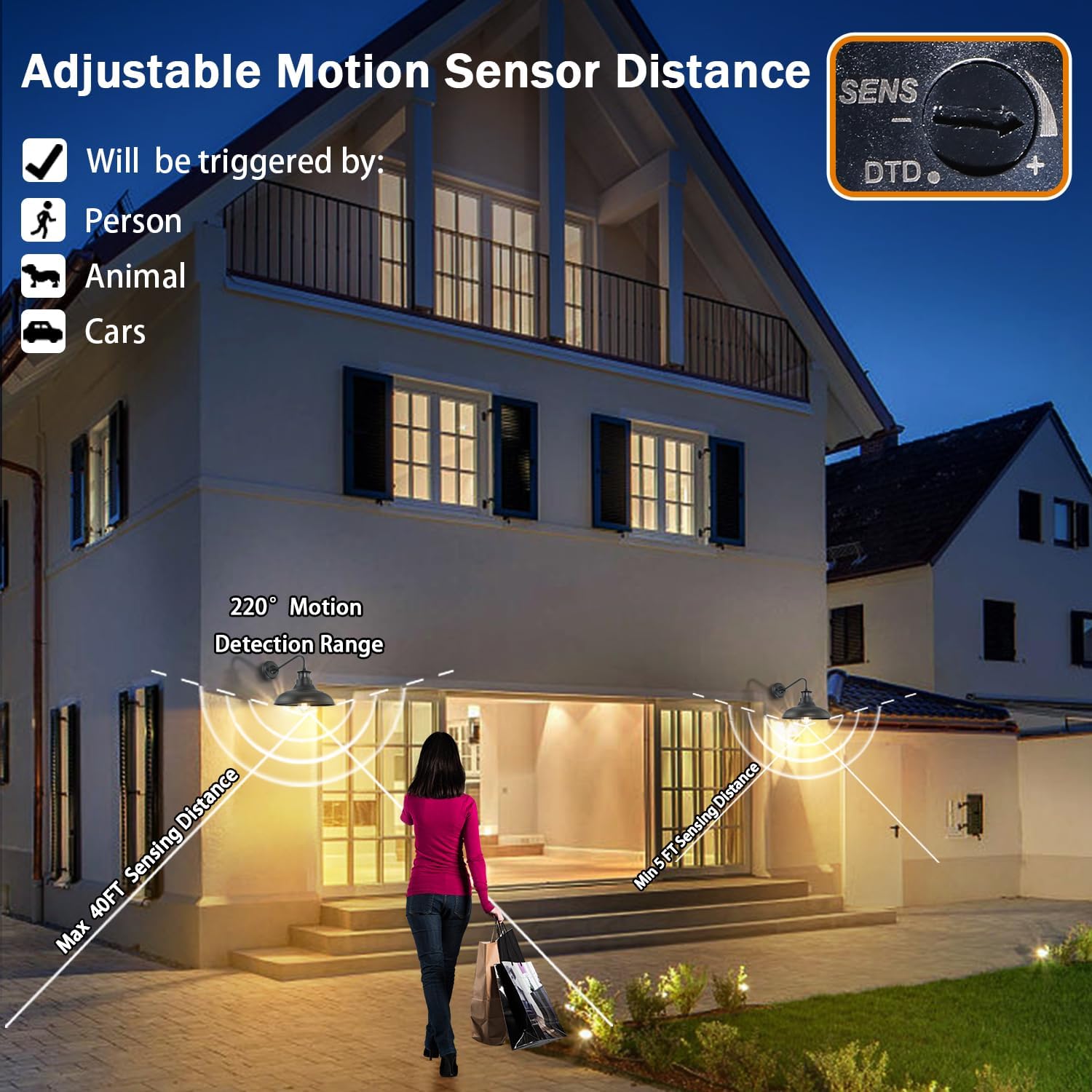
Image 6.3: Diagram illustrating the adjustable motion sensor distance and 220° detection range of the Untrammelife Outdoor Barn Light.
7. Maintenance
Regular maintenance ensures the longevity and optimal performance of your Untrammelife Outdoor Barn Light.
- Cleaning: Periodically wipe the fixture with a soft, damp cloth to remove dust and debris. Avoid using abrasive cleaners or solvents, as these can damage the finish.
- Bulb Replacement: Ensure the power is off before replacing the bulb. Use only E26 base bulbs with a maximum wattage of 60W. Incandescent or dimmable LED bulbs are recommended.
- Sensor Check: Keep the motion sensor lens clean and free from obstructions to ensure accurate detection.
- Weather Resistance: The heavy-duty steel construction provides resistance against corrosion and harsh weather conditions like rain, snow, sun, and wind. While designed for outdoor use, occasional inspection for any signs of wear or damage is advisable.

Image 7.1: Visual representation of the Untrammelife Outdoor Barn Light's weather-resistant features, indicating its durability against snow, rain, sun, and wind.
8. Troubleshooting
If you encounter issues with your Untrammelife Outdoor Barn Light, refer to the following common troubleshooting steps:
- Light Not Turning On:
- Check if the power supply is active at the circuit breaker.
- Ensure the bulb is securely screwed into the socket and is not burnt out.
- Verify the selected operating mode. In Auto or DB Mode, ensure there is sufficient darkness and motion. In DTD Mode, confirm it is dusk.
- Light Stays On or Flashes:
- Check for nearby heat sources (e.g., vents, air conditioners) or reflective surfaces that might be triggering the motion sensor.
- Adjust the motion sensor's sensitivity to a lower setting.
- Ensure the fixture is not in Override Mode, which keeps the light on continuously.
- Clean the sensor lens to remove any obstructions.
- Motion Sensor Not Detecting:
- Ensure the sensor lens is clean and unobstructed.
- Increase the motion sensor's sensitivity.
- Verify the fixture is installed at the recommended height (at least 6 feet) and in a location where motion can be effectively detected.
- Confirm the light is not in DTD Mode, where motion sensing is inactive.
If these steps do not resolve the issue, please contact customer support for further assistance.
9. Warranty and Support
Untrammelife stands behind all its products with professional after-sales support. If you have any questions, technical problems, or require assistance with your product, please do not hesitate to contact us. We are committed to providing a satisfactory solution.
For support, please refer to the contact information provided with your purchase or visit the official Untrammelife website.
10. Application Examples
The Untrammelife Outdoor Barn Light is suitable for a wide range of exterior applications, providing both illumination and enhanced security:
- House exteriors
- Barns
- Front doors and entryways
- Porches and patios
- Gardens and balconies
- Garages and corridors
- Courtyards

Image 10.1: Collage of images demonstrating the Untrammelife Outdoor Barn Light installed in various outdoor settings, including residential exteriors and garden areas.