
1. Introduction
Thank you for choosing the VGR V-008 Professional Rechargeable Hair Trimmer. This manual provides essential information for the safe and effective use, maintenance, and troubleshooting of your new trimmer. Please read it thoroughly before first use and keep it for future reference.
2. Safety Information
- Keep this appliance out of reach of children.
- Use with caution, especially near sensitive areas such as the face and eyes.
- Ensure the trimmer is clean and well-maintained regularly to ensure optimal performance and hygiene.
- Do not immerse the trimmer in water.
- Do not use if the blades are damaged, as this may cause injury.
- Only use the provided charging cable and accessories.
3. Package Contents
Upon unpacking, please verify that all the following items are included:
- 1 x VGR V-008 Hair Trimmer
- 1 x Protection Cover
- 1 x User Manual
- 3 x Guide Combs (1mm, 2mm, 3mm)
- 1 x Lubricating Oil
- 1 x Cleaning Brush
- 1 x USB Type-C Charging Cable
4. Product Overview
The VGR V-008 trimmer features a high-quality stainless steel T-blade designed for efficient, precise, and smooth trimming. It is equipped with a powerful motor and a rechargeable battery for cordless operation.
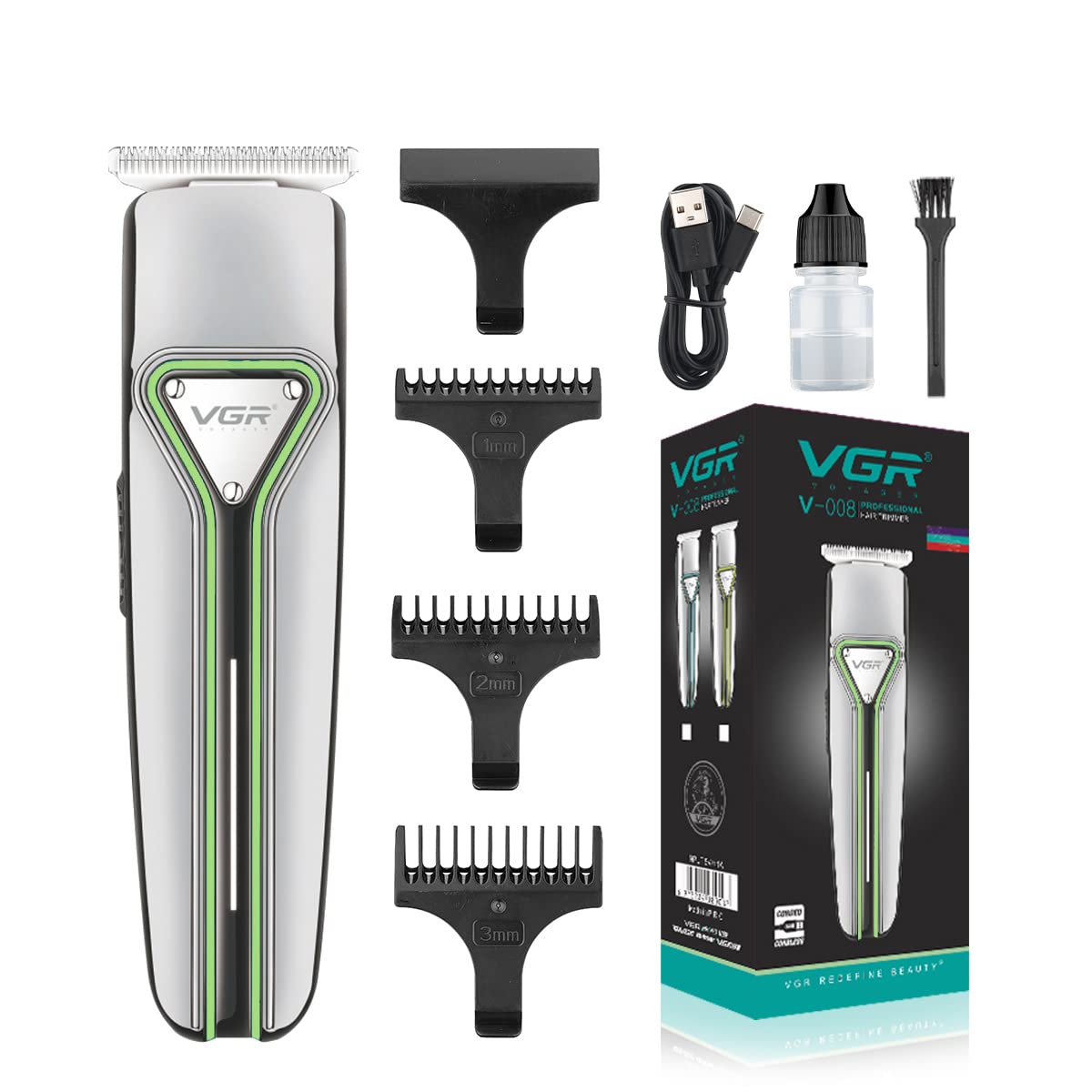
Image: The VGR V-008 Professional Rechargeable Hair Trimmer in silver with green accents.
Key Features:
- Precision T-Blade: The sharp, extra-thin T-blade ensures precise trimming and remains sharp for extended periods, suitable for various hair types.
- R-Angle Processing: Designed with R-angle processing to protect the skin during use.
- Powerful Motor: Equipped with a robust motor for consistent performance.
- Rechargeable Battery: Features a 600mAh Lithium-Ion battery, providing up to 120 minutes of work time on a 2-hour charge.
- USB Type-C Charging: Conveniently charge your trimmer anywhere using the included USB Type-C cable.
- LED Strip: An integrated LED strip indicates battery status or charging progress.

Image: Close-up view of the VGR V-008 trimmer blade, highlighting the precision T-blade and R-angle processing for skin protection.

Image: Diagram showing the location of the On/Off switch, powerful motor, USB charging port, and LED strip on the VGR V-008 trimmer.

Image: Visual representation of the VGR V-008's 600mAh battery, 2-hour charge time, and 120-minute work time, along with compatible USB charging sources.
5. Setup
5.1 Initial Charging
- Before first use, fully charge the trimmer.
- Connect the USB Type-C charging cable to the trimmer's charging port.
- Plug the other end of the USB cable into a compatible USB power source (e.g., computer, laptop, USB charger, power bank).
- The LED strip will indicate charging status. A full charge typically takes 2 hours.
- Once fully charged, disconnect the trimmer from the power source.
5.2 Attaching Guide Combs
To achieve desired hair lengths, attach one of the three guide combs:
- Ensure the trimmer is turned off.
- Select the desired guide comb (1mm, 2mm, or 3mm).
- Align the comb with the trimmer blade and push it firmly until it clicks into place.
- To remove, gently pull the comb away from the blade.

Image: The VGR V-008 trimmer with its three guide combs (1mm, 2mm, 3mm) for precise length control.
6. Operating Instructions
6.1 Basic Trimming
- Ensure your hair is clean and dry before trimming.
- Attach the desired guide comb for your preferred length. For a closer trim (0.5mm), use the trimmer without a comb.
- Press the ON/OFF switch to turn on the trimmer.
- Hold the trimmer with the blade flat against the skin and move it slowly against the direction of hair growth.
- Use smooth, even strokes.
- After use, turn off the trimmer by pressing the ON/OFF switch.
6.2 Detailing and Edging
For precise lines, detailing, and edging, remove the guide comb and use the bare blade. Exercise extra caution when using the bare blade directly on the skin.
7. Maintenance
7.1 Cleaning the Blades
- Turn off the trimmer and disconnect it from any power source.
- Remove any attached guide comb.
- Use the provided cleaning brush to brush away loose hairs from the blades and the trimmer head.
- For a more thorough clean, the blade head can be carefully detached (refer to the manual for specific instructions if available, otherwise proceed with caution). Rinse the blades under running water if they are detachable and washable. Ensure they are completely dry before reattaching.
- Do not rinse the main body of the trimmer under water.
7.2 Oiling the Blades
- After cleaning, apply 1-2 drops of the provided lubricating oil onto the blades.
- Turn on the trimmer for a few seconds to allow the oil to distribute evenly.
- Wipe off any excess oil with a soft cloth.
- Regular oiling ensures smooth operation and extends blade life.
7.3 Storage
Store the trimmer in a cool, dry place, away from direct sunlight and moisture. Use the protection cover to safeguard the blades when not in use.
8. Troubleshooting
| Problem | Possible Cause | Solution |
|---|---|---|
| Trimmer does not turn on. | Battery is depleted. | Charge the trimmer for 2 hours. |
| Trimmer runs slowly or pulls hair. | Blades are dirty or not oiled. | Clean and oil the blades as per maintenance instructions. |
| Trimmer is not cutting effectively. | Blades are dull or damaged. | Ensure blades are clean and oiled. If problem persists, consider blade replacement or contact support. |
| Trimmer gets hot during use. | Extended use or dirty blades. | Allow the trimmer to cool down. Clean and oil the blades. Avoid prolonged continuous use. |
9. Specifications
| Feature | Detail |
|---|---|
| Model Number | V-008 |
| Blade Material | Stainless Steel |
| Power Source | Cordless (Rechargeable Lithium-Ion Battery) |
| Battery Capacity | 600mAh |
| Charge Time | 2 Hours |
| Work Time | 120 Minutes |
| Charging Interface | USB Type-C |
| Minimum Cutting Length | 1 mm |
| Maximum Cutting Length | 3 mm (with guide combs) |
| Guide Combs Included | 1mm, 2mm, 3mm |
| Product Dimensions | 15 x 4 x 3 cm |
| Item Weight | 100 grams |
| Special Features | Rechargeable, Portable |
| Target Audience | Men, Youth, Adults |
10. Warranty and Support
VGR products are manufactured to high-quality standards. For warranty information or technical support, please refer to the warranty card included in your package or contact the retailer where you purchased the product. Keep your proof of purchase for any warranty claims.


