
Donner Multi-Pad100
Donner Multi-Pad100 Multi Effects Pedal & Guitar Patch Cables
User Instruction Manual
Introduction
This manual provides detailed instructions for the Donner Multi-Pad100 Multi Effects Pedal and the accompanying 6-inch Guitar Pedal Patch Cables. It covers product features, setup, operation, maintenance, and troubleshooting to ensure optimal performance and longevity of your equipment.

The Donner Multi-Pad100 Multi Effects Pedal shown with the included 6-inch guitar pedal patch cables.
Donner Multi-Pad100 Multi Effects Pedal
The Multi-Pad100 is a versatile guitar effects processor designed to provide a wide range of tonal possibilities in a compact unit. It integrates multiple effect modules, amplifier models, a drum machine, and a built-in tuner.
Controls and Functions
The Multi-Pad100 features intuitive controls for easy navigation and sound shaping. Key controls include knobs for various effects parameters and buttons for patch selection, saving, playback, and tuner activation.
Detailed view of the Multi-Pad100's control layout, showing the various knobs and buttons for effect and amplifier adjustments.
Effect Modules
The pedal includes five distinct effect modules, allowing for a broad spectrum of sound textures:
- Delay: Adds echoes to your sound.
- Reverb: Simulates acoustic spaces, adding depth and spaciousness.
- Chorus: Creates a thicker, shimmering sound by slightly detuning and delaying the signal.
- Flanger: Produces a sweeping, jet-plane like sound.
- Tremolo: Varies the volume of the signal, creating a pulsating effect.

Visual representation of the Multi-Pad100's five integrated effect modules.
Amplifier Models
The Multi-Pad100 features 7 amplifier models, each offering unique tonal characteristics based on renowned amplifiers:
- Tweed Deluxe*
- AC30*
- JCM800*
- AD30*
- 5150*
- Savage 120*
- SVT BASS AMP*
*Brand names and model names are trademarks of their respective owners and are not affiliated with Donner. These names are used solely to identify the sound characteristics.

Overview of the 7 amplifier models and their associated cabinet simulations.
Drum Rhythms and Tuner
The Multi-Pad100 includes a built-in drum machine with 40 selected rhythms and a metronome function for practice. It also features an integrated tuner for accurate instrument tuning.

The Multi-Pad100's drum machine offers 40 diverse rhythms for practice and accompaniment.
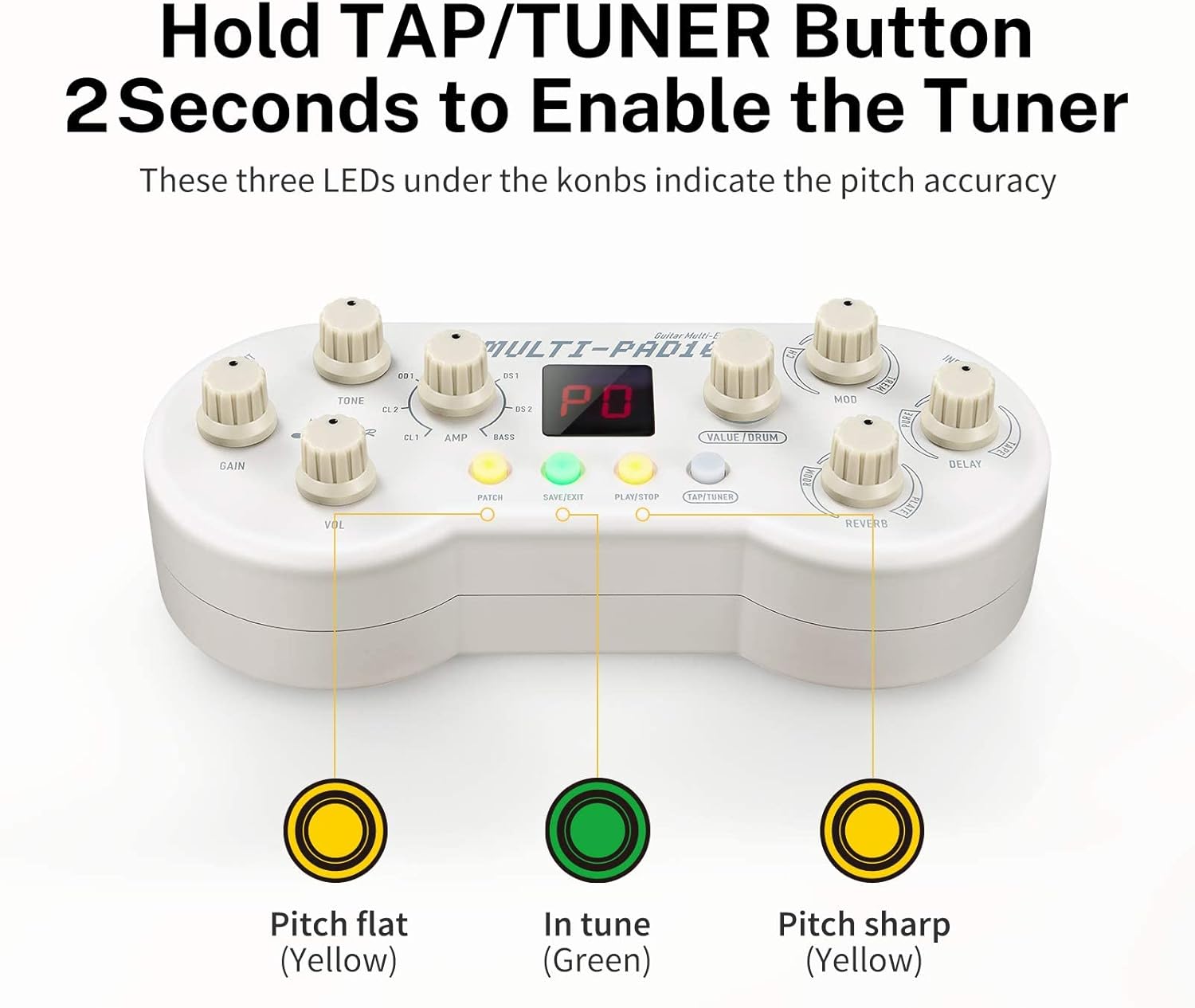
Activating the built-in tuner and interpreting the LED pitch indicators.
6-Inch Guitar Pedal Patch Cables
The included 6-inch patch cables are designed for connecting guitar pedals on a pedalboard, featuring right-angle connectors for efficient space utilization and high-quality signal transmission.
Features
- Standard Audio Connector: Utilizes ultra-pure, oxygen-free copper conductors for low capacitance and pure tone.
- Right Angle Connectors: Helps save space on crowded pedalboards.
- Flexible Design: Cables are flexible enough to allow for optimal pedal positioning.

Dimensions of the 6-inch guitar pedal patch cable, highlighting its compact size.

The benefit of right-angle connectors for efficient pedalboard layout.

The flexibility of the cables allows for custom pedal arrangements.

Example of multiple Donner pedals interconnected using the patch cables.
Setup
Multi-Pad100 Connection
- Power Supply: Connect a compatible 9V DC power adapter (not included) to the DC IN jack on the Multi-Pad100.
- Instrument Input: Connect your guitar to the INPUT jack using a standard 1/4-inch instrument cable.
- Output to Amplifier/Mixer: Connect the OUTPUT jack to your amplifier's input or a mixing console using a standard 1/4-inch instrument cable.
- Headphones (Optional): If available, connect headphones to the dedicated headphone jack for silent practice.
Patch Cable Usage
Use the 6-inch patch cables to connect multiple guitar pedals in series on your pedalboard. The right-angle connectors allow for close placement of pedals, optimizing space.
- Connect one end of a patch cable to the output of the first pedal.
- Connect the other end of the same patch cable to the input of the next pedal in your signal chain.
- Repeat for all pedals in your desired order.
Operating Instructions
Multi-Pad100 Basic Operation
- Power On/Off: Connect/disconnect the power adapter.
- Selecting Patches: Use the 'PATCH' button to cycle through different preset patches.
- Adjusting Effects: Turn the dedicated knobs (MOD, DELAY, REVERB) to adjust the parameters of the active effects.
- Selecting Amplifier Models: Use the 'AMP' knob to select from the 7 built-in amplifier models.
- Drum Machine: Press the 'PLAY/STOP' button to start/stop the drum rhythm. Use the 'VALUE/DRUM' knob to select different rhythms.
- Tuner: Hold the 'TAP/TUNER' button for 2 seconds to activate the tuner. The LEDs will indicate pitch accuracy. Press again to exit tuner mode.
- Saving Settings: Press the 'SAVE/EXIT' button to save your customized settings to a patch.
Maintenance
- Cleaning: Wipe the unit and cables with a soft, dry cloth. Do not use abrasive cleaners or solvents.
- Storage: Store the pedal and cables in a cool, dry place away from direct sunlight and extreme temperatures.
- Cable Care: Avoid sharp bends or kinks in the patch cables to prevent internal wire damage.
Troubleshooting
| Problem | Possible Cause | Solution |
|---|---|---|
| No sound from pedal | Incorrect connections, no power, volume/gain set to zero. | Check all cable connections. Ensure power adapter is connected and functional. Increase GAIN and VOL knobs. |
| Distorted sound | Input signal too hot, incorrect amplifier model, faulty cable. | Reduce guitar's output volume. Try a different amplifier model. Test with different cables. |
| Tuner not activating | Button not held long enough. | Hold the 'TAP/TUNER' button for a full 2 seconds. |
| Drum machine not playing | 'PLAY/STOP' button not pressed. | Press the 'PLAY/STOP' button to initiate playback. |
| Patch cables not working | Damaged cable, incorrect connection. | Inspect cables for visible damage. Ensure connectors are fully inserted into jacks. Try a different cable. |
Specifications
Donner Multi-Pad100
- Signal Format: Analog
- Power Source: Corded Electric (9V DC, center negative, adapter not included)
- Effect Modules: Delay, Reverb, Chorus, Flanger, Tremolo
- Amplifier Models: 7
- Drum Rhythms: 40
- Controls Type: Knob
6-Inch Guitar Pedal Patch Cables
- Length: 6 inches (approx. 15.24 cm)
- Connector Type: 1/4-inch TS (Tip-Sleeve), Right-Angle
- Conductor Material: Ultra-pure, oxygen-free copper
Warranty and Support
For warranty information, technical support, or service inquiries, please contact Donner customer support through their official website or the retailer from whom the product was purchased. Please retain your proof of purchase for any warranty claims.
Donner Official Website: www.donnerdeal.com
Related documentsMulti-Pad100


Ask a question about this manual
Ask about setup, troubleshooting, compatibility, parts, safety, or missing instructions. Manuals+ will review the question and use this page’s manual context to help answer it.