
1. Introduction
This manual provides essential instructions for the safe operation, maintenance, and troubleshooting of your FASTPRO 20V Cordless Lithium-ion Drill Driver and 177-Piece Home Tool Set. Please read this manual thoroughly before using the product to ensure proper function and to prevent injury.
2. Safety Instructions
Always observe basic safety precautions to reduce the risk of fire, electric shock, and personal injury.
- Wear Eye Protection: Always wear safety goggles or safety glasses with side shields when operating power tools.
- Keep Work Area Clean: Cluttered areas and benches invite injuries.
- Avoid Dangerous Environment: Do not use power tools in damp or wet locations, or expose them to rain. Keep work area well lit.
- Keep Children Away: All visitors should be kept at a safe distance from the work area.
- Secure Workpiece: Use clamps or a vise to hold work. This is safer than using your hand and it frees both hands to operate the tool.
- Do Not Overreach: Keep proper footing and balance at all times.
- Disconnect Tools: Disconnect the battery pack from the drill before making any adjustments, changing accessories, or storing the tool.
- Use Right Tool: Do not force tool or attachment to do a job for which it was not designed.
- Maintain Tools With Care: Keep tools sharp and clean for better and safer performance. Follow instructions for lubricating and changing accessories.
3. Product Overview
The FASTPRO 177-Piece Home Tool Set includes a 20V cordless drill driver and a comprehensive collection of hand tools and accessories for various household repair and DIY projects. All components are organized within a durable storage case.
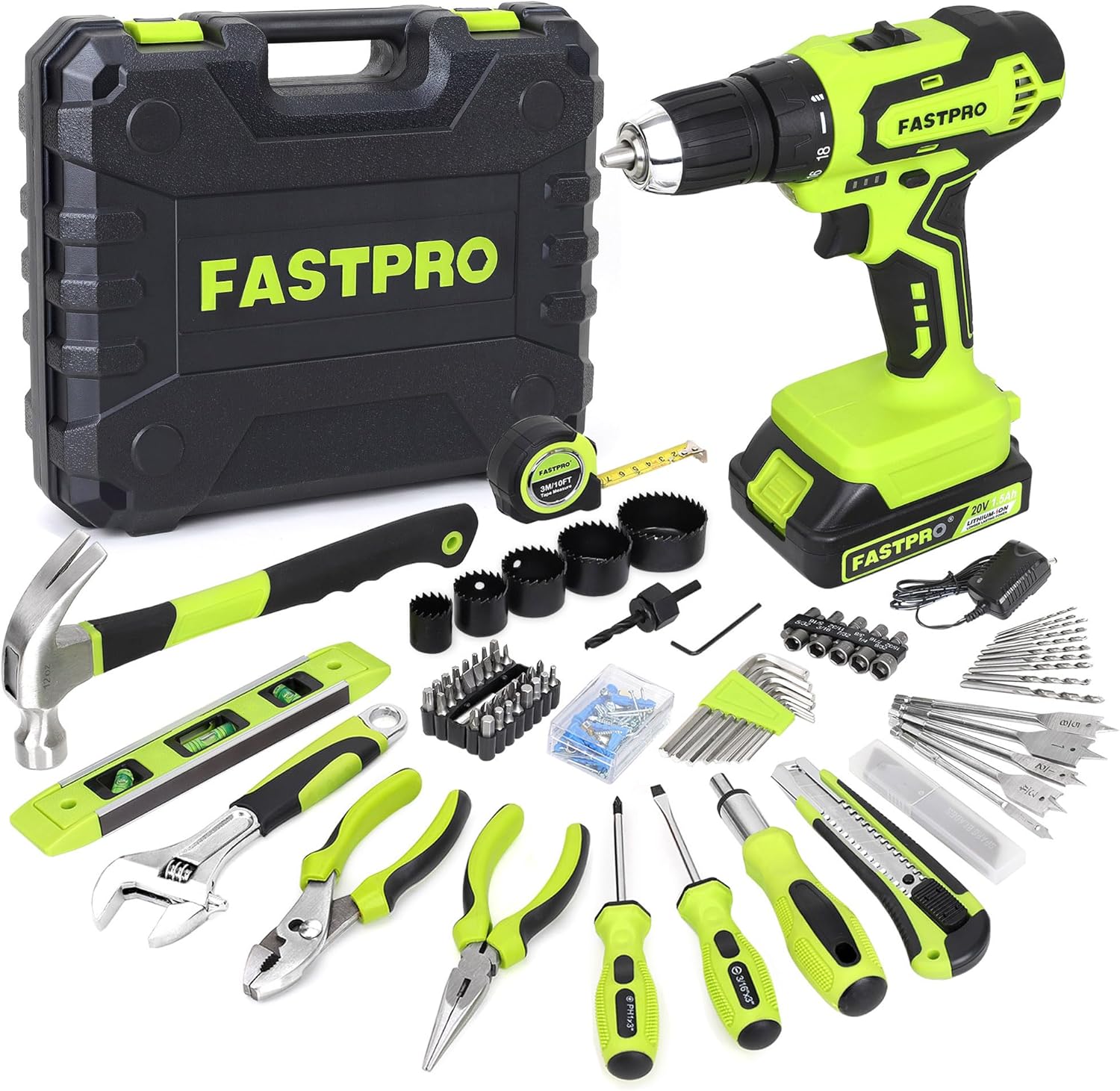
Image 3.1: Complete FASTPRO 177-Piece Home Tool Set.
Included Components:
- 1 x 20V Cordless Drill Driver
- 1 x 8” Adjustable Wrench
- 1 x 6” Slip-joint Pliers
- 1 x 6” Long Nose Pliers
- 1 x 12 oz Fiber Glass Handle Hammer
- 1 x 9” Torpedo Level
- 1 x 3 M / 10 FT Tape Measure
- 1 x Ratcheting Screwdriver
- 2 x Screwdriver Set (Slotted 3/16” X 3”, Philips: PH1X3”)
- 10 x HSS6542 Drill Bits
- 5 x Woodboring Spade Drill Bits
- 32 x Screwdriver Bits Set
- 1 x 60mm Magnetic Extension Bar
- 10 x Nut Drivers set
- 5 x Hole Saw Set
- 1 x Hole Saw Arbor with 1pc Central Drills
- 8 x Hex Key Set
- 85 x Hardware Kit
- 1 x Battery Charger
- 1 x Storage Case
Drill Driver Components:

Image 3.2: Labeled components of the FASTPRO 20V Cordless Drill Driver.
- Bits Socket Chuck (3/8 inch / 10mm)
- Torque Setting (19-position)
- Gear Selector (1-Low Speed, 2-High Speed)
- Battery Indicator Lights
- Forward/Reverse Rotation Control
- Variable-Speed Trigger Switch
- Work Light
- Battery Pack (20V 1.5Ah)
4. Setup
4.1 Battery Charging
The drill driver is powered by a 20V, 1.5Ah Lithium-ion battery. Before first use, fully charge the battery. Connect the battery charger to a standard power outlet and then connect it to the battery pack. The battery indicator lights on the drill will show the charging status. Ensure the battery is securely seated in the charger.

Image 4.1: Battery indicator lights on the drill driver.
4.2 Installing Drill Bits and Accessories
The drill features a 3/8 inch (10mm) keyless chuck for quick bit replacement.
- Ensure the drill is off and the battery is removed for safety.
- Rotate the chuck counter-clockwise to open the jaws.
- Insert the desired drill bit or accessory into the chuck.
- Rotate the chuck clockwise to tighten the jaws securely around the bit. Ensure the bit is centered and firmly held.

Image 4.2: Quick bit replacement using the keyless chuck.
5. Operation
5.1 Adjusting Torque Settings
The drill driver features a 19-position clutch that allows you to adjust the torque output. This controls the depth of the screw or fastener, preventing overtightening or stripping. Rotate the torque collar to select the desired setting:
- Settings 1-4: For driving small screws into soft material.
- Settings 5-8: For driving screws into soft material.
- Settings 9-12: For driving screws into soft and hard materials.
- Settings 13-16: For driving screws into hard wood.
- Settings 17-18: For driving large screws.
- Drill Symbol: For heavy drilling applications.

Image 5.1: Adjustable torque settings on the drill driver.
5.2 Changing Speed Settings
The drill driver has a variable 2-speed transmission for multiple purposes. Use the gear selector switch located on top of the drill:
- Position 1 (0-400 RPM): Low speed, suitable for driving screws and applications requiring higher torque.
- Position 2 (0-1500 RPM): High speed, suitable for drilling.

Image 5.2: Drill driver operating at different speeds for drilling and screwdriving.

Image 5.3: The 2-speed gear selector switch.
5.3 Forward/Reverse Rotation Control
The forward/reverse switch allows you to change the direction of rotation. Push the switch to the left for forward rotation (drilling/driving) and to the right for reverse rotation (removing screws/bits). Center position locks the trigger for safety.
5.4 Using Hand Tools
The set includes various hand tools designed for durability and ease of use. Pliers are constructed from forged steel with heat treatment for strength. Always select the appropriate tool for the task to ensure safety and effectiveness.

Image 5.4: Examples of hand tools: adjustable wrench, slip-joint pliers, and long nose pliers.

Image 5.5: Ratcheting screwdriver with interchangeable bits.

Image 5.6: Hammer, tape measure, and torpedo level.
6. Maintenance
6.1 Cleaning
Regularly clean your tools to ensure longevity and optimal performance. Wipe down the drill driver and hand tools with a clean, dry cloth after each use. For stubborn dirt, a slightly damp cloth can be used, ensuring no moisture enters the drill's ventilation openings. Do not use harsh chemicals or abrasive cleaners.
6.2 Battery Care
- Store the battery in a cool, dry place away from direct sunlight and extreme temperatures.
- Do not store the battery in a discharged state for extended periods. Recharge it periodically if not in use.
- Avoid exposing the battery to water or moisture.
6.3 Storage
The blow-molded case is designed for easy storage and transportation. After use, ensure all tools are clean and dry before returning them to their designated places within the case. This keeps tools organized and protected.

Image 6.1: Durable storage case for easy organization and transport.
7. Troubleshooting
- Drill Not Operating: Ensure the battery is fully charged and properly inserted. Check the forward/reverse switch is not in the center (locked) position.
- Battery Not Charging: Verify the charger is correctly plugged into a working power outlet and securely connected to the battery. Ensure the battery and charger are not damaged.
- Sparks from Drill: This drill driver utilizes carbon brushes. It is normal for the carbon brushes to produce visible sparks from the electromagnetic charge inside the drill during operation. This is not an indication of a malfunction.
- Reduced Performance: Ensure the correct torque setting and speed are selected for the task. Check that drill bits or accessories are sharp and not worn.
8. Specifications
| Feature | Specification |
|---|---|
| Brand | FASTPRO |
| Model Number | F00719 |
| Power Source | Battery Powered |
| Battery Type | 20V 1.5Ah Lithium-ion |
| Maximum Rotational Speed | 1500 RPM |
| Voltage | 20 Volts |
| Amperage | 1.5 Amps |
| Maximum Chuck Size | 0.38 Inches (10mm) |
| Item Torque | 25 Newton Meters |
| Number of Speeds | 2 (Variable) |
| Product Dimensions | 14"L x 7.5"W x 9.25"H |
| Item Weight | 12 Pounds |
| Material | Metal, Plastic |
9. Warranty and Support
For warranty information or technical support, please refer to the documentation included with your purchase or contact FASTPRO customer service. Keep your purchase receipt as proof of purchase.
For additional assistance, you may visit the official FASTPRO store online: FASTPRO Store