
Introduction
This manual provides essential information for the safe and effective operation of your FIRElood Wood Burning Tool. This professional pyrography kit is designed for detailed art on various materials, offering precise temperature control and versatile pen tips.
Safety Information
- Always operate the tool in a well-ventilated area.
- The pen tips reach very high temperatures (up to 750°C). Avoid direct contact with skin or flammable materials.
- Use the included pen stand to safely rest the hot pens when not in use.
- Keep out of reach of children and pets.
- Ensure the sponge is saturated with water before wiping hot pen tips.
- When replacing pen tips, ensure the unit is off and the tips have cooled, or use appropriate heat-resistant tools. Tighten screws firmly to ensure good contact.
Package Contents
Your FIRElood Wood Burning Kit includes:
- Wood Burning Machine (Control Unit)
- Two (2) Pyrography Pens
- Twenty-three (23) assorted Pen Tips
- One (1) Pen Shelf / Stand
- One (1) Screwdriver
- One (1) Sponge (for cleaning tips)
- Small Wooden Boards (for practice)
- One (1) Engraving Pen (for scraping/scratching)
- User Manual (this document)

Image: Overview of the FIRElood Wood Burning Tool kit, showing the main control unit, two pyrography pens, a stand with a cleaning sponge, a screwdriver, and a variety of pen tips.
Setup
- Unpacking: Carefully remove all components from the packaging.
- Placement: Place the main control unit on a stable, heat-resistant surface in a well-ventilated area.
- Pen Stand Assembly: Place the sponge into the designated tray on the pen stand. Saturate the sponge with water before use.
- Connecting Pens: Insert the connectors of the pyrography pens into the corresponding ports on the front of the control unit. The unit supports two pens for quick switching.
- Attaching Pen Tips: Select the desired pen tip and use the screwdriver to securely fasten it into the pen's terminal. Ensure a tight connection to prevent poor contact.
- Power Connection: Plug the power cord into a standard 110V electrical outlet.
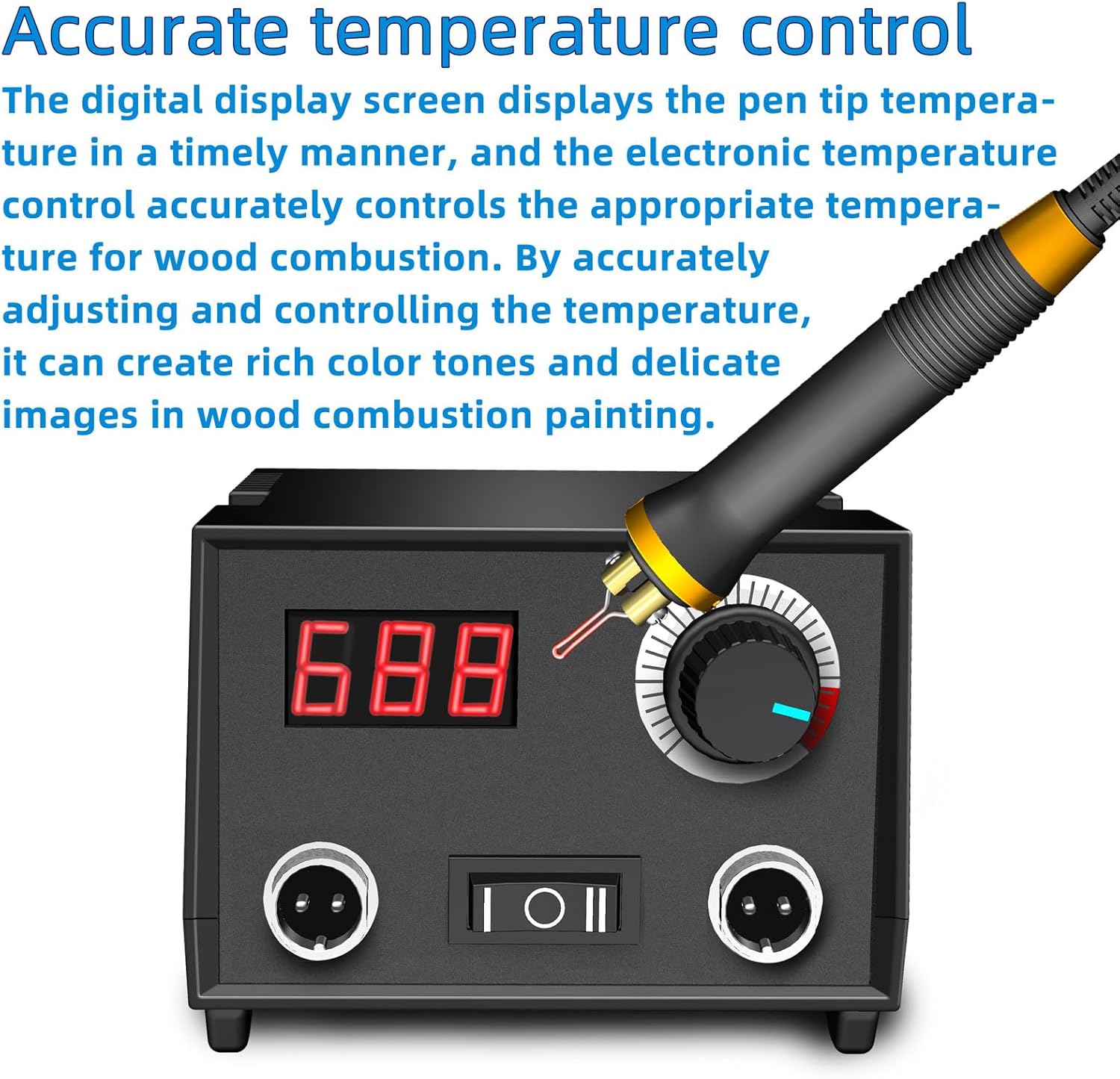
Image: The main control unit with its digital temperature display and rotary knob for adjusting heat.

Image: Illustration of the dual pen ports on the control unit, highlighting the ability to switch between two pens by pressing the corresponding button.

Image: A close-up diagram illustrating the correct method for attaching a pen tip to the pyrography pen using the provided screwdriver.
Operating Instructions
- Power On: Flip the main power switch on the control unit to the "ON" position. The digital display will illuminate.
- Temperature Adjustment: Use the rotary knob to set the desired temperature. The digital display shows the current temperature.
- Note: For light colors, approximately 250°C is recommended. For very dark rendering, around 450°C is suitable. Adjust as needed based on practice and material.
- Quick Heating: It is recommended to set the temperature to the highest setting initially. The pen tip will heat up in 5-10 seconds. Then, slowly lower the temperature to your working preference.
- Pen Selection: If using two pens, press the corresponding button (I or II) on the control unit to activate the desired pen. The active pen will immediately begin to heat.
- Pyrography Technique:
- Hold the pen comfortably. The ergonomic design and short distance from the tip to the hand (0.75 inches diameter, 33 grams weight) allow for precise control.
- Apply gentle, consistent pressure to the wood surface.
- Experiment with different pen tips (23 included) to achieve various line widths, textures, and shading effects.
- Use the engraving pen to lighten dark areas or add fine details by scraping.
- Cleaning Tips: Regularly wipe hot pen tips on the wet sponge in the pen stand to remove carbon buildup and maintain optimal performance.

Image: A user demonstrating the comfortable grip and precise control offered by the pyrography pen, with a partially completed wood burning artwork of a cat.

Image: Detailed diagram of the pyrography pen, showing its dimensions and highlighting the non-slip heat insulation material and ergonomic design for comfortable and precise use.

Image: A visual guide to the multi-functional pen holder, indicating where to place working pens, the pen tip dirt cleaning box (sponge), and the pen tip accessory storage box.
Official Product Videos
Video: This video demonstrates the functions and usage skills of the LH42-2 wood burner, showing how to set up the device, adjust temperature, and use the pens for pyrography.
Video: This video showcases various real creation works made with the pyrography machine, demonstrating the artistic possibilities and detailed results achievable with the tool.
Maintenance
- Cleaning: Always ensure the unit is unplugged and cooled before cleaning. Wipe the control unit and pens with a soft, dry cloth.
- Tip Care: Regularly clean pen tips on the wet sponge during use. Store unused tips in a dry place.
- Storage: When not in use, store the wood burning tool and its accessories in a cool, dry place, away from direct sunlight and moisture.
Troubleshooting
| Problem | Possible Cause | Solution |
|---|---|---|
| Pen tip not heating | Loose pen tip connection | Ensure pen tip screws are tightened with the screwdriver. |
| Pen not heating (control unit on) | Incorrect pen selected or pen not fully plugged in. | Press the correct pen selection button (I or II). Ensure the pen connector is fully inserted into the port. |
| Inconsistent burning | Dirty pen tip or incorrect temperature setting. | Clean the pen tip on the wet sponge. Adjust temperature as needed for the material and desired effect. |
| Unit not powering on | Power cord not connected or outlet issue. | Check power cord connection and try a different electrical outlet. |
Specifications
- Product Dimensions: 5.51 x 4.33 x 3.54 inches
- Item Model Number: LH40-2-new
- Item Weight: 3.32 pounds
- Manufacturer: FIRElood
- Country of Origin: China
- Voltage: 110V (suitable for US standard outlets)
- Max Temperature: 700°C
- Pen Handle Diameter: 0.75 inches
- Pen Weight: 33 grams
Warranty and Support
FIRElood is committed to customer satisfaction. If you encounter any problems during use, please contact us for prompt assistance. If a pen nib is damaged during shipping, a new pen will be sent immediately.
For further support or inquiries, please refer to the contact information provided with your purchase or visit the official FIRElood store on Amazon.
Visit the Official FIRElood Store

