
VANMASS CTVK61
VANMASS Car Phone Holder User Manual
Model: CTVK61
Introduction
This user manual provides detailed instructions for the installation, operation, and maintenance of your VANMASS 2025 Upgraded Car Phone Holder. Designed for maximum stability and compatibility, this holder ensures your device is securely mounted while driving, minimizing distractions and enhancing safety. Please read this manual thoroughly before use to ensure optimal performance and longevity of your product.
What's in the Box
Upon opening your VANMASS Car Phone Holder package, you should find the following components:
- 1x Best Silence Car Mount (fits big phone/thick case)
- 1x Super Strong Suction Cup (2025 New Upgrade)
- 1x Air Vent Clip (fits vertical / horizontal air vent)
- 1x Wipe (for cleaning Dash / Windshield surface)
- 36 Months Refund or Replacement Support information

Image: All components of the VANMASS Car Phone Holder, including the main phone cradle, the suction cup base, and the air vent clip.
Setup and Installation
Your VANMASS Car Phone Holder offers versatile installation options to suit your vehicle's interior: Dashboard, Windshield, or Air Vent. Choose the method that best fits your needs and vehicle type.
1. Suction Cup Installation (Dashboard/Windshield)
The upgraded suction cup provides extreme holding power. For optimal adhesion, ensure the surface is clean and dry.
- Step 1: Clean the Surface. Use the provided wipe to thoroughly clean the desired mounting area on your dashboard or windshield. Allow it to dry completely.

Image: A hand cleaning a car dashboard surface with a white wipe, preparing for suction cup installation.
- Step 2: Press the Suction Cup. Place the suction cup firmly onto the cleaned surface.

Image: A hand pressing the suction cup base of the phone holder onto a car dashboard.
- Step 3: Lock the Suction Cup. Press down the locking lever on the suction cup to create a strong vacuum seal.
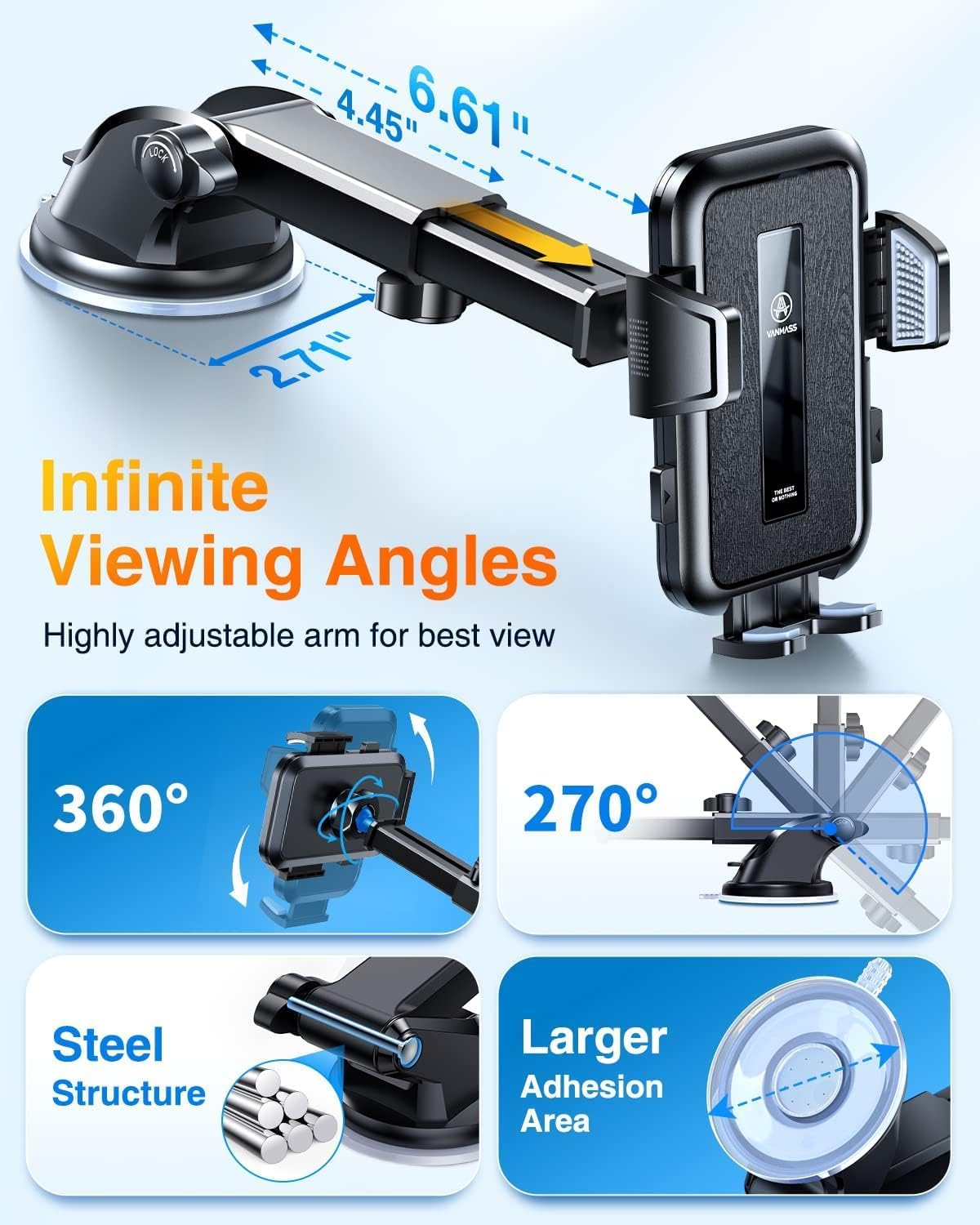
Image: The suction cup base with its locking lever engaged, demonstrating a secure attachment to a surface.
Note: The LEATHER dashboard is NOT suitable for ALL suction cups. If your dashboard is leather, please mount the holder on the windscreen or use the air vent clip instead.
2. Air Vent Clip Installation
The air vent clip is designed for secure attachment to most horizontal and vertical air vents.
- Step 1: Attach the Clip to the Mount. Securely connect the air vent clip to the back of the phone holder cradle.

Image: A person's hands attaching the air vent clip accessory to the main phone holder unit.
- Step 2: Secure to Air Vent. Push the vent clip firmly onto an appropriate air vent blade. Ensure it is stable and does not obstruct airflow significantly. The clip has a 3-level adjustable mechanism for different vent thicknesses (0.07-0.1 inches).

Image: The phone holder securely mounted on a car's air vent, with various car logos indicating broad compatibility.
Note: If the weather is too hot, or car temperature gets over 100°F (38°C), please use the air vent clip instead of the suction cup to prevent potential issues with adhesion.
3. Adjusting the Holder
The VANMASS holder features a 360° ball joint and a telescopic & rotatable arm for optimal viewing angles. Adjust the arm length and angle to ensure your phone is visible without obstructing your view of the road.

Image: The car phone holder mounted on a dashboard, positioned to not obstruct the driver's view of the road, emphasizing safety.
Operating Instructions
Using your VANMASS Car Phone Holder is simple and intuitive.
Inserting Your Phone
- Open the Clamps: Press the release buttons on the sides of the holder to open the clamping arms.
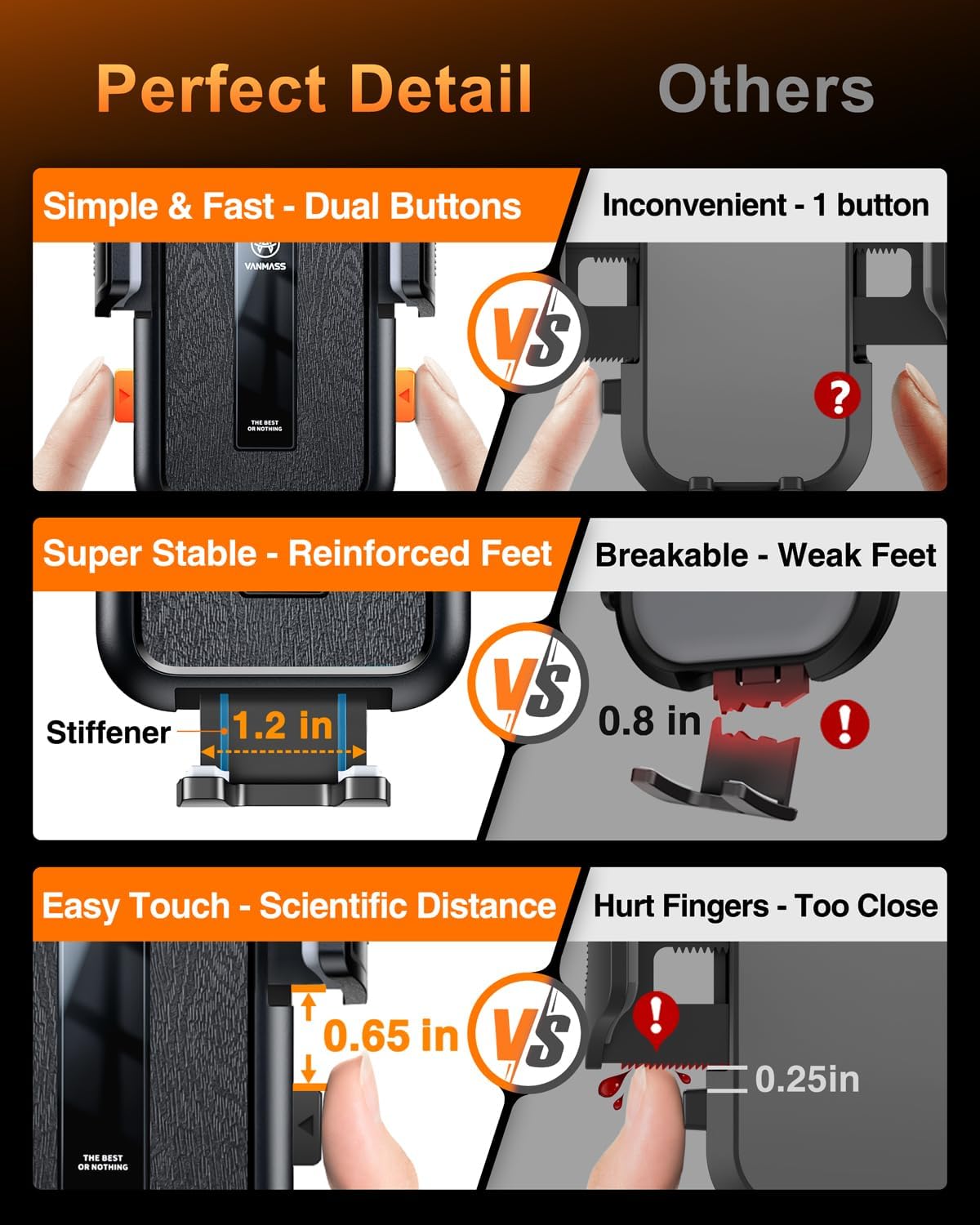
Image: A detailed view of the phone holder's dual release buttons, designed for easy and quick phone insertion and removal.
- Place Your Phone: Gently place your smartphone into the cradle. The holder is designed with a deep cradle (0.8 inches) and strong clamp force to accommodate 99% of smartphones, including those with thick cases (4-7 inches).

Image: The phone holder demonstrating its compatibility with various phone sizes and thick cases, highlighting its adjustable design.
- Secure Your Phone: The clamping arms will automatically close and secure your phone. Ensure it is held firmly without excessive pressure.
Removing Your Phone
To remove your phone, simply press the release buttons on the sides of the holder again. The arms will open, allowing you to safely retrieve your device.
Maintenance
Proper maintenance will extend the lifespan of your VANMASS Car Phone Holder.
- Cleaning the Suction Cup: If the suction cup loses its stickiness, rinse it with warm water and let it air dry. Do not use harsh chemicals or abrasive materials. The suction cup is washable and reusable, designed for 6+ years lifetime.

Image: The suction cup being rinsed under running water, illustrating its washable and reusable design.
- General Cleaning: Wipe the holder with a soft, damp cloth to remove dust and grime. Avoid excessive moisture.
- Storage: When not in use for extended periods, store the holder in a cool, dry place away from direct sunlight.
Troubleshooting
If you encounter any issues with your VANMASS Car Phone Holder, please refer to the following common solutions:
| Problem | Possible Cause | Solution |
|---|---|---|
| Suction cup not sticking. | Surface is dirty, oily, or uneven. Leather dashboard. Extreme temperatures. | Clean the surface thoroughly with the provided wipe. Ensure it's dry. If the dashboard is leather, use the windshield or air vent. In very hot conditions (>100°F), use the air vent clip. |
| Phone not held securely. | Clamping arms not fully closed. Phone size outside compatible range. | Ensure the release buttons are fully pressed to allow the arms to close completely. Verify your phone size is between 4-7 inches. |
| Holder obstructs view. | Improper adjustment of the arm or ball joint. | Adjust the telescopic arm and 360° ball joint to find a position that provides a clear view of the road. |
For more detailed troubleshooting, please refer to the official Troubleshooting Guide (PDF).
Specifications
| Feature | Detail |
|---|---|
| Brand | VANMASS |
| Model Number | CTVK61 |
| Mounting Type | Vent, Windshield, Dashboard |
| Compatible Phone Sizes | 4-7 inches (99% of smartphones, including thick cases) |
| Suction Force | Up to 85 LBS |
| Temperature Resistance | -40°F to 194°F (-40°C to 90°C) |
| Adjustability | 360° Ball Joint, Telescopic & Rotatable Arm |
| Item Weight | 7.5 ounces |
| Package Dimensions | 4.84 x 4.76 x 3.43 inches |
Warranty and Support
VANMASS stands behind the quality of its products. Your car phone holder comes with a 36-month warranty, offering refund or replacement support.
For any questions, concerns, or warranty claims, please contact VANMASS customer support directly. Contact information can typically be found on the product packaging or the official VANMASS website.
We are committed to ensuring your satisfaction and providing a reliable product for your driving needs.
Related documentsCTVK61


Ask a question about this manual
Ask about setup, troubleshooting, compatibility, parts, safety, or missing instructions. Manuals+ will review the question and use this page’s manual context to help answer it.