
BOYA BY XM6
BOYA BY-XM6 Wireless Lavalier Microphone System
User Instruction Manual
Introduction
The BOYA BY-XM6 is a state-of-the-art 2.4GHz adaptive frequency hopping wireless microphone system designed to deliver exceptional, broadcast-quality sound. Consisting of one transmitter and one receiver, it provides a perfect sound capturing and delivering solution for various applications, including one-person vlogs, YouTube videos, live streaming, interviews, and general video recording.

Figure 1: BOYA BY-XM6 Wireless Lavalier Microphone System with included accessories.
Setup
Before first use, ensure all components are present and charged. The system includes a transmitter (TX) and a receiver (RX), along with necessary cables and accessories.
What's in the Box?

Figure 2: Detailed view of the BOYA BY-XM6 package contents.
- 1x BY-XM6 RX Receiver
- 1x BY-XM6 TX Transmitter
- 2x USB-C Charging Cable
- 1x Lavalier Microphone
- 1x Fur Windshield for Built-in Microphone
- 1x Pouch
- 1x 3.5mm TRS to TRS Output Cable for Cameras
- 1x 3.5mm TRS to TRRS Output Cable for Smartphones
Connecting the Receiver (RX)
The receiver unit connects to your recording device. Use the appropriate 3.5mm audio cable:
- For cameras (DSLR, mirrorless, camcorders): Use the 3.5mm TRS to TRS output cable.
- For smartphones/tablets: Use the 3.5mm TRS to TRRS output cable.
Plug the cable into the 'LINE OUT' jack on the RX unit and the corresponding audio input on your camera or smartphone.

Figure 3: The receiver (RX) unit mounted on a camera's hot shoe and connected via 3.5mm cable.
Connecting the Transmitter (TX)
The transmitter unit can be used with its built-in omni-directional microphone or with the included lavalier microphone.
- Built-in Mic: Simply clip the TX unit directly onto the speaker's collar or clothing.
- Lavalier Mic: Plug the lavalier microphone into the 'MIC IN' jack on the TX unit. Clip the lavalier mic to the speaker's clothing and conceal the TX unit (e.g., in a pocket or clipped to a belt).

Figure 4: The transmitter (TX) unit clipped onto clothing for audio capture.
Attaching the Windshield
For outdoor use or in windy conditions, attach the fur windshield to the built-in microphone on the TX unit to reduce wind noise and improve audio clarity.
Operating
Powering On/Off
Press and hold the power button on both the TX and RX units to turn them on or off. The OLED display will illuminate upon powering on.
OLED Display and Controls
Both the transmitter and receiver units feature a vivid OLED display that shows vital information such as battery life, signal strength, and audio levels. Buttons on the side allow for easy adjustment of settings.

Figure 5: Close-up view of the OLED display on the BOYA BY-XM6 units.
- Mute: Short press the mute button on the TX unit to mute/unmute the microphone.
- Volume/Gain: Use the '+' and '-' buttons to adjust the audio gain (volume) on both the TX and RX units.
- Stereo/Mono Mode: The receiver supports switching between stereo and mono recording modes to suit different recording needs and facilitate post-editing.
Real-time Headphone Monitoring
The RX unit includes a 3.5mm headphone jack, allowing users to monitor audio in real-time. This is crucial for ensuring optimal audio quality during recording, especially with cameras that lack a built-in headphone output.
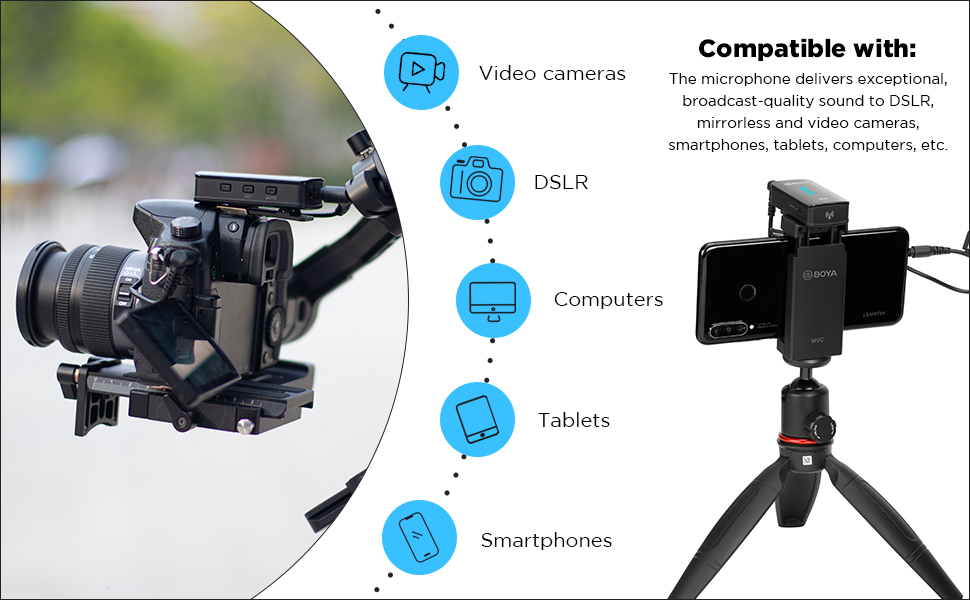
Figure 6: The receiver unit allows for real-time audio monitoring via headphones.
Operating Distance and Transmission
The BOYA BY-XM6 utilizes 2.4GHz wireless transmission technology, providing a stable and reliable connection. It supports an operating distance of up to 328ft (100m) without obstacles, making it suitable for various shooting environments.

Figure 7: The BOYA BY-XM6 offers a long operating distance for flexible recording.
Battery Life
Both the transmitter and receiver units are equipped with built-in rechargeable lithium batteries. The transmitter (TX) can work continuously for up to 7 hours, while the receiver (RX) provides up to 6.5 hours of operation. Both units support Type-C port charging, allowing for on-the-go charging with a power bank or computer.

Figure 8: Battery life indicators for the BOYA BY-XM6 Transmitter and Receiver.
Official Product Videos
Watch these official videos from the seller for more detailed instructions and demonstrations:
Video 1: Highly Recommended Wireless Microphone System BOYA BY-XM6. This video provides a comprehensive overview of the BY-XM6 system, including its features and benefits for content creation.
Video 2: Using Display of BOYA BY-XM6 Wireless Microphone System. Learn how to navigate and utilize the OLED display on your BY-XM6 units to monitor settings and performance.
Video 3: Introducing the BYXM6 S3-6 Wireless Lavalier Microphone Kit. This video introduces the various kits available for the BY-XM6 series, highlighting their compatibility and features.
Video 4: Package Content of BOYA BY-XM6 Wireless Lavalier Microphone. A detailed look at what comes inside the box of the BY-XM6 wireless microphone system.
Video 5: Audio quality of BOYA BY-XM6 Wireless Microphones. This video demonstrates the audio quality of the BY-XM6 system in various recording conditions.
Video 6: Introduction of BY-XM6 Mini Wireless Lavalier Microphone. A brief introduction to the compact BY-XM6 Mini variant of the wireless microphone system.
Video 7: BOYA BY-XM6 S1 2.4GHZ Wireless Lavalier Microphone System. This video provides an overview of the BY-XM6 S1 system, showcasing its features and applications.
Maintenance
Charging
Charge both the TX and RX units using the provided USB-C charging cables. The OLED display will indicate the charging status and battery level.
Cleaning and Storage
Wipe the units with a soft, dry cloth. Store the microphone system in the included pouch when not in use to protect it from dust and damage.
Troubleshooting
If you encounter any issues, please refer to the official User Manual (PDF) available for download on the product's Amazon page or the BOYA website. Common issues and solutions include:
- No Sound: Ensure both TX and RX units are powered on, properly paired, and connected with the correct audio cables. Check volume levels on both units and the recording device.
- Interference/Poor Signal: The 2.4GHz adaptive frequency hopping helps minimize interference. Try moving closer to the receiver or changing your recording environment to reduce obstacles.
- Low Battery: Recharge the units using the USB-C cables. Monitor battery levels on the OLED display.
Specifications
| Item Weight | 320 Grams (11.3 ounces) |
| Microphone Form Factor | Microphone System |
| Item Dimensions (L x W x H) | 3.94 x 1.57 x 6.3 inches |
| Power Source | Battery Powered (2 C batteries required) |
| Material | Acrylonitrile Butadiene Styrene |
| Signal-to-Noise Ratio | 78 dB |
| Hardware Platform | Laptop, Camera, Smartphone |
| Number of Channels | 5 |
| Frequency Range | 35Hz-18KHz |
| Frequency Response | 18 KHz |
| Noise Level | 84 dB |
| Polar Pattern | Omnidirectional |
| Connectivity Technology | Wireless |
| Connector Type | USB C jack, 3.5 mm Jack |
Warranty and Support
The BOYA BY-XM6 Wireless Lavalier Microphone System comes with a 2-Year BOYA warranty and after-sales support.
For further assistance, please refer to the official User Guide (PDF) or User Manual (PDF) available online.
Visit the BOYA Store on Amazon for more products and information.
Related documentsBY XM6


Ask a question about this manual
Ask about setup, troubleshooting, compatibility, parts, safety, or missing instructions. Manuals+ will review the question and use this page’s manual context to help answer it.