
WORKPRO Button Lock
WORKPRO Folding Utility Knife (Button Lock, Red)
Model: Button Lock | Brand: WORKPRO
Introduction
Thank you for choosing the WORKPRO Folding Utility Knife. This heavy-duty tool is designed for precision and durability, featuring a quick-open button lock and easy blade change mechanism. This manual provides essential information for safe and effective use, maintenance, and care of your utility knife.

Figure 1: WORKPRO Folding Utility Knife (Red)
Safety Information
Always exercise extreme caution when handling any utility knife. Blades are extremely sharp and can cause severe injury if not handled properly.
- Keep fingers clear of the blade path at all times.
- Always ensure the blade is fully retracted or locked in the open position before use or storage.
- Wear appropriate personal protective equipment, such as gloves and eye protection, when operating or changing blades.
- Store the knife in a safe place, out of reach of children.
- Do not use the knife for prying or as a screwdriver.
- Dispose of used blades safely in a designated sharps container.
Product Overview
The WORKPRO Folding Utility Knife features a robust design for various cutting tasks. Key components are illustrated below:
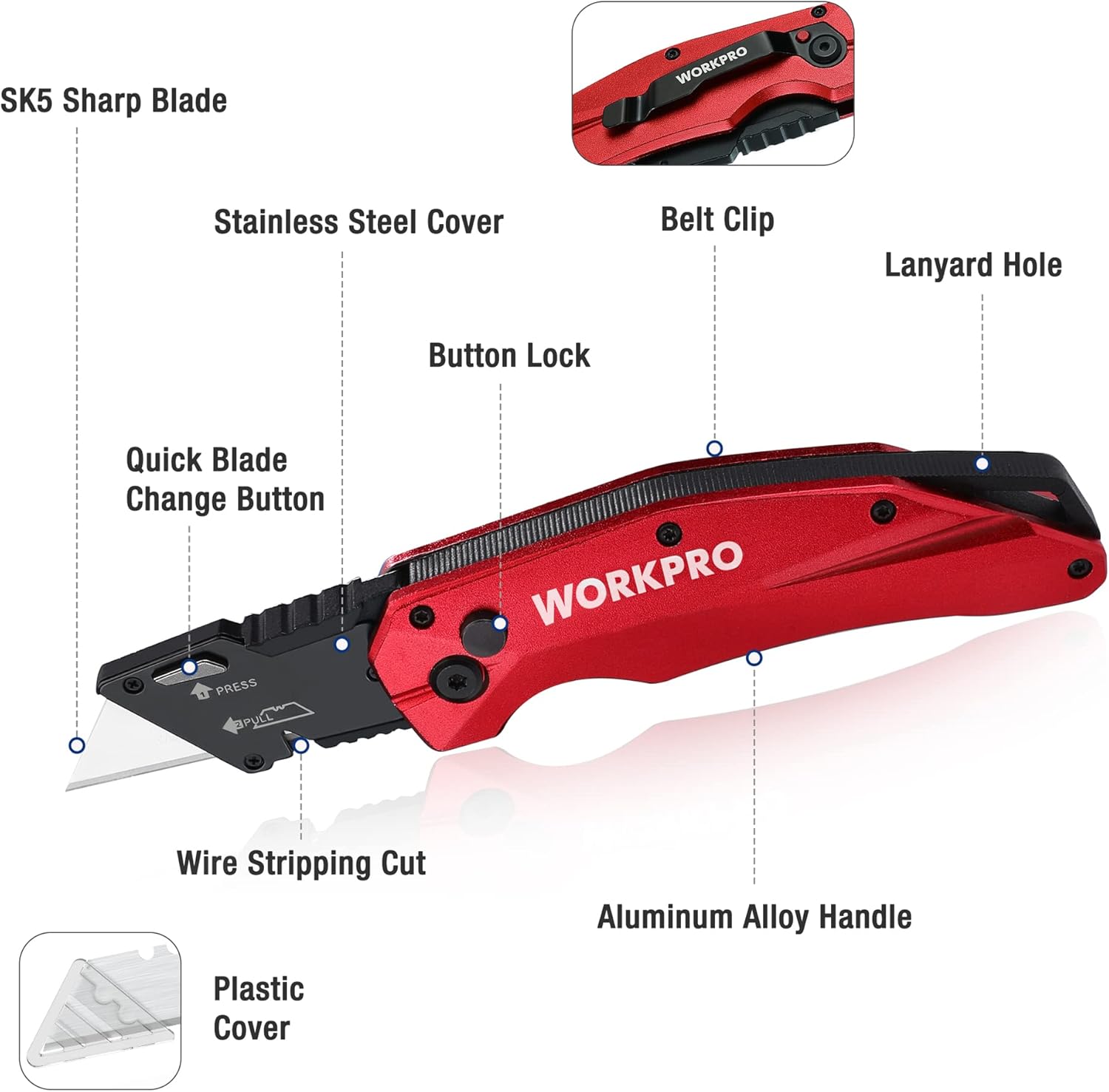
Figure 2: Labeled Components of the Utility Knife
- Aluminum Alloy Handle: Provides a durable and ergonomic grip.
- Button Lock: Securely locks the blade in place when open or closed.
- Quick Blade Change Button: Allows for fast and tool-free blade replacement.
- SK5 Razor Blades: High-hardness blades for long-lasting, sharp cuts.
- Wire Stripping Cut: Integrated notch for stripping wires or cutting rope.
- Stainless Steel Belt Clip: For convenient and portable carrying.

Figure 3: Product Dimensions
Setup and Blade Installation
Your WORKPRO Utility Knife comes with one blade pre-installed and 10 extra SK5 blades. Follow these steps to install or replace a blade:
- Ensure the knife is in the folded position for safety.
- Locate the Quick Blade Change Button on the blade housing.
- Press and hold the Quick Blade Change Button.
- Carefully pull the old blade out from the front of the knife.
- Insert a new SK5 blade into the slot, ensuring the notches on the blade align with the pins in the knife's mechanism.
- Release the Quick Blade Change Button. The blade should lock securely into place. Gently tug on the blade to confirm it is seated properly.

Figure 4: Quick Blade Change Process
Blade Storage:
The extra blades are provided in a safe dispenser. To retrieve a new blade, push the red slider forward to expose one blade at a time. Always handle new blades with care.
Operating Instructions
Opening and Closing the Knife
- To open: Press the button lock on the side of the handle and swing the blade housing open until it locks into place.
- To close: Press the button lock again and carefully fold the blade housing back into the handle until it clicks securely.
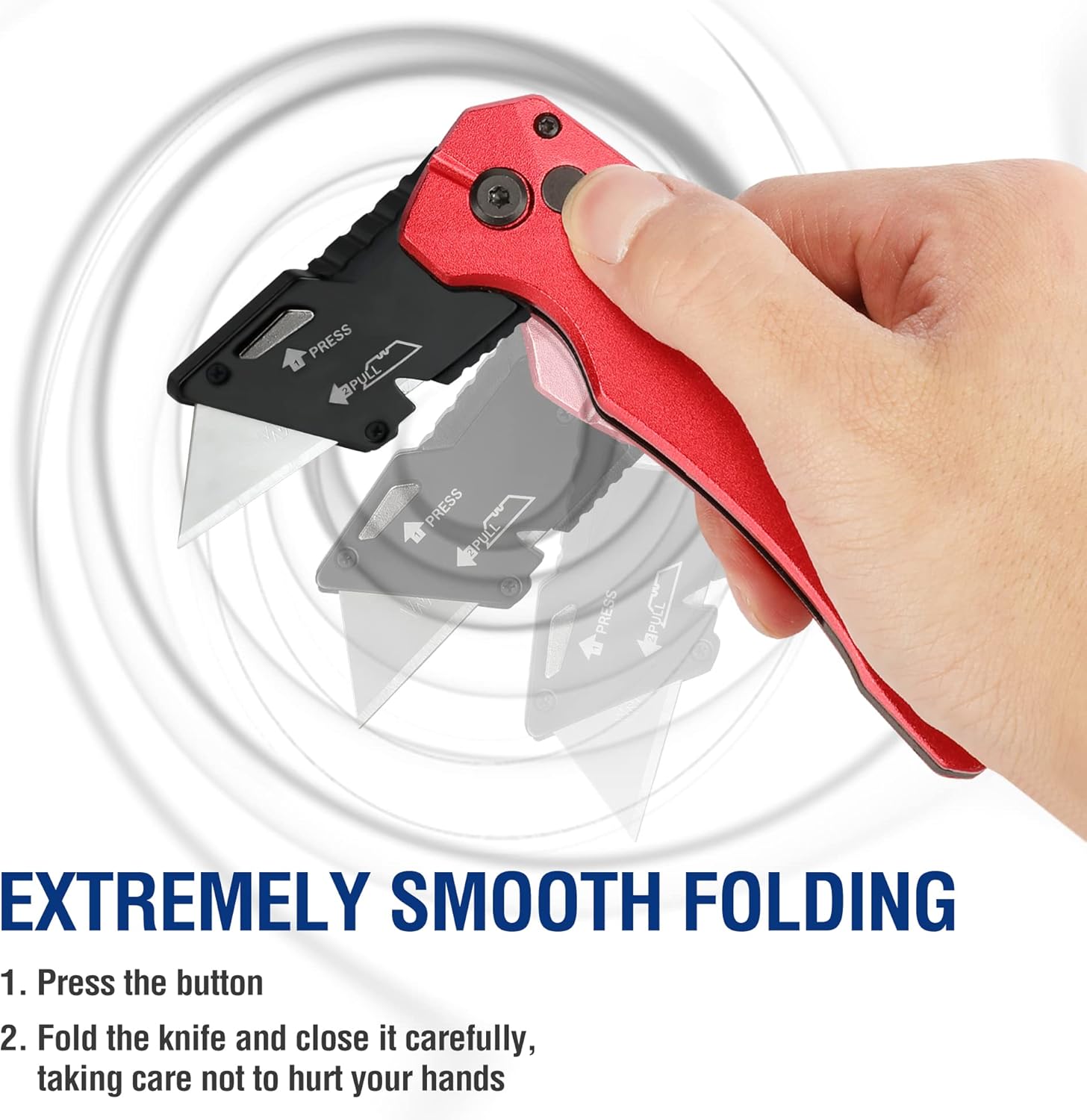
Figure 5: Smooth One-Handed Folding
General Cutting
The WORKPRO Utility Knife is suitable for cutting various materials such as cardboard, carpet, drywall, rope, vinyl, leather, and flooring. Ensure the blade is sharp for optimal performance.
- Place the material on a stable, cut-resistant surface.
- Apply firm, even pressure while guiding the knife along the desired cut line.
- Always cut away from your body.

Figure 6: Versatile Cutting Applications
Wire Stripping / Rope Cutting
Utilize the integrated wire stripping notch for light-duty wire stripping or cutting thin ropes.
- With the blade retracted, position the wire or rope into the designated notch.
- Apply gentle pressure and rotate the knife around the wire/rope to score it, then pull to strip or cut.

Figure 7: Using the Wire Stripping Notch
Carrying the Knife
The knife includes a stainless steel belt clip for convenient carrying. Ensure the blade is fully retracted before clipping it to your belt or pocket.

Figure 8: Belt Clip for Portability
Product Demonstration Video
This video demonstrates the features and usage of the WORKPRO Heavy Duty Folding Utility Knife, including its quick-open mechanism, blade change process, and various cutting applications.
Maintenance
Blade Replacement
Replace the blade when it becomes dull to maintain cutting efficiency and safety. Refer to the Setup and Blade Installation section for detailed instructions.
Cleaning
Clean the knife regularly to prevent debris buildup. Use a dry cloth to wipe down the handle and blade housing. For stubborn dirt, a slightly damp cloth can be used, ensuring the knife is thoroughly dried afterward to prevent rust.
Storage
Always store the knife with the blade fully retracted in a dry environment to prevent corrosion. Keep it away from moisture and corrosive materials.
Troubleshooting
- Blade not locking securely: Ensure the blade is correctly seated and the quick blade change button is fully released. Check for any debris obstructing the locking mechanism.
- Difficulty opening/closing: Apply a small amount of light machine oil to the pivot points if movement feels stiff. Ensure no debris is caught in the folding mechanism.
- Dull blade: Replace the blade with a new SK5 blade. A dull blade requires more force and increases the risk of injury.
Specifications
| Feature | Detail |
|---|---|
| Brand | WORKPRO |
| Model | Button Lock (Red) |
| Material | Metal (Aluminum Alloy Handle, Carbon Steel Blade) |
| Item Length | 5.55 Inches (175mm open, 120mm closed) |
| Item Weight | 150 Grams (5.3 oz) |
| Blade Material | SK5 Carbon Steel (up to 64 HRC) |
| Lock Mechanism | Button Lock |
| Blade Change | Quick Change (Tool-free) |
| Additional Features | Wire Stripping Notch, Stainless Steel Belt Clip |
Warranty and Support
WORKPRO products are manufactured to high-quality standards. For warranty information, technical support, or replacement parts, please contact WORKPRO customer service through their official website or the retailer where the product was purchased.
Please retain your proof of purchase for warranty claims.
Ask a question about this manual
Ask about setup, troubleshooting, compatibility, parts, safety, or missing instructions. Manuals+ will review the question and use this page’s manual context to help answer it.