
LOEWE klang bar5 mr & sub5
LOEWE klang bar5 mr & sub5 Soundbar and Subwoofer Set Instruction Manual
Model: klang bar5 mr & sub5 | Brand: LOEWE
1. Introduction
This manual provides essential information for the safe and efficient operation of your LOEWE klang bar5 mr Soundbar and sub5 Subwoofer set. Please read these instructions carefully before using the product and retain them for future reference.
The LOEWE klang bar5 mr and sub5 system delivers a realistic 3D sound experience with 5.1.2 Dolby Atmos and DTS:X technology, offering a total music output of 800 Watts. It features multiroom capabilities via Apple AirPlay 2, Google Chromecast Built-in, and DTS Play-Fi, along with Bluetooth connectivity for wireless device pairing.
2. Safety Information
Observe the following safety precautions to prevent electric shock, fire, or damage to the product.
- Power Supply: Ensure the power supply voltage matches the requirements specified on the product label.
- Ventilation: Do not block any ventilation openings. Install in accordance with the manufacturer's instructions.
- Water and Moisture: Do not expose this appliance to rain or moisture. Do not place objects filled with liquids, such as vases, on the apparatus.
- Cleaning: Unplug the appliance from the wall outlet before cleaning. Use a dry cloth for cleaning.
- Servicing: Do not attempt to service this product yourself. Refer all servicing to qualified service personnel.
- Placement: Place the soundbar and subwoofer on a stable, flat surface. Avoid placing near heat sources or in direct sunlight.

Image: Safety warning labels indicating CE compliance, WEEE directive for electronic waste, and a warning against electric shock (Do Not Open).
3. Package Contents
Verify that all items are present in the package:
- 1 x LOEWE klang bar5 mr Soundbar
- 1 x LOEWE sub5 Subwoofer
- Power cables
- Remote control (not explicitly listed but typically included)
- Instruction Manual (this document)

Image: The LOEWE klang bar5 mr soundbar and sub5 subwoofer, showcasing the complete set.
4. Setup
4.1 Placement
- Soundbar: Place the klang bar5 mr directly in front of your television, centered for optimal sound dispersion. Ensure no objects obstruct the front or top of the soundbar.
- Subwoofer: The sub5 subwoofer can be placed anywhere in the room, ideally near a wall or corner for enhanced bass response. Its wireless design offers flexibility.
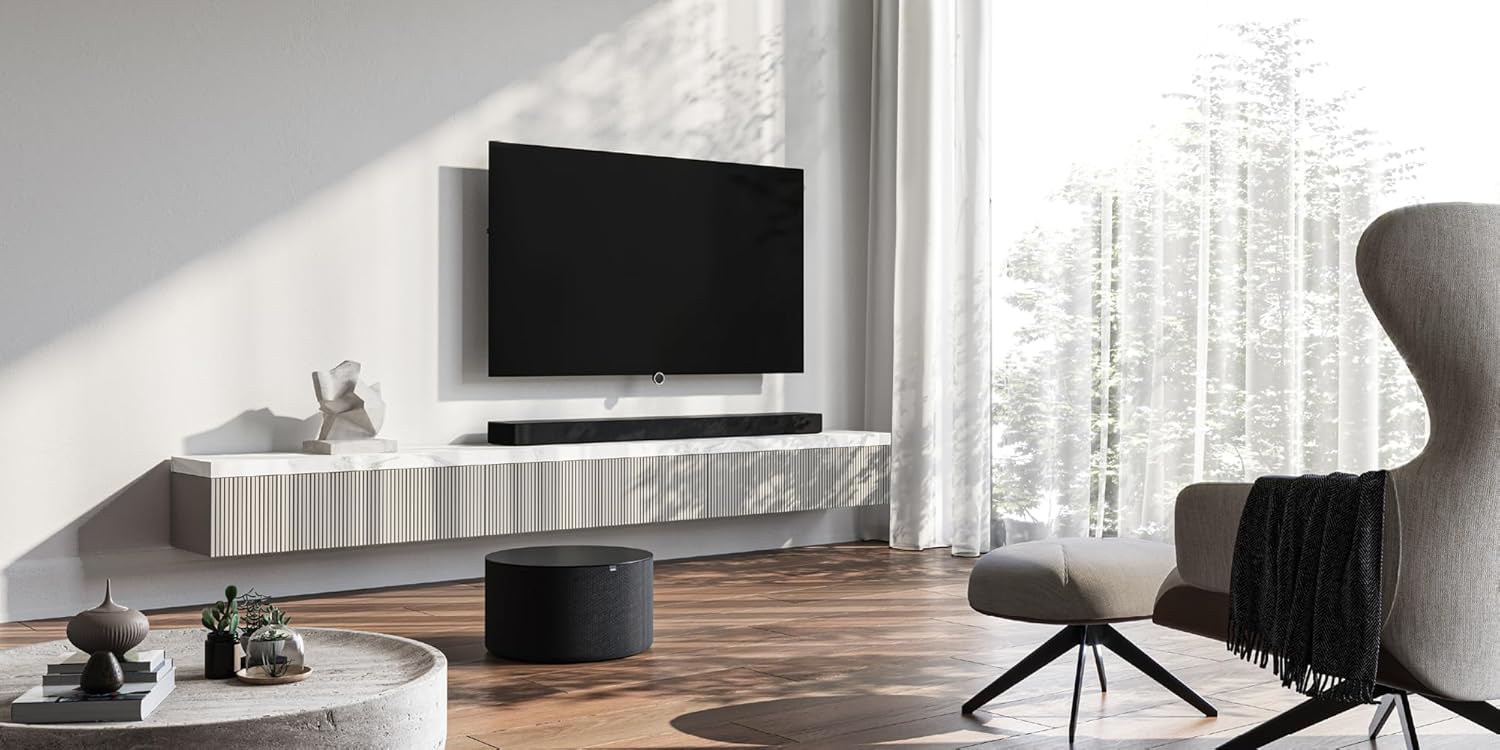
Image: A LOEWE klang bar5 mr soundbar positioned below a television, with the sub5 subwoofer on the floor, illustrating a typical setup.
4.2 Connections
- Power: Connect the power cables to the soundbar and subwoofer, then plug them into a wall outlet.
- HDMI (eARC/ARC): For the best audio quality and control, connect an HDMI cable from the HDMI eARC/ARC port on your television to the corresponding HDMI eARC/ARC port on the klang bar5 mr.
- Other Inputs: Utilize the additional HDMI inputs for connecting external devices such as Blu-ray players or gaming consoles. An optical input is also available for older televisions or devices.

Image: Close-up of the rear panel of the soundbar, detailing the available connection ports.
4.3 Initial Setup and Pairing
Upon first power-on, the soundbar and subwoofer should automatically attempt to pair. Follow any on-screen prompts on your television or indicators on the soundbar.
- Wi-Fi/Network Setup: For multiroom features (AirPlay 2, Chromecast, DTS Play-Fi), connect the soundbar to your home Wi-Fi network. This process may require a dedicated app or on-screen menu navigation. Refer to the detailed on-screen instructions for specific steps.
- Bluetooth Pairing: To connect a Bluetooth device, activate Bluetooth on your device and put the soundbar into pairing mode (refer to the soundbar's display or indicator lights). Select "LOEWE klang bar5 mr" from your device's Bluetooth list.
Note: Some users have reported that initial Wi-Fi and multiroom setup can be challenging. Ensure you follow the instructions precisely. If difficulties arise, consult LOEWE customer support.
5. Operating Instructions
5.1 Basic Operation
- Power On/Off: Use the power button on the remote control or the soundbar.
- Volume Control: Adjust volume using the remote control or the touch controls on the soundbar.
- Input Selection: Switch between HDMI, Optical, Bluetooth, and other inputs using the remote control.

Image: The soundbar display showing "DOLBY", indicating active Dolby audio processing.
5.2 Advanced Features
- Dolby Atmos & DTS:X: Experience immersive 3D audio. Ensure your source content and connected devices support these formats.
- Dialogue Enhancement: The system is designed to reproduce dialogues clearly, even at varying television volumes.
- Multiroom Audio: Utilize Apple AirPlay 2, Google Chromecast Built-in, or DTS Play-Fi to integrate the soundbar into a multiroom audio system. Follow the respective app instructions for these platforms.
- Bluetooth Streaming: Stream audio wirelessly from your smartphone, tablet, or other Bluetooth-enabled devices.
6. Maintenance
- Cleaning: Use a soft, dry cloth to clean the surfaces of the soundbar and subwoofer. Do not use liquid cleaners or abrasive materials.
- Ventilation: Ensure the ventilation openings remain clear of dust and debris.
- Software Updates: Periodically check the LOEWE website or the device's settings for available firmware updates to ensure optimal performance and compatibility.
7. Troubleshooting
- No Sound:
- Check power connections for both soundbar and subwoofer.
- Verify the correct input source is selected on the soundbar.
- Ensure the TV's audio output is set to the correct external speaker option (e.g., HDMI ARC/eARC).
- Check volume levels on both the soundbar and the connected device.
- Subwoofer Not Pairing:
- Ensure both units are powered on.
- Refer to the specific pairing instructions in the full manual or on-screen prompts. A factory reset might be necessary in some cases.
- Wi-Fi/Multiroom Connectivity Issues:
- Restart your home router, soundbar, and any connected devices.
- Ensure the soundbar is within range of your Wi-Fi router.
- Verify Wi-Fi network credentials.
- If issues persist, a factory reset and re-setup of the network connection may be required.
- Distorted Audio:
- Reduce the volume.
- Check cable connections for secure fit.
- Test with a different audio source.
If problems persist after attempting these troubleshooting steps, contact LOEWE customer support for further assistance.
8. Specifications
| Feature | Specification |
|---|---|
| Brand | LOEWE |
| Model Number | 60601D10 |
| Speaker Type | Soundbar, Subwoofer |
| Surround Sound Channel Configuration | 5.1.2 |
| Maximum Speaker Output Power | 800 Watts |
| Connectivity Technology | Bluetooth, AirPlay, Chromecast |
| Audio Output Mode | Surround Sound |
| Compatible Devices | Television |
| Soundbar Dimensions (L x W x H) | 120 cm x 16 cm x 7.1 cm (approximate) |
| Item Weight | 6.5 Kilograms (total for set) |
| Material | Plastic |
| Power Source | Wired |
| Input Voltage | 100 Volt (AC) |
| Frequency Response | 20 Hz (minimum) |
| Control Method | Touch |
| Waterproof | No |
| Country of Origin | China |

Image: The soundbar with its key dimensions indicated.
9. Warranty and Support
Your LOEWE klang bar5 mr & sub5 set is covered by a limited warranty. For specific details regarding the warranty period and terms, please refer to the documentation included with your purchase or visit the official LOEWE website.
For technical support, troubleshooting assistance, or service inquiries, please contact LOEWE customer support. Contact information can typically be found on the LOEWE website or in your product documentation.
Return Policy: The product is subject to a return policy with a duration of 2026 days (refund/replacement type) as per the seller's terms at the time of purchase.
Related documentsklang bar5 mr & sub5


Ask a question about this manual
Ask about setup, troubleshooting, compatibility, parts, safety, or missing instructions. Manuals+ will review the question and use this page’s manual context to help answer it.