
Donner SE-1
Donner SE-1 88 Key Digital Piano User Manual
Model: SE-1
1. Introduction
Thank you for choosing the Donner SE-1 88 Key Digital Piano. This manual provides essential information for setting up, operating, and maintaining your instrument. The SE-1 is designed to offer a realistic piano playing experience with its graded hammer action keys and rich sound capabilities, suitable for both practice and performance.
2. Important Safety Information
- Do not expose the instrument to extreme temperatures, humidity, or direct sunlight.
- Avoid placing the instrument near heat sources such as radiators or amplifiers.
- Do not place objects containing liquids on the instrument.
- Use only the specified power adapter.
- Keep out of reach of small children to prevent accidental injury or damage.
- Disconnect the power cord during lightning storms or when unused for long periods.
- Do not attempt to disassemble or modify the instrument. Refer all servicing to qualified personnel.
3. Package Contents
Verify that all items are present in the package:
- Donner SE-1 88 Key Digital Piano
- Music Rest
- Sustain Pedal (single)
- Triple Pedals (for use with stand)
- Headphones
- Power Adapter
- User Manual (this document)
- Optional: Piano Stand (if purchased as part of a bundle)

Figure 3.1: Donner SE-1 Digital Piano with included single sustain pedal and headphones.
4. Setup
4.1 Assembling the Piano and Stand (Optional)
If your package includes a piano stand, follow the instructions provided with the stand for assembly. The SE-1 digital piano is designed to be lightweight and can be easily placed on a compatible X-stand or a dedicated piano stand. Ensure the piano is stable and level before use.

Figure 4.1: The Donner SE-1 Digital Piano can be placed on an X-stand for stable playing.
4.2 Connecting Peripherals
Locate the various ports on the rear panel of the SE-1 digital piano:
- Power Interface (DC 12V): Connect the included power adapter here.
- Sustain Pedal Socket (PEDAL): Connect the sustain pedal(s) here.
- Audio Interface (AUDIO IN/OUT): For connecting external audio devices or outputting audio to an amplifier/mixer.
- MIDI Interface (MIDI IN/OUT): For connecting to other MIDI devices.
- USB Transmission Interface (USB): For connecting to a computer or smart device for MIDI data transfer.
- Headphones Jack (3.5mm): Connect the included headphones for private practice.
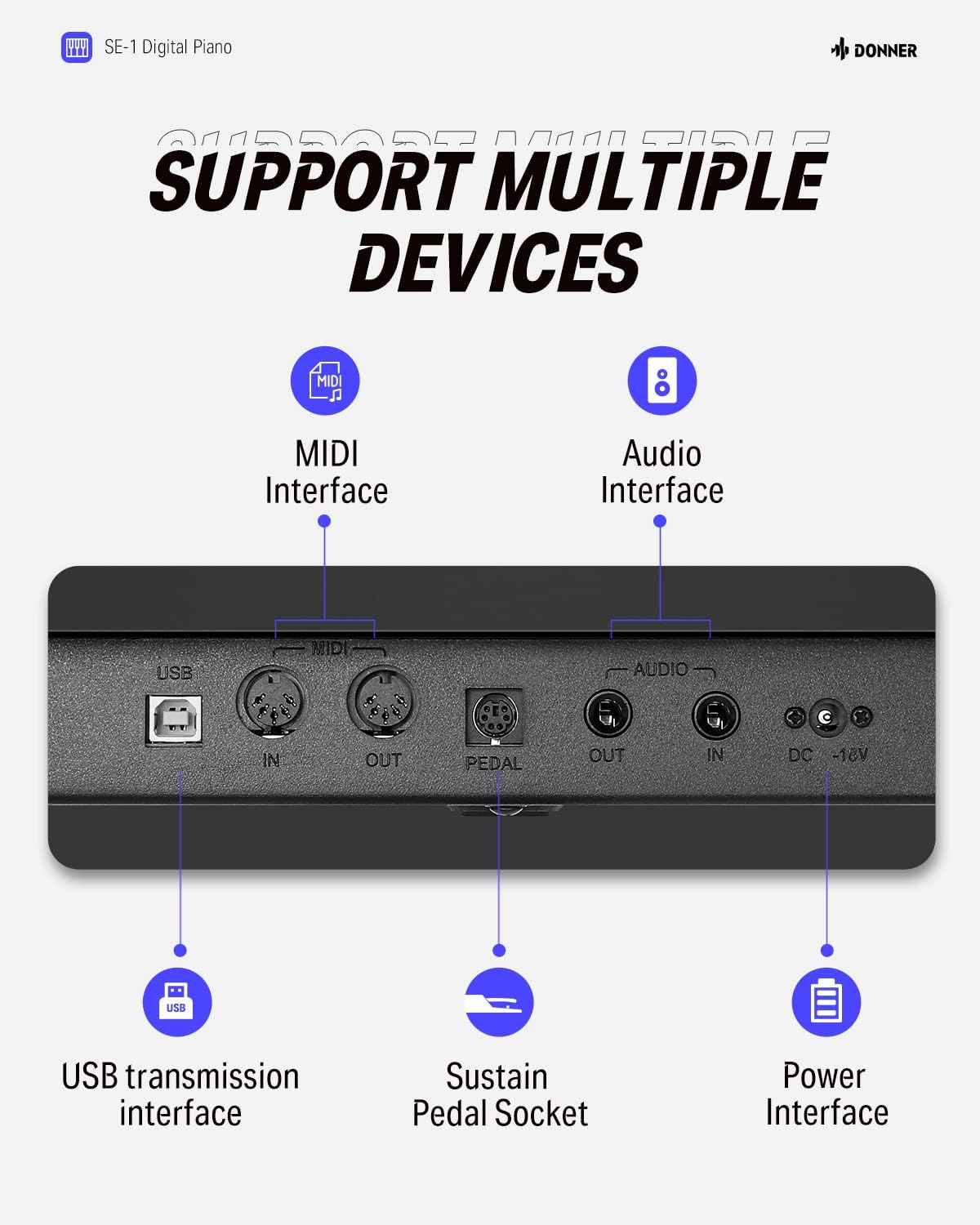
Figure 4.2: Rear panel connections of the Donner SE-1 Digital Piano.
5. Operating Instructions
5.1 Power On/Off
Press the POWER button located on the control panel to turn the digital piano on or off.
5.2 Basic Playback and Controls
The SE-1 features 88 full-size graded hammer action keys, providing a realistic piano feel. The control panel includes an LCD screen for easy navigation and selection of various functions.

Figure 5.1: Graded hammer action keys provide a realistic playing experience.

Figure 5.2: The 1.3-inch LCD display and panel buttons for intuitive control.
5.3 Sound Features
- Tones: The piano includes 200 different tones. Use the TONE button and navigation controls to select your desired instrument sound.
- Rhythms: Access 100 built-in rhythms using the RHYTHM button.
- Demo Songs: Explore 60 pre-loaded demo songs.
- Polyphony: The SE-1 supports 128-note polyphony, allowing for complex musical passages without notes cutting off.
- Dual-Tone Mode: Combine two voices simultaneously (e.g., piano and strings) for richer sounds. Refer to the detailed manual section for activation.
- Reverb: The instrument features 4 reverb types to add depth to your sound.
- Metronome: Use the metronome function for timing practice.

Figure 5.3: The SE-1 offers a wide range of tones, rhythms, and demo songs.
5.4 Speaker System and Headphones
The SE-1 is equipped with dual 15W stereo speakers for clear and immersive sound. For private practice, connect the included headphones to the 3.5mm headphone jack. This will mute the internal speakers.

Figure 5.4: Built-in dual 15W stereo speakers provide excellent sound quality.

Figure 5.5: Practice silently using the included headphones.
5.5 Connectivity (Bluetooth, MIDI, USB)
- Bluetooth: The SE-1 supports wireless Bluetooth connectivity for audio streaming or MIDI over Bluetooth. Refer to the detailed manual for pairing instructions.
- MIDI IN/OUT: Connect to external MIDI devices suchs as sound modules, sequencers, or other keyboards.
- USB: Connect the piano to a computer (Windows/macOS) or mobile device (iOS/Android) via USB for MIDI data transfer, enabling use with music software for recording, arranging, or learning applications.
Video 5.1: Official product video demonstrating the Donner SE-1 88 Key Full-Size Digital Piano's features and portability.
6. Maintenance
- Cleaning: Use a soft, dry cloth to wipe the surface of the instrument. For stubborn dirt, dampen the cloth slightly with water and a mild detergent, then wipe dry immediately. Avoid abrasive cleaners or solvents.
- Key Care: Keep the keys clean. If they become dirty, wipe them gently with a soft, slightly damp cloth.
- Storage: When not in use, store the piano in a clean, dry environment away from direct sunlight and extreme temperatures.
- Transportation: The SE-1 is designed to be portable. When transporting, ensure it is securely packed to prevent damage.

Figure 6.1: The lightweight design of the SE-1 makes it highly portable.
7. Troubleshooting
| Problem | Possible Cause | Solution |
|---|---|---|
| No sound from speakers. |
|
|
| Some keys do not produce sound. |
|
|
| Power cord feels loose or disconnects easily. |
|
|
| Bluetooth connection issues. |
|
|
8. Specifications
| Feature | Detail |
|---|---|
| Model Name | SE-1 |
| Number of Keys | 88 |
| Key Action | Graded Hammer Action Weighted Keys |
| Polyphony | 128-note |
| Tones | 200 |
| Rhythms | 100 |
| Demo Songs | 60 |
| Reverb Types | 4 |
| Display | 1.3 inches LCD Screen |
| Speakers | Dual 15W Stereo Speakers |
| Connectivity | Bluetooth, MIDI IN/OUT, USB, 3.5mm Audio IN/OUT, 3.5mm Headphone Jack |
| Power Source | Corded Electric (DC 12V) |
| Item Weight | 30 pounds (approx. 13.6 kg) |
| Product Dimensions | 55.91 x 15.35 x 7.48 inches (approx. 142 x 39 x 19 cm) |
9. Warranty and Support
Donner provides a standard warranty for its products. For detailed warranty information, product registration, or technical support, please visit the official Donner website or contact their customer service directly. Keep your purchase receipt as proof of purchase for warranty claims.
Official Donner Store: Donner Store on Amazon
Related documentsSE-1


Ask a question about this manual
Ask about setup, troubleshooting, compatibility, parts, safety, or missing instructions. Manuals+ will review the question and use this page’s manual context to help answer it.