
1. Introduction
The Audien Hearing ATOM PRO is a wireless, rechargeable hearing amplifier designed to enhance sound clarity and assist with hearing in various environments. Its compact and discreet design aims to provide comfort and ease of use, amplifying speech while minimizing background noise. This manual provides essential information for the proper setup, operation, maintenance, and troubleshooting of your ATOM PRO device.
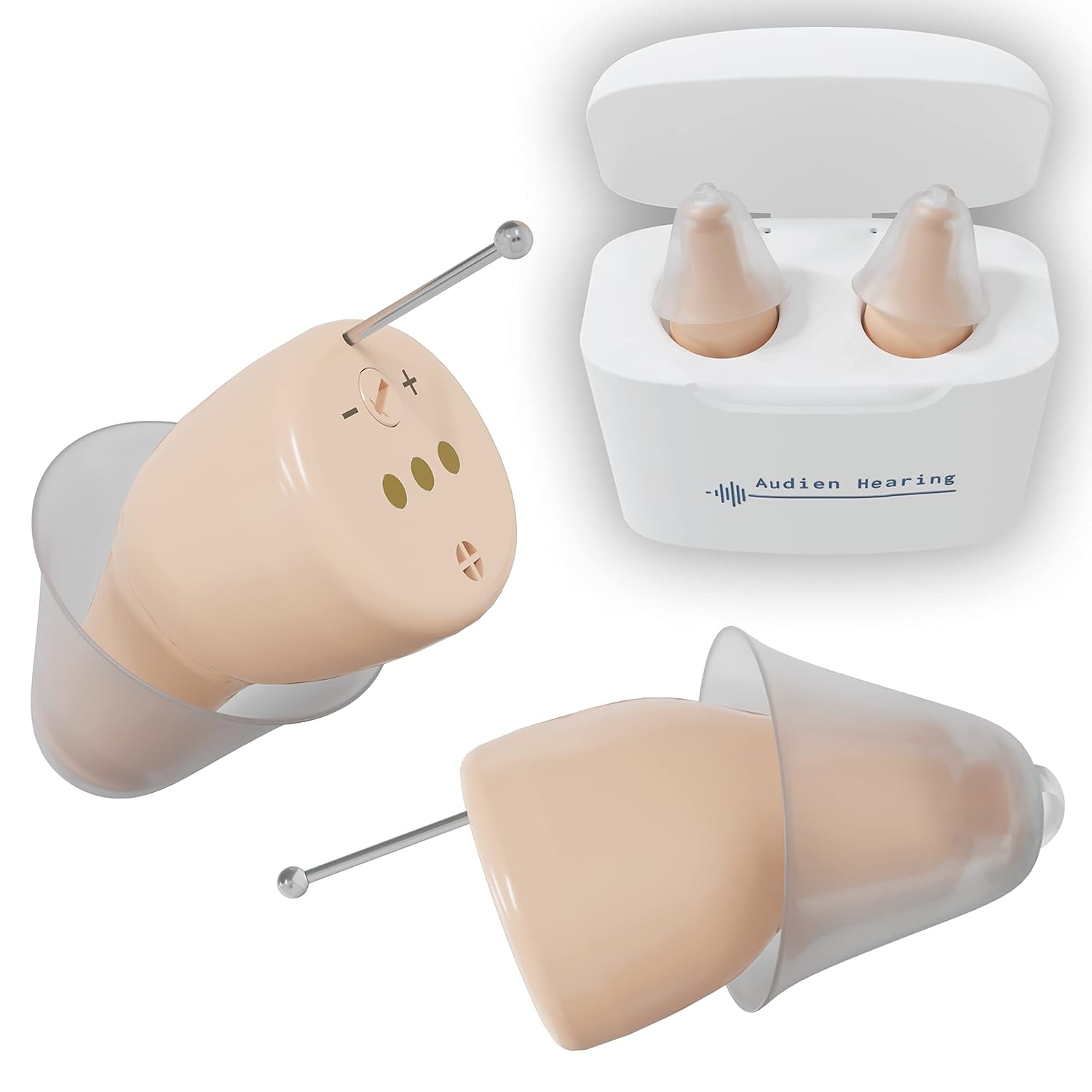
Figure 1.1: Audien Hearing ATOM PRO devices and charging case.
2. What's in the Box
Upon opening your Audien Hearing ATOM PRO package, please verify that all the following components are included:
- 1 pair of Audien Hearing ATOM PRO devices
- 3 pairs of different sized earbuds (Small, Medium, Large)
- 1 portable charging box
- 1 USB charging cable
- 1 cleaning brush
- 4 replaceable wax guards
3. Product Overview
Familiarize yourself with the key components of your Audien Hearing ATOM PRO device:

Figure 3.1: Key components of the ATOM PRO device.
- Comfort Tip Silicone Earplug: Ensures a secure and comfortable fit within the ear canal.
- Advanced Sound Processing Microphone: Captures sound and processes it for clear amplification.
- Precise Tuning Volume Control: Allows for individual adjustment of amplification levels.
- Pull Line: A small string or tab to assist with easy removal of the device from the ear.
4. Setup
4.1 Initial Charging
Before first use, fully charge your ATOM PRO devices. The charging case provides portable power for on-the-go charging.
- Place both ATOM PRO devices into their respective slots in the charging case. Ensure they are correctly seated.
- Connect the USB charging cable to the charging case and plug the other end into a compatible USB power source (e.g., wall adapter, computer USB port).
- The indicator lights on the charging case will show the charging status. A full charge typically takes 4-6 hours.
- Once fully charged, the devices provide approximately 24 hours of battery life.

Figure 4.1: ATOM PRO devices in the portable charging case.
4.2 Selecting and Fitting Earbuds
Proper earbud selection is crucial for comfort and optimal sound quality. The package includes small, medium, and large earbud sizes.
- Experiment with the different earbud sizes to find the one that provides the most comfortable and secure fit in your ear canal. A good fit minimizes feedback and maximizes sound clarity.
- Gently attach the selected earbud to the ATOM PRO device.
- Carefully insert the device into your ear canal until it feels snug and comfortable. The pull line should be accessible for easy removal.

Figure 4.2: Proper insertion of the ATOM PRO device.
5. Operating the Device
5.1 Powering On/Off
The ATOM PRO devices typically power on automatically when removed from the charging case and power off when placed back into the case.
5.2 Adjusting Volume
The ATOM PRO features precise tuning volume control directly on the device.
- To increase the volume, press the '+' button.
- To decrease the volume, press the '-' button.
Adjust the volume to a comfortable level that allows you to hear clearly without discomfort or whistling. It is recommended to start at a lower volume and gradually increase it.
5.3 Daily Use
The ATOM PRO is designed for daily use to amplify speech and filter out feedback and white noise. It is suitable for various listening environments, making conversations easier and more comfortable.
6. Maintenance
Regular maintenance ensures the longevity and optimal performance of your ATOM PRO devices.
6.1 Cleaning
- Use the provided cleaning brush to gently remove any earwax or debris from the earbud and the sound outlet of the device daily.
- Wipe the body of the device with a soft, dry cloth. Do not use water or cleaning solutions directly on the device.
6.2 Replacing Wax Guards
The ATOM PRO includes built-in, replaceable wax guards to protect the internal components from earwax buildup. Replace them as needed, typically when you notice a decrease in sound quality or blockage.
- Use the tool provided (or a small, pointed object) to carefully remove the old wax guard.
- Insert a new wax guard firmly into the opening.
6.3 Storage
When not in use, store your ATOM PRO devices in their charging case to keep them charged and protected from dust and damage. Store in a cool, dry place away from direct sunlight and extreme temperatures.
7. Troubleshooting
If you encounter issues with your ATOM PRO, refer to the following common problems and solutions:
| Problem | Possible Cause | Solution |
|---|---|---|
| No sound or very low sound | Device not charged; Earbud or wax guard blocked; Volume too low. | Charge devices fully; Clean earbud and replace wax guard; Increase volume. |
| Whistling or feedback sound | Improper earbud fit; Earbud too small; Device not inserted correctly. | Try a larger earbud size; Reinsert device firmly into ear canal. |
| Device not charging | Improper placement in case; Charging cable or power source issue. | Ensure devices are correctly seated; Check USB cable and power adapter. |
| Discomfort in ear | Earbud size is too large or incorrect fit. | Try a smaller earbud size; Adjust device position in ear. |
If the problem persists after attempting these solutions, please contact Audien Hearing customer support for further assistance.
8. Specifications
| Feature | Detail |
|---|---|
| Model Name | Atom Pro |
| Color | Beige |
| Power Source | Battery Powered |
| Special Feature | Rechargeable |
| Batteries | 2 Lithium Ion batteries required (included) |
| Battery Life | Up to 24 hours per charge |
| Charging Time | 4-6 hours for full charge |
| Package Dimensions | 5.98 x 3.82 x 1.65 inches |
| Item Weight | 7.05 ounces |
9. Warranty and Support
Audien Hearing is committed to providing quality products and customer satisfaction. For information regarding product warranty, returns, or technical support, please visit the official Audien Hearing website or contact their customer service directly.
Manufacturer: Audien Hearing
For the latest support information and FAQs, please visit: Audien Hearing Store on Amazon


