Introduction
Thank you for purchasing the Technical Pro 1500 Watts Professional Receiver. This high-quality audio component is designed to provide powerful and versatile sound for your home entertainment system, karaoke setup, or public address needs. Featuring 1500 watts of peak power, Bluetooth compatibility, USB and SD card inputs, and comprehensive microphone controls, this receiver offers a robust audio experience. This manual provides detailed instructions for setup, operation, maintenance, and troubleshooting to ensure optimal performance and longevity of your device.
Safety Information
Please read all safety and operating instructions carefully before using this product. Retain these instructions for future reference.
- Power Source: Connect the unit only to an AC power outlet of the type described in the operating instructions or as marked on the appliance.
- Ventilation: Ensure proper ventilation. Do not block any ventilation openings. Install in accordance with the manufacturer's instructions.
- Water and Moisture: Do not use this apparatus near water or in damp environments. Do not expose to dripping or splashing.
- Heat: Do not install near any heat sources such as radiators, heat registers, stoves, or other apparatus (including amplifiers) that produce heat.
- Cleaning: Clean only with a dry cloth. Unplug this apparatus during lightning storms or when unused for long periods of time.
- Servicing: Do not attempt to service this product yourself. Refer all servicing to qualified service personnel.
- Overloading: Do not overload wall outlets or extension cords as this can result in a risk of fire or electric shock.
- Foreign Objects: Never push objects of any kind into this product through openings as they may touch dangerous voltage points or short-out parts that could result in a fire or electric shock.
Package Contents
Please check to ensure all items are present in the package:
- Technical Pro 1500 Watts Professional Receiver (TRX55URIBTT)
- Remote Control
- User Manual (this document)
Product Overview
The Technical Pro 1500 Watts Professional Receiver is a central component for your audio system. Familiarize yourself with its design and layout.

Image: Front perspective view of the Technical Pro 1500 Watts Professional Receiver, showcasing its sleek black design and illuminated controls.
Front Panel
The front panel provides access to all primary controls and inputs for easy operation.

Image: Detailed view of the receiver's front panel, showing the digital display, volume knob, equalizer controls, microphone inputs, and various function buttons.
- Power Button: Turns the unit on or off.
- Digital Fluorescent Display: Shows current input, track information, and equalizer levels.
- Master Volume Knob: Adjusts the overall output volume. Features blue LED illumination.
- 5-Band Equalizer: Individual sliders for precise frequency adjustment.
- Input Selectors: Buttons for selecting Tuner, DVD, AUX, MP3/iPod/Bluetooth, and USB/SD inputs.
- Microphone Inputs (MIC1, MIC2): Two 1/4" inputs for connecting microphones.
- Microphone Controls: Echo, Mic Tone, and Mic Volume knobs for microphone effects.
- Bass, Treble, Balance: Rotary knobs for fine-tuning audio output.
- USB/SD Card Inputs: Ports for playing media directly from USB drives and SD cards (up to 32GB).
- Headphone Jack: 1/8" (3.5mm) output for private listening.
Rear Panel
The rear panel houses all the necessary connections for speakers and external audio devices.
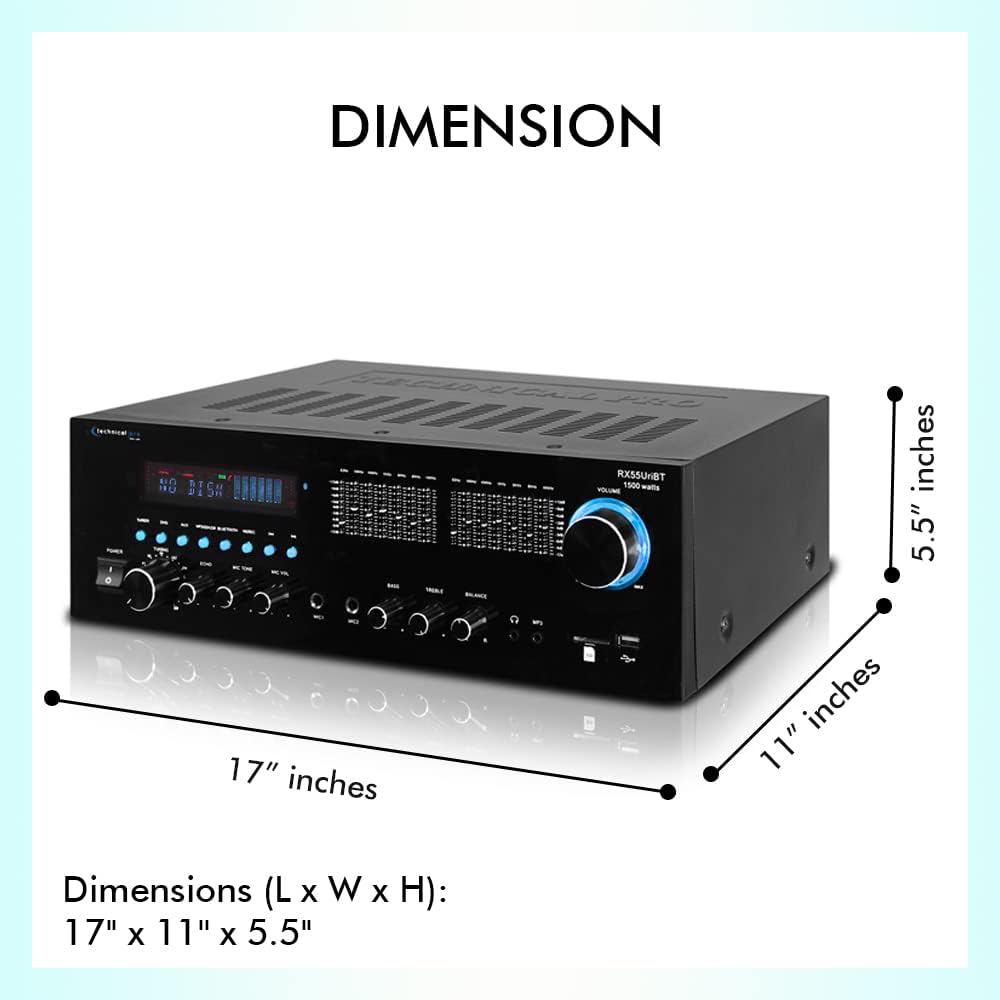
Image: Detailed view of the receiver's rear panel, showing speaker terminals, RCA audio inputs/outputs, FM antenna input, and power connection.
- Main Speaker Outputs: Banana binding post (2 speakers) and push button (surround speakers) terminals for connecting passive speakers.
- Audio Inputs (RCA): Multiple RCA stereo inputs (AUX, DVD, LINE) for connecting external audio sources like CD players, TVs, or other devices.
- Audio Outputs (RCA): RCA Line Out and 2 Mono RCA Subwoofer Out for connecting to other audio equipment or powered subwoofers.
- FM Antenna Input: For connecting the included FM antenna.
- Power Input: AC power cord connection.
Dimensions
Understanding the dimensions of your receiver is important for proper placement within your audio setup.

Image: Diagram illustrating the length, width, and height of the receiver, showing dimensions of 17 inches (L) x 11 inches (W) x 5.5 inches (H).
The receiver measures approximately 17 inches (Length) x 11 inches (Width) x 5.5 inches (Height).
Setup
1. Connecting Speakers
Ensure the receiver is powered off before making any connections.
- Identify the "MAIN SPEAKERS" terminals on the rear panel. These are typically red (+) and black (-) for each channel (Left and Right).
- Connect your passive speakers to these terminals. Match the positive (+) terminal on the receiver to the positive (+) terminal on your speaker, and the negative (-) to the negative (-).
- For surround speakers, use the "SURROUND SPEAKERS" push-button terminals, ensuring correct polarity.
- If using a powered subwoofer, connect it to the "SUB OUT" RCA jacks.
2. Connecting Audio Sources
Connect your external audio devices using RCA cables.
- For devices like CD players, DVD players, or other audio components, connect their audio output to the "AUX", "DVD", or "LINE" RCA inputs on the receiver's rear panel. Match the red (right) and white (left) connectors.
- For USB drives or SD cards, insert them into the corresponding slots on the front panel.
3. Connecting the FM Antenna
For optimal FM radio reception, connect the included FM antenna to the "FM ANTENNA" terminal on the rear panel.
4. Power Connection
Once all audio and speaker connections are made, plug the receiver's power cord into a standard AC power outlet.
Operating Instructions
Powering On/Off
Press the POWER button on the front panel or the remote control to turn the receiver on or off.
Source Selection
Use the input selector buttons on the front panel (Tuner, DVD, AUX, MP3/iPod/Bluetooth, USB/SD) or the remote control to choose your desired audio source.
Volume Control
Rotate the large MASTER VOLUME knob on the front panel clockwise to increase volume and counter-clockwise to decrease it. You can also use the volume buttons on the remote control.
Bluetooth Pairing
The receiver supports Bluetooth v2.0 with EDR technology for wireless audio streaming.

Image: The receiver shown with a graphic indicating Bluetooth compatibility, highlighting its wireless streaming capabilities.
- Select the MP3/iPod/Bluetooth input on the receiver. The display will indicate Bluetooth mode.
- On your Bluetooth-enabled device (smartphone, tablet, laptop), enable Bluetooth and search for available devices.
- Select "Technical Pro" or a similar name from the list of devices.
- Once paired, you can stream audio wirelessly to the receiver. The Bluetooth range is approximately 30 feet.
USB/SD Card Playback
Insert a USB flash drive or SD card (up to 32GB) containing MP3, WAV, or WMA audio files into the respective front panel slot. The receiver will automatically switch to the USB/SD input and begin playback. The digital display will show track title, number, and elapsed time.
Microphone Usage
Connect microphones to the MIC1 or MIC2 inputs on the front panel.
- MIC VOL: Adjusts the volume of the connected microphones.
- ECHO: Controls the echo effect applied to the microphone audio.
- MIC TONE: Adjusts the tone (bass/treble) of the microphone audio.
FM Radio Tuning
Select the TUNER input. Use the tuning controls on the front panel or remote to scan for and select FM radio stations.
Equalizer Adjustment
Use the 5-band equalizer sliders on the front panel to fine-tune the audio frequency response to your preference. Adjustments can be made across a range of ±12dB.
Maintenance
Proper maintenance ensures the longevity and optimal performance of your receiver.
- Cleaning: Disconnect the power cord before cleaning. Use a soft, dry cloth to wipe the exterior of the unit. Do not use liquid cleaners or aerosol cleaners.
- Ventilation: Keep the ventilation openings clear of dust and debris. Ensure adequate airflow around the unit to prevent overheating.
- Storage: If storing the unit for an extended period, unplug it from the power outlet and store it in a cool, dry place away from direct sunlight and extreme temperatures.
Troubleshooting
If you encounter issues with your receiver, refer to the following common problems and solutions:
| Problem | Possible Cause | Solution |
|---|---|---|
| No power | Power cord not connected; Power outlet not active; Unit is off. | Ensure power cord is securely plugged in. Check power outlet with another device. Press the POWER button. |
| No sound output | Incorrect input selected; Volume too low; Speakers not connected properly; Mute function active. | Select the correct input source. Increase master volume. Check speaker connections (polarity). Deactivate mute if active. |
| Bluetooth not connecting | Receiver not in Bluetooth mode; Device too far; Device already paired with another unit. | Select MP3/iPod/Bluetooth input. Move device closer to receiver (within 30 ft). Disconnect from other Bluetooth devices. |
| USB/SD card not playing | Incorrect file format; Card/drive not inserted correctly; Card/drive corrupted. | Ensure files are MP3, WAV, or WMA. Reinsert card/drive. Try a different card/drive. |
| Microphone not working | Microphone not plugged in; Mic volume too low; Microphone faulty. | Ensure microphone is fully plugged into MIC1/MIC2. Increase MIC VOL. Test with another microphone. |
If the problem persists after trying these solutions, please contact Technical Pro customer support for assistance.
Specifications
Detailed technical specifications for the Technical Pro 1500 Watts Professional Receiver.
| Brand | Technical Pro |
| Model Number | TRX55URIBTT |
| Power Output | 1500 Watts Peak Power |
| Speaker Impedance | 2-8 Ohms |
| Bluetooth Version | v2.0 with EDR (2.4 GHz) |
| Bluetooth Range | 30 Feet |
| USB/SD Card Support | Up to 32GB; Plays .mp3, .wav, .wma files |
| Equalizer Adjustment Range | ±12dB |
| Microphone Inputs | 2 x 1/4" (6.35mm) |
| Audio Inputs | RCA (AUX, DVD, LINE) |
| Audio Outputs | RCA Line Out, 2 Mono RCA Subwoofer Out |
| Product Dimensions (L x W x H) | 17 x 11 x 5.5 inches |
| Item Weight | 9.9 pounds |
Warranty and Support
Technical Pro products are designed for reliability and performance. For information regarding warranty coverage, technical support, or service inquiries, please visit the official Technical Pro website or contact their customer service department. Keep your purchase receipt as proof of purchase for warranty claims.
For the most up-to-date support information, please refer to the Technical Pro website: www.technicalpro.com


