
1. Product Overview
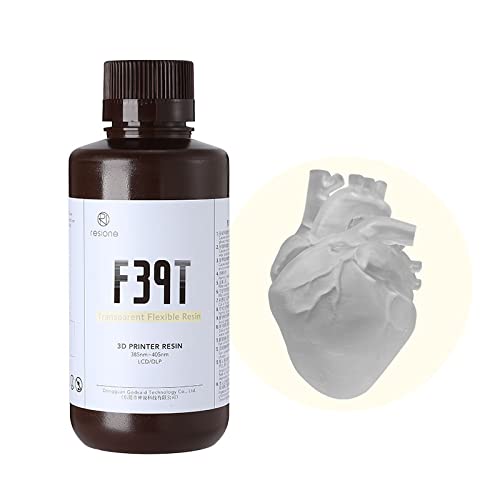
The RESIONE F39T is a high-performance flexible 3D printer resin designed for 405nm LCD, DLP, and MSLA UV curing 3D printers. This resin offers exceptional elasticity, tear resistance, and high elongation, making it ideal for creating rubber-like models and parts that require flexibility and durability.
Key characteristics include:
- High Elongation & Tear Resistance: Features an elongation at break of 255% and a tear strength of 47.2 KN/m, allowing printed objects to bend and stretch without breaking.
- Rubber-like Softness: With a Shore Hardness of 60-75A, models exhibit a soft, rubbery feel at temperatures above 20°C, becoming firmer at lower temperatures (e.g., impact-resistant at 5°C).
- Versatile Application: Suitable for printing prototypes like shoes and wearable devices, as well as flexible figures and resin parts such as tires.
- Toughening Agent: Can be mixed with other tough resins like K/M58/M68/G217 to enhance the durability and prevent brittleness of printed objects over time.

2. Safety Precautions
Always prioritize safety when handling 3D printer resins. The following guidelines are essential for safe use and disposal of RESIONE F39T Flexible Resin:
2.1 During Use
- Operating Temperature: Maintain an ambient temperature between 20-35°C (68-95°F).
- Shake Before Use: Shake the resin bottle thoroughly before each use. If the resin is highly viscous, preheat the bottle in 60°C hot water to improve flow.
- Personal Protective Equipment: Always wear nitrile gloves to prevent skin contact.
- Ventilation: Ensure the working area is well-ventilated to minimize inhalation of fumes.
- UV Exposure: Do not use the resin near balconies, windows, or other strong UV light sources, as this can cause premature curing.
- Emergency Contact: In case of eye or mouth contact, rinse immediately with plenty of water and consult a medical professional.
- Skin Contact: If resin gets on skin, wash thoroughly with soap and water or hand sanitizer.
- Material Compatibility: Avoid contact with acrylic materials.
2.2 Storage
- Store the resin in a cool, dark place, away from direct sunlight and heat sources.
- Keep the resin bottle tightly sealed when not in use.
- Keep out of reach of children and pets.
- If the 3D printer will not be used for more than one day, filter any remaining resin from the tank through a funnel and pour it back into an empty, clean container. Do not return used resin to the original bottle to prevent contamination.
2.3 Disposal
- Unused Resin: To dispose of unwanted liquid resin, pour small amounts into a transparent container and expose it to direct sunlight until it fully hardens. Once solid, it can be disposed of as general waste according to local regulations.
- Cleaning Solution: Do not pour resin-contaminated cleaning solutions (e.g., IPA) directly down the drain. Allow the resin particles in the cleaning solution to settle and harden under sunlight. Filter out the solidified residue, and the cleaned solution can often be reused or disposed of responsibly.

3. Setup and Printing Parameters
Optimal printing results depend on correct printer settings and environmental conditions. It is recommended for users with some prior 3D printing experience.
3.1 Recommended Printing Environment
- Room Temperature: The recommended printing temperature is 25-32°C, with an optimal range of 28-32°C.
- Temperature Impact: In environments below 25°C, the viscosity of F39T resin increases, which can reduce the printing success rate, especially for large models.
3.2 Slicer Settings
When setting up your slicer software, ensure that 'Anti-aliasing' and 'Grayscale' options are turned off. Use the following table as a guide for setting parameters. If you have successfully printed with standard resin, use those settings as a baseline and adjust according to the RESIONE parameters below. These parameters are suitable for printing room temperatures of 25-35°C.

| Setting | Standard Resin | F39/F39T (50µm) | F39/F39T (100µm) | F69 |
|---|---|---|---|---|
| Layer Height (µm) | 50 | 50 | 100 | 50 |
| Bottom Exposure Time (s) | A | 1*A | 1.2*A | 1.25*A |
| Exposure Time (s) | B | 0.8*B | 1.4*B | 1.2*B |
| Light-off Delay (s) | D | D+1.5 | D+1.5 | D+1.5 |
| Bottom Lift Distance (mm) | E | E+2 | E+2 | E+2 |
| Lift Height (mm) | F | F+2 | F+2 | F+2 |
| Bottom Lift Speed (mm/min) | G | 60-120 | 60-120 | 60-120 |
| Lift Speed (mm/min) | H | 60-120 | 60-120 | 60-120 |
| Retract Speed (mm/min) | I | 120-180 | 120-180 | 120-180 |
4. Operating Instructions
Follow these steps for successful 3D printing with RESIONE F39T Flexible Resin:
- Preparation: Ensure your 3D printer is clean and level. Shake the resin bottle well before pouring. Maintain the recommended room temperature (25-32°C).
- Pouring Resin: Carefully pour the resin into the printer's resin tank, ensuring it does not exceed the maximum fill line.
- Printing: Load your sliced 3D model file into the printer and start the printing process. Monitor the first few layers to ensure proper adhesion.
- Post-Processing - Cleaning: Once printing is complete, carefully remove the build plate. Use a scraper to detach the printed model. Wash the model thoroughly with IPA (Isopropyl Alcohol) or a dedicated resin cleaner to remove any uncured resin. Use a soft brush if necessary for intricate details.
- Post-Processing - Drying: Allow the cleaned model to air dry completely or use a gentle air blower. Ensure no residual IPA remains.
- Post-Processing - Curing: Place the dried model in a UV curing chamber. For F39T prints thicker than 3mm, use a 40W UV post-curing box and cure both the front and back surfaces for at least 30 minutes each. Proper post-curing enhances the model's strength and surface finish.

Video demonstrating the potential medical applications of F39 resin, highlighting its flexibility and suitability for specific uses.
5. Maintenance
Proper maintenance of your resin and equipment ensures consistent print quality and extends the lifespan of your materials.
- Resin Tank Cleaning: After each print, inspect the resin tank for any cured resin debris. Use a plastic scraper to gently remove any hardened bits to prevent damage to the FEP film or future prints.
- FEP Film Care: Handle the FEP film with care. Avoid touching it directly with bare hands or sharp objects. Replace the FEP film if it shows signs of wear, scratches, or punctures.
- Printer Cleaning: Regularly clean the printer's build plate and other components with IPA to remove resin residue.
- Resin Filtration: If resin has been sitting in the tank for an extended period or if you suspect contamination, filter it using a fine mesh filter or funnel filter before reuse or storage.
6. Troubleshooting
Encountering issues during printing is common. Here are some tips for troubleshooting with RESIONE F39T Flexible Resin:
- Print Failures (e.g., model not adhering, partial prints):
- Temperature: Ensure the printing environment is within the recommended 25-32°C range. Low temperatures significantly increase resin viscosity and can lead to failures.
- Exposure Time: If prints are failing, consider increasing the exposure time for single layers. Light attenuation can occur, especially with mono-screen printers.
- Support Settings: Adjust support settings in your slicer. Insufficient or poorly placed supports can cause print failures, especially for flexible resins.
- Resin Mixing: Ensure the resin is thoroughly shaken before use to ensure all components are evenly mixed.
- Models are too soft or sticky after curing:
- Post-Curing: Ensure adequate post-curing. For models thicker than 3mm, cure both sides for at least 30 minutes each in a 40W UV curing box.
- Cleaning: Ensure all uncured resin is completely washed off before curing. Residual resin will result in a sticky surface.
- Models are too brittle:
- Over-Curing: While flexible, excessive UV exposure during post-curing can sometimes lead to increased brittleness. Adjust curing times if necessary.
- Mixing with Toughener: If increased toughness is desired, consider mixing F39T with other RESIONE tough resins as a toughening agent.
7. Specifications
Detailed technical specifications for RESIONE F39T Flexible Resin:
- Brand: RESIONE
- Model: F39T
- Color: Transparent (available in other colors)
- Curing Wavelength: 405nm
- Printer Compatibility: LCD, DLP, MSLA 3D Printers
- Product Weight: 1.21 kg (for 1000g bottle)
- Product Dimensions: 25 x 10 x 10 cm
7.1 Mechanical Properties (Post-Cured)
| Property | Value |
|---|---|
| Shore Hardness | 60-75A |
| Tear Strength | 47.2 KN/m |
| Tensile Strength | 7.9 MPa |
| Elastic Modulus | 2.0 MPa |
| Elongation at Break | 255.1% |
| Viscosity (28°C) | 1250 mPa.s |

8. Warranty and Support
For warranty information, technical support, or any product-related inquiries, please contact RESIONE customer service through the official website or the platform where the product was purchased. Experienced engineers are available to provide professional technical support to ensure a successful printing experience.


