
1. Introduction
The Weeylite S03 RGB Camera Light is a compact and versatile portable lighting solution designed for photography and videography. Featuring app control, a built-in battery, and Type-C charging, it offers a wide range of customizable lighting modes including CCT, RGB, and various scene effects to enhance your creative work.
2. What's in the Box
Upon unboxing your Weeylite S03, please ensure all the following items are present:
- Weeylite S03 Pocket RGB Fill Light
- USB to Type-C charging cable
- Hot Shoe Adapter
- User Manual

Figure 1: Weeylite S03 package contents, showing the light, USB-C cable, hot shoe adapter, and manual.
3. Product Overview and Key Features
The Weeylite S03 is designed for portability and advanced lighting control. Key features include:
- Custom CCT/RGB/Scene Modes: Offers HSI/RGBWY, X & Y Coordinate RGB modes for millions of colors, 0-100% dimming, CCT from 2800-6800K, and 26 scene effects. High CRI (RA≥95, TLCI≥97) ensures vibrant colors.
- Color Chip & Color Picker Function: Built-in "LEE" & "ROSCO" color chips for quick color selection. "Color Picker" function allows the camera to recognize and replicate object colors. Save favorite lighting scenes via "My Scene".
- Smart Bluetooth App Control: "WeeylitePro" app for Bluetooth control, supporting 19 Channels & 6 Groups for simultaneous control of multiple lights. Compatible with Android & iOS.
- Built-in Battery & Type-C Charging: Integrated 3.7V/1000mAh rechargeable battery provides approximately 60 minutes of use at 100% power. Charges via universal Type-C port.
- Advanced Light Design: 60pcs LED bulbs with a soft light panel. Compact size (3.5x2x0.8 inches, 0.16 lbs) for easy portability. Universal 1/4 screw interface and included hot shoe adapter for versatile mounting.
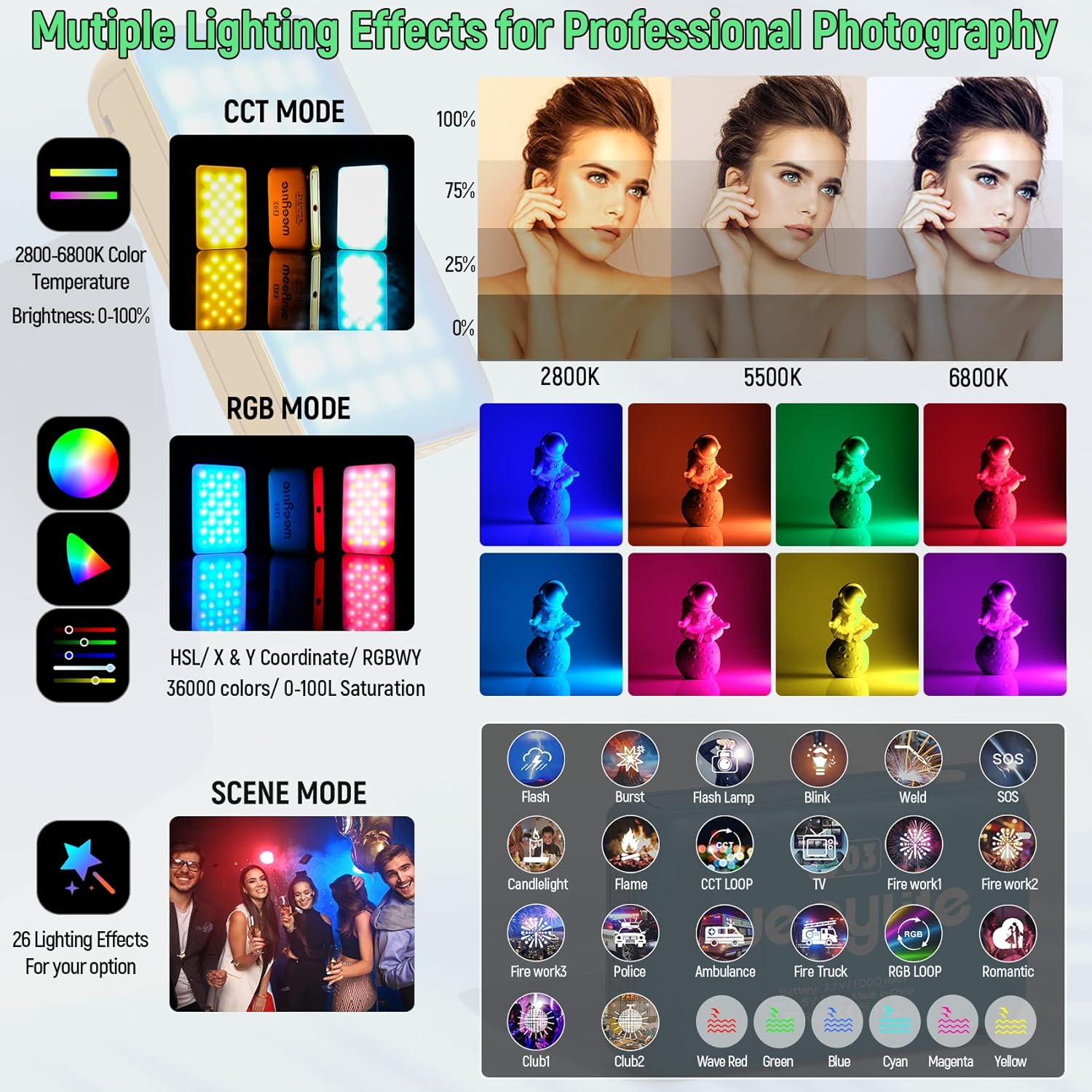
Figure 2: Overview of Weeylite S03 features, including CCT, RGB, and Scene modes, demonstrating its versatility for different lighting needs.

Figure 3: The compact and lightweight design of the Weeylite S03, highlighting its high CRI for natural color reproduction.
4. Setup
4.1. Charging the Device
The Weeylite S03 has a built-in 3.7V/1000mAh battery. Before first use, it is recommended to fully charge the device.
- Locate the USB to Type-C charging cable included in the box.
- Connect the Type-C end of the cable to the charging port on the side of the Weeylite S03.
- Connect the USB-A end of the cable to a compatible USB power source (e.g., mobile power supply, laptop, computer, or USB charger).
- The indicator light will show charging status. A full charge typically takes approximately 3 hours.

Figure 4: Close-up of the USB Type-C charging port on the Weeylite S03.
4.2. App Download and Installation
The Weeylite S03 is primarily controlled via the "WeeylitePro" Bluetooth app. Please download the app from your device's respective app store:
- For iOS devices: Search "WeeylitePro" in the App Store.
- For Android devices: Search "WeeylitePro" in Google Play.
Video 1: Official Weeylite US Store video demonstrating the download and function instructions for the WeeylitePro App.
5. Operating Instructions
5.1. Power On/Off
The Weeylite S03 features a single physical button for power control.
- To power on: Press and hold the power button on the side of the device.
- To power off: Press and hold the power button again.
5.2. Connecting to the WeeylitePro App
Once the app is installed and the light is powered on, follow these steps to connect:
- Open the "WeeylitePro" app on your smartphone.
- The app will automatically search for nearby Weeylite S03 devices.
- Select the desired channel and group within the app. The light will automatically connect to the selected channel and group.

Figure 5: The WeeylitePro app interface, demonstrating multi-light control and various lighting adjustment functions.
5.3. Lighting Modes and Functions
The WeeylitePro app provides comprehensive control over the light's output:
- CCT Mode: Adjust color temperature from 2800K to 6800K and brightness from 0-100%.
- HSL Mode: Control hue, saturation, and lightness for a full spectrum of colors.
- RGBWY Mode: Fine-tune individual Red, Green, Blue, White, and Yellow channels.
- X & Y Coordinate Mode: Precise color selection using CIE 1931 color space coordinates.
- Color Chip Function: Select from pre-programmed "LEE" & "ROSCO" color filters.
- FX (Scene) Mode: Choose from 26 built-in special effects like Flash, Burst, Firework, Police, Ambulance, TV, Candlelight, and more. Adjust speed and brightness for each effect.
- Color Picker: Use your smartphone camera to sample a color from your environment and replicate it with the light.
- My Scene: Save your customized lighting settings for quick recall.

Figure 6: Detailed view of the app's Color Picker and Color Chip functions, allowing for precise color matching and selection.
Video 2: Official Weeylite US Store video showcasing the Weeylite S03 Pocket RGBW LED Video Camera Light and its various color modes and effects.
5.4. Group Control
The WeeylitePro app allows you to control multiple S03 lights simultaneously or individually by assigning them to different channels and groups.
- Open the mobile app.
- Set the required channel number and group number for each light first.
- Then, turn on the light. The light will automatically connect to the channel number and group number that have been set.

Figure 7: The app's group control interface, illustrating how multiple lights can be managed for synchronized or varied lighting effects.
6. Mounting Options
The Weeylite S03 offers flexible mounting options:
- 1/4" Screw Interface: The light features a universal 1/4" screw hole, making it compatible with tripods, light stands, and other accessories.
- Hot Shoe Adapter: An included hot shoe adapter allows direct mounting onto DSLR cameras, camcorders, or camera cages.

Figure 8: The Weeylite S03 mounted on a camera, showcasing its compact size and ease of integration with camera setups.

Figure 9: Various applications of the Weeylite S03, including mounting on stabilizers, mini tripods, DSLR cameras, light stands, and phone clamps.
7. Specifications
| Feature | Specification |
|---|---|
| Model Number | WY-S03 |
| Product Dimensions | 3.5 x 0.8 x 2 inches (3.5"L x 0.8"W x 2"H) |
| Item Weight | 3.52 ounces |
| Battery | 1 Lithium Ion battery (3.7V/1000mAh) |
| Battery Life | Approx. 60 minutes (at 100% power) |
| Charging Port | USB Type-C |
| Connectivity | Bluetooth (App Control) |
| Color Temperature (CCT) | 2800K-6800K |
| CRI (Color Rendering Index) | RA≥95, TLCI≥97 |
| LED Bulbs | 60pcs |
| Power | 4W |
| Lumen | 300LM |
| Lux | 350Lux (0.5M, 5500K) |
8. Maintenance
To ensure the longevity and optimal performance of your Weeylite S03, follow these maintenance guidelines:
- Keep the device clean by wiping it with a soft, dry cloth. Avoid using harsh chemicals or abrasive materials.
- Store the light in a cool, dry place away from direct sunlight and extreme temperatures.
- Avoid dropping or subjecting the device to strong impacts.
- Do not attempt to disassemble or repair the device yourself, as this will void the warranty.
9. Troubleshooting
If you encounter issues with your Weeylite S03, refer to the following common solutions:
- Light not turning on: Ensure the battery is charged. Connect the device to a power source using the Type-C cable.
- App not connecting:
- Ensure Bluetooth is enabled on your smartphone.
- Make sure the Weeylite S03 is powered on.
- Restart the app and try connecting again.
- Check if the app version is up to date.
- Inconsistent light output: Ensure the device is fully charged. If using multiple lights, verify that they are assigned to the correct channels/groups in the app.
10. Warranty and Support
Weeylite products come with a standard manufacturer's warranty. For specific warranty details, please refer to the documentation included with your purchase or visit the official Weeylite website. If you experience any issues or require technical assistance, please contact Weeylite customer support.