
1. Introduction
This manual provides essential instructions for the safe and efficient operation of your XIAOMI Soundbar 3.1ch. Please read this manual thoroughly before using the product and retain it for future reference.
The XIAOMI Soundbar 3.1ch is designed to enhance your home theater audio experience with its 3.1 channel configuration and wireless subwoofer, delivering clear sound and powerful bass.
2. Safety Information
- Do not expose the device to rain or moisture to prevent fire or electric shock.
- Do not open the casing. Refer all servicing to qualified personnel.
- Ensure proper ventilation around the unit. Do not block any ventilation openings.
- Place the soundbar and subwoofer on a stable, flat surface.
- Keep the device away from heat sources such as radiators, heat registers, stoves, or other apparatus (including amplifiers) that produce heat.
- Use only attachments/accessories specified by the manufacturer.
- Unplug the apparatus during lightning storms or when unused for long periods of time.
3. Package Contents
Verify that all items are present in the package:
- XIAOMI Soundbar 3.1ch (Main Unit)
- Wireless Subwoofer
- Power Cord(s)
- Remote Control
- User Manual (this document)
- HDMI Cable (may vary by region)
4. Product Overview
Familiarize yourself with the components of your XIAOMI Soundbar system.

Figure 4.1: Front view of the XIAOMI Soundbar 3.1ch and its accompanying wireless subwoofer. The soundbar is a long, slender unit typically placed in front of a television, while the subwoofer is a larger, rectangular unit designed to provide deep bass sounds.
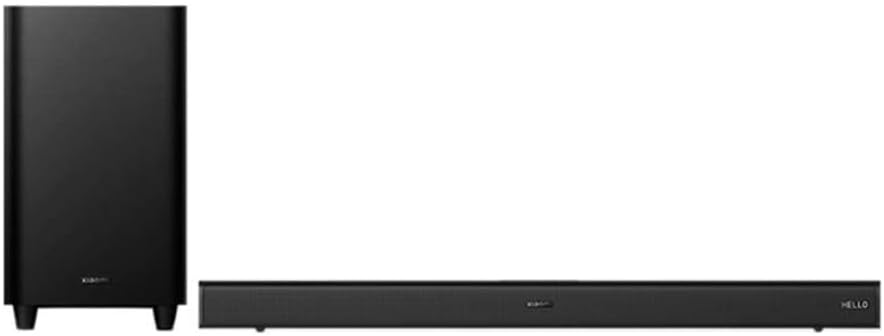
Figure 4.2: Angled view of the XIAOMI Soundbar 3.1ch and wireless subwoofer, showing the compact design of both units. The soundbar features a minimalist design with controls often integrated discreetly.
4.1 Soundbar Front Panel
- Power Button: Turns the soundbar on/off.
- Volume Up/Down: Adjusts the volume level.
- Source/Input Button: Switches between input sources (HDMI, Bluetooth, Optical, etc.).
- LED Indicators: Display current status or input mode.
4.2 Soundbar Rear Panel
- HDMI eARC Port: Connects to your TV for high-quality audio.
- Optical Input: Connects to devices with an optical audio output.
- USB Port: For firmware updates or media playback (if supported).
- Power Input: Connects to the AC power cord.
4.3 Wireless Subwoofer
- Power Input: Connects to the AC power cord.
- Pairing Button: For manual pairing with the soundbar (if automatic pairing fails).
- Status LED: Indicates pairing status.
5. Setup
5.1 Placement
- Soundbar: Place the soundbar centrally below your TV. Ensure there are no obstructions in front of the soundbar.
- Subwoofer: The wireless subwoofer can be placed anywhere in the room, ideally near a wall or corner for enhanced bass. Avoid placing it directly against a wall or in a cabinet, which can muffle the sound.
5.2 Connecting to Power
- Connect the power cord to the soundbar's power input, then plug it into a wall outlet.
- Connect the power cord to the wireless subwoofer's power input, then plug it into a wall outlet.
- The soundbar and subwoofer will automatically attempt to pair. The subwoofer's status LED will indicate pairing status (e.g., blinking while searching, solid when connected).
5.3 Connecting to Your TV
Choose one of the following connection methods:
Option 1: HDMI eARC (Recommended)
- Connect one end of an HDMI cable to the HDMI eARC port on your TV.
- Connect the other end of the HDMI cable to the HDMI eARC port on the soundbar.
- On your TV, enable HDMI-CEC (Consumer Electronics Control) and eARC/ARC functions in the audio settings.
Option 2: Optical Cable
- Connect one end of an optical cable to the Optical OUT port on your TV.
- Connect the other end of the optical cable to the Optical IN port on the soundbar.
- On your TV, set the audio output to "Optical" or "PCM".
6. Operating Instructions
6.1 Power On/Off
- Press the Power button on the soundbar or remote control to turn the unit on or off.
6.2 Selecting Input Source
- Press the Source or Input button on the soundbar or remote control repeatedly to cycle through available input sources (e.g., HDMI eARC, Optical, Bluetooth).
- The LED indicators on the soundbar will show the currently selected input.
6.3 Volume Control
- Press Volume Up (+) or Volume Down (-) buttons on the soundbar or remote control to adjust the volume.
- Press the Mute button on the remote control to mute or unmute the sound.
6.4 Bluetooth Pairing
- Press the Bluetooth button on the remote control or cycle through inputs until "Bluetooth" mode is selected. The Bluetooth indicator will blink.
- On your mobile device, enable Bluetooth and search for available devices.
- Select "XIAOMI Soundbar 3.1ch" from the list.
- Once paired, the Bluetooth indicator on the soundbar will become solid.
6.5 NFC Pairing (Near Field Communication)
If your device supports NFC:
- Ensure NFC is enabled on your mobile device.
- Tap your NFC-enabled device gently against the NFC tag area on the soundbar (refer to product diagram for exact location).
- Confirm the pairing request on your mobile device.
7. Maintenance
7.1 Cleaning
- Always unplug the soundbar and subwoofer from the power outlet before cleaning.
- Use a soft, dry, lint-free cloth to wipe the surfaces of the soundbar and subwoofer.
- Do not use liquid cleaners, aerosol sprays, or abrasive cleaning agents, as they may damage the finish or internal components.
7.2 Storage
- If storing the unit for an extended period, unplug it from the power source and store it in a cool, dry place, away from direct sunlight and extreme temperatures.
8. Troubleshooting
| Problem | Possible Cause | Solution |
|---|---|---|
| No power | Power cord not connected securely. | Ensure power cords are firmly plugged into the soundbar/subwoofer and wall outlet. |
| No sound | Incorrect input source selected. Volume is too low or muted. Cables not connected properly. | Select the correct input source. Increase volume and check mute status. Reconnect HDMI or Optical cables. |
| Subwoofer not pairing | Out of range or interference. Manual pairing required. | Move subwoofer closer to the soundbar. Press the pairing button on the subwoofer and then on the soundbar (if available, refer to specific product instructions for manual pairing sequence). |
| Bluetooth connection issues | Device not in pairing mode. Interference. | Ensure soundbar is in Bluetooth pairing mode. Move Bluetooth device closer to the soundbar. Disconnect and reconnect Bluetooth. |
9. Specifications
- Model: Soundbar 3.1ch
- Speaker Type: Soundbar with Wireless Subwoofer
- Surround Sound Channel Configuration: 3.1
- Speaker Maximum Output Power: 430 Watts
- Connectivity Technology: Bluetooth, NFC, HDMI eARC, Optical
- Subwoofer Connectivity: Wireless
- Subwoofer Diameter: 6.5 Inches
- Control Method: Remote
- Power Source: Corded Electric
- Product Dimensions: 11.02 x 4.33 x 9.06 inches
- Item Weight: 24.2 pounds
10. Warranty and Support
XIAOMI products are manufactured to the highest quality standards. For detailed warranty information, please refer to the warranty card included with your product or visit the official XIAOMI website. Keep your purchase receipt as proof of purchase.
For technical support or service inquiries, please contact XIAOMI customer service through their official channels. Contact information can typically be found on the XIAOMI website or in your product packaging.


