
SYNLETT Q034G-F007EBK(5)
SYNLETT Wireless Call System Nurse Call System User Manual
Model: Q034G-F007EBK(5)
Introduction
This user manual provides comprehensive instructions for the SYNLETT Wireless Call System Nurse Call System. This system is designed to facilitate communication and assistance in various settings such as clinics, restaurants, nursing homes, and for patient and caregiver use. It includes a Central Monitoring Unit (CMU) and dual-function call buttons to enhance efficiency and response times.
Product Overview
The SYNLETT Wireless Call System consists of a Central Monitoring Unit (CMU) and multiple dual-function call buttons. The CMU features a display for call numbers, adjustable volume, language selection, and recording functions. The call buttons are designed for ease of use and can be worn or mounted.

Image: The complete SYNLETT Wireless Call System, showing the Central Monitoring Unit and five dual-function call buttons.
Key Components:
- Central Monitoring Unit (CMU): Portable unit with a display, applicable in various settings like nurses' stations, emergency rooms, clinics, hospitals, and restaurants.
- Dual Function Call Buttons: 2-in-1 buttons with CALL and CLEAR features. Allows caregivers or staff to clear individual calls at the call point.
Features:
- Multiple Languages with Number Call Out: The system supports 7 languages and 8 different alert tones in 3 volume levels.
- Long Operating Range: Up to 660-foot operating range in open areas, capable of transmitting through multiple floors and walls.
- Easy Setup and Simple to Use: All functional buttons are front-facing for easy operation.
Setup
Setting up your SYNLETT Wireless Call System is straightforward. Follow these steps for initial configuration:
- Powering the CMU: Plug the Central Monitoring Unit into a power socket using the provided AC adapter. For backup power, keep 4 C-type batteries aside (not included).

Image: The Central Monitoring Unit showing the AC adapter connection and the battery compartment for backup power.
- Call Button Batteries: Ensure the 12V batteries are installed in each call button. These are typically included.

Image: Illustration of battery installation within a call button.
- Mounting Call Buttons: Call buttons can be worn with a lanyard, screwed into a wall, or attached using an adhesive patch. Choose the most suitable method for your environment.

Image: Various mounting options for the dual-function call button, including lanyard, screw-in, and adhesive patch.
- Antenna Extension: Fully extend the antenna on the CMU for optimal signal range. Avoid installing near metal surfaces as this can shorten the range.
Operating Instructions
The SYNLETT Wireless Call System is designed for intuitive operation. Here's how to use its primary functions:
Making a Call:
- To request assistance, press the red CALL button on the dual-function call button.
- The Central Monitoring Unit will receive the signal and call out the corresponding number in the selected language, displaying it on the screen.
Clearing a Call:
- To clear an individual call at the call point, press the green CLEAR button on the dual-function call button. This is a "real step saver" feature.
- Calls can also be cleared from the CMU directly using the "Clear Calls" button.
CMU Controls:
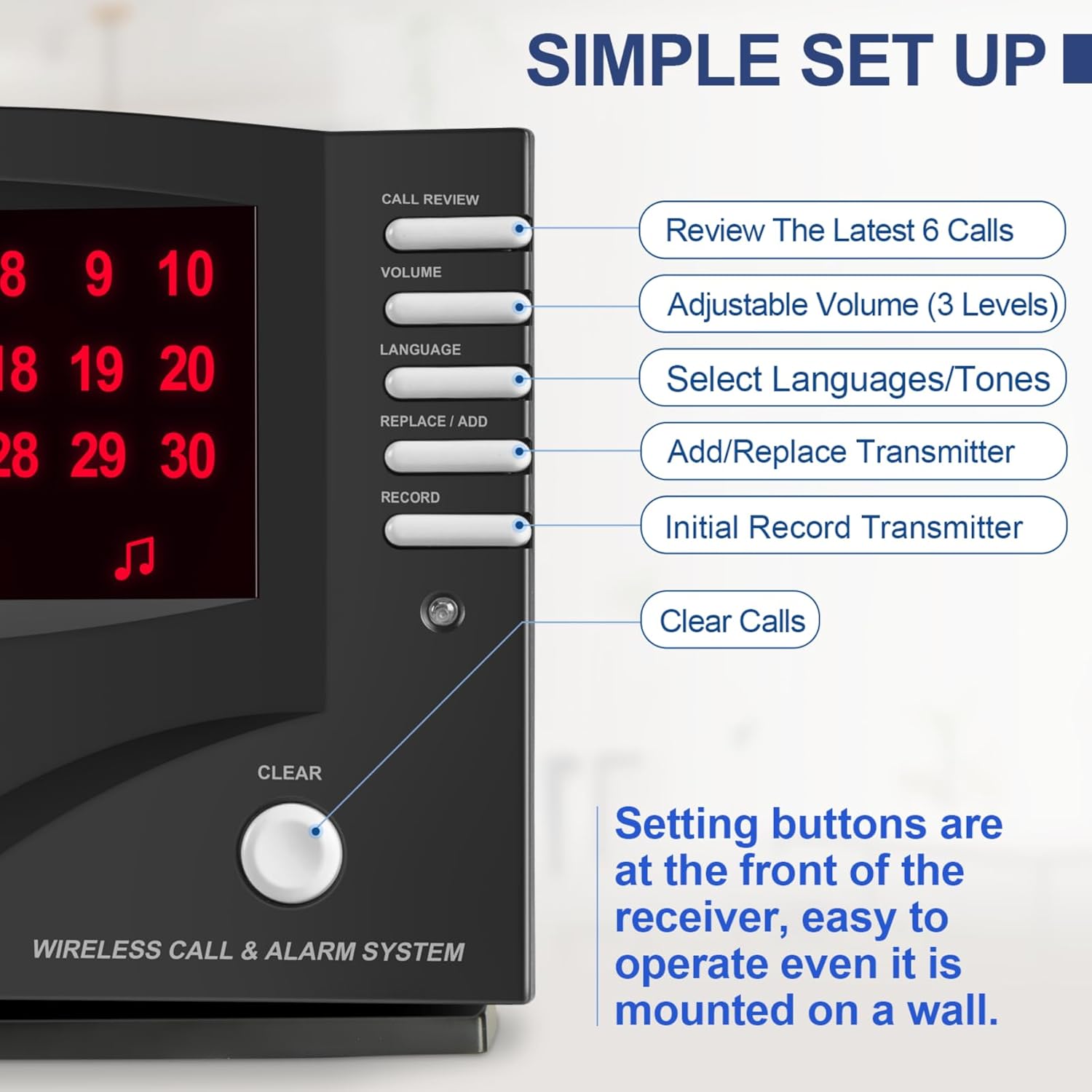
Image: Close-up of the Central Monitoring Unit showing the control buttons and their functions.
- CALL REVIEW: Review the latest 6 calls.
- VOLUME: Adjust volume (3 levels available).
- LANGUAGE: Select from 7 languages and 8 different alert tones.
- REPLACE/ADD: Add or replace a transmitter (call button).
- RECORD: Initial record transmitter.
- CLEAR: Clear all calls displayed.
Voice Alert and Tones:
The CMU provides voice alerts in multiple languages and various tones. You can select between one-off alerts or repeat alerts.

Image: Display of available languages for voice alerts and various chime options.

Image: The switch on the CMU to select between one-off and repeat alert modes.
Official Product Video:
Video: An official product video demonstrating the SYNLETT Wireless Calling System Nurse Call System in various scenarios, including caregiver and hospitality use, and showing how the monitoring unit responds to calls in different languages.
Maintenance
To ensure the longevity and optimal performance of your SYNLETT Wireless Call System, follow these maintenance guidelines:
- Battery Replacement: Replace batteries in the call buttons as needed. The system uses 12V batteries for the call buttons and C-type batteries for CMU backup.
- Cleaning: Use a soft, dry cloth to clean the Central Monitoring Unit and call buttons. Avoid abrasive cleaners or solvents.
- Signal Testing: Periodically test the system to understand its effective operating range and ensure all components are functioning correctly.
Troubleshooting
If you encounter issues with your SYNLETT Wireless Call System, refer to the following common problems and solutions:
| Problem | Possible Cause | Solution |
|---|---|---|
| No signal from call button | Low or dead battery in call button; Call button out of range; Interference. | Replace call button battery. Ensure CMU antenna is fully extended. Move call button closer to CMU. Check for metal obstructions. |
| CMU not powering on | AC adapter not connected; Backup batteries depleted or incorrectly installed. | Ensure AC adapter is securely plugged in. Check and replace C-type backup batteries if necessary. |
| Shortened signal range | CMU antenna not fully extended; Metal walls or surfaces interfering. | Fully extend the CMU antenna. Relocate the CMU away from metal walls or large metal objects. |
Important Notice:
The products do not have an out-of-range function and as such must be tested periodically to understand their area of effective operation.

Image: Visual reminder about the importance of periodic testing for effective range.
Specifications
| Attribute | Detail |
|---|---|
| Brand | SYNLETT |
| Model Number | Q034G-F007EBK(5) |
| Power Source | Battery Powered |
| Compatible Devices | Call Buttons, Call Light System, Caregiver Pager, PIR Motion Sensors, Panic Button System, Window/Door Exit Alarms |
| Item Dimensions (L x W x H) | 8.07 x 2.16 x 6.7 inches |
| Connectivity Technology | Wireless |
| Installation Type | Self-Adhesive, Screw-In |
| Alert Type | Motion |
| Control Method | Touch |
| Battery Cell Composition | Alkaline |
| Maximum Range | 660 Feet (6.6E+2 Feet) |
| Included Components | 1 CMU & 5 Call Buttons |
| Item Weight | 2.05 pounds |
| UPC | 768564518743 |
Safety Information
While we work to ensure that product information is correct, on occasion manufacturers may alter their ingredient lists. Actual product packaging and materials may contain more and/or different information than that shown on our Web site. We recommend that you do not solely rely on the information presented and that you always read labels, warnings, and directions before using or consuming a product. We recommend all personnel receive periodic training in the operation of these products and products are tested before each use. These devices are not a substitute for visual monitoring by a personnel. These devices are to be used by a licensed caregiver or trained service staff only.
Legal Disclaimer
It is designed to be installed by the end user. As such, it is the entire responsibility of the buyer to insure that the product is properly installed and tested. Further, the product is not designed to replace good caregiving practices including, but not limited to: A.) Direct patient supervision B.) Adequate training for staff personnel for elopement and fall prevention C.) Testing of the system before each use.
Warranty and Support
For customer support and inquiries, please refer to the SYNLETT brand store or contact the manufacturer directly. While specific warranty details are not provided in this manual, general product support is available.
You can visit the official SYNLETT store for more information: SYNLETT Store
A PDF user guide is also available for download: User Guide (PDF)
Related documentsQ034G-F007EBK(5)


Ask a question about this manual
Ask about setup, troubleshooting, compatibility, parts, safety, or missing instructions. Manuals+ will review the question and use this page’s manual context to help answer it.