
1. Introduction
The Wellue AI ECG Monitor (Model 1) is a compact and lightweight device designed for continuous electrocardiogram (ECG/EKG) monitoring. It provides 24-hour dynamic heart event tracking, real-time heartbeat observation, and advanced Artificial Intelligence (AI) analysis to help identify various heart events. This manual provides instructions for setting up, operating, maintaining, and troubleshooting your device.

Image 1.1: The Wellue AI ECG Monitor shown with its accompanying mobile application and PC software interfaces, illustrating its comprehensive monitoring capabilities.

Image 1.2: The Wellue AI ECG Monitor demonstrating its compact and lightweight design (18g), making it easily portable in a pocket or purse.
2. Package Contents
Please verify that all items listed below are included in your package:
- Wellue AI ECG Monitor (Model 1)
- USB Charging Cable
- Chest Strap
- Electrode Stickers
- User Manual (this document)

Image 2.1: An overhead view of the Wellue AI ECG Monitor package contents, including the monitor, chest strap, USB cable, and instruction manual.
3. Setup
3.1 Charging the Device
Before first use, fully charge the Wellue AI ECG Monitor. Connect the device to a USB power source using the provided USB charging cable. The device features a Lithium-Ion battery with approximately 24 hours of continuous monitoring capability on a full charge.

Image 3.1: The Wellue AI ECG Monitor connected to a USB power adapter for charging, highlighting its rechargeable feature.
3.2 Software Installation
The Wellue AI ECG Monitor requires both a mobile application and PC software for full functionality, including real-time monitoring and AI analysis.
- Mobile App: Download the compatible mobile application from your device's app store (available for iPhone and Android).
- PC Software: Download the 'ECG Browser' software from the official Wellue website. This software is compatible with Mac and Windows operating systems and is necessary for AI report analysis and data management.
3.3 Device Activation
Before initial use, connect the device to your computer and activate it using the PC software. Follow the on-screen prompts within the 'ECG Browser' application to complete the activation process.
4. Wearing the Device
The Wellue AI ECG Monitor offers two primary wearing modes for comfort and convenience:
4.1 Chest Strap Mode
Attach the monitor to the adjustable chest strap. Ensure the electrodes on the strap are in firm contact with your skin. For optimal signal quality, moisten the electrode areas with a small amount of water or electrode gel before wearing.
4.2 Electrode Sticker Mode
For a more discreet or flexible wearing option, attach the monitor directly to your chest using the provided electrode stickers. Position the stickers according to the diagrams in the quick start guide for accurate readings.

Image 4.1: Illustrations demonstrating the two supported wearing modes: with an adjustable chest strap for stable monitoring and with electrode stickers for comfortable, less visible placement.
5. Operating Instructions
5.1 Starting and Stopping Monitoring
The device features an auto-sensing design. Simply put it on your chest, and it will automatically begin recording. Remove the device to stop monitoring.
5.2 Real-Time Monitoring
Once the device is worn and connected via Bluetooth to your mobile phone, you can observe your heartbeat and ECG waveforms in real-time on the mobile application. The app can also provide abnormal heartbeat reminders.
5.3 24-Hour Continuous Monitoring
The Wellue AI ECG Monitor is designed for continuous EKG monitoring for up to 24 hours, capturing dynamic heart events throughout the day and night.

Image 5.1: Visual representation of the Wellue AI ECG Monitor providing continuous heart monitoring throughout a 24-hour cycle, including daytime activities and nighttime sleep.
5.4 AI Analysis and Reporting
For detailed AI analysis of your recorded ECG data, transfer the data to the 'ECG Browser' PC software. The AI analysis can screen for over 104 different abnormal heart events across 16 categories.

Image 5.2: A user interacting with the 'ECG Browser' PC software, which displays detailed ECG waveforms and analysis reports.
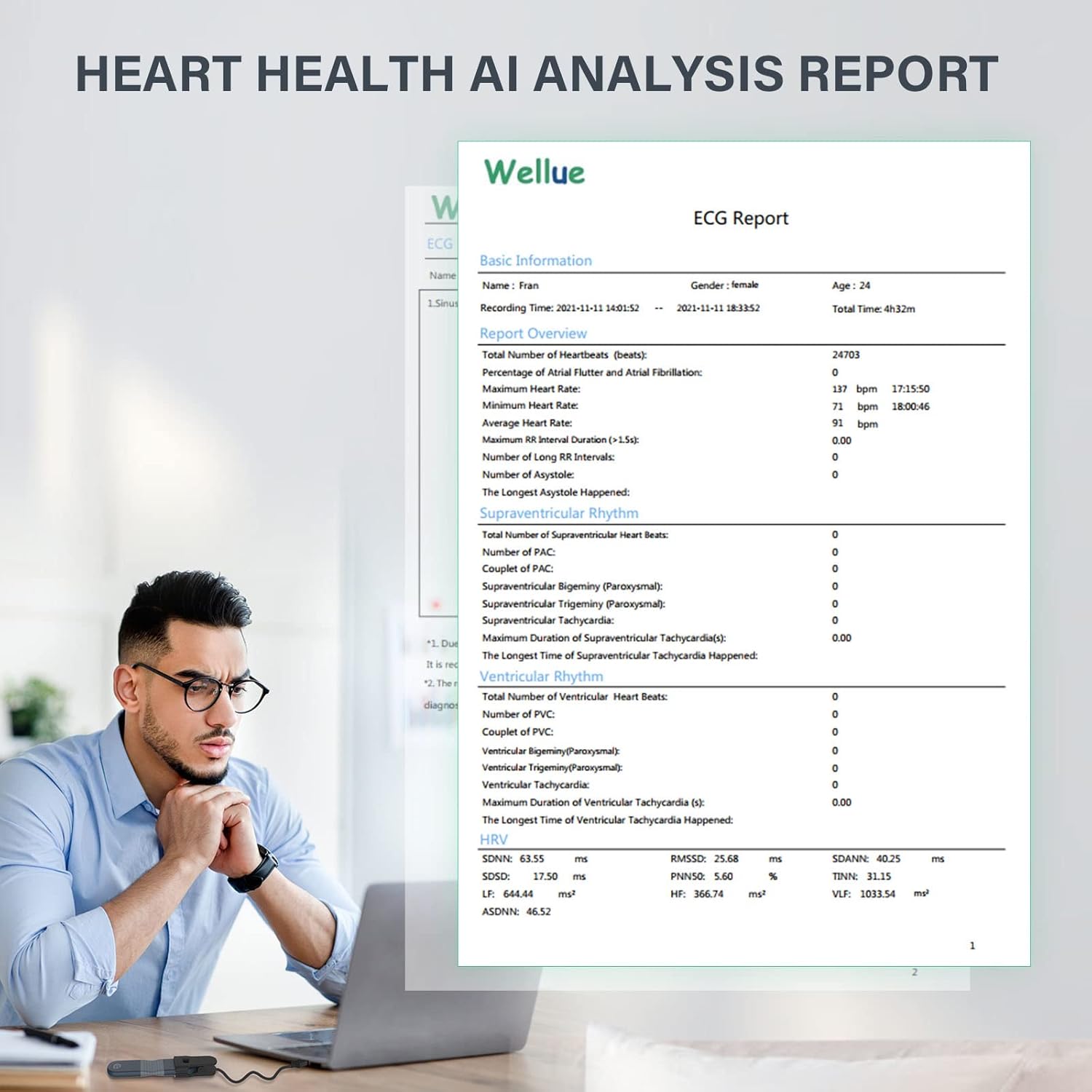
Image 5.3: A close-up of an AI analysis report generated by the Wellue AI ECG Monitor, detailing various heart event classifications and measurements.
5.5 Data Management and Sharing
The 'ECG Browser' software allows you to analyze, save, and manage your reports. You can easily share complete ECG and analysis reports with your healthcare provider directly from the software.

Image 5.4: A healthcare professional reviewing ECG reports on a computer, with a mobile device also displaying report data, illustrating the ease of sharing medical information.
6. Maintenance
6.1 Cleaning the Device
Wipe the device with a soft, dry cloth. Do not use abrasive cleaners or immerse the device in water. Ensure the electrodes are clean and free of residue after each use.
6.2 Battery Care
To prolong battery life, avoid fully discharging the device frequently. Charge the device regularly, especially if it will not be used for an extended period.
6.3 Storage
Store the device in a cool, dry place away from direct sunlight and extreme temperatures. Keep it out of reach of children.
7. Troubleshooting
If you encounter issues with your Wellue AI ECG Monitor, please refer to the following common troubleshooting steps:
- Device not turning on: Ensure the device is fully charged. Connect it to a power source and allow it to charge for at least 30 minutes before attempting to use it.
- No ECG signal: Verify that the device is worn correctly and the electrodes are in firm contact with your skin. Moisten the electrode areas if necessary. Check Bluetooth connection to your mobile device.
- Connectivity issues: Ensure Bluetooth is enabled on your mobile device or that the USB cable is securely connected to your PC. Restart the device and your mobile/PC application.
- Software problems: Ensure your mobile app and PC software are updated to the latest version. If issues persist, try reinstalling the software.
For further assistance, please contact Wellue customer support.
8. Specifications
| Feature | Specification |
|---|---|
| Brand | Wellue |
| Model | 1 |
| Color | black |
| Compatible Devices | Smartphones (iPhone & Android), Mac, Windows |
| Battery Life | 24 Hours (continuous monitoring) |
| Sensor Type | ECG/EKG Sensor |
| Battery Description | Lithium-Ion |
| Item Package Dimensions (L x W x H) | 6.6 x 4.5 x 2.3 inches |
| Package Weight | 0.32 Kilograms |
9. Warranty and Support
9.1 Warranty Information
The Wellue AI ECG Monitor comes with a 1-year warranty from the date of purchase. Please retain your proof of purchase for warranty claims.
9.2 Customer Support
For any questions, technical support, or warranty inquiries, please contact our 24/7 service center. Contact details can be found on the official Wellue website or in the quick start guide included with your product.


