
Introduction
The RIG 800 PRO HS is a critically acclaimed wireless gaming headset designed for PlayStation consoles (PS4, PS5), PC, and Mac. It features a multi-function base station for wireless connection and seamless charging. The headset offers up to 24 hours of battery life, extreme wireless comfort, and precision 40 mm speaker drivers tuned for PlayStation Tempest 3D Audio, enhancing your gaming experience with accurate sound detection.
What's in the Box
Upon opening your RIG 800 PRO HS package, please ensure all the following components are present:
- RIG 800 PRO HS headset
- USB-A wireless transmitter
- USB-A to USB-C Charge Cable
- Multi-function charging base station for headset

Setup
Initial Charging
Before first use, fully charge your RIG 800 PRO HS headset. Place the headset onto the multi-function charging base station. Ensure the headset is properly seated for charging. The base station can be powered via the included USB-A to USB-C charge cable connected to a USB power source (e.g., console, PC, or USB wall adapter). A full charge provides up to 24 hours of wireless audio.
Connecting to Your Device
The RIG 800 PRO HS uses a dedicated 2.4GHz RF digital wireless transmitter for a secure, lag-free connection.
- Using the Multi-Function Base Station:
- Connect the multi-function base station to your PlayStation (PS4/PS5), PC, or Mac using the USB-A wireless transmitter. The transmitter plugs into a USB port on your device.
- The base station provides both wireless connection and convenient charging for your headset.
- Direct Connection (without base station):
- The removable USB wireless adapter can also be plugged directly into a USB port on your PS4, PS5 console, PC, or laptop. This allows the base station to be placed anywhere for charging convenience, independent of the active connection.
Once connected, power on your headset. The headset and transmitter should automatically pair. If pairing does not occur, refer to the troubleshooting section.

Operating Instructions
Headset Controls
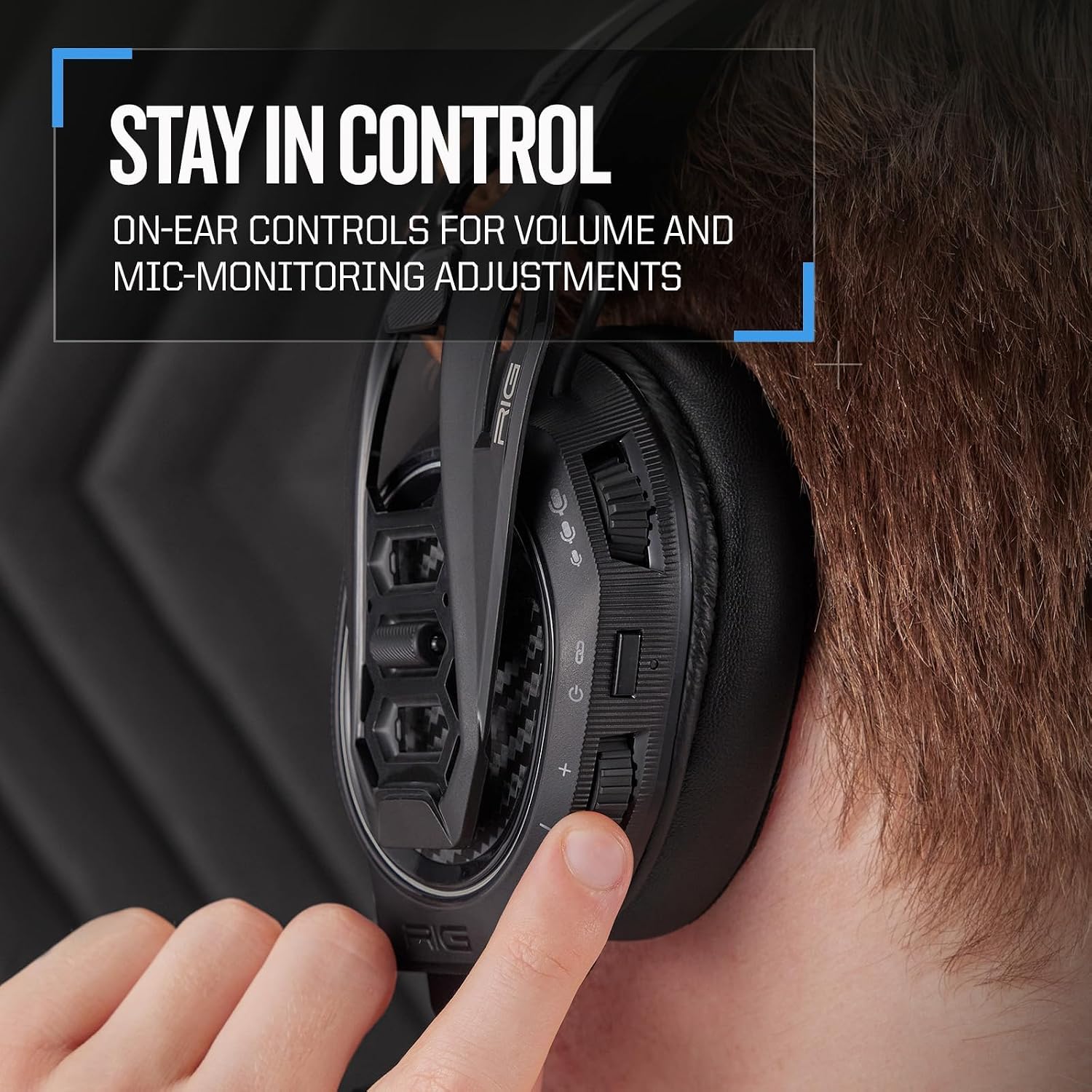
The RIG 800 PRO HS features intuitive on-ear controls for quick adjustments during gameplay.
- Volume Control: Use the dedicated volume wheel on the earcup to adjust the overall audio level.
- Mic Monitoring (Sidetone): Adjust the level of your own voice heard through the headset using the mic monitoring control. This helps prevent shouting.
- Flip-to-Mute Microphone: The pro-grade flexible noise-cancelling microphone can be flipped up to instantly mute your voice. Flip it down to unmute. For optimal mic performance, ensure the "CHAT" on the microphone tip points towards your mouth.
Audio Performance
The headset is equipped with 40 mm, high-sensitivity speaker drivers and low frequency resonators that reinforce bass and reduce distortion. It is precisely tuned for gaming audio and optimized for PlayStation Tempest 3D Audio, providing immersive spatial audio that allows you to detect the distance and direction of in-game threats more accurately.

Comfort and Fit
The RIG 800 PRO HS features a signature self-adjusting headband strap and an innovative Snap-Fit S/M/L size adjustment system. This allows for a perfect and comfortable fit for extended gaming sessions. The sound-isolating earcups are designed to block external noise, keeping you focused on your game.

Maintenance
Cleaning
To maintain your headset's condition, gently wipe the earcups and headband with a soft, damp cloth. Avoid using harsh chemicals or abrasive cleaners. Ensure the headset is dry before charging or storing.
Storage
When not in use, store your headset on its multi-function charging base station or in a clean, dry place away from extreme temperatures and direct sunlight. This helps preserve battery life and material integrity.
Durability
The RIG 800 PRO HS is built with an extremely durable and flexible headset frame, designed to withstand the rigors of regular use.

Troubleshooting
If you encounter issues with your RIG 800 PRO HS headset, please refer to the following common solutions:
- No Audio / Disconnecting Audio:
- Ensure the USB wireless transmitter is securely plugged into your device (console, PC, Mac).
- Verify the headset is powered on and fully charged.
- Check that the headset is paired with the transmitter. If not, power cycle both the headset and the device.
- Confirm the headset is selected as the audio output device in your console or computer's sound settings.
- Ensure you are within the 30-foot wireless range of the transmitter.
- Microphone Not Working:
- Ensure the microphone is flipped down to unmute.
- Check that the "CHAT" side of the microphone tip is pointing towards your mouth.
- Verify the headset is selected as the input device in your console or computer's sound settings.
- Adjust the mic monitoring level to ensure you can hear yourself.
- Charging Issues:
- Ensure the headset is correctly seated on the charging base station.
- Verify the USB-A to USB-C charge cable is securely connected to both the base station and a power source.
- Try a different USB port or power adapter.
For further assistance, please refer to the official User Guide PDF available online or contact RIG customer support.
Note: This headset is NOT compatible with Xbox consoles. Please ensure you have the correct version for your platform.
Specifications
| Feature | Detail |
|---|---|
| Model Name | RIG 800 PRO HS |
| Connectivity Technology | Wireless (RF 2.4GHz) |
| Compatible Devices | PlayStation (PS4, PS5), PC, Mac, Laptops |
| Battery Life | Up to 24 Hours |
| Charging Time | Approximately 7 Hours |
| Wireless Range | Up to 30 feet (9 meters) |
| Speaker Drivers | 40 mm with low frequency resonators |
| Frequency Response | 20 Hz - 20 kHz |
| Sensitivity | 111 dB |
| Impedance | 32 Ohm |
| Microphone | Flexible, noise-cancelling, flip-to-mute |
| Weight | 310 Grams (10.9 ounces) |
| Dimensions | 3.74 x 7.68 x 7.8 inches |
| Material | Plastic |
| UPC | 850025646239 |
Warranty and Support
Your RIG 800 PRO HS headset is covered by a standard manufacturer's warranty. Please retain your proof of purchase for warranty claims.
For detailed warranty information, technical support, or to download the full user guide, please visit the official RIG website or refer to the User Guide (PDF) link provided with your product documentation.
Official User Guide (PDF): Download User Guide
For additional product information and accessories, visit the RIG Store on Amazon.


