
CUCKOO CAC-AB0610FI
CUCKOO True HEPA Air Purifier User Manual
Model: CAC-AB0610FI
Your guide to clean and fresh air.
1. Introduction
Thank you for choosing the CUCKOO True HEPA Air Purifier. This manual provides essential information for the safe and efficient operation of your new air purifier. Please read it thoroughly before use and keep it for future reference.
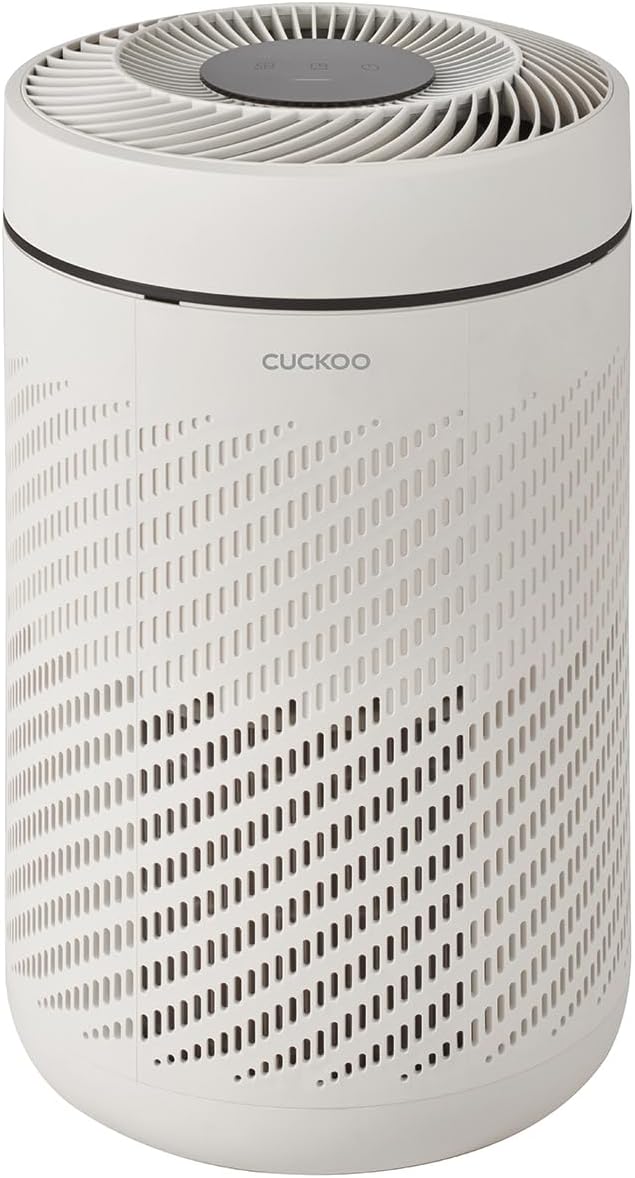
Figure 1: CUCKOO True HEPA Air Purifier (Model CAC-AB0610FI)
2. Safety Information
To reduce the risk of fire, electric shock, or injury, please observe the following safety precautions:
- Always unplug the air purifier before moving, cleaning, or performing any maintenance.
- Do not operate the unit with a damaged cord or plug.
- Keep the air purifier away from water or other liquids.
- Do not insert fingers or foreign objects into the air inlets or outlets.
- Ensure the unit is placed on a stable, level surface.
- This appliance is not intended for use by persons (including children) with reduced physical, sensory or mental capabilities, or lack of experience and knowledge, unless they have been given supervision or instruction concerning use of the appliance by a person responsible for their safety.
3. Product Overview
3.1 Components
The CUCKOO Air Purifier features a robust design with essential components for effective air purification.
- Main Unit: Houses the fan, motor, and control panel.
- Filter System: Consists of a Pre-Filter, H13 True HEPA Filter, and Activated Carbon Filter.
- Control Panel: Top-mounted interface for operating the unit.
- Air Quality Sensor: Detects real-time air pollution levels.

Figure 2: 3-Layered Filtration System
3.2 Control Panel
The intuitive control panel located on the top of the unit allows for easy operation and mode selection.

Figure 3: Top Control Panel
4. Setup
4.1 Unpacking
Carefully remove the air purifier from its packaging. Ensure all packing materials are removed before operation.
4.2 Filter Installation
The air purifier comes with a True HEPA H13 filter. Before first use, ensure the filter is properly installed and any protective packaging is removed from the filter itself.
- Unscrew the base cover of the air purifier.
- Remove the new filter from its sealed plastic bag.
- Insert the filter into the unit, ensuring it is seated correctly.
- Replace and secure the base cover.

Figure 4: H13 True HEPA Filter
4.3 Placement
Place the air purifier on a firm, level surface. For optimal performance, ensure there is adequate space around the unit for air circulation. It is ideal for home offices, small bedrooms, and kids' rooms, covering up to 1,109 square feet.

Figure 5: Ideal Placement in a Home Office
5. Operating Instructions
5.1 Power On/Off
Press the power button (⑂) on the control panel to turn the unit on or off.
5.2 Modes and Fan Speed
The air purifier offers various modes and fan speed settings to suit your needs.
- Auto Mode: The smart dust sensor detects the pollution status of the air in real-time and automatically adjusts the fan speed accordingly.
- Sleep Mode: Designed for quiet operation, this mode slows down the fan speed and dims the lights for a calm ambiance, ideal for nighttime use.
- Manual Fan Speed: Adjust the fan speed manually to your preferred level.

Figure 6: Peaceful Sleep Mode
5.3 Air Quality Indicator
The 4-color LED display indicates the cleanliness of indoor air based on the dust sensor readings:
- Blue: Excellent Air Quality
- Green: Good Air Quality
- Orange: Moderate Air Quality
- Red: Poor Air Quality

Figure 7: LED Air Quality Display
5.4 Official Product Video
Video 1: CUCKOO CAC-AB0610FI Air Purifier Overview. This video provides a visual demonstration of the air purifier's features and operation.
6. Maintenance
6.1 Filter Replacement
The air purifier is equipped with a filter replacement indicator that alerts you when replacements are needed. It is recommended to replace the filter every 6-12 months, depending on usage and air quality.
- When the filter replacement indicator lights up, it's time to replace the filter.
- Unplug the unit and unscrew the base cover.
- Remove the old filter and dispose of it properly.
- Install a new CUCKOO True HEPA H13 filter (Model: CAC-AB0610FI-FILTER, sold separately).
- Replace the base cover.
- Press and hold the filter reset button for 3 seconds to reset the filter indicator.

Figure 8: Filter Replacement Indicator
6.2 Cleaning
Regular cleaning helps maintain optimal performance.
- Wipe the exterior of the unit with a soft, dry cloth.
- The pre-filter can be gently cleaned with a soft brush or vacuum cleaner to remove large dust particles. Do not wash the HEPA or Activated Carbon filters.
7. Troubleshooting
If you encounter issues with your air purifier, refer to the table below for common problems and solutions.
| Problem | Possible Cause | Solution |
|---|---|---|
| Unit does not turn on. | Not plugged in; Power outage; Damaged cord. | Ensure power cord is securely plugged in; Check power supply; Contact customer support if cord is damaged. |
| Poor air purification. | Dirty filter; Incorrect filter installation; Room size too large. | Clean or replace filter; Reinstall filter correctly; Ensure unit is suitable for room size (up to 1,109 sq. ft.). |
| Unusual noise. | Obstruction in fan; Unit not on a level surface. | Check for foreign objects and remove; Place unit on a stable, flat surface. |
| Filter replacement indicator remains on after replacement. | Filter reset not performed. | Press and hold the filter reset button for 3 seconds until the light turns off. |
8. Specifications
| Feature | Detail |
|---|---|
| Model Number | CAC-AB0610FI |
| Brand | CUCKOO |
| Color | Ivory |
| Product Dimensions (D x W x H) | 11.7"D x 11.7"W x 18.4"H |
| Item Weight | 7.8 pounds |
| Floor Area Coverage | Up to 1,109 sq. ft. (554 sq. ft. AHAM Certified) |
| Filtration System | 2-Stage Filter (H13 True HEPA and Activated Carbon) with Pre-Filter |
| Particle Retention Size | 0.3 microns |
| Controller Type | Button Control |
| Wattage | 12 watts |
| Included Components | Air Purifier, Filter |
| Country of Origin | China |
9. Warranty and Support
9.1 Warranty Information
This CUCKOO Air Purifier (Model CAC-AB0610FI) comes with a 1-year manufacturer warranty. Please retain your proof of purchase for warranty claims.
9.2 Customer Support
For technical assistance, troubleshooting, or warranty inquiries, please contact CUCKOO customer support. Visit the official CUCKOO website for the most up-to-date contact information.
You can also visit the CUCKOO Store on Amazon for more product information and support resources.
Related documentsCAC-AB0610FI


Ask a question about this manual
Ask about setup, troubleshooting, compatibility, parts, safety, or missing instructions. Manuals+ will review the question and use this page’s manual context to help answer it.