1. Introduction
Thank you for choosing the LOE Insert-Type Privacy Filter. This product is designed to protect your screen from prying eyes and reduce blue light emissions, enhancing both privacy and visual comfort. This manual provides essential information on how to install, use, and maintain your privacy filter.
Please read these instructions carefully before use to ensure proper installation and optimal performance.
2. Product Overview
The LOE Insert-Type Privacy Filter offers a unique design that allows for easy attachment and removal. It features privacy protection, blue light reduction, and a reversible surface for different viewing preferences.
2.1 Key Features
- Insert-Type Design: Simple installation and removal by inserting into the screen bezel.
- Privacy Protection: Limits viewing angle to 60 degrees, making the screen appear dark from side angles.
- Blue Light Reduction: Cuts approximately 50% of harmful blue light (380-540nm).
- Anti-Glare & Reversible: Features a matte anti-glare side and a glossy side for varied usage environments.
- High-Quality Material: Made from 100% Japanese PET material.
2.2 Compatibility
This privacy filter is specifically designed for the following Panasonic Let's note CF-FV series models:
- CF-FV1
- CF-FV3
- CF-FV4
- CF-FV5
Note: This product is not compatible with touch panel equipped models.
2.3 Product Dimensions
The filter measures 297mm (width) x 198mm (height) and is designed for 14-inch screens with a 3:2 aspect ratio.

Image: Filter dimensions (297mm x 198mm) and compatible models (CF-FV1, CF-FV3, CF-FV4, CF-FV5).
3. Setup and Installation
Follow these steps to correctly install and remove your LOE Insert-Type Privacy Filter:

Image: Visual guide for filter installation and removal.
- Step 1: Insert Bottom Tabs. Gently insert the bottom tabs of the filter into the grooves at the bottom of your laptop screen's bezel.
- Step 2: Flex and Insert Top Tabs. Slightly flex the filter and insert the small tabs at the top into the grooves at the top of the screen's bezel.
- Step 3: Secure Side Tabs. Ensure the tabs on the left and right sides of the filter are fully extended into the outer frame of the screen. The filter should fit snugly against the screen.
- Step 4: Removal. To remove the filter, hold the top tabs and gently pull the filter forward.
Important Note: Due to the high precision cutting, the filter fits very securely. If you anticipate frequent removal, consider alternative filter types such as magnetic or universal models, which are available on separate product pages. Search for 'LOE Let's note' to find them.
4. Operating Instructions
4.1 Privacy Function
The LOE Privacy Filter utilizes polarizing technology to restrict the viewing angle. When viewed directly from the front (within 60-120 degrees), the screen remains clear. However, from side angles (0-60 degrees or 120-180 degrees), the screen appears completely dark, preventing unauthorized viewing.

Image: Demonstration of clear front view versus darkened side view for privacy.
4.2 Blue Light Reduction
This filter is designed to reduce blue light emissions from your laptop screen by approximately 50% in the 380-540nm wavelength range. Reducing blue light can help alleviate eye strain and minimize potential impacts on your circadian rhythm, especially during prolonged use.

Image: Blue light reduction test results, showing a 49% cut in the 380-540nm range.
5. Reversible Feature and Maintenance
The LOE Privacy Filter is reversible, offering two distinct viewing experiences:
- Matte (Anti-Glare) Side: This side has a low-reflection, matte finish, making it ideal for environments with strong overhead lighting, such as offices with many fluorescent lights. It minimizes glare and reflections for comfortable viewing.
- Glossy Side: This side has a higher reflection rate, which enhances the privacy effect from side angles. It provides a clearer, more vibrant image when viewed directly, but offers stronger privacy from the sides.
You can easily switch between the two sides to suit your current usage environment and preference.
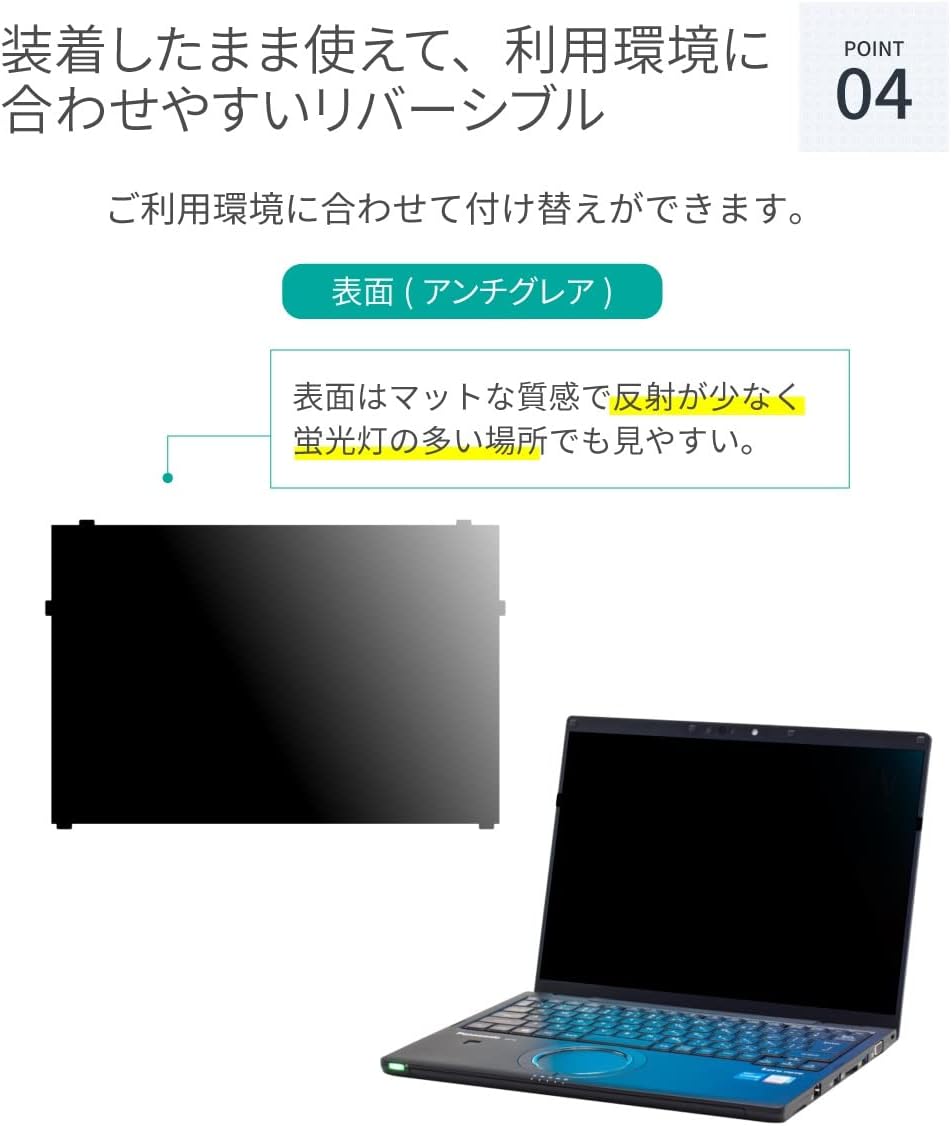
Image: Matte (Anti-Glare) Surface
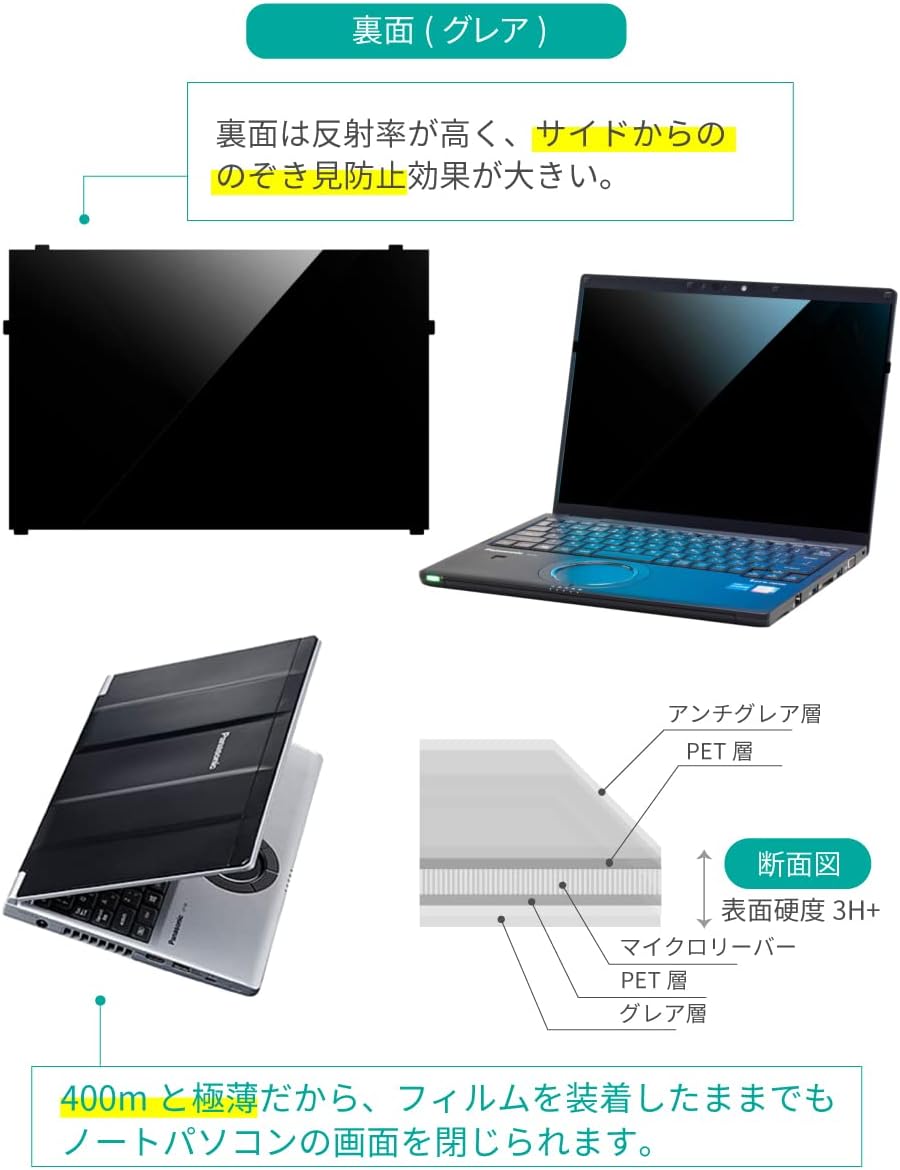
Image: Glossy Surface and Filter Cross-Section
5.1 Cleaning
To clean the filter, gently wipe it with a soft, lint-free cloth. For stubborn smudges, lightly dampen the cloth with water or a screen-safe cleaning solution. Avoid harsh chemicals or abrasive materials that could damage the filter surface.
5.2 Material Quality
The LOE Privacy Filter is manufactured using 100% Japanese PET material, ensuring high quality and durability.

Image: Comparison of LOE original material quality.
6. Specifications
| Specification | Detail |
|---|---|
| Product Weight | 10 g |
| Product Dimensions (L x W x H) | 29.7 x 19.8 x 1.27 cm |
| Model Number | CFVPS14JSPVCG |
| Special Features | Anti-glare, Blue Light Cut, Privacy Protection |
| Compatible Devices | Laptop (Panasonic Let's note CF-FV series, non-touch panel) |
| Material | Polyethylene terephthalate (PET) |
| Product Hardness | 3H |
| Transparency | 9 |
| Number of Items | 1 |
7. Troubleshooting
7.1 Filter Does Not Fit Securely
- Ensure you have the correct model and size filter for your laptop. This filter is for Panasonic Let's note CF-FV series, 14-inch, 3:2 aspect ratio, non-touch panel models.
- Verify that the tabs are correctly aligned with the grooves in the screen bezel.
- Apply gentle pressure to ensure all tabs are fully seated.
7.2 Screen Appears Too Dark
- Privacy filters inherently reduce screen brightness. Adjust your laptop's screen brightness settings to a higher level.
- Ensure you are viewing the screen directly from the front. The privacy feature darkens the screen from side angles.
- If using the glossy side, try reversing the filter to the matte (anti-glare) side, which may offer a slightly brighter appearance in some lighting conditions.
7.3 Reflections or Glare
- If experiencing excessive reflections, ensure the matte (anti-glare) side of the filter is facing outwards.
- Adjust your viewing position or the angle of your laptop to minimize direct light sources hitting the screen.
8. Warranty and Support
Specific warranty information is not provided in the product details. For any product-related inquiries, technical support, or warranty claims, please contact LOE customer service through the retailer where you purchased the product or visit the official LOE brand store on Amazon.
LOE Brand Store: https://www.amazon.co.jp/stores/LOE/page/6DD09E07-86E1-4990-858B-48D72A13E88C


