Introduction
This manual provides comprehensive instructions for the proper setup, operation, and maintenance of your SmallRig V-Mount Battery Adapter Plate, Model 3499. This adapter plate is designed to provide versatile power distribution for camera rigs, monitors, transmitters, and other accessories using a V-mount battery. Please read this manual thoroughly before use to ensure optimal performance and safety.
What's in the Box
Verify that all components are present upon unpacking:
- 1 x V Mount Battery Adapter Plate
- 1 x 15mm Dual Rod Clamp with Extension Arm
- 2 x Allen Wrench
- 4 x Screw

Image: Contents of the SmallRig V-Mount Battery Adapter Plate package, including the main plate, 15mm dual rod clamp with extension arm, two Allen wrenches, and four screws.
Product Features
- Universal V-Mount Compatibility: Designed to fit a wide range of standard V-mount batteries.
- Versatile Power Output: Features dual D-Tap output ports and DC output ports for powering multiple devices simultaneously.
- Intuitive Power Switch: An integrated on/off switch controls all output ports for convenient power management.
- Secure 15mm Rod Clamp: Equipped with a dual rod clamp for secure attachment to 15mm rail support systems, ensuring stability.
- Adjustable Extension Arm: Allows for quick repositioning of the battery plate to achieve optimal balance and angle.
- Multiple 1/4"-20 Threaded Holes: Provides attachment points for additional accessories like super clamps or magic arms.

Image: Overview of the SmallRig V-Mount Battery Adapter Plate, highlighting the V-Lock switch, 12V DC output port, 14.8V D-TAP output port, and multiple 1/4"-20 threaded holes for accessory attachment.
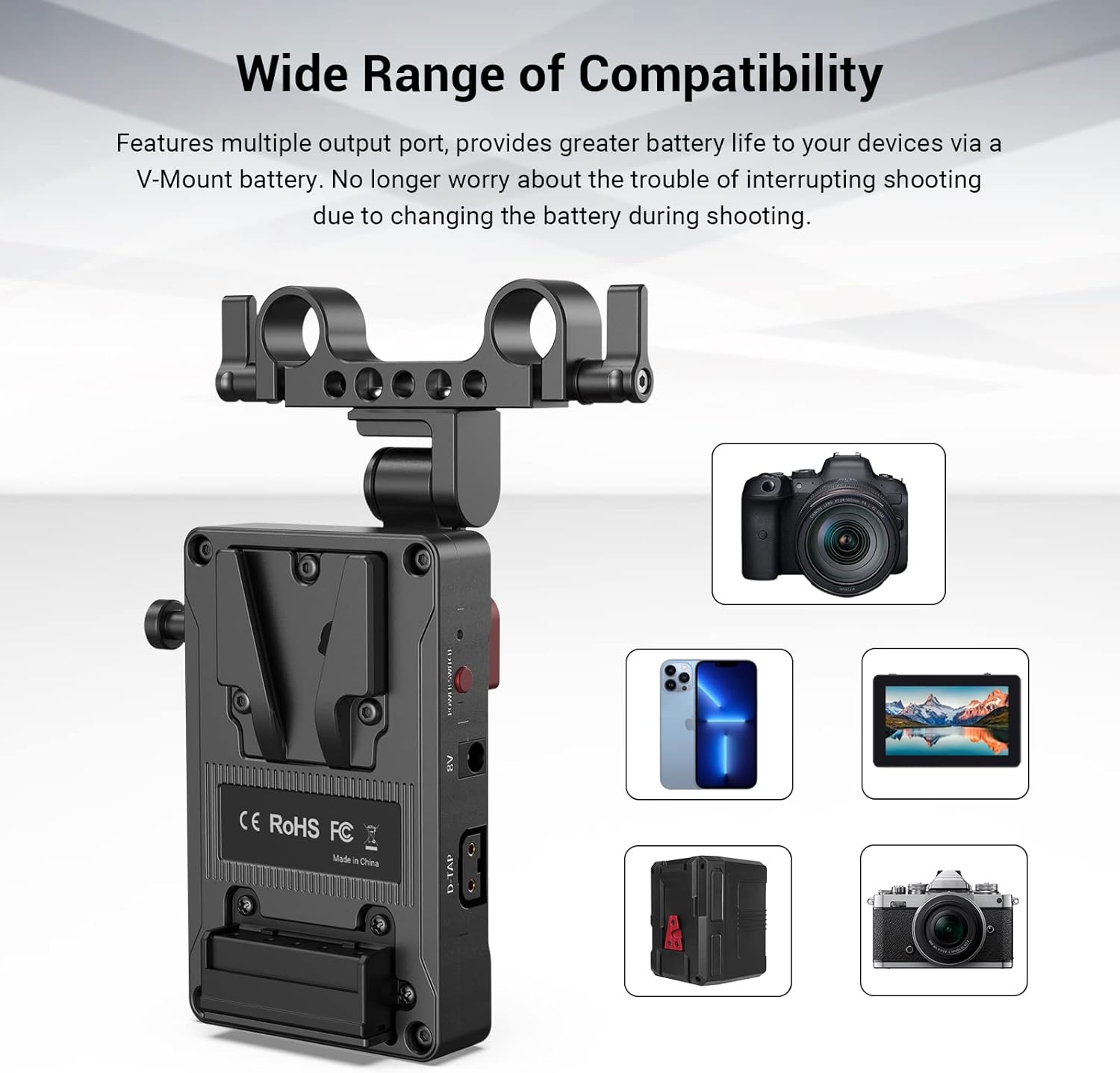
Image: The V-Mount Battery Adapter Plate shown with various compatible devices, including cameras, monitors, and smartphones, illustrating its wide range of compatibility.
Setup
- Attach to 15mm Rod System: Secure the 15mm dual rod clamp to your camera rig's 15mm rods. Use the included Allen wrench to tighten the clamp screws until the plate is firmly in place.
- Adjust Extension Arm: Loosen the red wing nut on the adjustable extension arm to reposition the V-mount battery plate. Adjust it to your desired angle and balance, then securely tighten the wing nut.
- Mount V-Mount Battery: Align your V-mount battery with the V-lock mechanism on the adapter plate. Slide the battery down until it clicks into place, indicating a secure connection. To release, press the V-lock switch.

Image: The V-Mount Battery Adapter Plate mounted on a rod system, illustrating the flexibility of its adjustable arm to achieve various angles and positions for the battery.

Image: A detailed view of the V-lock mechanism on the adapter plate, demonstrating how V-mount batteries are securely attached and released. Note: Not compatible with PAGlink series V-mount batteries or Patona Premium Battery for BP-190WS.
Operating Instructions
- Connect Devices: Once the V-mount battery is securely attached, connect your camera, monitor, transmitter, or other accessories to the available D-Tap or DC output ports on the adapter plate. Ensure all connections are firm.
- Power On/Off: Use the integrated power switch to turn the power output to your connected devices on or off. This switch controls all output ports simultaneously.
- Monitor Battery Level: Some V-mount batteries feature their own battery level indicators. Refer to your battery's manual for specific details on monitoring its charge.

Image: A close-up view of the SmallRig V-Mount Battery Adapter Plate's output ports, including an 8V DC output, a 12V DC output, two 14.8V D-TAP ports, and the main power switch for controlling all outputs.
Maintenance
- Cleaning: Regularly wipe the adapter plate with a soft, dry cloth to remove dust and debris. Avoid using harsh chemicals or abrasive materials.
- Storage: When not in use, store the adapter plate in a cool, dry place away from direct sunlight and extreme temperatures.
- Inspect Connections: Periodically check all ports and connections for any signs of wear or damage. Ensure screws are tight and the V-lock mechanism operates smoothly.
Troubleshooting
- No Power Output:
- Ensure the V-mount battery is fully charged and properly seated on the adapter plate.
- Verify the power switch on the adapter plate is in the 'ON' position.
- Check all cables and connections to the devices for proper insertion.
- Loose Mounting:
- If the rod clamp or extension arm feels loose, use the provided Allen wrench to tighten the respective screws and the red wing nut.
- Ensure the 15mm rods are correctly sized and free from obstructions.
- Battery Not Locking:
- Confirm that your V-mount battery is compatible with the SmallRig V-lock system (refer to compatibility notes).
- Check for any debris or obstruction in the V-lock mechanism.
Specifications
| Brand | SMALLRIG |
| Model Number | 3499 |
| Product Dimensions | 2.86 x 4.25 x 4.78 inches (72.6 x 108 x 121.3 mm) |
| Item Weight | 0.176 ounces (5g) |
| Material | Aluminum Alloy |
| Input Voltage | 12 Volts |
| Wattage | 10 watts |
| Connector Type | Barrel Connector, D-TAP |
| Compatible Devices | Cameras, Monitors, Smartphones (via V-mount battery) |
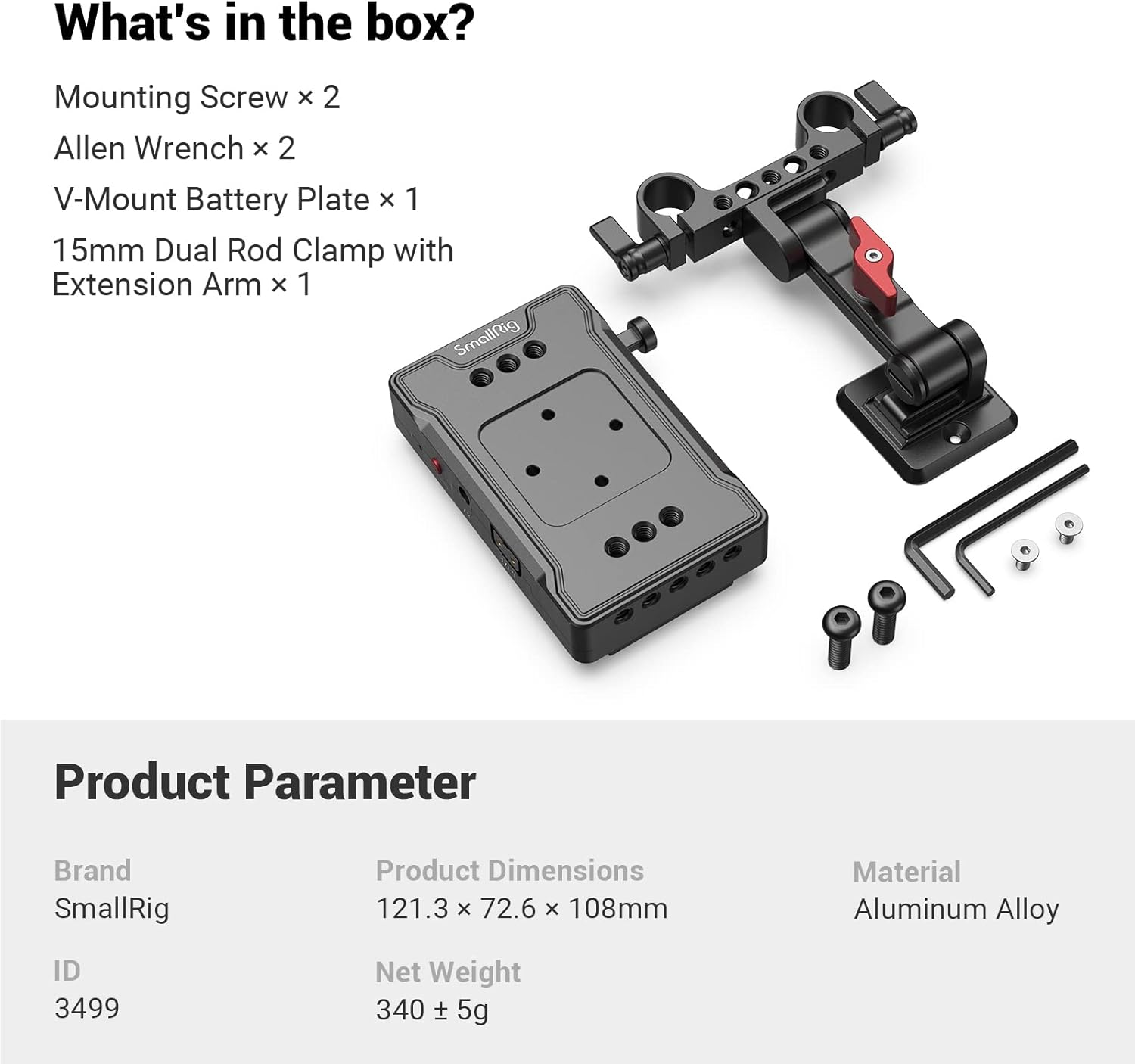
Image: Product parameter table for the SmallRig V-Mount Battery Adapter Plate, listing brand, ID (3499), product dimensions (121.3 x 72.6 x 108 mm), net weight (340 ± 5g), and material (Aluminum Alloy).
Warranty and Support
For warranty information or technical support, please refer to the official SmallRig website or contact their customer service directly. Keep your purchase receipt as proof of purchase for any warranty claims.
Official SmallRig Website: www.smallrig.com


