
Introduction
The ViewSonic VS2247-MH monitor is designed to deliver solid multimedia features and a sleek design for both home and office environments. Featuring frameless MVA panel technology, this 22-inch Full HD (1920x1080p) LED monitor provides stunning brightness and contrast from nearly any viewing angle. Its minimalist, edge-to-edge screen and frameless bezel make it ideal for seamless multi-screen setups. The monitor includes HDMI and VGA inputs for flexible connectivity to various devices.
What's in the Box
Upon unboxing your ViewSonic VS2247-MH monitor, please ensure all the following components are present:
- VS2247-MH Monitor
- HDMI Cable
- AC/DC Adapter
- Quick Start Guide

Figure 1: Contents of the VS2247-MH retail package.
Setup
Monitor Assembly
The VS2247-MH monitor is designed for easy assembly without the need for tools. Simply attach the stand base to the stand neck, and then securely connect the assembled stand to the back of the monitor panel. Ensure it clicks into place for a stable setup.
Connectivity
The monitor offers flexible connectivity options to suit various devices:
- HDMI 1.4: For high-definition digital video and audio transmission. An HDMI cable is included for convenience.
- VGA: For analog video connections, ensuring compatibility with older systems.
- Audio In/Out: Connect external audio devices or headphones for enhanced sound. The monitor also features integrated 2-watt speakers.

Figure 2: Available input and output ports on the VS2247-MH monitor.
Video 1: Official product overview highlighting the VS2247-MH monitor's features and connectivity options.
Operating Instructions
Display Features
The VS2247-MH monitor incorporates several features to enhance your viewing experience:
- Frameless Design: Provides a more immersive viewing experience, especially in multi-monitor setups.
- 100Hz Refresh Rate: Delivers smoother visuals, reducing motion blur for a clearer picture.
- AMD FreeSync: Synchronizes the monitor's refresh rate with your graphics card's frame rate, eliminating screen tearing and stuttering for fluid gameplay and video playback.
- Flicker-Free Technology: Reduces screen flickering, minimizing eye strain during prolonged use.
- Blue Light Filter: Helps to reduce harmful blue light emissions, further contributing to eye comfort.

Figure 3: Enjoy 1080P Clarity and Detail for working, gaming, or multitasking.
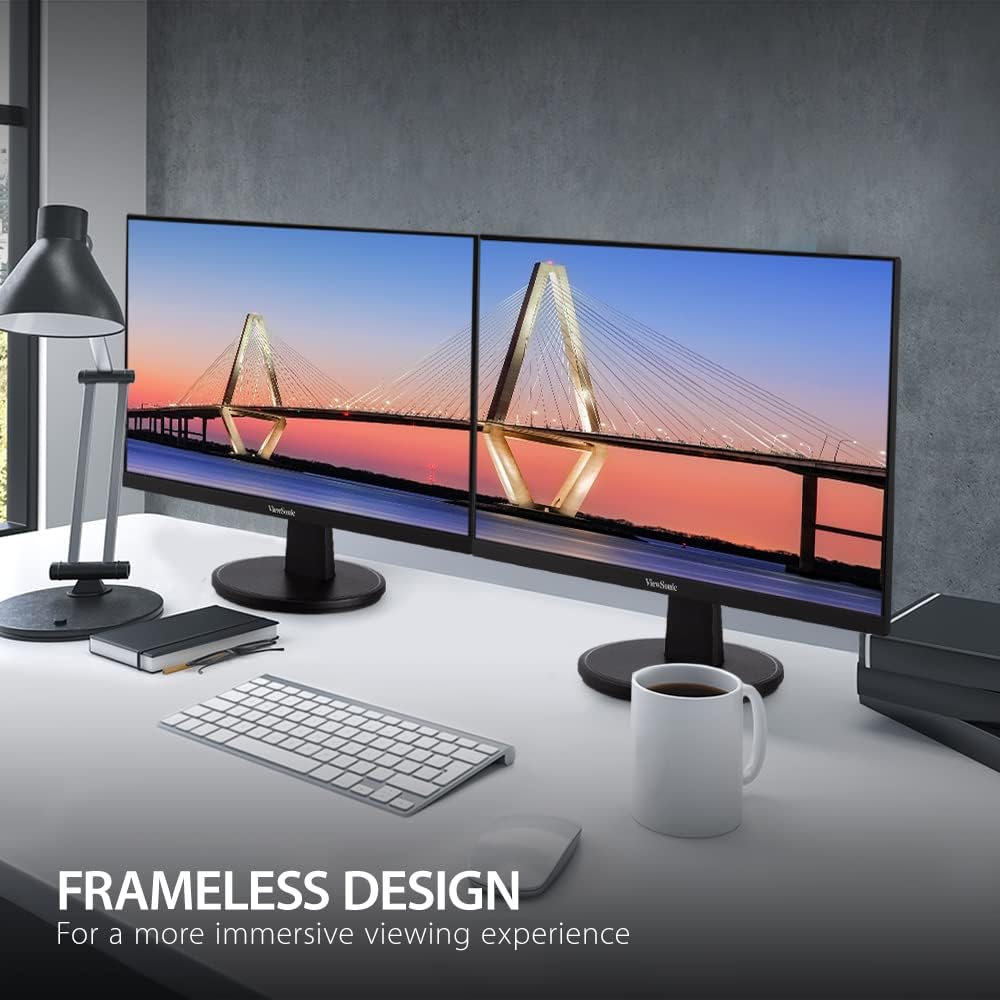
Figure 4: Frameless Design for a more immersive viewing experience.

Figure 5: Enhanced Viewing Comfort to reduce headaches and eye strain.
Optimized View Settings
The monitor offers various pre-set viewing modes to optimize display settings for different content types. These modes can be accessed through the On-Screen Display (OSD) menu:
- Game: Optimized for gaming, enhancing contrast and response time.
- Movie: Adjusts settings for cinematic viewing, providing richer colors and deeper blacks.
- Web: Ideal for general web browsing and document viewing.
- Text: Reduces brightness and contrast for comfortable reading.
- Mono: Displays content in grayscale, suitable for specific tasks or preferences.
Video 2: A brief product overview video demonstrating the monitor's features and benefits.
Maintenance
To ensure the longevity and optimal performance of your ViewSonic VS2247-MH monitor, follow these maintenance guidelines:
- Cleaning the Screen: Gently wipe the screen with a soft, lint-free cloth. For stubborn marks, lightly dampen the cloth with water or a non-abrasive screen cleaner. Avoid spraying liquid directly onto the screen.
- Cleaning the Casing: Use a soft, dry cloth to clean the monitor's casing. Do not use strong detergents or abrasive cleaners.
- Ventilation: Ensure the ventilation openings on the monitor are not blocked. Proper airflow prevents overheating.
- Power Off When Not in Use: Turn off the monitor when not in use for extended periods to conserve energy and prolong its lifespan.
Troubleshooting
If you encounter any issues with your monitor, refer to the following common troubleshooting steps:
| Problem | Possible Cause / Solution |
|---|---|
| No Power | Ensure the power cable is securely connected to the monitor and a working power outlet. Check the power adapter. |
| No Image | Verify the video cable (HDMI/VGA) is correctly connected to both the monitor and the source device. Ensure the correct input source is selected via the OSD menu. |
| Image is Blurry/Distorted | Check the display resolution settings on your computer to match the monitor's native resolution (1920x1080p). Adjust monitor settings via the OSD menu. |
| No Sound | Ensure audio cables are connected correctly (if using VGA). Check volume levels on both the monitor and the source device. If using HDMI, ensure audio output is selected on the source device. |
Specifications
| Feature | Detail |
|---|---|
| Screen Size | 22 Inches |
| Max Screen Resolution | 1920 x 1080 (Full HD) |
| Refresh Rate | 100Hz |
| Panel Technology | MVA |
| Aspect Ratio | 16:9 |
| Connectivity | 1x HDMI 1.4, 1x VGA, 2x Audio In/Out |
| Integrated Speakers | 2x 2-watt |
| Item Weight | 6.4 pounds |
| Product Dimensions | 7.4 x 19.4 x 14.8 inches |
| Color | Black |
| Manufacturer | ViewSonic |

Figure 6: Physical dimensions of the VS2247-MH monitor.
Warranty and Support
The ViewSonic VS2247-MH monitor comes with a 3-year limited warranty. This warranty covers defects in materials and workmanship under normal use. For detailed warranty information, terms, and conditions, please refer to the official ViewSonic website or the warranty card included with your product.
For technical support, troubleshooting assistance, or warranty claims, please contact ViewSonic Customer Support. You can find contact information on the official ViewSonic website or in your Quick Start Guide.
Additional protection plans may be available for purchase to extend coverage beyond the standard warranty period. Please check with your retailer for options such as 3-Year Protection Plan or 4-Year Protection Plan.


