
WITMOTION HWT3100
WitMotion HWT3100 Fluxgate Electronic Compass User Manual
Model: HWT3100-485
1. Introduction
The WitMotion HWT3100 is a high-performance 3-axis fluxgate electronic compass designed for precise magnetic field and heading angle measurements. This sensor is engineered for robust performance in various environments, providing reliable data for a wide range of applications.
Key features include a 32-bit processor, a MEMS SCA3300 module, and a military-grade RM3100 temperature compensation chip. It offers 3-axis magnetic output and heading output with a configurable measurement range and output rate from 0.2 Hz to 100 Hz. The HWT3100 provides military-grade angle measurement accuracy of 0.05 degrees on the X and Y axes, coupled with low Z-axis angle drift, automatic data correction, and enhanced immunity to signal and noise interference. WitMotion's R&D dynamic fusion algorithm and Kalman filtering ensure stable data output, excellent bias stability, and low noise, contributing to high measurement precision.

2. Setup
2.1 Power Supply
Connect the sensor to a stable 5V DC power source. Ensure the power supply meets the sensor's current requirements for optimal performance.
2.2 Connection
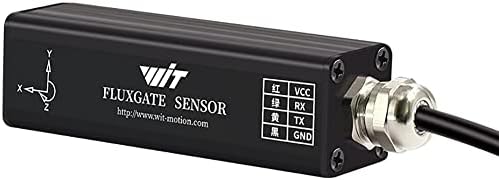
The HWT3100 utilizes an RS485 interface for data communication. Connect the VCC, RX, TX, and GND pins as indicated on the sensor. Proper wiring is crucial for establishing a reliable communication link.
- VCC: Power input (5V)
- RX: Receive data line
- TX: Transmit data line
- GND: Ground
2.3 Software Installation
Download the official WitMotion PC software from the WitMotion website. This software is essential for configuring the sensor, visualizing real-time data, and performing calibration. Refer to the software's installation guide for detailed instructions.
3. Operating Instructions
3.1 Data Output
The HWT3100 sensor outputs 3-axis magnetic field data and the calculated heading angle. This data can be accessed via the RS485 interface.
3.2 Software Interface
Use the WitMotion PC software to view real-time data, configure sensor settings, and log measurements. The software provides a graphical interface to display magnetic field components (X, Y, Z) and the heading angle. Ensure the correct COM port and baud rate are selected in the software to establish communication with the sensor.

3.3 Calibration
For optimal accuracy, especially in environments with varying magnetic interference, it is recommended to perform a calibration procedure. Follow the calibration instructions provided within the WitMotion PC software or the detailed tutorials available on the WitMotion website.
4. Specifications
| Feature | Detail |
|---|---|
| Model Number | HWT3100-485 |
| Interface | RS485 |
| Power Supply | 5V |
| Material | Aluminum |
| IP Rating | IP67 (as per product image, providing protection against dust and temporary immersion in water) |
| Accuracy (X, Y axis) | 0.05 degrees |
| Output Rate | 0.2 - 100 Hz |
| Certifications | CE, ISO 9001, RoHS, UKCA |
| UPC | 604787286239 |


5. Maintenance
5.1 Cleaning
Keep the sensor clean and free from dust and debris. Use a soft, dry cloth for cleaning. Avoid using harsh chemicals or abrasive materials that could damage the sensor's casing or components.
5.2 Environmental Conditions
Operate and store the sensor within specified temperature and humidity ranges. Avoid exposure to extreme temperatures, direct sunlight, excessive moisture, or corrosive substances to ensure longevity and accurate performance.
5.3 Disposal
Dispose of the product according to local electronic waste regulations. Do not discard with general household waste. Proper disposal helps prevent potential negative consequences for the environment and human health.

6. Troubleshooting
6.1 No Data Output
- Verify the power supply connection (5V) to ensure the sensor is receiving adequate power.
- Check the RS485 wiring for correct VCC, RX, TX, and GND connections. Incorrect wiring can prevent communication.
- Ensure the WitMotion PC software is correctly configured for the specific RS485 port and baud rate being used.
6.2 Inaccurate Readings
- Perform a calibration procedure using the WitMotion software. Calibration helps compensate for local magnetic disturbances.
- Ensure the sensor is placed away from strong magnetic fields or large metallic objects that could cause interference and distort readings.
- Check for environmental factors such as nearby electrical equipment or power lines that might affect magnetic readings.
6.3 Software Connection Issues
- Confirm that the correct COM port is selected in the software, matching the port assigned to your RS485 adapter.
- Reinstall the sensor drivers if necessary, ensuring they are up-to-date.
- Refer to the WitMotion support resources for detailed software guides and troubleshooting tips.
7. Warranty and Support
7.1 Warranty
The WitMotion HWT3100 Fluxgate Electronic Compass comes with a 12-month warranty from the date of purchase, covering manufacturing defects.
7.2 Customer Support
WitMotion is committed to providing lifetime friendly customer service. For any assistance, technical queries, or support needs, please utilize the following resources:
- Tutorials: A guide card with tutorial links is included inside the product package.
- Online Resources: Visit wit-motion.com for comprehensive tutorials, software downloads, and detailed documentation.
- Email Support: Contact our support team directly at support@wit-motion.com for personalized assistance.
Related documentsHWT3100


Ask a question about this manual
Ask about setup, troubleshooting, compatibility, parts, safety, or missing instructions. Manuals+ will review the question and use this page’s manual context to help answer it.