
Introduction
Thank you for choosing the Remax RB-620HB Bluetooth Wireless Headphones. This manual provides essential information for the proper setup, operation, and maintenance of your device. Please read it carefully before use to ensure optimal performance and longevity of your headphones.
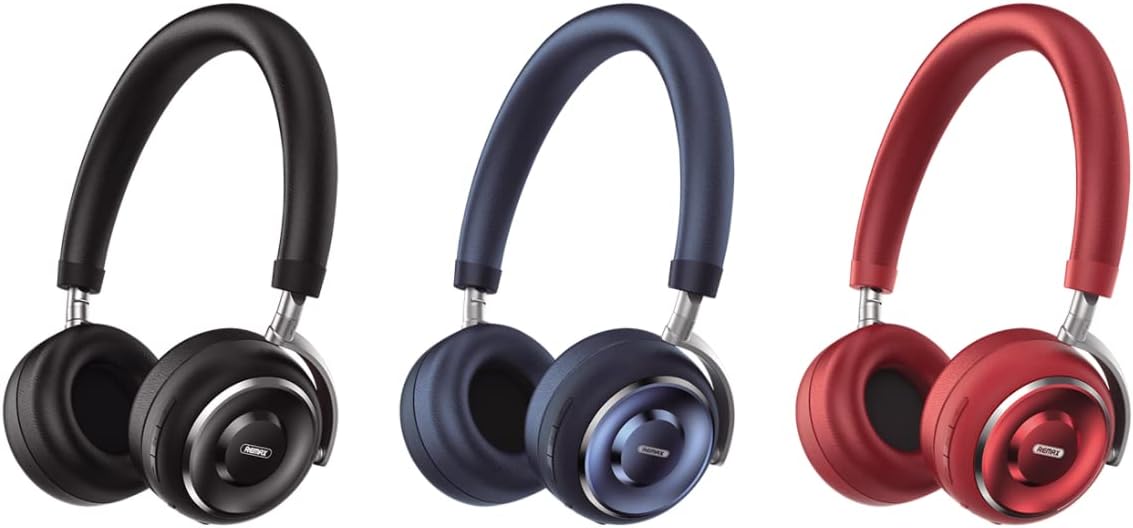
Image: The Remax RB-620HB headphones displayed in three color variations: black, blue, and red. These are over-ear headphones with a sleek design.
Setup
1. Charging the Headphones
Before first use, fully charge the headphones. The estimated charging time is 2-3 hours.
- Connect the charging cable to the charging port on the headphones.
- Connect the other end of the cable to a USB power source (e.g., computer USB port, USB wall adapter).
- The indicator light will show the charging status. It typically turns off or changes color when fully charged.
2. Bluetooth Pairing
To connect your headphones to a device (smartphone, tablet, laptop):
- Ensure the headphones are charged and powered off.
- Press and hold the power button until the indicator light flashes, indicating pairing mode.
- On your device, enable Bluetooth and search for available devices.
- Select "RB-620HB" from the list of found devices.
- Once connected, the indicator light will typically stop flashing or show a steady light.
Operating Instructions
1. Power On/Off
- Power On: Press and hold the power button for approximately 3 seconds.
- Power Off: Press and hold the power button for approximately 5 seconds.
2. Music Playback
- Play/Pause: Press the multi-function button once.
- Next Track: Press and hold the volume up button.
- Previous Track: Press and hold the volume down button.
3. Call Management
- Answer/End Call: Press the multi-function button once.
- Reject Call: Press and hold the multi-function button for 2 seconds.
- Redial Last Number: Double-press the multi-function button.
4. Volume Control
- Increase Volume: Press the volume up button.
- Decrease Volume: Press the volume down button.
5. Wearing the Headphones
The RB-620HB features a retractable head beam for adaptive adjustment to various head shapes, ensuring a comfortable and stable fit. The earcups have a rotation design, allowing them to lay flat for easy portability.

Image: A woman wearing the Remax RB-620HB headphones, demonstrating the comfortable fit and highlighting key features like the 40mm driver for strong bass and protein leather earcups.
Maintenance
1. Cleaning
- Use a soft, dry cloth to wipe the headphones.
- Do not use abrasive cleaners, alcohol, or chemical solvents.
- Keep the charging port free from dust and debris.
2. Storage
- Store the headphones in a cool, dry place away from direct sunlight and extreme temperatures.
- When not in use for extended periods, charge the headphones periodically to maintain battery health.
- Utilize the rotation design to lay the earcups flat for compact storage.
Troubleshooting
- Headphones not powering on: Ensure the headphones are fully charged. Connect to a power source and try again.
- Cannot pair with device:
- Ensure Bluetooth is enabled on your device.
- Make sure the headphones are in pairing mode (flashing indicator light).
- Move the headphones closer to your device.
- Turn off and on both the headphones and your device, then try pairing again.
- No sound:
- Check the volume levels on both the headphones and your connected device.
- Ensure the headphones are properly connected via Bluetooth.
- Try playing audio from a different application or source.
- Poor sound quality:
- Ensure there are no obstructions between the headphones and your device.
- Move away from other wireless devices that might cause interference.
- Check if the headphones are fully charged.
Specifications

Image: A summary of the Remax RB-620HB's key features including charging time, play time, battery capacity, 40mm driver, protein leather earcups, and retractable head beam.
| Bluetooth Version | 5.0 |
| Material | Plastic + Metal |
| Battery Capacity | 300mAh |
| Charging Time | 2-3 Hours |
| Talking Time | 18 Hours |
| Music Playing Time | 18 Hours |
| Standby Time | 300 Hours |
| Speaker Impedance | 32 ohms |
| Speaker Power | 10mW |
| Driver Unit | 40MM |
| Headphones Ear Placement | On Ear |
| Headphones Form Factor | Over Ear |
| Control Method | Button Control |
| Water Resistance Level | Waterproof |
| Dimensions (L x W x H) | 199 x 159.85 x 77.35 mm |
| Weight | 217g |
Warranty and Support
This product is covered by a standard manufacturer's warranty. For specific warranty terms, conditions, and duration, please refer to the warranty card included with your purchase or contact the retailer. For technical support or further assistance, please reach out to your point of purchase or the official Remax customer service channels.


